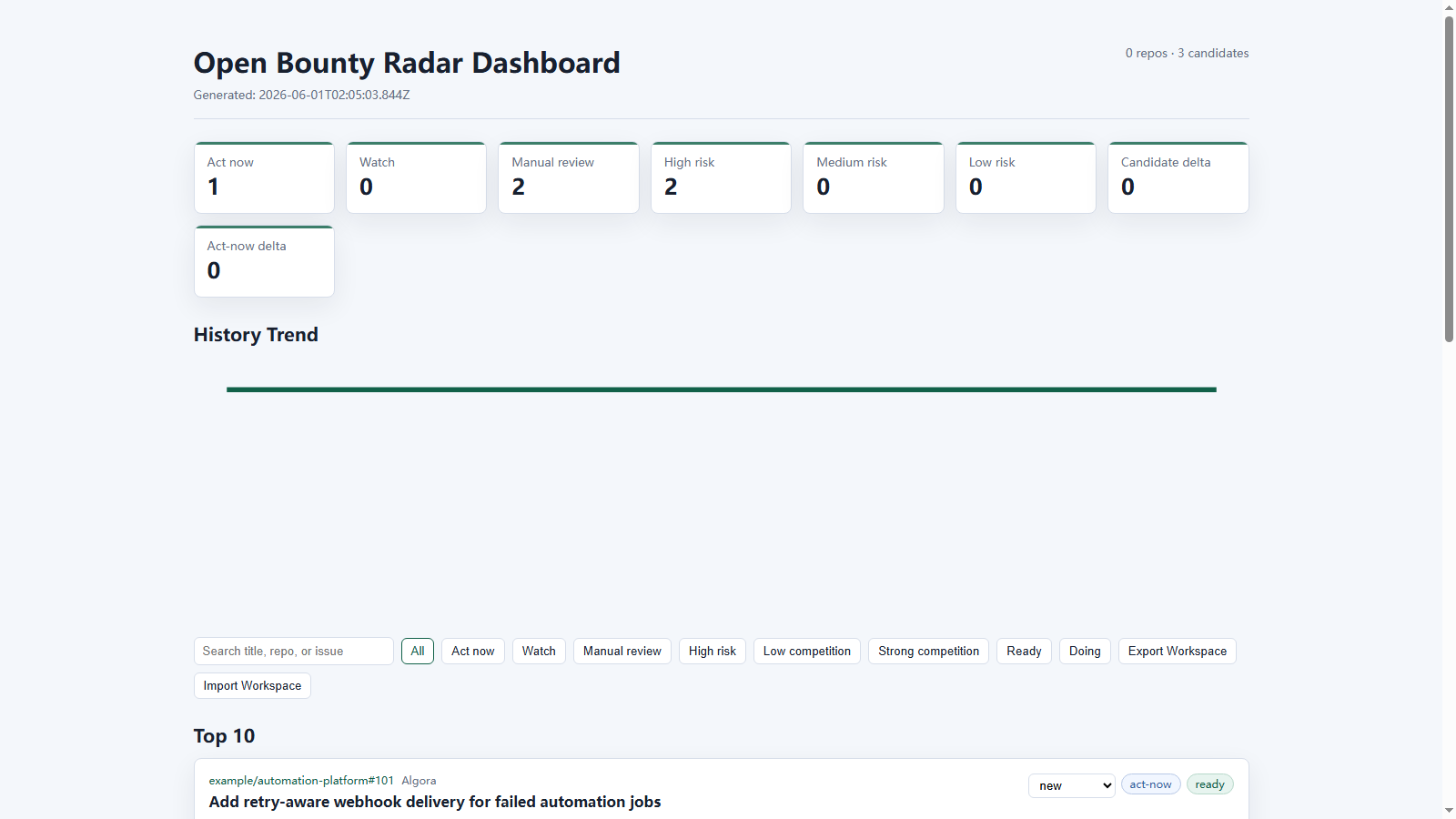
Open Bounty Radar is a small CLI for discovering and monitoring paid open-source issues, bounty-style GitHub issues, and competitive pull request opportunities.
It helps turn scattered bounty research into a repeatable workflow:
configure repos -> scan bounty issues -> score candidates -> inspect competition -> watch submitted PRs
It is designed for developers who want to find issues that are:
- still open
- clearly paid or bounty-backed
- not already crowded by many pull requests
- practical to review quickly from a Linux-friendly development workflow
Who this is for
- Independent developers who want a practical bounty radar instead of manually refreshing GitHub searches.
- Open-source contributors who need to avoid already-crowded or already-solved issues.
- Small teams tracking submitted bounty PRs, maintainer comments, checks, and competitor movement.
- Builders who want a local-first workflow with explainable scoring and no hosted service requirement.
Why this exists
Paid OSS issues are scattered across GitHub labels, issue bodies, platform comments, and project-specific conventions such as /bounty $6000. Developers waste time opening issues that are already solved, crowded, closed, or missing payment details.
This project turns that manual research into a repeatable scan and report.
Project Status
Open Bounty Radar is an early-stage OSS project with a working 0.1.x CLI surface, documented configuration, offline demo fixtures, automated tests, CI, and a release checklist. The current goal is to make bounty-related OSS contribution more transparent and less duplicative, not to encourage rushed or spammy pull requests.
Suggested repository topics: open-source, bounty, github, cli, developer-tools, triage, pull-requests, oss.
Current MVP
- Scans configured GitHub repositories and GitHub-wide issue searches with GitHub Search API
- Detects bounty amounts such as
$250,$6k,/bounty $6000, and250 USDC - Filters closed issues by default
- Searches for pull requests that mention each issue
- Reads GitHub issue timeline cross-references to catch linked PRs search can miss
- Enriches competing PRs with draft/merged state, maintainer review signals, checks, and strength labels
- Scores candidates by bounty amount, freshness, open state, and PR competition
- Adds recommendation and risk tags such as
strong,risky,crowded, andspecial-requirements - Assigns risk severity levels so high-risk blockers stand out from minor warnings
- Adds action labels such as
act-now,watch,manual-review, andskip - Highlights top candidates so the report opens with the most actionable issues
- Shows linked PR competition details with state, update date, and detection source
- Writes Markdown, JSON, static HTML, and dashboard reports
- Supports GitHub search presets such as
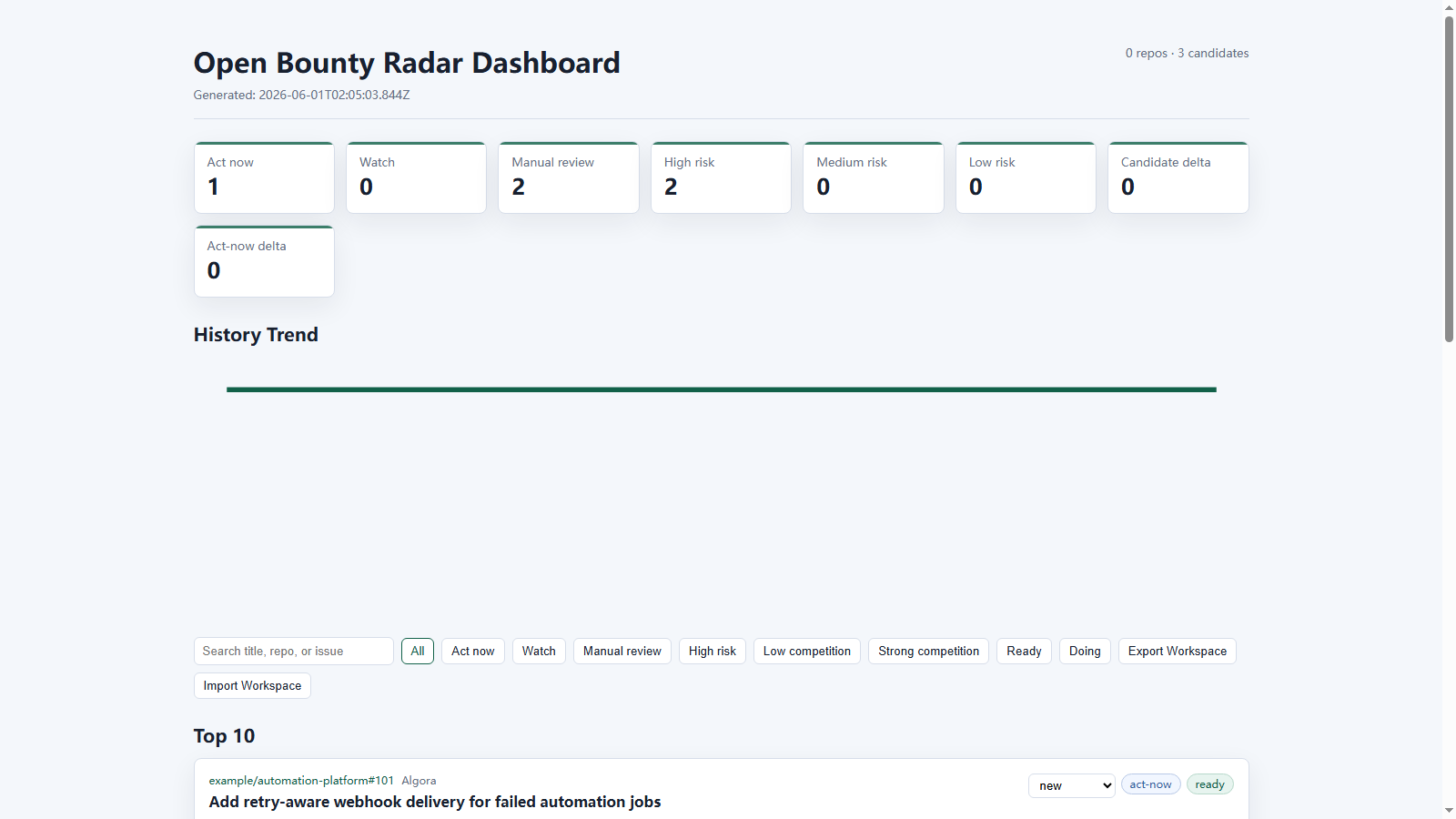
bounty,external,recent,low-competition,crypto-bounty,reward, andamounts - Provides an interactive static dashboard with filters, search, copyable issue URLs, and candidate detail pages
- Includes Algora and Opire adapter foundations with optional GitHub issue enrichment
- Can extract GitHub-linked bounty listings from simple live HTML sources
- Adds local AI-style assessments with verdict, confidence, next steps, likely files, and abandon conditions
- Adds PR readiness checks for reproduction, scope, requirements, bounty, and competition risk
- Exports watchlist suggestions so promising candidates can be turned into submitted-PR monitoring entries
- Maintains optional local workspace state for candidate status and notes
- Adds watch next-action hints such as
reply,fix-ci,revise, andclaim-or-confirm - Includes a GitHub Actions workflow template for scheduled runs
- Watches submitted pull requests for merge/close state, checks, reviews, and maintainer comments
- Stores state snapshots and detects meaningful changes between runs
- Sends Telegram or generic webhook notifications for detected changes
Quick Start
git clone https://github.com/owenshuo/open-bounty-radar.git
cd open-bounty-radar
npm test
npm run init
npm run doctor
npm run validate
npm run radar
npm run init creates local config files, then npm run radar reads bounty-radar.json and runs both configured jobs:
- scan open bounty candidates
- watch already-submitted pull requests
Markdown, JSON, static HTML, and dashboard reports are written to reports/ by default.
npm run doctor checks your Node.js version, config files, output directories, token setup, and GitHub API connectivity.
npm run validate checks the radar config and referenced scan/watch configs without making GitHub API calls.
npm run init creates local config files from the examples:
bounty-radar.jsonbounty-radar.config.jsonbounty-radar.watchlist.json
Local config files are ignored by git so you can customize them safely.
5-Minute Tour
- Run
npm run initto create local config files. - Edit
bounty-radar.config.jsonand add repositories or GitHub-wide search queries you care about. - Run
npm run doctorto confirm the local environment and GitHub API access. - Run
npm run validateto catch config mistakes without using GitHub API calls. - Run
npm run radarto create Markdown, JSON, and HTML reports. - Open
reports/bounty-report.htmland start with the Top Candidates section. - Add submitted PRs to
bounty-radar.watchlist.json, then keep usingnpm run radarto monitor them.
See Demo Output for a compact example of the generated reports.
Want to try the UI without a GitHub token or live API calls?
Open the hosted demo dashboard or run it locally:
npm run demo:offline
npm run serve
Then open reports/demo-dashboard.html. The fixture data lives in examples/fixtures/demo-listings.json, so this path is safe for hosted demos, screenshots, and release smoke tests.
Guides
- Configuration Guide
- Config Schema
- Demo Output
- Bounty Platform Notes
- Bounty Contributor Checklist
- Pull Request Quality Checklist
- Scoring Guide
- Roadmap
- GitHub Actions Template
- Release Checklist
- Architecture
- Demo Script
- Demo Assets
- Codex for OSS Application Notes
- Responsible Contribution Guide
- Contributing
- Security
Outputs
Open Bounty Radar can write:
- Markdown reports
- JSON reports
- static HTML reports
- scan dashboard
- watch dashboard
- CSV exports
- JSONL exports
- action plans
- watchlist suggestion JSON
- workspace state JSON
- history JSONL
To run each job separately:
npm run scan
npm run watch
To run a broader discovery pass that keeps more candidates for review while still applying risk labels:
export GITHUB_TOKEN=github_pat_xxx
npm run scan:discovery
Discovery mode uses more GitHub Search queries than the compact example, so a token is strongly recommended.
To validate an example or custom radar config:
node ./bin/open-bounty-radar.js validate --config ./examples/radar.full.json
To create local config files again and overwrite existing ones:
node ./bin/open-bounty-radar.js init --force
To enable Telegram notifications without adding CLI flags, set notifications.telegram.enabled to true in bounty-radar.config.json and/or bounty-radar.watchlist.json, then run:
npm run radar
For higher rate limits, set a GitHub token:
export GITHUB_TOKEN=github_pat_xxx
export TELEGRAM_BOT_TOKEN=123456:your_bot_token
export TELEGRAM_CHAT_ID=123456789
npm run scan
On Windows PowerShell:
$env:GITHUB_TOKEN="github_pat_xxx"
$env:TELEGRAM_BOT_TOKEN="123456:your_bot_token"
$env:TELEGRAM_CHAT_ID="123456789"
npm run scan
Configuration
The recommended one-command entrypoint is the local bounty-radar.json generated by npm run init:
{
  "scan": {
    "enabled": true,
    "config": "./bounty-radar.config.json",
    "out": "./reports/bounty-report.md",
    "json": "./reports/bounty-report.json",
    "html": "./reports/bounty-report.html",
    "dashboard": "./reports/dashboard.html",
    "detailsDir": "./reports/details",
    "watchlistSuggestions": "./reports/watchlist-suggestions.json"
  },
  "watch": {
    "enabled": true,
    "config": "./bounty-radar.watchlist.json",
    "out": "./reports/pr-watch.md",
    "json": "./reports/pr-watch.json",
    "html": "./reports/pr-watch.html"
  }
}
Run it with:
npm run radar
You can disable either section by setting "enabled": false.
Additional example profiles:
examples/radar.minimal.json: scan-only starter profile.examples/radar.full.json: explicit scan + watch profile for copying.
Development/demo commands that run directly from examples/ are also available:
npm run validate:example
npm run doctor:example
npm run radar:example
npm run dashboard:example
npm run demo:offline
npm run audit
npm run release:check
npm run serve
Inspect one issue deeply:
node ./bin/open-bounty-radar.js inspect --issue-url https://github.com/owner/repo/issues/123 --out ./reports/issue-inspection.md --json ./reports/issue-inspection.json --html ./reports/issue-inspection.html
Batch inspect issues from a text file:
node ./bin/open-bounty-radar.js inspect --issue-list ./issues.txt --out ./reports/issue-batch.md --json ./reports/issue-batch.json
Add --html ./reports/issue-batch.html to create a browser-friendly batch inspection dashboard. Batch HTML also writes linked per-issue detail pages under reports/issue-details/ by default:
node ./bin/open-bounty-radar.js inspect --issue-list ./issues.txt --out ./reports/issue-batch.md --json ./reports/issue-batch.json --html ./reports/issue-batch.html --inspect-details-dir ./reports/issue-details
Scan Config
Create a JSON config:
{
  "githubTokenEnv": "GITHUB_TOKEN",
  "statePath": "./reports/radar-state.json",
  "notifications": {
    "notifyOnFirstRun": false,
    "telegram": {
      "enabled": false,
      "botTokenEnv": "TELEGRAM_BOT_TOKEN",
      "chatIdEnv": "TELEGRAM_CHAT_ID"
    }
  },
  "defaults": {
    "maxIssuesPerQuery": 20,
    "globalMaxIssuesPerQuery": 5,
    "includeClosed": false,
    "linkedPullRequestDetection": "both",
    "competitionDetails": true,
    "competitionDetailLimit": 5
  },
  "workspacePath": "./reports/workspace.json",
  "filters": {
    "minAmount": 100,
    "excludeKeywords": ["marketing", "hardware", "ios only"]
  },
  "repositories": [
    {
      "owner": "Expensify",
      "repo": "App",
      "queries": ["$ in:title,body label:External"]
    }
  ],
  "githubSearches": [
    {
      "name": "global-bounty-labels",
      "queries": ["label:bounty $ in:title,body archived:false"]
    }
  ]
}
Then run:
node ./bin/open-bounty-radar.js scan --config ./examples/config.json --out ./reports/bounty-report.md --json ./reports/bounty-report.json --html ./reports/bounty-report.html
Add --state to compare this run with the previous run:
node ./bin/open-bounty-radar.js scan --config ./examples/config.json --out ./reports/bounty-report.md --state ./reports/radar-state.json
Watching Pull Requests
Watch Config
Create a watchlist:
{
  "githubTokenEnv": "GITHUB_TOKEN",
  "statePath": "./reports/radar-state.json",
  "notifications": {
    "notifyOnFirstRun": false,
    "telegram": {
      "enabled": false,
      "botTokenEnv": "TELEGRAM_BOT_TOKEN",
      "chatIdEnv": "TELEGRAM_CHAT_ID"
    }
  },
  "defaults": {
    "activityLimit": 5
  },
  "pullRequests": [
    {
      "owner": "spaceandtimefdn",
      "repo": "sxt-proof-of-sql",
      "number": 1986,
      "label": "Example watched bounty PR"
    }
  ]
}
Then run:
node ./bin/open-bounty-radar.js watch --config ./examples/watchlist.json --out ./reports/pr-watch.md --json ./reports/pr-watch.json --html ./reports/pr-watch.html
The watch report highlights PRs that need attention because they were closed, have failing checks, or received maintainer/owner activity.
Notifications
Notifications are change-based. The first run creates a baseline state file, then later runs notify only when something meaningful changes.
Telegram environment variables:
export TELEGRAM_BOT_TOKEN=123456:your_bot_token
export TELEGRAM_CHAT_ID=123456789
Run with notifications by turning on Telegram in the JSON config:
{
  "notifications": {
    "telegram": {
      "enabled": true
    }
  }
}
Then use the normal one-command entrypoint:
npm run radar
You can also force notification mode from the CLI:
node ./bin/open-bounty-radar.js watch --config ./examples/watchlist.json --out ./reports/pr-watch.md --state ./reports/radar-state.json --notify
To enable notifications from config instead of passing --notify, set notifications.telegram.enabled to true.
Generic JSON webhooks are also supported:
{
  "notifications": {
    "webhook": {
      "enabled": true,
      "urlEnv": "OPEN_BOUNTY_RADAR_WEBHOOK_URL"
    }
  }
}
The webhook payload includes the run kind, generation time, compact digest text, and the structured change list.
Discord and Slack incoming webhooks can use the same digest:
{
  "notifications": {
    "discord": {"enabled": true},
    "slack": {"enabled": true}
  }
}
Set DISCORD_WEBHOOK_URL or SLACK_WEBHOOK_URL in the environment.
Notification rules let routine scans stay quieter:
{
  "notifications": {
    "rules": {
      "minSeverity": "medium",
      "actions": ["act-now", "manual-review"],
      "minAmount": 250,
      "competitionRisks": ["none", "low"]
    }
  }
}
You can also use presets: quiet, aggressive, high-value-only, or low-competition-only.
Workspace state can be merged back from a dashboard export:
node ./bin/open-bounty-radar.js scan --workspace ./reports/workspace.json --workspace-import ./exports/workbench.json
You can also summarize or merge workspace state directly:
node ./bin/open-bounty-radar.js workspace --workspace ./reports/workspace.json --workspace-import ./exports/workbench.json --out ./reports/workspace-summary.md --json ./reports/workspace.json
The dashboard also supports importing a previously exported workspace JSON file directly in the browser. Use Export Workspace to copy the current local workbench state, save it as JSON if desired, then Import Workspace to restore status and notes on another generated dashboard.
Config Schema
A formal JSON Schema is included at schema/open-bounty-radar.schema.json. It covers the top-level radar config plus scan and watch config shapes, including GitHub repositories, GitHub-wide searches, Algora/Opire listing sources, notifications, workspace paths, and report outputs.
Release Check
Before tagging or sharing a release candidate, run:
npm run release:check
It runs tests, example validation, the offline demo scan, package audit, and git diff --check.
Scoring
The score is intentionally simple:
- higher bounty amount improves score
- recently updated issues score higher
- open issues score higher than closed ones
- each linked or mentioned PR reduces score
- strong competing PRs with approvals, passing checks, or merged state increase risk
- AI-style assessments summarize whether to start, watch, manually review, or abandon
Linked PR detection supports search, timeline, or both. The default both mode merges GitHub Search results with issue timeline cross-references, then de-duplicates by PR URL.
This is not meant to decide for you. It is meant to triage quickly.
Roadmap
The short version:
- better setup diagnostics
- richer HTML reports
- Algora and Opire adapters
- GitHub Actions scheduled reports
- maintainer assignment and winner-detection heuristics
- local web dashboard
See the full Roadmap.
Ethics
This project should help contributors find suitable work and reduce duplicate effort. It should not be used to spam maintainers, mass-generate low-quality pull requests, or bypass project contribution rules.
Always read the issue, reproduce the bug, follow the project process, and respect maintainers.
Comments