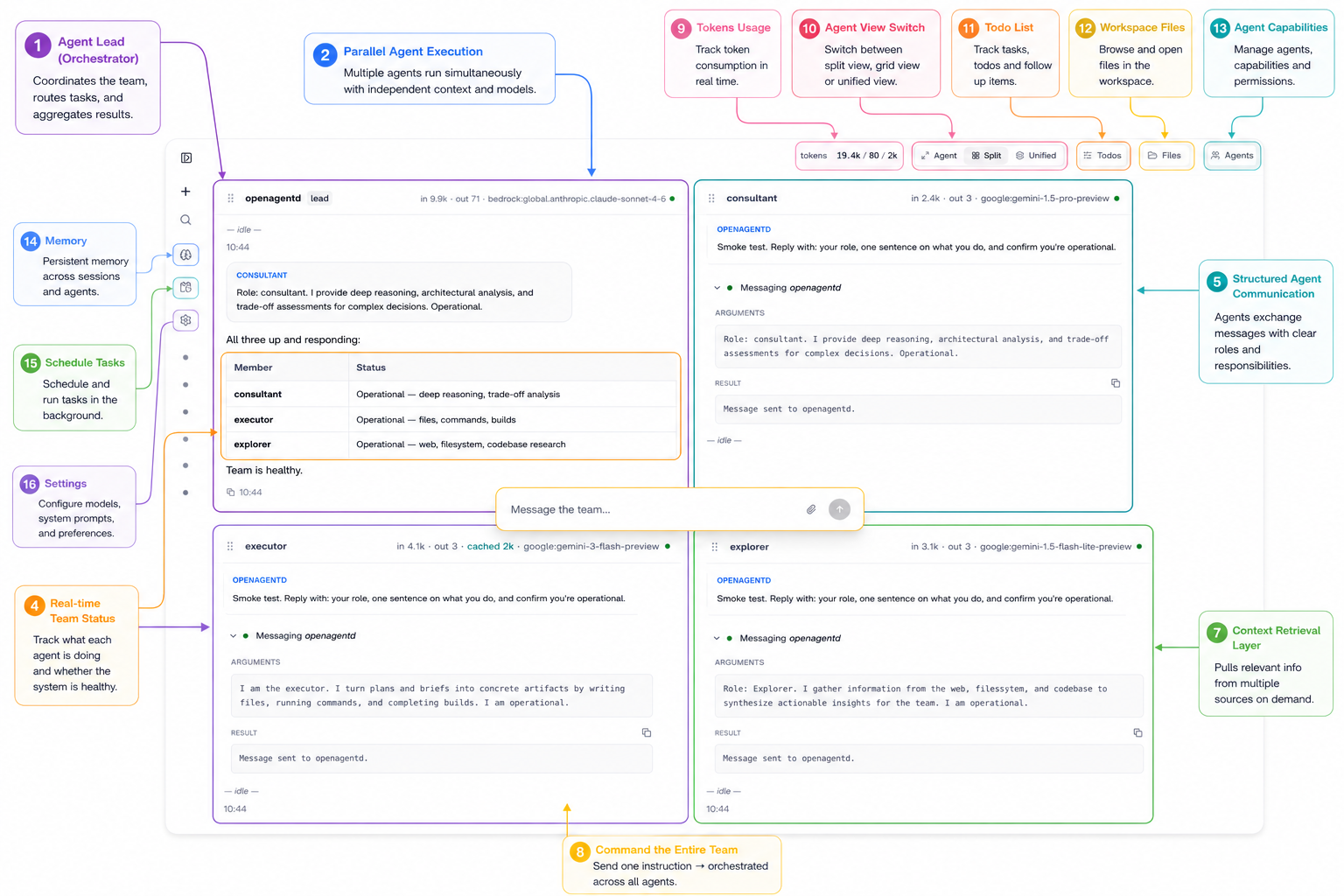
OpenAgentd provides a self-hosted platform for running AI agents on local hardware. Described as an "AI agent OS," it supports streaming chat interfaces, tool usage, persistent memory across sessions, and coordination among multiple agents. The project runs as a long-running service with a web-based cockpit, keeping all data and processing on the user's machine. Hosted on GitHub at https://github.com/lthoangg/openagentd, it has 93 stars and uses Python with FastAPI on the backend and React 19 on the frontend. Licensed under Apache 2.0, it requires Python 3.14.
This setup targets users who need agents capable of real tasks like file manipulation or scheduling, without third-party dependencies or cloud lock-in. Agents share a workspace with the user, maintain editable memory, and expose telemetry through a local OpenTelemetry (OTel) dashboard.
Core features
OpenAgentd includes a web cockpit that goes beyond basic chat. It offers a command palette activated via Ctrl+P for fuzzy searching across sessions, agents, files, and actions. Users can drag and drop files, view full-screen images, and inspect tool calls in real time.
Agents access built-in tools for reading and writing files, executing shell commands, web searches, image and video generation (multi-provider), todo management, and task scheduling. Custom skills load from .md files or any MCP server.
A shared workspace displays files touched by agents in a side panel, allowing preview and download.
Memory persists in a three-tier wiki: session notes, synthesized topics, and a USER.md file injected into every prompt. Users edit it directly from the Wiki panel.
Multi-agent teams follow a lead-worker model with an async mailbox for team_message delegation. Views split by agent or merge into a unified stream with labels. Scheduling supports cron, intervals, or one-shots, with results stored for later review.
The OTel dashboard tracks token usage, latency, and trace waterfalls locally. Configuration supports 12 model providers, including Gemini, OpenAI, OpenRouter, Bedrock, Grok, and DeepSeek—changed via one line in agent config. Hot-reload applies to everything without restarts, and agents can self-modify their configs.
REST and SSE endpoints enable embedding or API access.
Getting it running
Installation options cover macOS, Linux, Windows, and Docker. On macOS or Linux, the recommended method uses uv:
uv tool install openagentd
Homebrew users run:
brew tap lthoangg/tap && brew install openagentd
A curl-based script works too:
curl -fsSL https://raw.githubusercontent.com/lthoangg/openagentd/main/install.sh | sh
Windows uses PowerShell:
irm https://raw.githubusercontent.com/lthoangg/openagentd/main/install.ps1 | iex
For Docker, clone the repo, copy the environment file, and start:
git clone https://github.com/lthoangg/openagentd.git
cd openagentd && cp .env.example .env && docker compose up -d
After setup, access the web interface at the default local URL (typically http://localhost:8000—check docs for port). Documentation at https://github.com/lthoangg/openagentd/blob/main/documents/docs/index.md covers configuration, including model API keys in .env and agent definitions.
Who this is for
OpenAgentd fits users building automated workflows on personal hardware, such as developers scripting file ops or sysadmins scheduling agent-driven maintenance. It handles tasks like generating reports from local data, managing todos across sessions, or coordinating agents for complex jobs—e.g., one agent researches via web tools while another processes images.
Privacy-focused users benefit from its fully local operation, with no data leaving the machine. Those experimenting with multi-agent setups or needing editable, cross-session memory find the wiki and team views useful. If you run resource-intensive models locally and want visibility into token costs or latencies, the OTel dashboard provides that without external tools.
How it compares
OpenAgentd differentiates through its web cockpit and persistent, editable memory. The project's comparison table highlights contrasts with similar tools:
| Feature | openagentd | opencode | openclaw | hermes-agent |
|---|---|---|---|---|
| UI | Web cockpit | Terminal | Messaging apps | Messaging / CLI |
| Memory | 3-tier wiki, cross-session, editable | Session only | Session only | Cross-session (FTS5) |
| Image / video | Multi-provider images + native video | — | Via plugins | Images, no video |
| Hot-reload | Everything, no restart | Restart req. | Partial | MCP only |
| Self-modification | Agent edits own config | — | Partial | Persona + skills |
| Telemetry | Built-in OTel dashboard | — | — | — |
| Embed / API | First-class REST + SSE | Protocol only | Channel-shaped | Channel-shaped |
Full details appear in documents/docs/comparison.md. OpenAgentd requires more setup than terminal-based options like opencode but offers richer UI and persistence. It exceeds hermes-agent in video support and dashboard features, though all stay local.
OpenAgentd works best for setups with decent hardware to run local models or API calls. Lighter users might prefer single-agent tools without the team overhead. Source at https://github.com/lthoangg/openagentd.
Comments