Enter gatekeeper‑ha
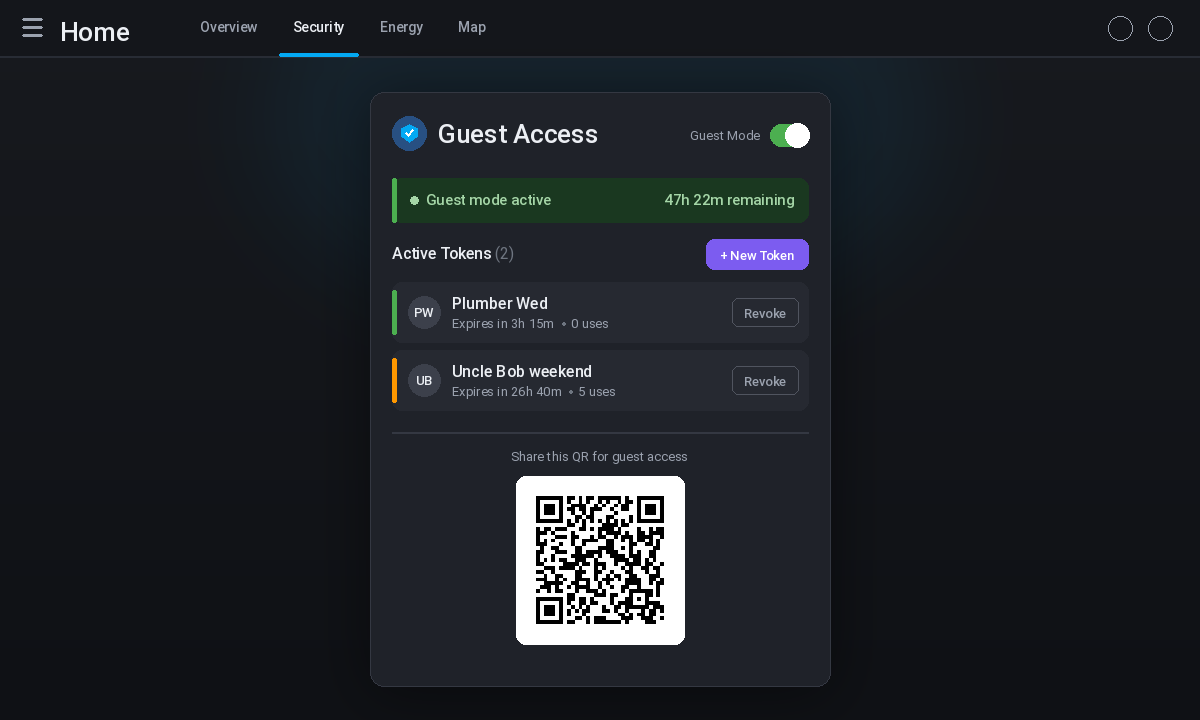
Home Assistant users who manage smart‑home ecosystems often face a recurring dilemma: how to grant temporary access to visitors without exposing the full power of the platform or requiring guests to install apps or create accounts. Traditional approaches either rely on sharing privileged credentials or on cumbersome work‑arounds that lack scoped permissions and automatic expiration. The project described here tackles that problem with a lightweight, QR‑code‑driven workflow that lives entirely within the Home Assistant environment. By generating time‑limited URLs that map to a stripped‑down guest interface, it offers a practical middle ground between convenience and security. The result is a solution that fits naturally into existing Lovelace dashboards while keeping the underlying network traffic isolated.
The interesting bits
What makes gatekeeper‑ha stand out is its blend of simplicity and control. First, it uses a custom integration paired with a Lovelace card that handles token creation, QR‑code rendering, and token revocation without any YAML editing. The UI‑driven configuration lives under Settings → Devices & Services → Gatekeeper HA, where users can set the guest page port, default token expiry, and auto‑disable thresholds. This eliminates the need to hunt through configuration files for basic adjustments.
Second, the system enforces strict scoping at the server level. Tokens are tied to specific entity patterns — such as lock.* or light.* — and are hashed with bcrypt before being stored. The guest page itself never receives raw secrets; it only receives the permissions explicitly granted during token generation. This server‑side enforcement prevents a guest from circumventing restrictions through client‑side JavaScript tricks. Third, the project ships with three automation blueprints that illustrate practical use cases. One blueprint creates a token automatically when a doorbell sensor fires, another alerts when a token is approaching its expiration, and a third links a specific lock code to a guest‑mode activation. These blueprints demonstrate how the integration can be extended without writing custom code, offering a clear path for users who want to prototype more complex flows.
Finally, the architecture separates concerns cleanly. A lightweight asyncio HTTP server runs on a configurable port (default 8921) and serves both the QR‑code page and a reverse‑proxy endpoint. Because the server binds to 0.0.0.0 by default, it is reachable from any device on the LAN, yet it can be confined to 127.0.0.1 if the operator prefers to expose it only through a reverse proxy. This flexibility lets users keep the guest interface isolated from the rest of the Home Assistant instance while still benefiting from the same authentication stack.
Caveats
The project does not attempt to replace full‑featured authentication providers such as OAuth or OpenID Connect. Its scope is deliberately narrow: temporary, scoped access for trusted guests. Users who need granular role‑based access across multiple Home Assistant instances will find the offering insufficient. Additionally, while the integration can be toggled into a “guest mode” that disables selected automations, the documentation does not detail how to audit which automations are affected beyond the snapshot/restore mechanism. Those who rely on complex automations may need to test the mode thoroughly before depending on it for production scenarios.
Another practical limitation is the reliance on HACS for distribution. Since the integration is not yet part of the official HACS repository, users must add it as a custom repository and manage updates manually. This extra step can be a barrier for less technical operators, even though the subsequent installation steps are straightforward. If you want to run it
To try gatekeeper‑ha, you need a recent Home Assistant installation (2025.8.0 or newer) running on Python 3.12 or later, and you must have HACS available to add the custom repository. Once the integration is installed, the Lovelace card can be added through the HACS frontend repository section, and the guest page will be reachable on the configured port. All further configuration — setting token durations, defining scopes, and adjusting the guest page port — is performed through the UI under the Gatekeeper HA settings. For detailed step‑by‑step instructions, refer to the project’s README.
The approach presented here offers a pragmatic way to hand out time‑bounded access to Home Assistant without exposing the entire dashboard or requiring guest installations. It works best for scenarios where a handful of visitors need occasional, limited control — such as
Comments