COMPASS Skills
Start here: Use & develop your own Skill ecosystem
A practical tutorial for using
SKILL.md, auditing reusable skills, drafting skills with AI, extracting real workflows, and building a local Skill ecosystem.
npx skills add dongshuyan/compass-skills --skill '*' -a claude-code
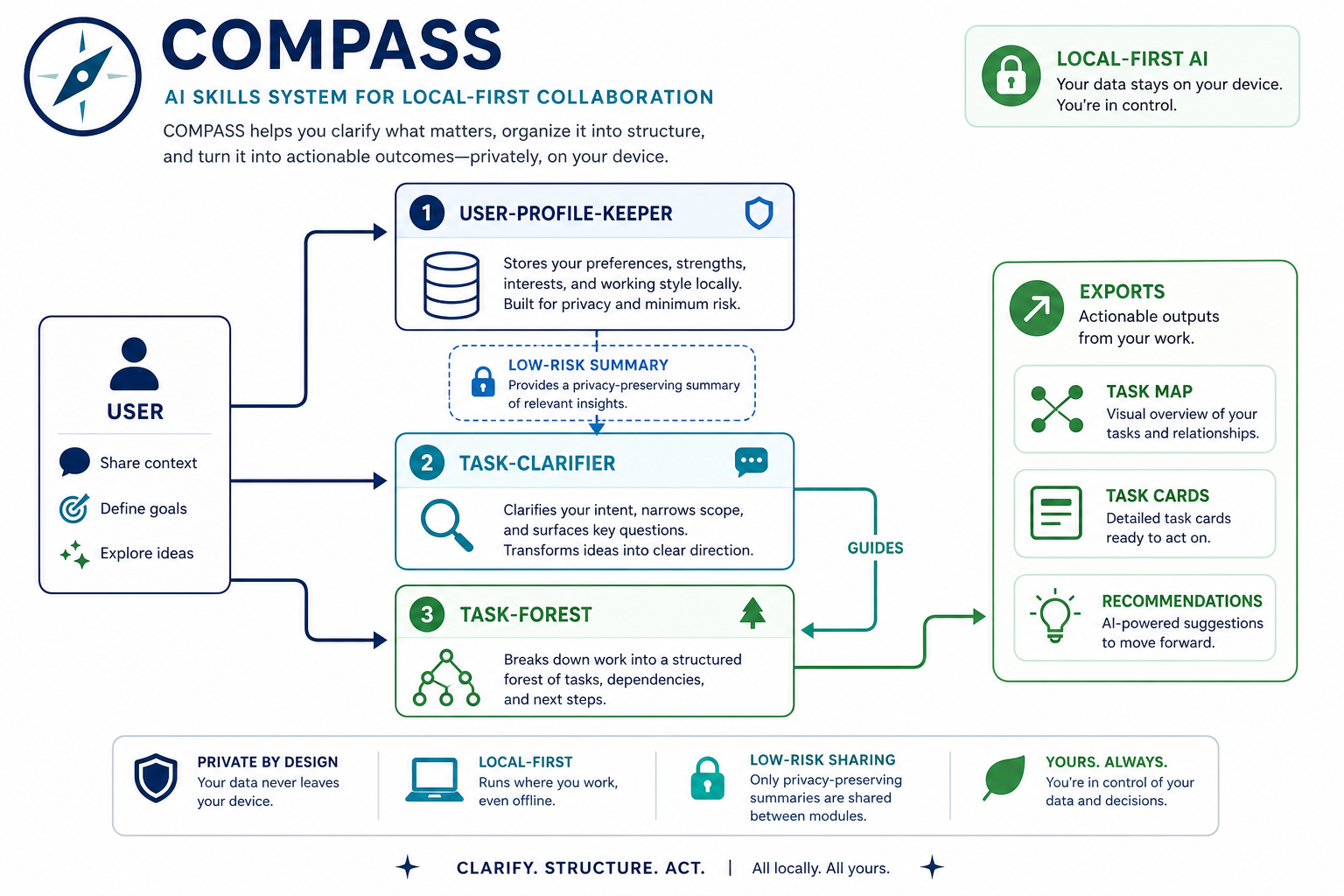
COMPASS Skills gives AI coding agents four local skills: task clarification, repo-local task memory, AI conversation handoff prompts, and a local collaboration profile.
The project currently ships four SKILL.md skills:
| Skill | Purpose |
|---|---|
task-clarifier |
Aligns goals, scope, evidence, acceptance criteria, and risk boundaries before ambiguous, costly, or externally visible work. |
task-forest |
Maintains a repo-local task forest / DAG with goals, subtasks, dependencies, progress, deviations, todos, decisions, and conversation history. |
session-handoff-prompt |
Compresses the current AI conversation's goal, progress, constraints, and next steps into a paste-ready prompt for a new AI conversation. |
user-profile-keeper |
Maintains a local, auditable, correctable collaboration profile for communication preferences, risk style, and recurring working context. |
Quick Start
List the available skills before installing:
npx skills add dongshuyan/compass-skills --list
Install all skills for Claude Code:
npx skills add dongshuyan/compass-skills --skill '*' -a claude-code
Install all skills for both Codex and Claude Code:
npx skills add dongshuyan/compass-skills --skill '*' -a codex -a claude-code
After installation, invoke the skills directly in an AI conversation:
$task-clarifier
$task-forest
$session-handoff-prompt
$user-profile-keeper
For manual installation, copy the four folders under skills/ into the agent's local skills directory and keep their references/, scripts/, and agents/ subdirectories intact.
Why COMPASS Exists
Long-running agent work needs four kinds of state:
- User context: communication preferences, risk boundaries, recurring omissions, and collaboration style.
- Project context: where the current request fits, what it depends on, and how far it has progressed.
- Goal context: how the current task contributes to the original objective and whether it still matches it.
- Handoff context: what a new AI conversation needs to continue the current task without replaying the whole transcript.
COMPASS organizes that state into four local workflows:
- A local profile that the user can inspect and correct.
- A repo-local task graph that survives AI conversation boundaries.
- A paste-ready continuation prompt for a new AI conversation.
- A clarification gate before ambiguous or risky execution.
How The Four Skills Work Together
task-clarifier is the entry point for ambiguous, high-cost, high-risk, evidence-sensitive, or externally visible work. It first identifies the user-owned decisions that must be made, asks 1-3 focused questions with recommended answers, confirms shared understanding, and only then searches or executes.
task-forest records long-running work structure: why a task exists, where it fits, how far it progressed, what changed, and what remains unresolved.
session-handoff-prompt turns the current AI conversation, explicit transcripts, workspace evidence, and optional task-forest exports into a concise prompt for the next AI conversation. It reads task-forest as structured context but never modifies it.
user-profile-keeper stores collaboration preferences locally. Future AI conversations use the profile to ask relevant questions and apply the right risk boundary. Current files, logs, and user-provided context remain the authority; secrets stay out of the profile.
user-profile-keeper    -> who is the user and how should we collaborate?
task-forest            -> where does this task fit and is it still aligned?
session-handoff-prompt -> what should the next AI conversation know to continue now?
task-clarifier         -> what should the agent do now?
Task Clarifier Example
A vague request is turned into a checked requirement before the agent recommends anything.
Example: choosing a suitcase
Formatted from a live terminal run. Terminal status lines are omitted.
Turn 1: vague request
User
I want to buy a suitcase, can you tell me which one is the best?
$task-clarifier
Before recommending a product, the skill turns "best" into concrete decision criteria:
- Use case — What will you use the suitcase for most?
- Options: business travel, leisure vacations, extended travel, or custom situation.
- Recommendation: start with the primary use case, because it changes size, weight, and feature priorities.
- Budget — What price range is realistic?
- Options: under $100, $100-300, $300-600, $600+, or custom budget.
- Recommendation: $100-300 is often the best durability-to-cost range for most travelers.
- Meaning of "best" — Which priority wins?
- Options: durability, light weight, price, warranty/service, organization, or custom priority.
- Recommendation: durability is the most universal priority.
User answer
1A 2C 3A
Business travel, $300-600, maximum durability.
Turn 2: narrow the product class
$task-clarifier
The first answers narrow the problem, but two choices still change the recommendation:
- Bag type — Carry-on or checked bag?
- Recommendation: carry-on for most business trips, faster airport flow, and lower damage risk.
- Material — Hard shell or soft-sided?
- Recommendation: hard shell for durability and professional appearance.
User answer
Checked bag, hard shell.
Turn 3: resolve the final size
$task-clarifier
One last decision remains:
- Checked-bag size — Compact, medium, or full-size?
- Recommendation: 26-27 inches handles many business trips without becoming oversized.
User answer
28 inches.
Confirmed requirement
$task-clarifier
You need a checked suitcase for frequent business travel. The bag should be hard-shell for maximum durability and professional appearance, 28 inches for extended trips, and within a $300-600 budget. Durability is your top priority over lighter weight or organizational gimmicks.
Inferences to confirm
- Durability means repeated airport handling and 5+ years without major failure.
- Brand, color, wheel type, TSA lock, and warranty length are not yet fixed preferences.
- The next step is specific model recommendations, unless the user prefers an evaluation framework.
Screenshots
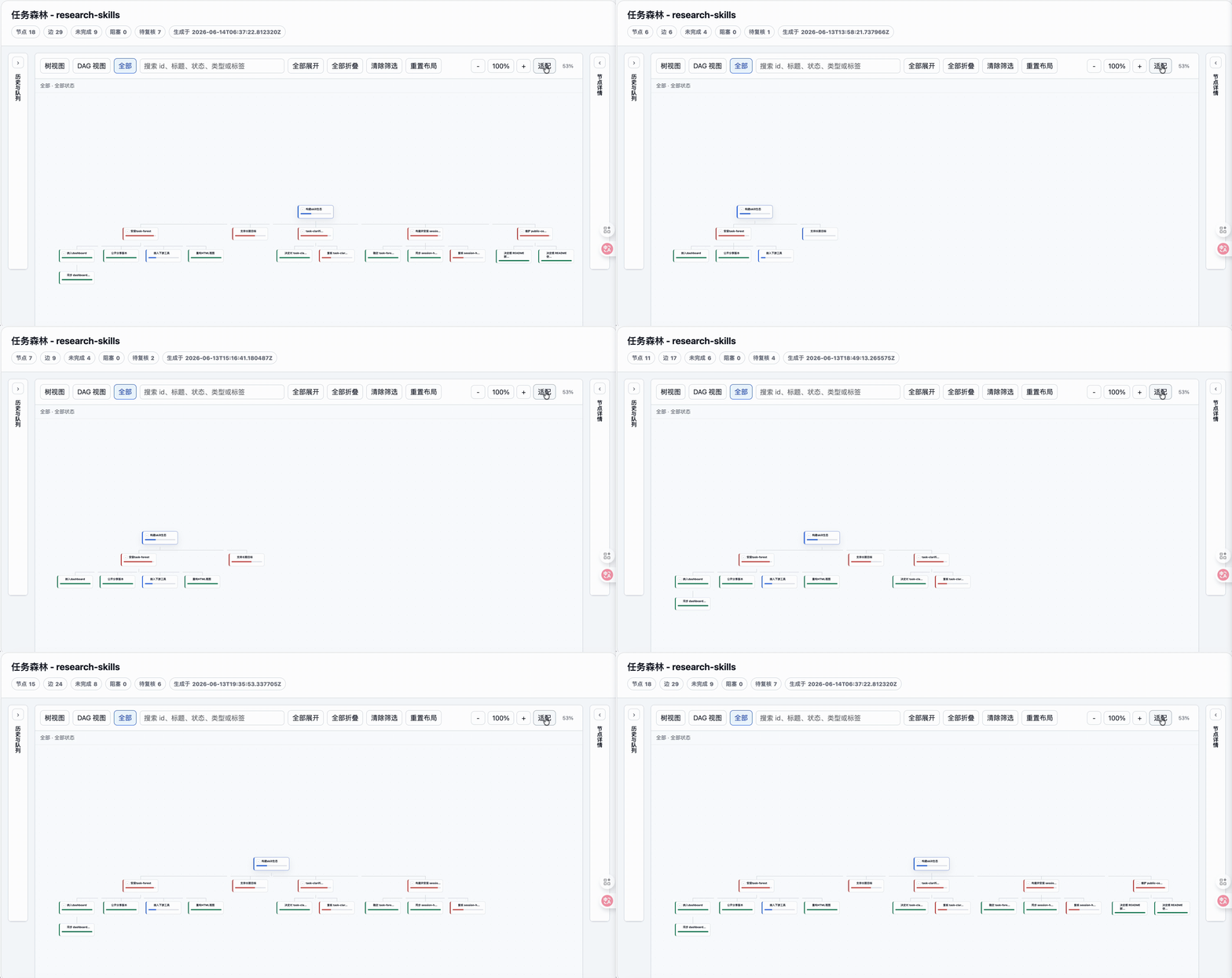
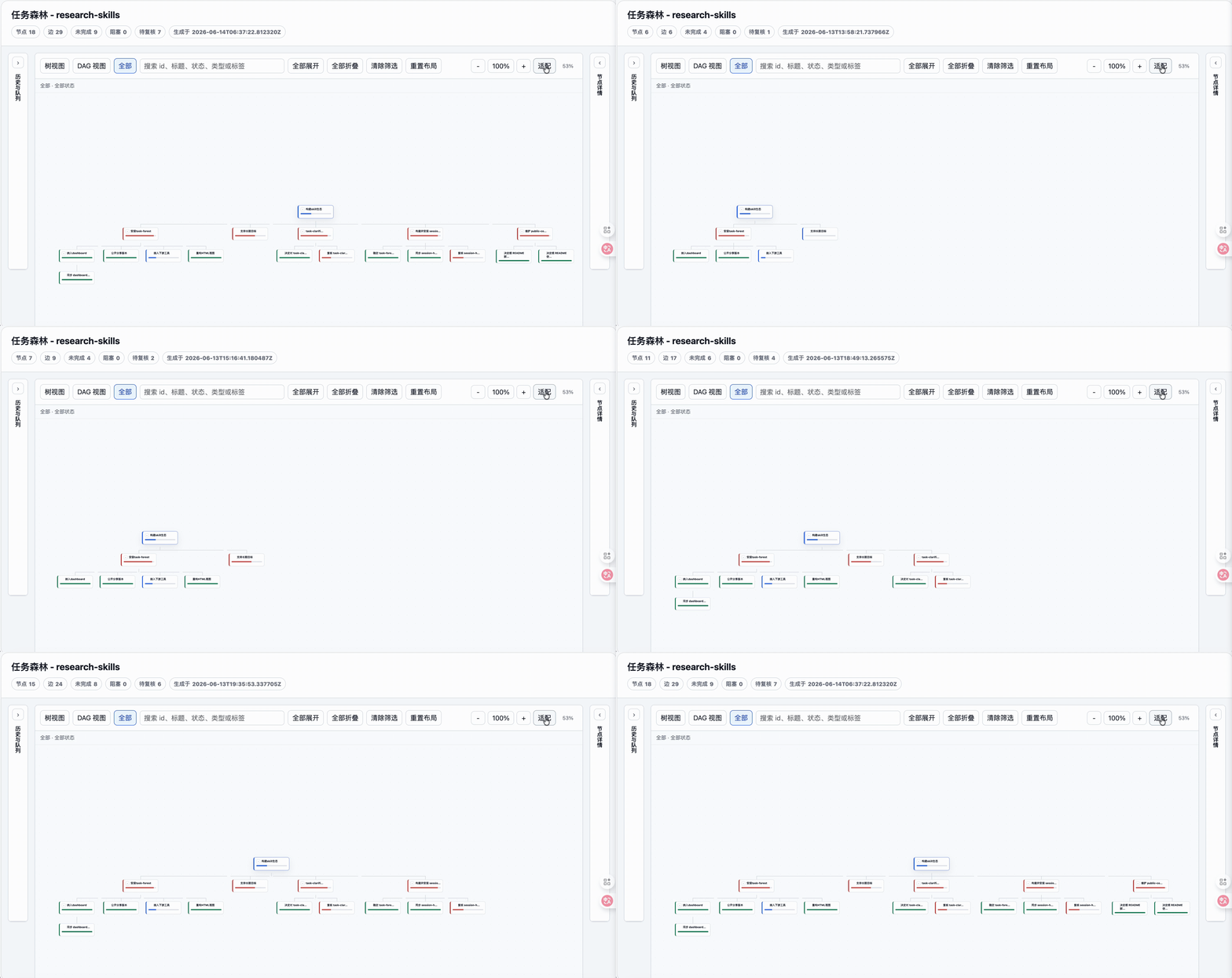
Task forest HTML export:
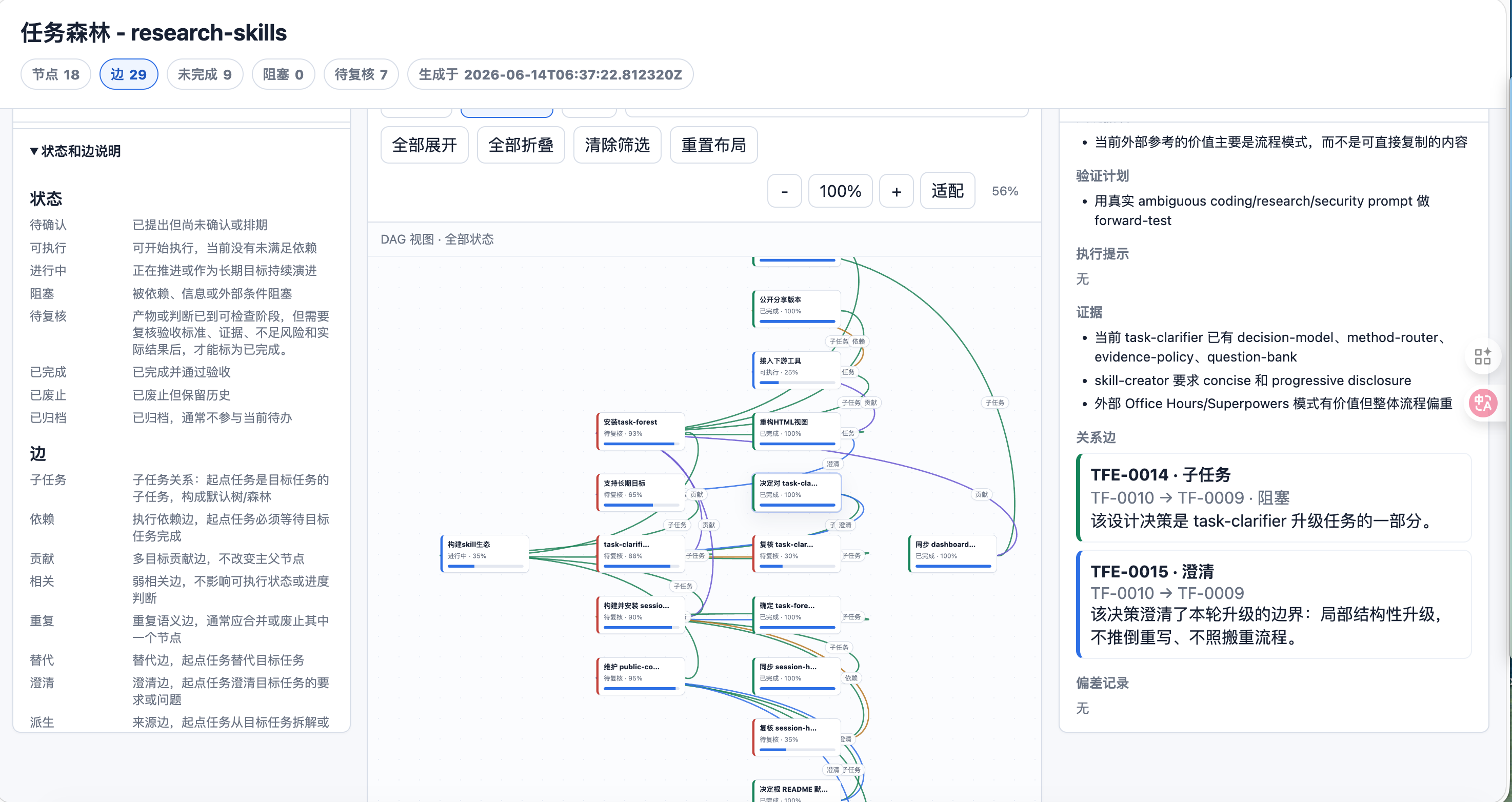
Live DAG view:
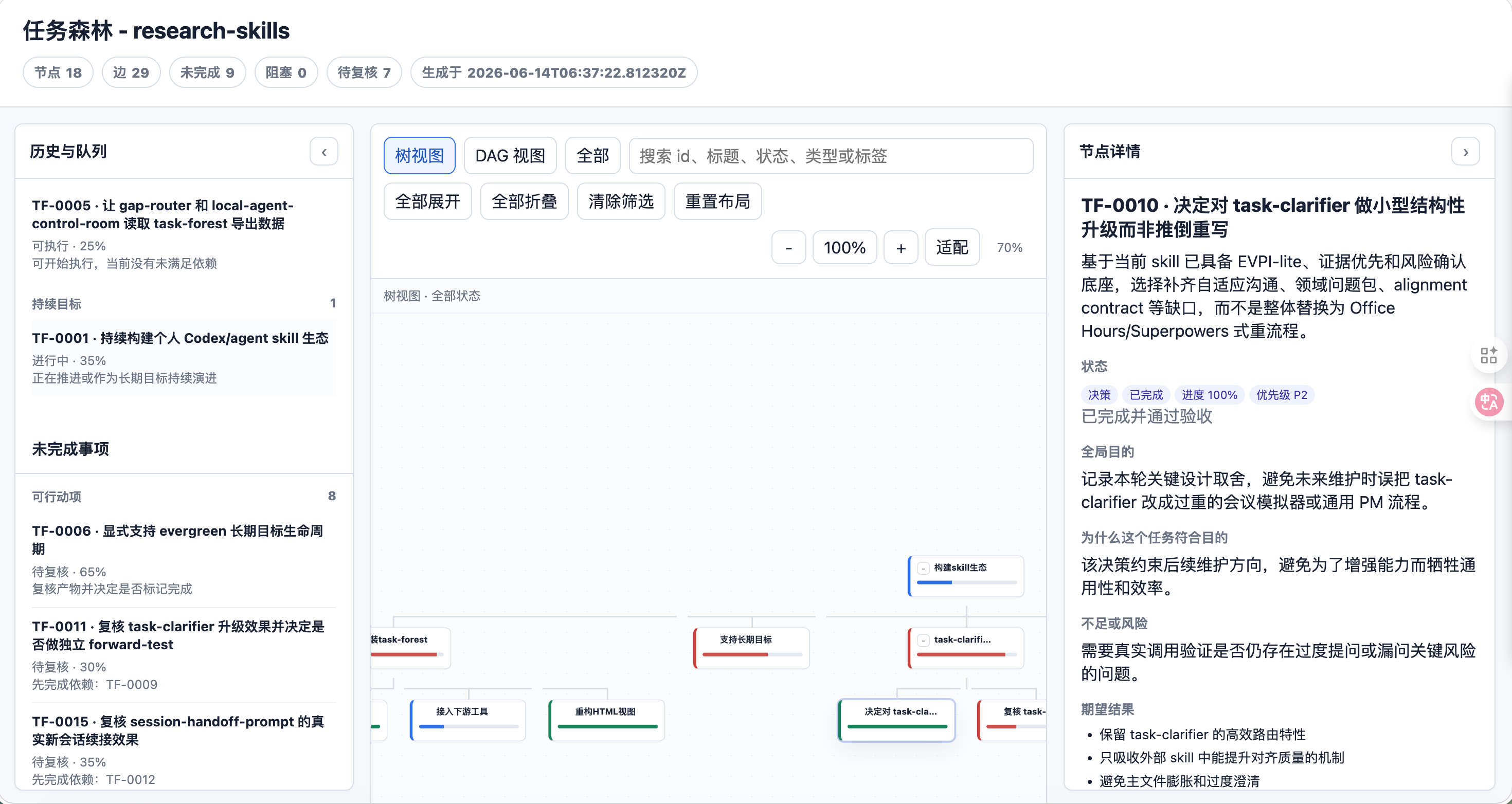
Task detail view:
User profile and alignment flow:
Ecosystem map:
Compatibility
COMPASS works across agent runtimes as a SKILL.md package with Markdown instructions, YAML frontmatter, optional references/, optional scripts/, and optional agent metadata.
| Agent / environment | Recommended setup |
|---|---|
| Claude Code | Use npx skills add dongshuyan/compass-skills --skill '*' -a claude-code, or copy the folders under skills/ into Claude Code's custom skills directory. |
| Codex | Use the skills CLI with -a codex when supported by your environment, or use the repo as a local skills source. |
| OpenCode / OpenClaw / other agents | Keep AGENTS.md and load the matching SKILL.md first, then use references/ and scripts/ as needed. |
The scripts use Python standard-library components and run locally.
Safety Model
COMPASS keeps runtime data local:
- No upload of task data or user-profile data.
- No browser cookie, token, private key, credential, or session extraction.
task-foreststores task data under the current workspace, usually.agent-workbench/task-forest/.session-handoff-promptis read-only by default. It can validate local handoffs with real workspace paths or redact them for shareable handoffs.user-profile-keeperstores local profile data under.compass-skills/user-profiles/v1by default, or a user-selectedCOMPASS_USER_PROFILE_HOME.- High-risk actions such as deletion, overwrite, publishing, remote writes, credential use, and global configuration changes require explicit confirmation.
Important: user-profile-keeper uses local plaintext storage without encryption. Do not store passwords, tokens, private keys, verification codes, or highly sensitive personal data in the profile.
See SECURITY.md for the security boundary.
Example Prompts
Clarify a task before execution:
Use $task-clarifier to align the task below.

Task: ...
Material: ...
Constraints: ask user-owned decisions first; infer discoverable facts from files, context, or reliable sources. Ask only questions that change scope, method, evidence, format, safety, or acceptance criteria.
Output: ask 1-3 key questions with recommended answers first; once the core need is clear, restate your understanding in 2-5 lines and ask me to confirm.
Maintain the task forest for a workspace:
Use $task-forest to analyze the current AI conversation and maintain the task forest for this workspace.

Goal: create a task-forest proposal from long-running goals, tasks, progress, deviations, risks, decisions, and follow-ups in this AI conversation.
Requirements:
1. Read the current task-forest list and todo first; initialize task-forest if missing.
2. Identify which long-term goal this AI conversation served. If no relation is clear, ask me or create a question/risk node.
3. Save a proposal and show me the planned changes before applying.
4. After approval, apply, validate, export, and report the HTML path.
Create a continuation prompt for a new AI conversation:
Use $session-handoff-prompt to create a balanced continuation prompt for a new AI conversation.

Goal: let the next AI conversation continue the current task without replaying the whole transcript.
Requirements:
1. Use the current conversation, explicit files I provide, current workspace evidence, and task-forest exports if present.
2. Keep task-forest read-only; do not save proposals or modify the task graph.
3. Use my language for the prompt. Default to Chinese if unknown.
4. Use privacy=local for this machine. If I ask for a public/shareable handoff, redact local paths and credential-like strings first.
5. Put the paste-ready prompt first, then briefly state mode, sources, and limitations.
Representative output shape:
你正在接手一个已经进行过多轮的 AI 对话。请按以下上下文恢复任务状态;如果当前文件或可验证证据与这里冲突,以当前证据为准。

【工作目录】
<workspace>

【用户目标】
把 session-handoff-prompt 作为 COMPASS 的正式 skill 接入,支持 macOS、Linux、Windows 和主流 agent。

【必须遵守的要求】
- [已验证] 内部说明用英文;交互和输出使用用户语言,默认中文。
- [已验证] 不读取 credential、cookie、浏览器 session 或无关私有日志。

【下一步】
1. 更新 README 和 manifest。
2. 运行 smoke test 和安全扫描。
3. 报告验证结果和剩余风险。
Initialize a local user profile:
Use $user-profile-keeper to initialize my local user profile.

Goal: build an auditable, correctable, retractable profile from a local questionnaire or the current context.
Boundaries:
1. Store locally only. Do not upload anything or read browser cookies, tokens, or credentials.
2. Do not save secrets, passwords, private keys, verification codes, or browser-session information.
3. Put inferred, private, sensitive, or conflicting claims into pending proposals for my review.
4. Report what was saved, proposed, skipped, or redacted.
Validation Status
The public install path has been validated with skills@1.5.11:
npx skills add dongshuyan/compass-skills --listfinds the released skills.npx skills add dongshuyan/compass-skills --skill '*' -a claude-code --copy -yinstalls the released skills into a temporary project's.claude/skills/directory.python3 skills/session-handoff-prompt/scripts/smoke_test_handoff.py --skill-dir skills/session-handoff-promptvalidates compacted-event projection, task-forest read-only summaries, local validation, and shareable redaction.
Roadmap
Planned additions:
- Build reusable skills from real task histories.
- Upgrade existing skills from observed failures, feedback, and validation evidence.
- Summarize local agent states, waiting-human items, risks, and review queues.
- Recommend low-switching-cost follow-up tasks from the task graph.
Community
- This repo has been shared as open source on Linux.do.
Comments