

Slopsoil is a Discord self-bot that streams live TV, IPTV playlists, YouTube videos, Jellyfin media, and any HTTP/HLS/RTSP stream directly into a Discord voice channel - as a screenshare that all server members can watch together.
Features include TVheadend integration, Jellyfin integration, M3U/IPTV playlist management with live EPG (now-playing), YouTube playback via yt-dlp, and hardware-accelerated H.264 encoding via VA-API or NVIDIA NVENC.
Disclaimer: Slopsoil is a self-bot. It runs on a real Discord user account, not a bot application. Self-bots violate Discord's Terms of Service. Use it on an account you are willing to lose, and do not use it in a way that disrupts other users or servers. The authors take no responsibility for account terminations or other consequences.
Keywords: discord iptv bot, discord youtube stream, stream tv to discord, discord live stream bot, discord voice channel video, iptv discord, self-bot streaming, tvheadend discord, hls discord bot
Screenshots
| Channel List | Stream Running |
|---|---|
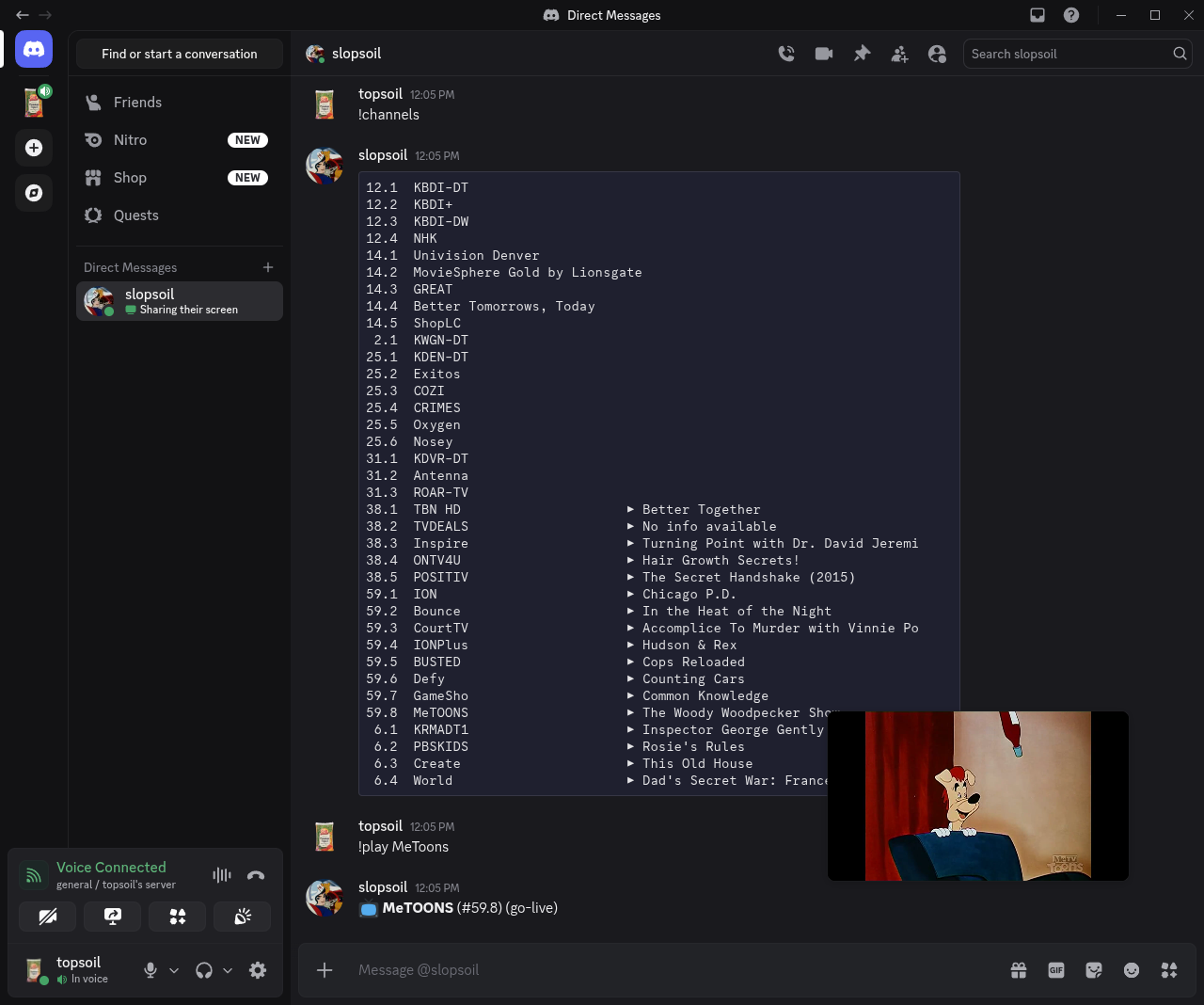 |
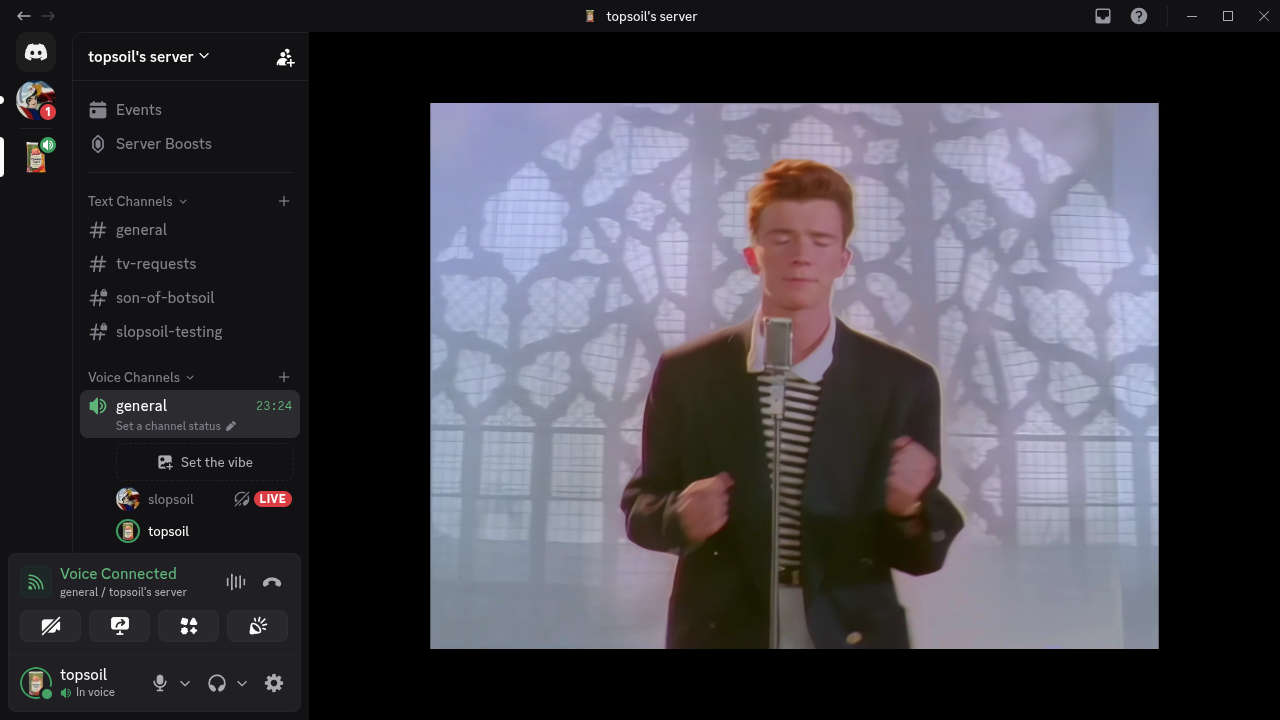 |
Features
- YouTube & media streaming - play any URL that yt-dlp supports (YouTube VODs, YouTube Live, Twitch VODs, etc.) directly into a voice channel; live streams are detected automatically and streamed without downloading
- MJPEG / CGI stream support - play
.cgivideo URLs (IP cameras, legacy streaming servers) and MJPEG-over-HTTP streams directly - IPTV / M3U playlist support - add M3U sources by URL; channels are listed with live EPG now-playing info
- TVheadend integration - browse and play live TV channels from a TVheadend server; search the EPG by show title and schedule playback; showtimes are shown in the configured timezone
- Jellyfin integration - search and stream movies, series, and episodes from a Jellyfin media server; transcoding is offloaded to Jellyfin so the bot streams H.264/AAC with subtitles suppressed
- Auto-leave on empty channel - the bot automatically leaves and stops streaming when the last user leaves the voice channel
- Go-live / screenshare delivery - streams appear as a screenshare so all members in the channel can watch
- H.264 hardware acceleration - auto-detects NVIDIA NVENC, VA-API (Intel/AMD), or falls back to software encoding
- Discord DAVE E2EE support - correctly handles Discord's end-to-end encryption protocol for voice channels
- Role-based access control - admin, friend, viewer, and none tiers; friends list and guild membership are used automatically
How It Works
slopsoil sends H.264 video and Opus audio directly over Discord's voice UDP protocol, appearing to other users as a screenshare (go-live stream). It patches discord.py-self at runtime to add video capability negotiation and implements the full RTP packetization pipeline including SPS/VUI rewriting, RFC 6184 FU-A fragmentation, and DAVE E2EE encryption.
For a detailed technical explanation of the streaming pipeline, the discord.py-self patches, and the esoteric protocol-level discoveries made while building this, see STREAMING.md.
Requirements
Bare metal
| Requirement | Notes |
|---|---|
| Python 3.11+ | |
| FFmpeg | Fedora: ffmpeg-free (not RPM Fusion's ffmpeg). See Hardware Acceleration. |
| libdave / dave.py | The official Discord DAVE E2EE C library; dave.py wraps it |
| A Discord account token | Not a bot token - slopsoil runs as a self-bot on a real user account |
Docker
- Docker Engine 24+ and Docker Compose v2
- Optional: a VA-API GPU (
/dev/dri) or NVIDIA GPU for hardware encoding - No build required — pre-built images are published to GHCR and Docker Hub (see below)
Installation - Bare Metal
1. Clone the repository
git clone https://github.com/dev-topsoil/slopsoil.git
cd slopsoil
2. Install FFmpeg
Fedora / RHEL:
sudo dnf install ffmpeg-free
Ubuntu / Debian:
sudo apt install ffmpeg
Important: Do not use RPM Fusion's
ffmpegpackage on Fedora. It ships libx264, whose output causes Discord to drop the stream after one frame. Fedora's built-inffmpeg-freepackage (libopenh264) is required. See STREAMING.md for the full explanation.
3. Install Python dependencies
python -m venv venv && source venv/bin/activate
pip install -r requirements.txt
This installs:
discord.py-self- self-bot library with voice supportPyNaCl- libsodium bindings for RTP encryptionpython-dotenv-.envfile loadingdavey- stub package (replaced at runtime by the DAVE compatibility shim)dave.py- DisnakeDev's official libdave Python bindings (working DAVE/E2EE)yt-dlp- YouTube and media downloader
4. Configure the bot
Copy the example environment file and fill in your values:
cp .env.example .env
See Configuration for details on each variable.
5. Run the bot
python3 bot.py
Installation - Docker Compose
Pre-built images are published automatically, so you can run slopsoil without cloning or building anything. Building from source is still supported if you want to modify the code.
Published images
| Registry | Image |
|---|---|
| GitHub Container Registry | ghcr.io/dev-topsoil/slopsoil |
| Docker Hub | docker.io/t0ps0il/slopsoil |
| Tag | Tracks |
|---|---|
latest |
The develop branch — newest features, updated on every merge |
1.2.3, 1.2, 1 |
Pinned stable releases — use these for production |
latestfollows active development. For a stable deployment, pin a version tag (e.g.:1.2.3).
Option A - Pre-built image (recommended)
1. Create a docker-compose.yml
services:
  slopsoil:
    image: ghcr.io/dev-topsoil/slopsoil:latest
    restart: unless-stopped
    env_file: .env

    # Persist IPTV source list across container restarts.
    volumes:
      - slopsoil-data:/root/.local/share/slopsoil

    # Uncomment for VA-API hardware encoding (see Hardware Acceleration):
    # devices:
    #   - /dev/dri:/dev/dri

volumes:
  slopsoil-data:
2. Create your .env
Create a .env file next to it with at least DISCORD_TOKEN and ALLOWED_USER_IDS. See Configuration for every supported variable.
3. Pull and start
docker compose pull
docker compose up -d
Option B - Build from source
1. Clone the repository
git clone https://github.com/dev-topsoil/slopsoil.git
cd slopsoil
2. Configure the bot
cp .env.example .env
Edit .env with your Discord token and other settings. See Configuration.
3. Build and start
docker compose up -d --build
The container will build automatically on first run.
View logs
IPTV source data is persisted in a named Docker volume (slopsoil-data) so your M3U sources survive container restarts and updates. Follow the logs with:
docker compose logs -f
Configuration
All configuration is done via environment variables in .env:
# Required - your Discord account token (not a bot token)
DISCORD_TOKEN=your_token_here

# Comma-separated Discord user IDs that can control the bot
ALLOWED_USER_IDS=123456789012345678,987654321098765432

# Optional - TVheadend server (all three must be set to enable TV commands)
TVHEADEND_URL=http://192.168.1.100:9981
TVHEADEND_USER=admin
TVHEADEND_PASS=yourpassword

# Optional - IANA timezone for showtimes displayed by !search (e.g. America/New_York)
# If unset, the system timezone of the machine running the bot is used.
TIMEZONE=

# Optional - Jellyfin server (both must be set to enable Jellyfin commands)
JELLYFIN_URL=http://192.168.1.100:8096
JELLYFIN_API_KEY=your_api_key_here

# Optional - yt-dlp format selector for downloaded !play <URL> VODs.
# Defaults to "bestvideo+bestaudio/best". On hardware that can't decode AV1/4K
# in real time (e.g. older GPUs), pin to H.264 <=1080p to avoid stutter and to
# skip downloading 4K only to downscale it:
#   YTDLP_FORMAT=bv*[vcodec^=avc1][height<=1080]+ba/b[height<=1080]
YTDLP_FORMAT=

# Optional - output stream quality preset (resolution/fps/bitrate together).
# One of: 720p, 1080p (default), 4k. Discord enforces per-account resolution/fps
# caps (e.g. 720p30 up to 4K60 by tier), so pick one your account supports.
STREAM_QUALITY=

# Optional - fine-grained overrides for the preset above (set only to deviate).
#   STREAM_RESOLUTION=1280:720   # W:H (or WxH)
#   STREAM_FPS=30                # 1-60
#   STREAM_VIDEO_BITRATE=2500k   # -b:v/-maxrate/-bufsize (CBR)
STREAM_RESOLUTION=
STREAM_FPS=
STREAM_VIDEO_BITRATE=

# Optional - pace each frame's RTP packets across this fraction of the frame
# interval instead of bursting them (0.0 = off/default; e.g. 0.75). Can reduce
# freezes from dropped packet bursts on some networks. Clamped to 0.0-0.95.
STREAM_PACKET_PACE=

# Optional - lip-sync correction in ms (default 0). Positive advances audio
# (fixes "audio behind"); negative delays audio (fixes "audio ahead"). Dial in
# by testing; clamped to +/-5000.
STREAM_AV_SYNC_MS=
| Variable | Required | Description |
|---|---|---|
DISCORD_TOKEN |
Yes | Your Discord account token |
ALLOWED_USER_IDS |
Yes | Comma-separated user IDs with admin access |
TVHEADEND_URL |
No | Base URL of your TVheadend server |
TVHEADEND_USER |
No | TVheadend username |
TVHEADEND_PASS |
No | TVheadend password |
TIMEZONE |
No | IANA timezone name for !search showtimes (e.g. America/Chicago). Defaults to the system timezone. |
JELLYFIN_URL |
No | Base URL of your Jellyfin server |
JELLYFIN_API_KEY |
No | Jellyfin API key (generate in Dashboard → API Keys) |
YTDLP_FORMAT |
No | yt-dlp format selector for downloaded !play <URL> VODs. Defaults to bestvideo+bestaudio/best. Pin a codec/resolution (e.g. bv*[vcodec^=avc1][height<=1080]+ba/b[height<=1080]) on hardware that can't decode AV1/4K in real time. |
STREAM_QUALITY |
No | Output quality preset (default 1080p): 720p→1280×720/30/2500k, 1080p→1920×1080/60/6000k, 4k→3840×2160/60/12000k (resolution/fps/bitrate set together). Discord enforces per-account resolution/fps caps, so pick a tier your account supports. |
STREAM_RESOLUTION |
No | Override the preset resolution as W:H (or WxH), e.g. 1280:720. |
STREAM_FPS |
No | Override the preset frame rate, 1–60. Matching the source fps avoids wasteful frame duplication. |
STREAM_VIDEO_BITRATE |
No | Override the preset video bitrate (used for -b:v/-maxrate/-bufsize, CBR), e.g. 2500k. |
STREAM_PACKET_PACE |
No | Spread each frame's RTP packets across this fraction of the frame interval instead of bursting them (default 0.0 = off; e.g. 0.75). Can reduce freezes caused by dropped packet bursts on some networks. Clamped to 0.0–0.95. |
STREAM_AV_SYNC_MS |
No | Lip-sync correction in ms (default 0). Audio and video send on independent threads, so a constant offset can appear. Positive advances audio (fixes "audio behind"); negative delays audio (fixes "audio ahead"). Dial in by testing; clamped to ±5000. |
TVheadend is optional. If any of the three TVHEADEND_* variables are missing, the !channels, !search, and TVheadend-backed !play commands are not loaded.
Finding your Discord token
- Open Discord in a browser
- Open DevTools (F12) → Network tab
- Filter for requests to
discord.com/api - Look for the
Authorizationheader on any request - that value is your token
Security: Keep your token private. Anyone with your token can access your Discord account.
Commands
Voice
| Command | Role | Description |
|---|---|---|
!join |
Friend | Join your current voice channel |
!leave |
Friend | Leave the voice channel |
!stop |
Friend | Stop the active stream |
Streaming
| Command | Role | Description |
|---|---|---|
!play <channel number> |
Friend | Play a TVheadend channel by number |
!play <channel name> |
Friend | Play a channel by name (case-insensitive substring match; searches TVheadend and IPTV) |
!play <URL> |
Friend | Play any URL — YouTube VODs, YouTube Live streams, direct HLS/HTTP/RTSP streams, .cgi MJPEG feeds, etc. Live streams are detected automatically and streamed without downloading. |
!channels |
Viewer | List all available channels with live now-playing info (paginated) |
!search <show title> |
Friend | Search EPG for a show — plays immediately if airing now, or schedules for upcoming airtime. Showtimes are shown in the TIMEZONE configured in .env. |
Jellyfin
| Command | Role | Description |
|---|---|---|
!media <title> |
Friend | Search Jellyfin for a movie or series and stream it into your voice channel. A single movie match plays immediately. For series, the bot walks you through season → episode selection. Accepts an optional sXXeYY suffix (e.g. !media breaking bad s03e05) to jump directly to a specific episode. Transcoding is handled server-side by Jellyfin; subtitles are always suppressed. |
IPTV Source Management
| Command | Role | Description |
|---|---|---|
!add-source <name> <url> |
Admin | Add an M3U playlist source |
!sources |
Admin | List all sources with enabled/disabled status |
!sources enable <name> |
Admin | Enable a source |
!sources disable <name> |
Admin | Disable a source |
!delete-source |
Admin | Interactively delete a source |
General
| Command | Role | Description |
|---|---|---|
!ping |
Any | Check if the bot is responding |
!help |
Any | List available commands |
Permission tiers
| Role | Who qualifies |
|---|---|
| Admin | User IDs listed in ALLOWED_USER_IDS |
| Friend | Users on the bot account's friends list |
| Viewer | Members of any guild the bot account is in |
| None | Everyone else |
Updating the Docker Container
Pre-built image (Option A)
Pull the newest published image and recreate the container:
docker compose pull
docker compose up -d
If you pinned a version tag (e.g. :1.2.3), bump it in docker-compose.yml before pulling to move to a newer release.
Built from source (Option B)
When you pull new changes to the project, rebuild the image:
# Pull latest changes
git pull

# Rebuild the image and restart the container
docker compose up -d --build
If you only changed .env (no code changes), a restart is enough - no rebuild needed:
docker compose restart
To completely reset the container and its image (does not delete IPTV source data, which lives in the volume):
docker compose down
docker compose up -d --build
To also wipe the IPTV source data volume:
docker compose down -v
docker compose up -d --build
Hardware Acceleration
slopsoil auto-detects the best available H.264 encoder in this priority order:
| Encoder | Type | Requires |
|---|---|---|
h264_nvenc |
NVIDIA GPU | NVIDIA driver + nvidia-container-toolkit |
h264_vaapi |
VA-API (Intel/AMD) | /dev/dri device |
libopenh264 |
Cisco software | Included in ffmpeg-free |
libx264 |
Software (fallback) | Not used in Docker (see below) |
Enabling VA-API in Docker
Uncomment the devices section in docker-compose.yml:
devices:
  - /dev/dri:/dev/dri
Then recreate the container (add --build if you build from source):
docker compose up -d
Enabling NVIDIA NVENC in Docker
Install nvidia-container-toolkit, then add to docker-compose.yml:
deploy:
  resources:
    reservations:
      devices:
        - driver: nvidia
          count: 1
          capabilities: [gpu]
Why libx264 isn't used in Docker
The Docker image is based on Fedora and uses ffmpeg-free. This package does not include libx264 (which requires a separate RPM Fusion repository and a different FFmpeg build). More importantly, libx264-encoded streams cause Discord to silently drop the stream after the very first frame. libopenh264 and the hardware encoders do not have this problem. See STREAMING.md for the technical details.
Running Tests
The test suite covers the permissions system, the IPTV/EPG and stream-probing services, the Jellyfin and TVheadend clients, the yt-dlp helpers, the video player's stream-profile logic, voice utilities, the video compat patches, and the DAVE shim logic.
Install test dependencies
source venv/bin/activate
pip install pytest pytest-asyncio pytest-mock
Or without activating the venv:
venv/bin/pip install pytest pytest-asyncio pytest-mock
Run all tests
venv/bin/pytest
Useful flags
# Verbose output with print statements
venv/bin/pytest -v -s

# Stop on first failure
venv/bin/pytest -x

# Run a specific file
venv/bin/pytest tests/test_permissions.py

# With coverage report
venv/bin/pip install pytest-cov
venv/bin/pytest --cov --cov-report=term-missing
Comments