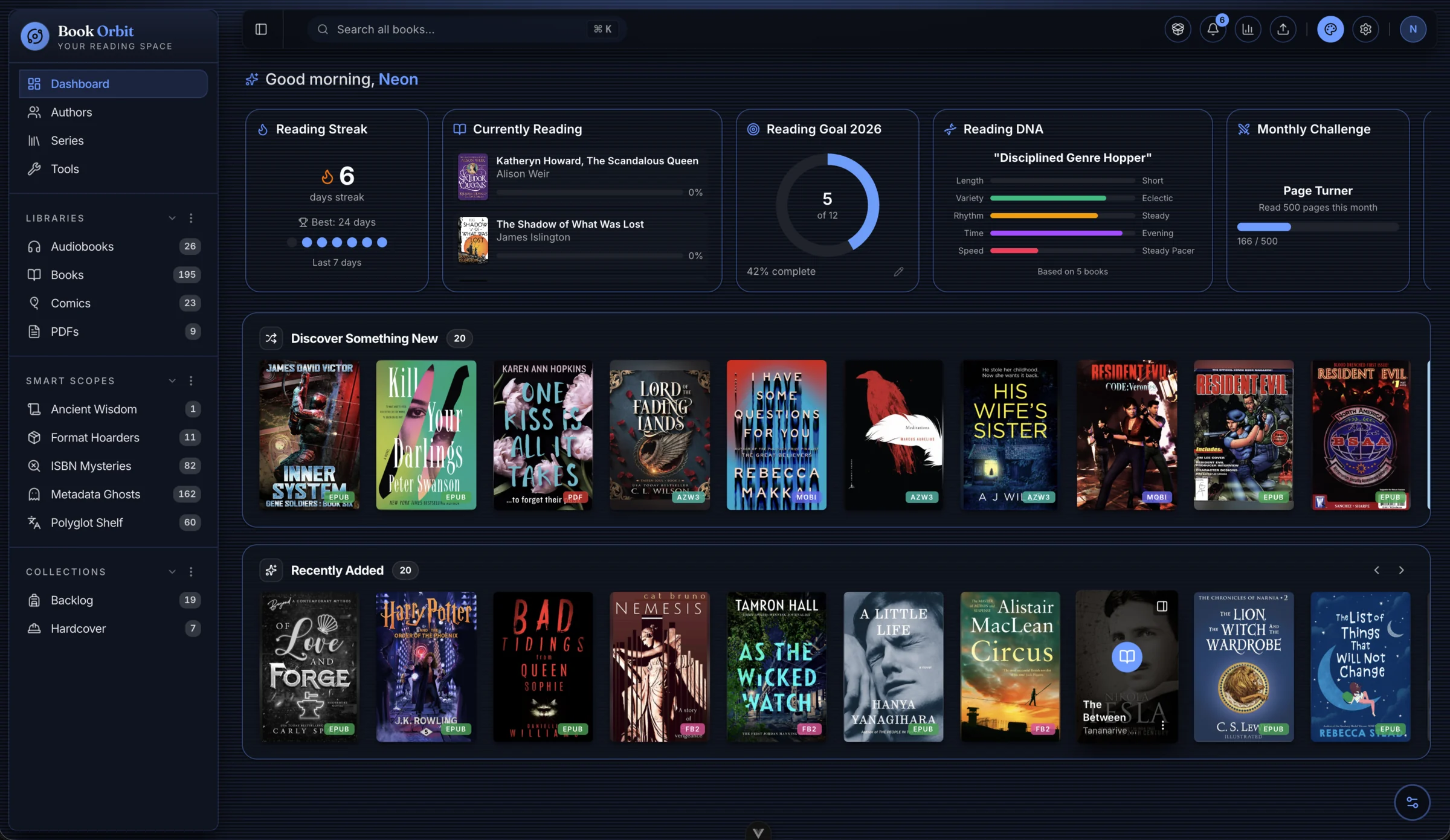
Managing a digital library often feels like a fragmented experience. You might have ebooks in one folder, a collection of PDFs in another, and audiobooks scattered across a different drive. Even when you centralize these files, getting them onto your preferred hardware—like a Kobo e-reader or a mobile device—usually involves manual transfers, tedious syncing of reading progress, or dealing with inconsistent metadata. For those who want to own their data and their reading experience, the gap between "having files" and "having a library" is wide.
The approach
BookOrbit attempts to bridge this gap by acting as a centralized, self-hosted hub for nearly every type of digital reading material. Rather than being a simple file browser, it functions as a full-scale management platform. The architecture is built around the idea of "libraries" that can be customized with specific scan rules, format priorities, and metadata configurations. This allows a user to treat a collection of comics differently from a collection of academic PDFs.
A core part of the project's design is the emphasis on automation and synchronization. Instead of the user acting as the middleman between their server and their device, BookOrbit handles the heavy lifting. It features built-in support for pushing books to Kobo devices and provides two-way reading progress synchronization via KOReader using the OPDS protocol. This moves the project away from being a passive storage solution toward becoming an active reading companion.
The software is written in TypeScript and relies on a containerized deployment model. By utilizing Docker, it aims to provide a predictable environment for managing the application, its PostgreSQL database, and the underlying file structures.
What you actually get
The platform provides a wide range of integrated tools designed to handle diverse media types without requiring external plugins:
- Multi-format Readers: The built-in readers support a significant variety of formats, including EPUB, MOBI, and AZW3 for ebooks; PDF for documents; CBZ and CBR for comics; and a variety of audio formats like M4B, MP3, and FLAC for audiobooks.
- Extensive Metadata Sourcing: To avoid the manual work of cleaning up library entries, the system can pull information from nine different providers, including Google Books, Amazon, Goodreads, and ComicVine. It even allows for field-level rules to refine how this data is applied.
- Smart Organization: Beyond simple folders, users can create "Smart Scopes," which are essentially dynamic, rule-based shelves and filters that update automatically as the library grows.
- Reading Analytics: For those who enjoy tracking their habits, the dashboard includes a heatmap, reading streaks, pace tracking, and daily reading time statistics.
- Multi-user Infrastructure: The project supports multiple users with isolated reading data. It integrates with OIDC/SSO providers like Authentik, Keycloak, and Authelia, making it suitable for households or small organizations that need granular permission controls.
- Flexible Delivery: Users can access content via OPDS, use a "Send-to-Kindle" email feature, or simply drag and drop files directly into a browser.
What it doesn't do
While the feature list is extensive, certain boundaries are clear. The project focuses heavily on the management and reading of files, but it does not mention built-in tools for downloading content from the web or managing DRM-protected files that require external decryption. It is a library manager for files you already own or have acquired.
Additionally, while the "Smart Scopes" and metadata rules provide high levels of customization, the README does not indicate a built-in way to "discover" new books via a social feed or a global marketplace; the discovery is driven by the metadata of the files you upload. The project also stays within the bounds of a self-hosted server; it does not offer a managed cloud service, meaning the responsibility for backups and hardware uptime rests entirely with the user.
Trying it out
Setting up BookOrbit is designed to be handled via Docker Compose, requiring the configuration of several environment variables for your database and application URL. For the specific commands and a full guide on handling NAS permissions or reverse proxies, you should consult the official README.
Who is this for?
BookOrbit is a strong candidate for users who already have a significant collection of diverse media and want to move away from proprietary ecosystems like Kindle or Audible. If you use Kobo or KOReader and want a "set it and forget it" way to sync your progress and metadata, this project addresses those specific pain points. It is more feature-rich than a basic file server but requires more intentional configuration than a simple cloud drive.
You can find the source code and more technical details on GitHub or explore the live demo at bookorbit.app.
Comments