
An Industrial-Grade AI Agent Operating System Built in Rust
Inspired by Zhuge Liang's Wooden Ox and Gliding Horse — Ancient Ingenuity Meets Modern AI
English · 中文 · Design Detail →
What Is Gliding Horse?
An AI agent operating system built in Rust that orchestrates multiple agents via the PDCA cycle, enabling coordinated, auditable, and self-improving systems. — much like how Zhuge Liang's Wooden Ox and Gliding Horse revolutionized logistics by harnessing mechanical power across treacherous terrain.
"We don't just build agents; we build the infrastructure that harnesses their collective intelligence."
Core Architecture
| Layer | Technology | Role |
|---|---|---|
| Core Coordination (Rust) | PDCA cycle · 5W2H ontology · EventBus |
Agent orchestration & lifecycle |
| Memory System | L0: Sled+Qdrant · L2: Oxigraph · MESI coherence |
5-layer hierarchical memory |
| Data Bus | JSON-LD 1.1 · @id/@type/@context · Named Graphs |
Universal interoperability |
| Knowledge Graph | Oxigraph RDF · SPARQL 1.1 · Code AST |
Cross-subsystem unified store |
| Skill Graph | RDF · 7.5k LOC · Self-evolving |
Dynamic cognitive network |
| Perception Engine | 10 triggers · Anomaly dedup · 5W2H constraint check |
Proactive monitoring |
| Gateway | gRPC · HTTP (OpenAI-compatible) · MCP |
Production interface |
📖 The Story: From Ancient Wisdom to Modern Intelligence
In the turbulent era of the Three Kingdoms (220–280 AD), the legendary strategist Zhuge Liang (诸葛亮), chancellor of the Shu Han state, faced a critical challenge: how to transport supplies efficiently through the treacherous mountain paths of Sichuan during his Northern Expeditions. Traditional wheeled carts struggled on narrow trails; human porters exhausted quickly.
His solution — the Wooden Ox (木牛) and Gliding Horse (流马) — were autonomous transport devices that could navigate difficult terrain with minimal human guidance. These mechanical wonders were not merely tools; they represented a paradigm shift — autonomous systems that extended human capability.
Bridging Past and Present
Just as the Gliding Horse served as an intelligent harness for transporting supplies across impossible terrain, Gliding Horse Agent OS serves as an intelligent harness for AI agents:
| Ancient Innovation | Modern Implementation |
|---|---|
| Autonomous Transport | Self-directing agent workflows |
| Terrain Adaptation | Dynamic complexity handling (7 levels) |
| Load Distribution | Parallel agent execution |
| Minimal Guidance | Proactive anomaly detection |
| Mechanical Reliability | Rust's memory safety guarantees |
"The wise adapt their methods to circumstances, just as water shapes its course according to the ground over which it flows." — Zhuge Liang
This ancient wisdom guides our design: flexible orchestration that adapts to task complexity, rather than rigid frameworks that force tasks into predefined molds.
🖥️ Software Engineering Team — The Flagship Application
The Software Engineering Team app demonstrates the full power of Gliding Horse — a federated architecture where multiple AI agents collaborate on real-world software engineering tasks.
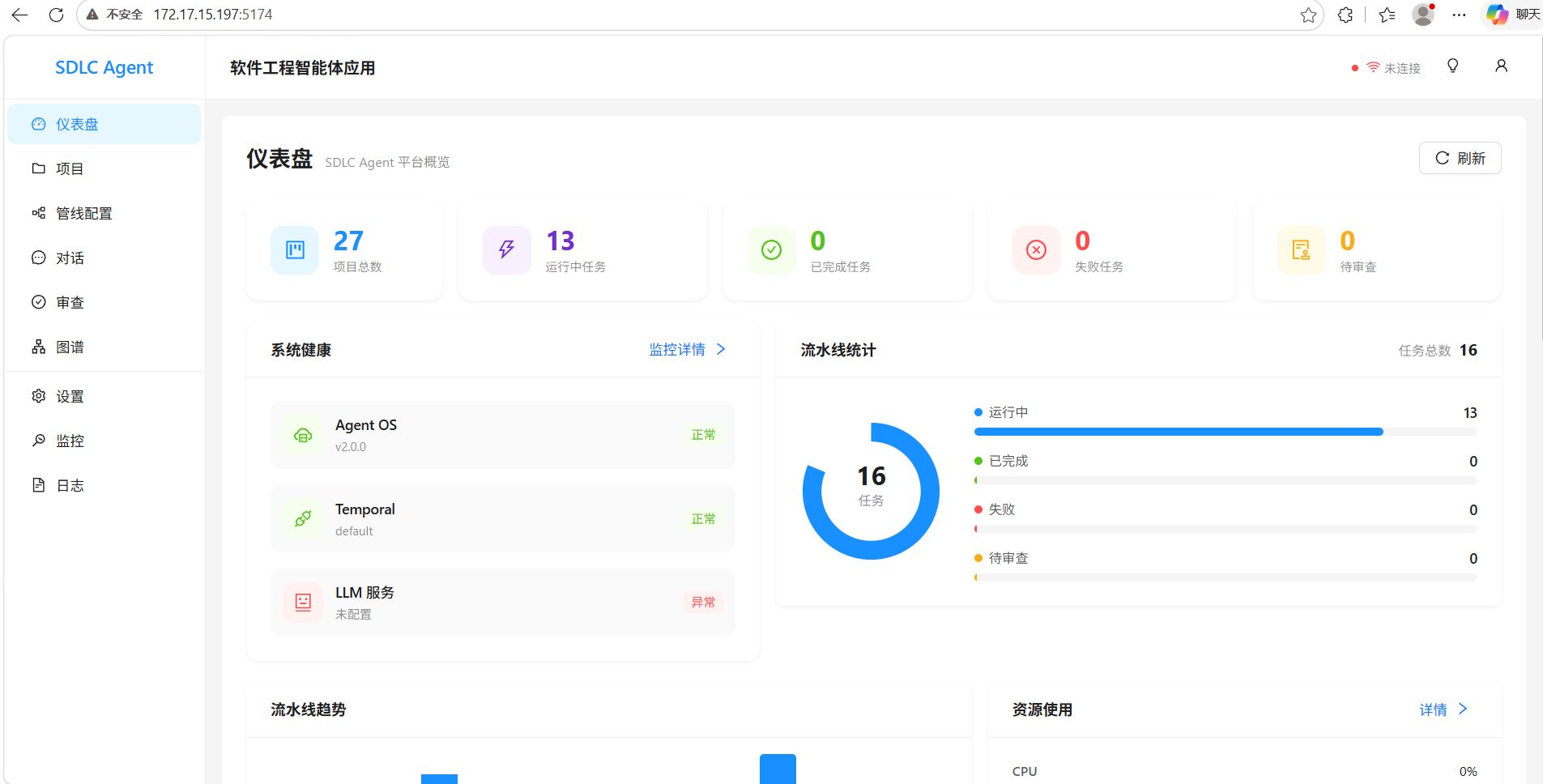 Center dashboard — project oversight, agent status, pipeline progress
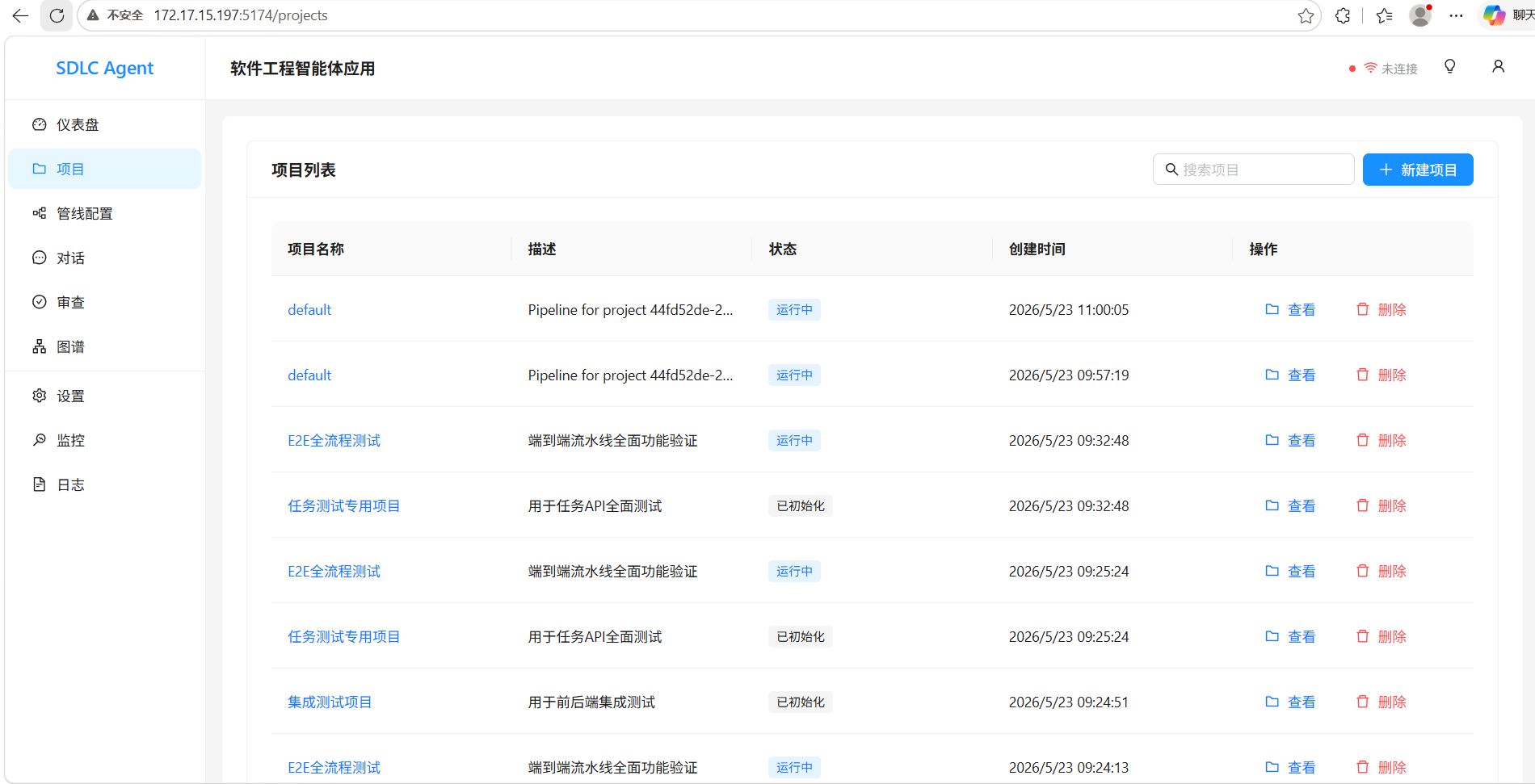 Project lifecycle management from req → design → code → review → deploy |
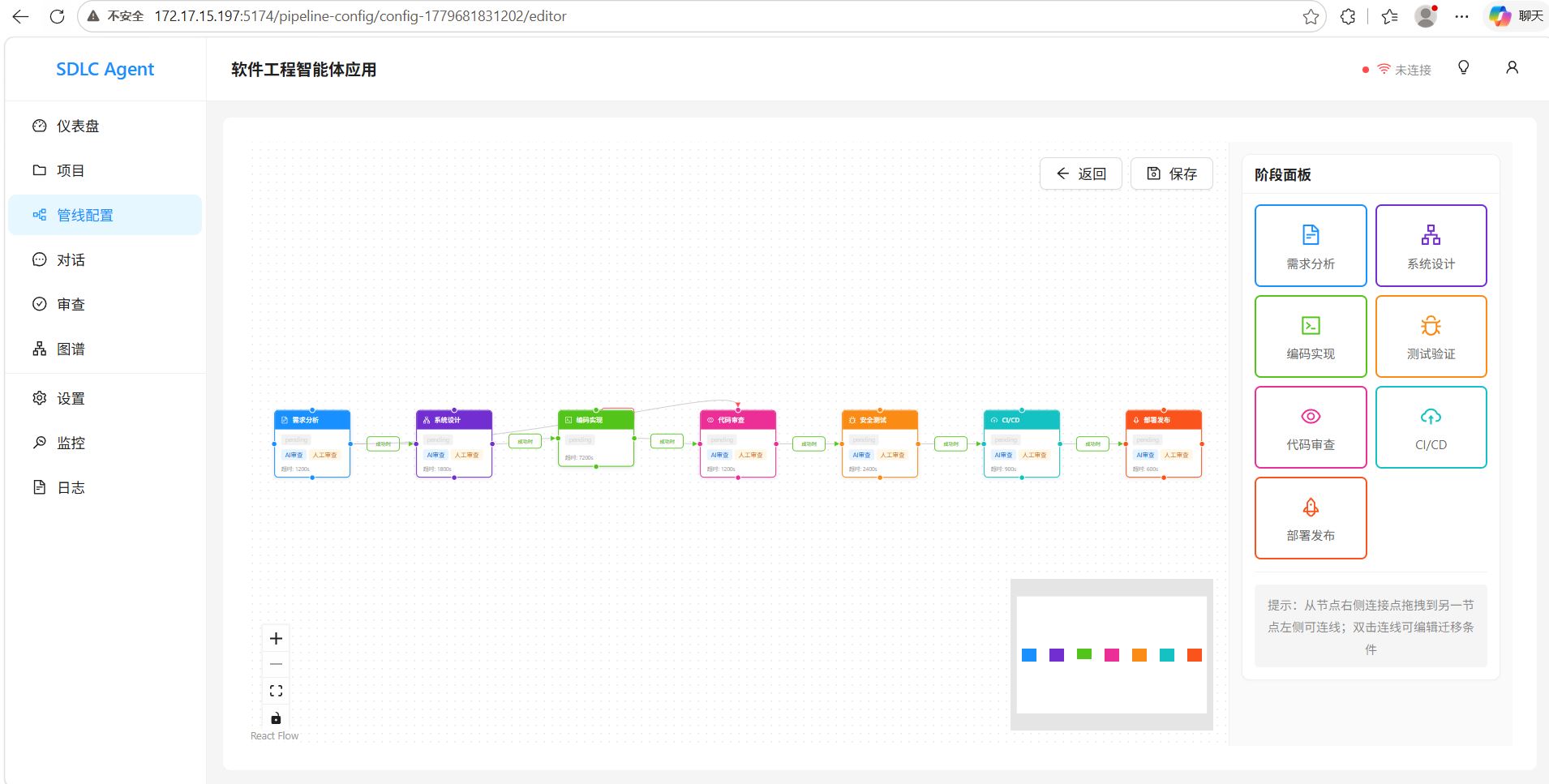 Multi-stage SDLC pipeline with real-time status tracking |
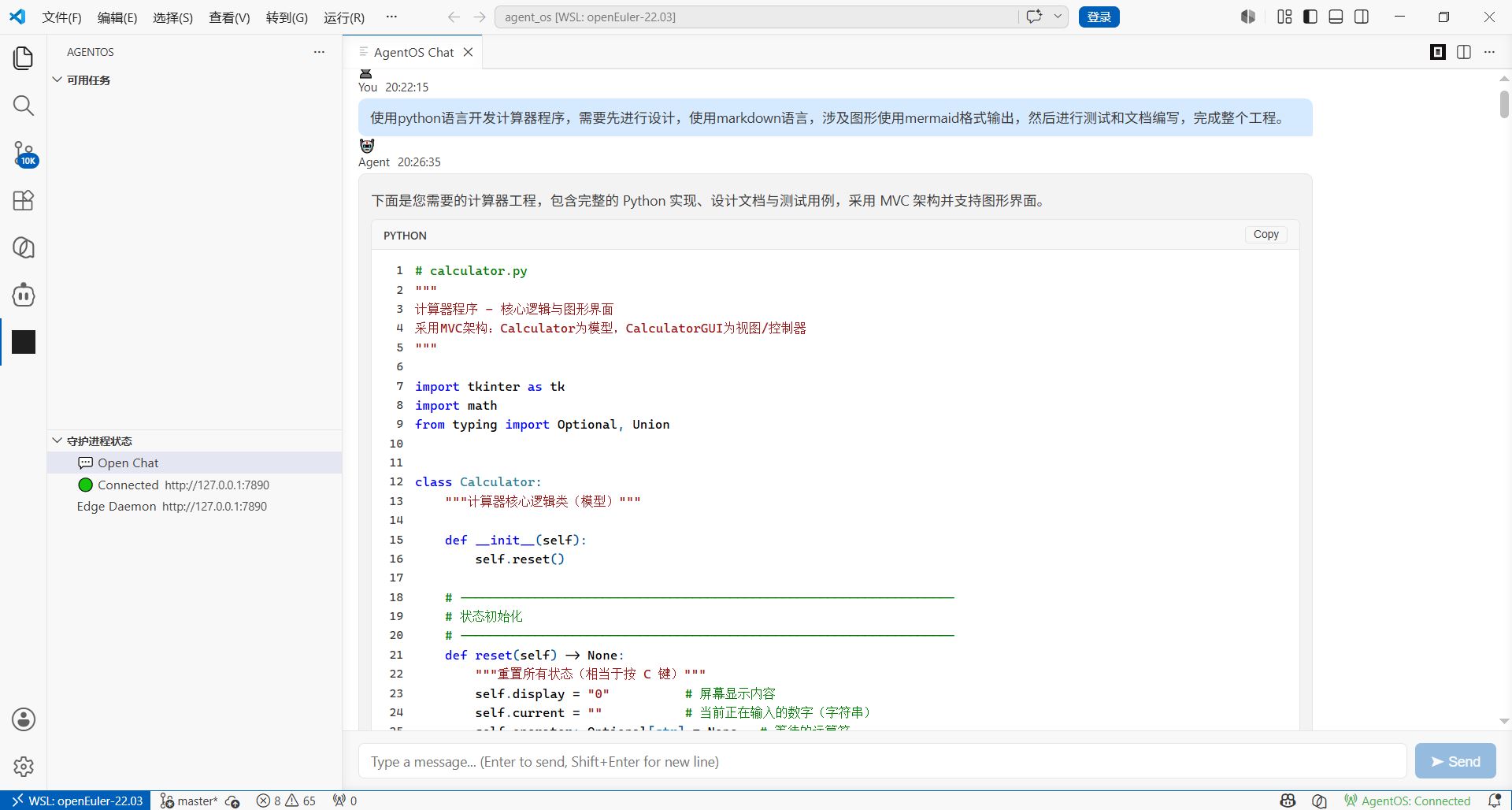 VS Code Plugin — chat panel, graph view, and task panel for real-time agent collaboration
Architecture: Center + Edge Federation
flowchart TB
    subgraph VS["VS Code Plugin (TypeScript)"]
        direction LR
        CHAT["Chat Panel"]
        GRAPH_V["Graph View"]
        TASK_P["Task Panel"]
    end

    subgraph EDGE["Edge Daemon (Rust · axum)"]
        API_EDGE["API Server<br/>ws / chat / health"]
        AGENT_CORE["Agent Core<br/>SupervisorAgent · DoAgent · LLM Client"]
        DOCKER["Docker Sandbox<br/>Safe execution · Compile / Test"]
        SYNC_EDGE["Sync Layer<br/>Heartbeat · gRPC · JWT Auth"]
        GRAPH_EDGE["Graph Layer<br/>Local Store (sled) · Delta Sync"]

        API_EDGE --- AGENT_CORE
        AGENT_CORE --- DOCKER
        API_EDGE --- SYNC_EDGE
        AGENT_CORE --- GRAPH_EDGE
    end

    subgraph CTR["Center (Go · Gin)"]
        API_CTR["HTTP API<br/>/api/v1/* · /ws"]
        TEMPORAL["Temporal Workflow<br/>Orchestrator"]
        AGENT_MGR["Agent Manager<br/>Register · Heartbeat · Dispatch"]
        EXEC["Executors<br/>req → design → coding → review → test → cicd → deploy"]
        STORE_CTR["Store<br/>SQLite · gRPC Client · Graph Sync"]

        API_CTR --- TEMPORAL
        API_CTR --- AGENT_MGR
        TEMPORAL --- EXEC
        AGENT_MGR --- STORE_CTR
    end

    VS <-->|"WebSocket / REST"| EDGE
    EDGE <-->|"gRPC + REST"| CTR
Key Design Patterns:
- Center (Go): Workflow orchestration via Temporal, project CRUD, agent registry, graph sync
- Edge (Rust): Local LLM execution, Docker sandbox, VS Code WebSocket bridge
- VS Code Plugin: Developer UI with real-time agent awareness
🖥️ Gliding Code — The Terminal AI Assistant
Gliding Code is a terminal-based AI coding assistant that brings the power of Gliding Horse's knowledge graph and agent orchestration directly into your command line — no IDE required.
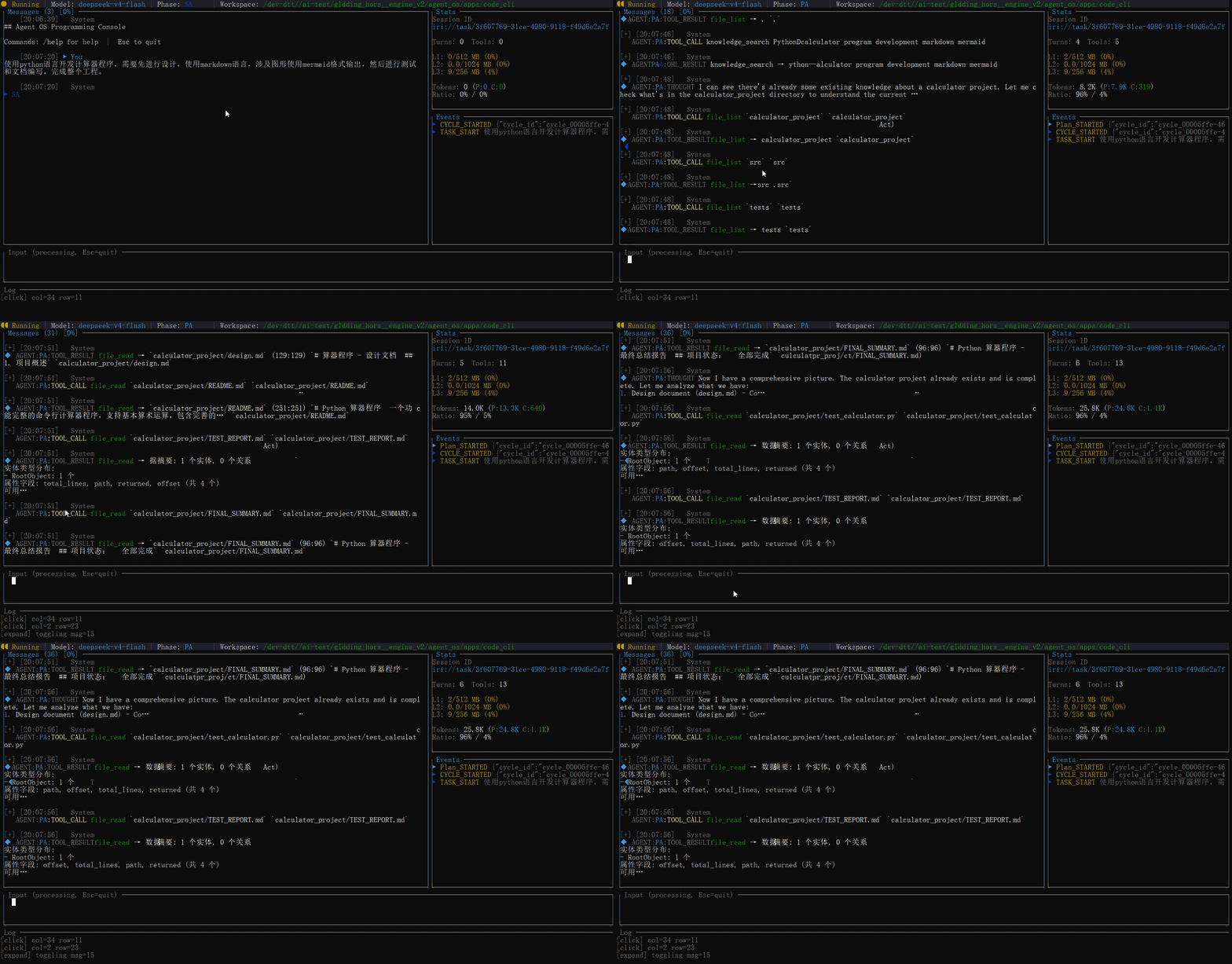
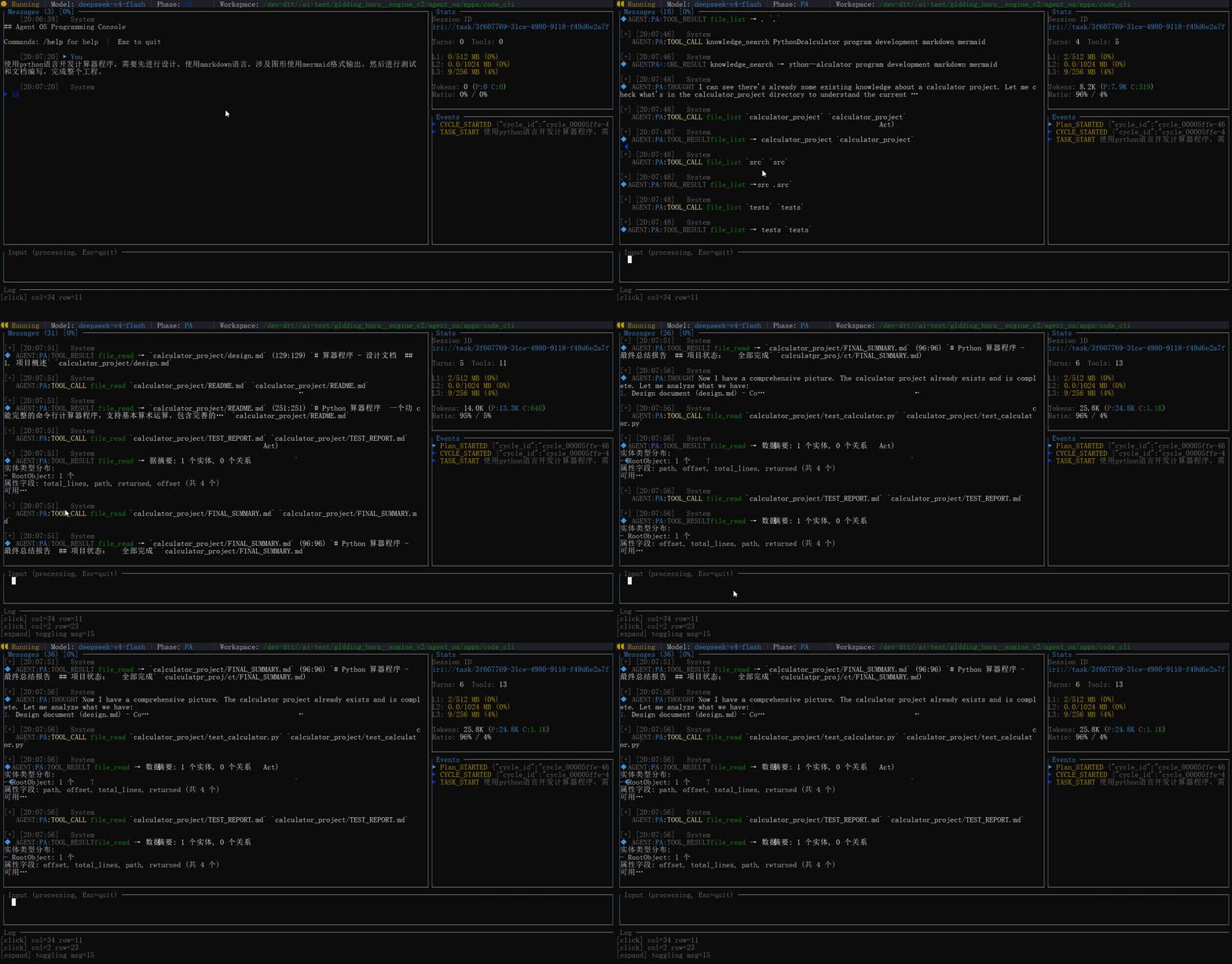
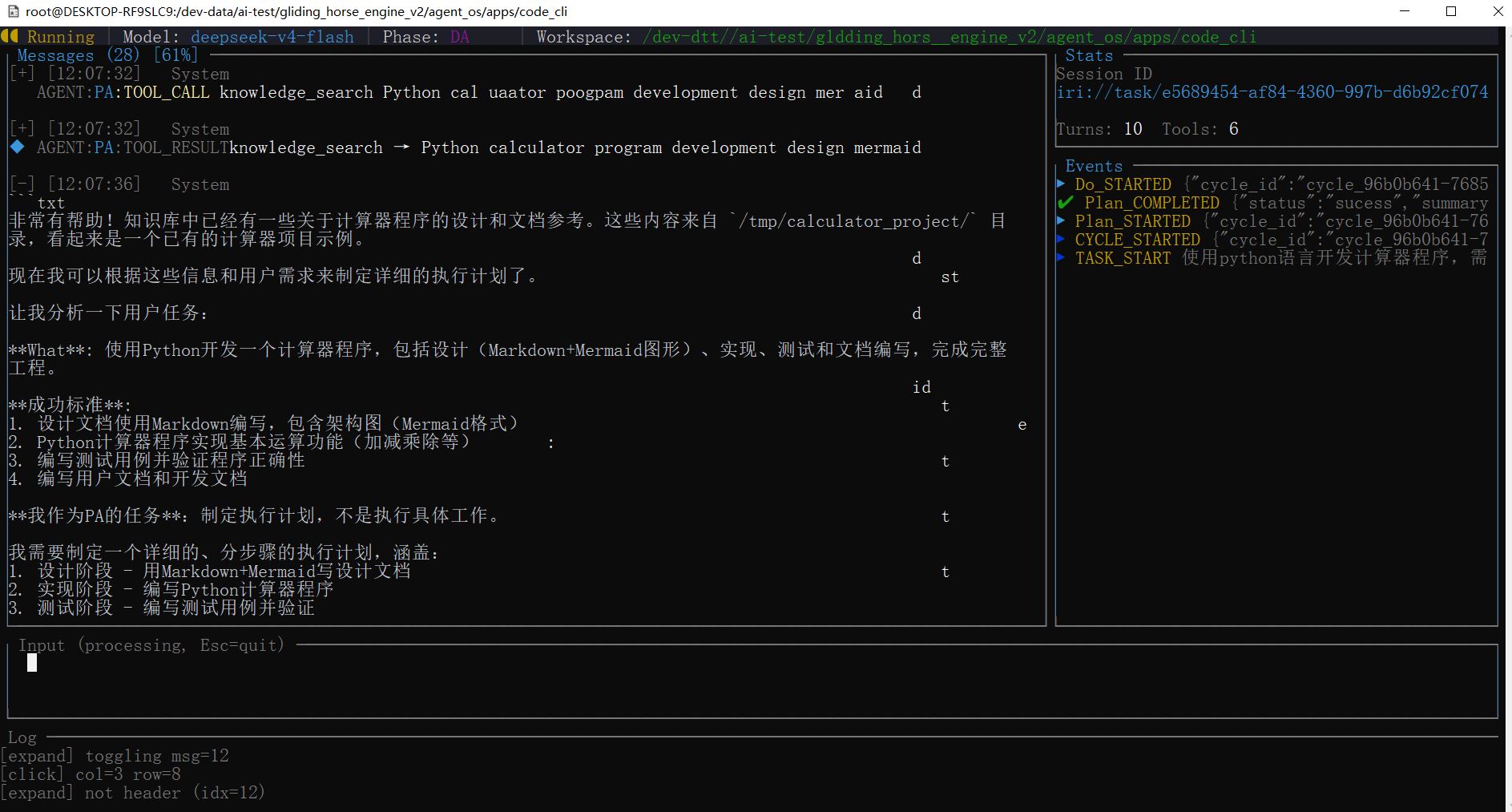 Knowledge graph visualization — real-time entity relationships, code structure understanding, and cross-subsystem awareness powered by Oxigraph RDF
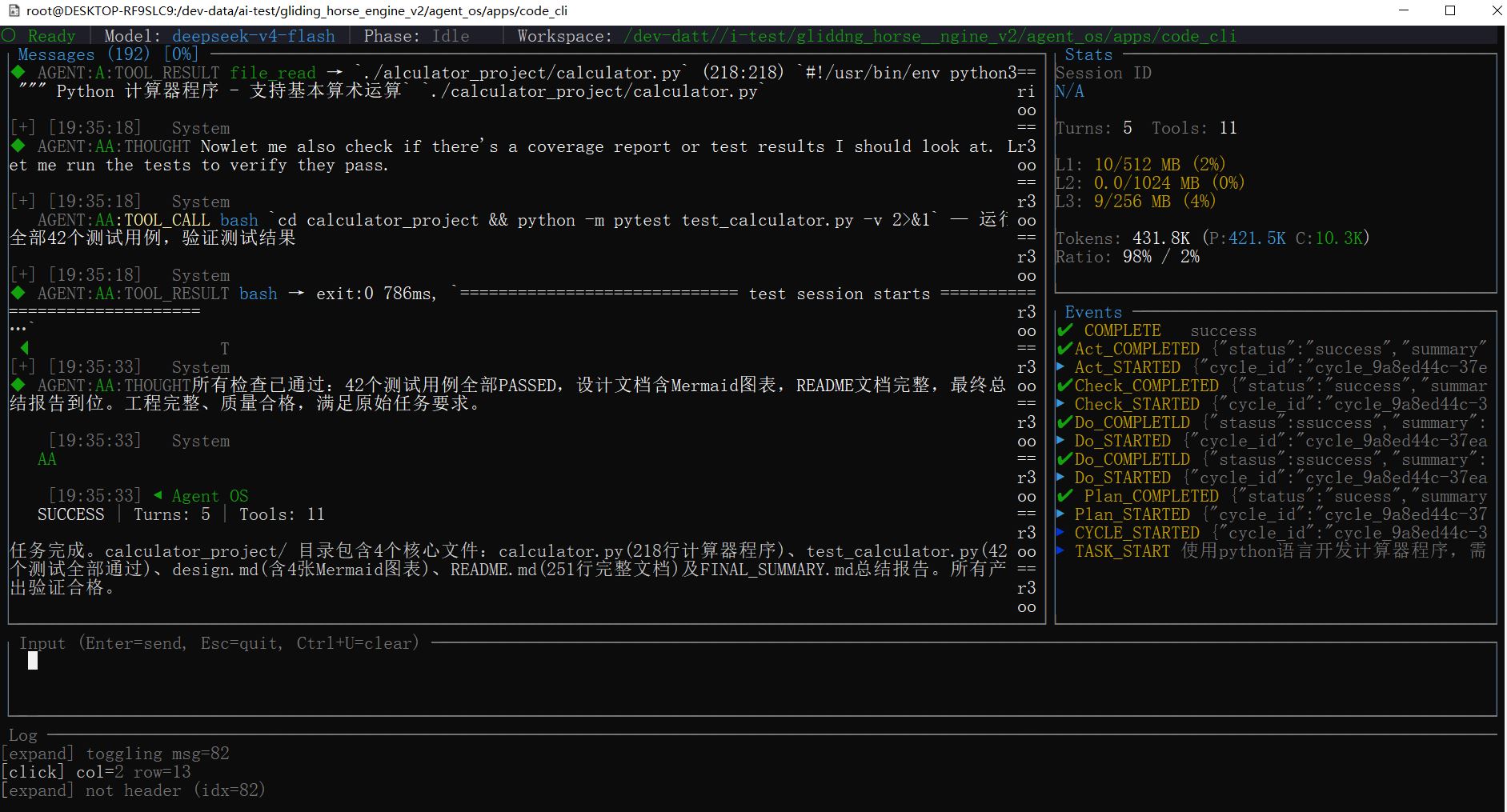 Programming Task">
Task completion interface — AI agent successfully analyzing and solving a programming task with full traceability
Programming Task">
Task completion interface — AI agent successfully analyzing and solving a programming task with full traceability
🚀 Quick Start
Choose your path — download and run the pre-built terminal AI assistant (zero dependencies), or build from source for the full Software Engineering Team.
Option A: Download & Run — Gliding Code
No dependencies required. Just download, extract, and run:
| Platform | Download |
|---|---|
| Linux (x86_64, musl) | glidingcode-x86_64-unknown-linux-musl.tar.gz (13.9 MB) |
| Linux (aarch64, musl) | glidingcode-aarch64-unknown-linux-musl.tar.gz (12.9 MB) |
| macOS (Apple Silicon) | glidingcode-aarch64-apple-darwin.tar.gz (12.1 MB) |
| Windows (x86_64) | glidingcode-x86_64-pc-windows-msvc.zip (11.6 MB) |
# Linux / macOS
tar xzf glidingcode-*.tar.gz
./glidingcode --help

# Windows (PowerShell)
Expand-Archive glidingcode-x86_64-pc-windows-msvc.zip .
.\glidingcode.exe --help
All Linux builds are fully statically linked (musl) — no runtime dependencies required.
Set your API key and start using it:
export DEEPSEEK_API_KEY="sk-..."        # Linux / macOS
# or
set DEEPSEEK_API_KEY="sk-..."            # Windows (cmd)
# or
$env:DEEPSEEK_API_KEY="sk-..."           # Windows (PowerShell)

# Alternatively, use any OpenAI-compatible provider:
export AGENT_OS_GATEWAY_API_KEY="sk-..."
export AGENT_OS_GATEWAY_API_URL="https://your-endpoint/v1"

# Run an interactive session (Linux/macOS: ./glidingcode, Windows: .\glidingcode)
./glidingcode

# Or run a one-shot task
./glidingcode "Explain how Rust's borrow checker works"
Option B: Full Setup — Software Engineering Team
Build the complete multi-agent system from source (requires Rust + Go + Docker).
Prerequisites
- Rust 1.75+ · Go 1.25+ · Docker · Temporal Server
- LLM API key (OpenAI-compatible)
1. Clone & Configure
git clone https://github.com/doiito/gliding_horse.git
cd gliding_horse/apps/software_engineering_team

cp center/config.yaml center/config.local.yaml
# Edit your LLM keys, Temporal host, etc.
2. Start the Center
cd center
go run ./cmd/server/...     # API server on :8080
go run ./cmd/worker/...     # Temporal worker
3. Start the Edge Daemon
cd edge/daemon
cargo run -- daemon start   # Agent daemon on :7890
4. Open VS Code
Install the plugin from edge/vscode/ and connect to the daemon — you now have an AI software engineering team at your fingertips.
Or Use the API Directly
curl http://localhost:8080/api/v1/projects \
  -X POST -H "Content-Type: application/json" \
  -d '{"name":"My Project","description":"Build a microservice"}'
🔧 Key Highlights
Generalized PDCA — 7-Level Adaptive Execution Dynamically selects from 7 complexity levels (L0 instant → L5 recursive → L6 emergency) via 5W2H metadata. One engine handles everything from instant queries to multi-week projects — no rigid workflows.
CPU Cache-Inspired Memory — 5 Layers + MESI Coherence First-ever application of CPU cache coherence to multi-agent memory. L0 disk → L1 context → L2 Oxigraph RDF → L3 SPARQL projection. Intelligent prefetching reduces perceived latency by 90%. Solves context explosion and shared memory inconsistency.
JSON-LD Universal Data Bus — W3C-Standard Interoperability
@contextduck-typing eliminates field name conflicts between skills.@idenables zero-cost cross-agent entity merging.@graphnamed graphs allow conflict-free parallel writes. Turns interoperability hell into plug-and-play.Self-Evolving Skill Graph — Cognitive Network 7,500+ LOC dynamic network with 6 semantic link types (Prerequisite, Composition, Related, etc.). AA creates knowledge fragments and new links after each task.
/learnand/reducemechanisms enable autonomous skill acquisition.Universal Knowledge Graph — Unified Cognitive Backbone All subsystems (skills, memories, tasks, code knowledge) share a single Oxigraph RDF store via named graphs, enabling cross-subsystem SPARQL joins. Code ASTs parsed by tree-sitter are automatically converted to RDF triples and linked into the same graph. A single
@idensures consistent entity identity across all contexts — no silos, no duplication.5W2H Dimension-Level Audit — Precision Rollback CA audits each of the 7 dimensions independently. What/Why fail → re-analyze. How/Where fail → re-plan. When/HowMuch fail → conditional pass. No more black-box "PASS/FAIL" — you know exactly what went wrong.
Proactive Perception Engine — Catch Failures Before They Happen 10 execution triggers with 60-second anomaly deduplication. Monitors deadline violations, budget overruns (>80% tokens), role mismatches, environment conflicts. Auto-escalates to human when needed.
Micro-Tool System — Tame Large Outputs Results >8KB auto-generate conversational micro-tools (e.g., "search_in_results"). Transforms unwieldy 50KB+ outputs into interactive, queryable artifacts within the LLM context.
MCP Integration — One Protocol to Connect Them All Standard Model Context Protocol connects GitHub, Slack, Jira, and any MCP-compatible server. Dynamic tool discovery at runtime. No more custom integrations for every external service.
Checkpoint & Recovery — Crash-Proof Long-Running Tasks Session state snapshots at critical points. Full restoration on crash without context loss. Enables hour/day-long agent tasks and post-mortem replay debugging.
Center + Edge Federation — Local Autonomy, Global Orchestration Go Center handles workflow orchestration (Temporal), project management, agent registry. Rust Edge runs local LLM execution with Docker sandbox. VS Code Plugin provides real-time developer awareness. No single point of failure.
🗺️ Roadmap
Core OS (ongoing):
- Enhanced MCP tool ecosystem and dynamic discovery
- Multi-model routing optimization with cost-aware scheduling
- Knowledge graph query performance and scale improvements
- Template engine with versioned prompt inheritance
- Rich event system with fine-grained subscription filters
Application Layer (upcoming):
- Q3 2026: Native web dashboard for agent monitoring and task management; Python/TypeScript SDK for easier integration
- Q4 2026: Kubernetes deployment operator; Multi-turn conversation memory compression; Skill marketplace prototype
- 2027: Distributed agent mesh across Edge nodes; Multi-modal agent support (vision, audio); Community plugin registry
📊 Performance Goals
| Operation | Latency | Throughput |
|---|---|---|
| L2 Node Write (Oxigraph) | ~2ms | 500 ops/sec |
| L3 SPARQL Projection | ~15ms | 66 ops/sec |
| L0 Sled KV Read | ~1ms | 1000 ops/sec |
| Agent ReAct Turn | 1-5s | 0.2-1 turns/sec |
| Idle Memory | ~200MB | scales with tasks |
📚 Documentation
- Design Detail →
docs/DESIGN_DETAIL.md·docs/DESIGN_DETAIL.zh.md(中文) - Core Design Philosophy →
docs/CORE_DESIGN_PHILOSOPHY.md·docs/CORE_DESIGN_PHILOSOPHY.zh.md(中文) - gRPC Proto →
proto/pdca_core.proto
🤝 Contributing
We welcome contributions from the community!
- 🐛 Report bugs: GitHub Issues
- 💡 Propose ideas: GitHub Discussions
- 🔀 Submit PRs: Fork → feature branch → PR against
main
git checkout -b feat/my-feature
# Make your changes
cargo fmt && cargo clippy  # Keep code clean
cargo test                 # Ensure nothing breaks
git commit -am 'Add my feature'
git push origin feat/my-feature
All contributors are expected to adhere to our Code of Conduct.
📄 License
MIT License — see LICENSE.
Star ⭐ if you find this useful — join us in building the infrastructure for tomorrow's AI.
"Wisdom is not inherited; it is built upon the shoulders of those who came before."
Comments