

"AI 帮你一个下午起十个项目,然后它们就再也找不到了。FanBox 帮你把它们找回来。" "AI spins up ten projects in an afternoon. FanBox helps you find them again."
FanBox:Coding Agent 的驾驶舱。指挥 Claude Code、Codex 在本地干活,看清它碰过的每个文件、改过的每一行,随时接手。
FanBox — the cockpit for coding agents: command Claude Code or Codex, see every file and line they change, and take over anytime.
一边浏览、预览、编辑本地文件;一边在内嵌真实终端里跑 Claude Code 或任何 coding agent。
agent 每写一个文件,对应卡片就会亮起来——找回文件 → 运行 agent → 看清改了什么,全部在一个窗口完成。
Browse, preview and edit local files on one side; run Claude Code or any coding agent in a real embedded terminal on the other.
Every time the agent writes a file, its card lights up — find files → run agents → see what changed, all in one window.
⬇ 下载 dmg / Download dmg · Screenshots / 截图 · Features / 功能 · Install / 安装 · Credits / 致谢
▲ 真机截图:浏览 fanbox 仓库本身,README 原地预览,内嵌终端正在跑 git。本页所有截图均由 Playwright 从实时 App 中直接拍摄,未修图。
Real capture: browsing the fanbox repo itself, README previewed in place, git running in the embedded terminal. All screenshots in this README are taken from the live app via Playwright, unedited.
Why FanBox · 为什么要做 FanBox
AI 帮你一个下午起十个项目,但它们散在各处、名字认不出、改了啥看不见。每天的真实流程是:Finder 里翻半天 → 切到 iTerm 启 agent → 再切��览器看效果,三个窗口来回跳。
AI helps you start ten projects in an afternoon — then they scatter everywhere, the names stop making sense, and you can't see what got changed. The daily reality: dig through Finder → switch to iTerm to launch an agent → switch to the browser to check results. Three windows, endless hopping.
FanBox 把这条链路收进一个窗口:左边文件 × 右边/下边终端 × 原地预览,一个有机整体。它不跟 Finder 拼文件操作,不跟 VS Code 拼编辑,专注「找回 + 预览 + 轻改 + 指挥 agent」这一条链路做到顺手。
FanBox folds that loop into one window: files on the left × terminal on the right/bottom × preview in place. It doesn't compete with Finder on file ops or VS Code on editing. It does one chain well: find → preview → light edits → command the agent.
不做云、不做远程、不做账号。本地、零配置、运行时零依赖。
No cloud, no remote, no accounts. Local-first, zero config, zero runtime dependencies.
Three skins · 三套皮肤
界面在 huashu-design 辅助下完成设计,三套皮肤不是换个主题色——配色、字体、图标、代码高亮、终端 ANSI 主题整体随之变化。
The UI was designed with huashu-design. The three skins are not theme-color swaps — palette, typography, icons, code highlighting and terminal ANSI themes all change together:
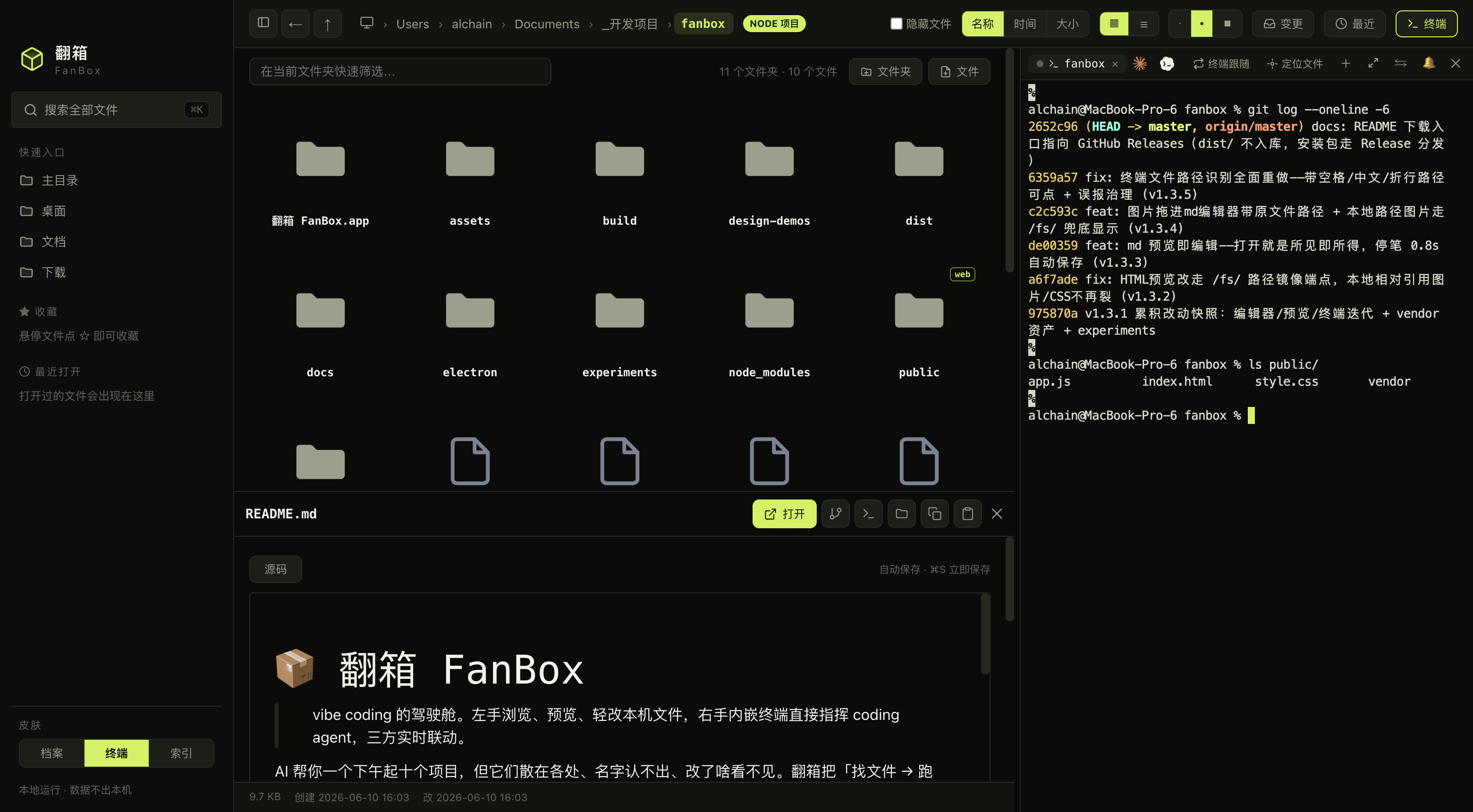 |
终端 · Volt · 荧光绿 × 炭黑 × 等宽字,工业仪器面板感(默认) Volt · neon green × charcoal × monospace, industrial instrument panel (default) |
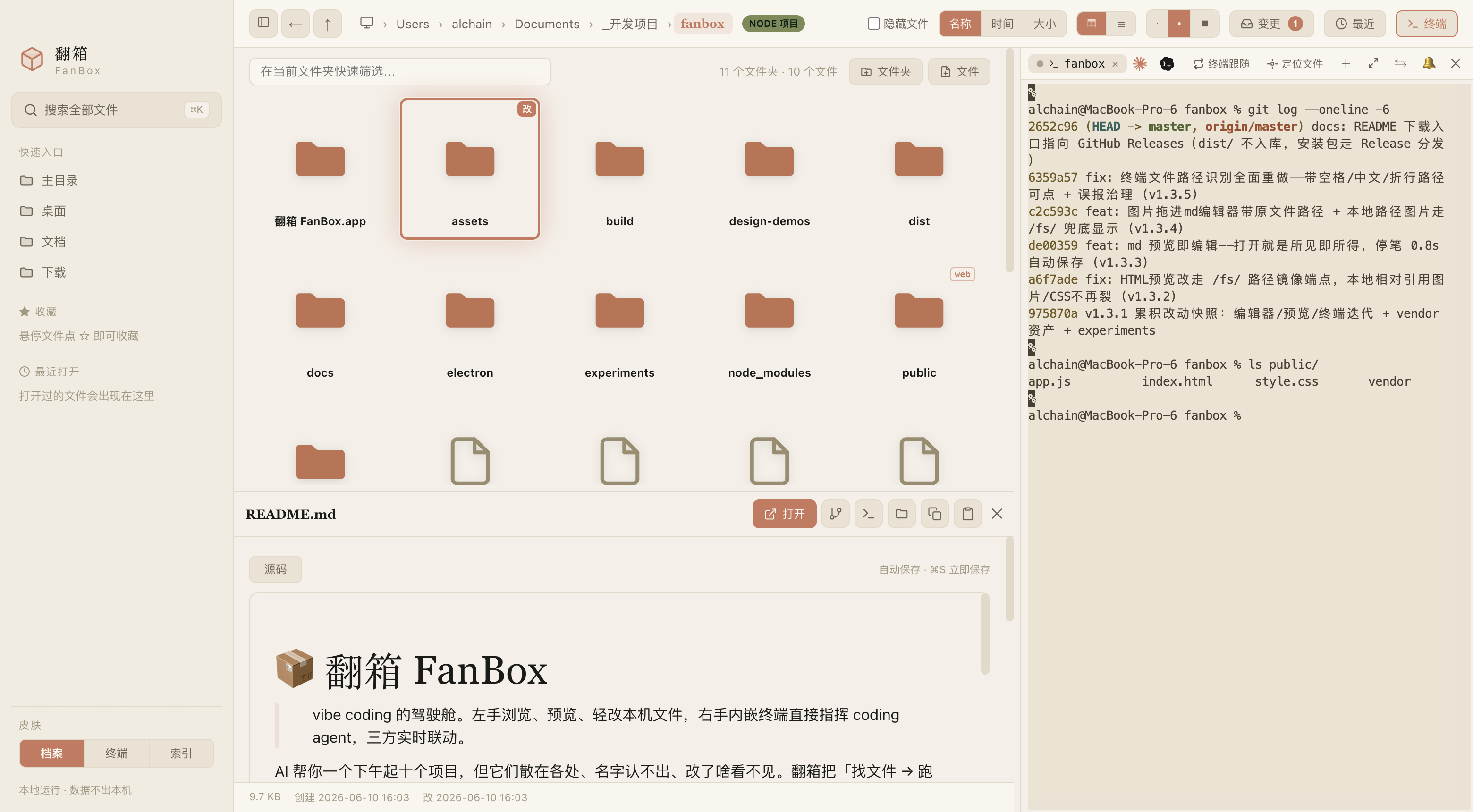 |
档案 · Archive · 奶油纸 × 赤陶橙 × 衬线,温暖纸感档案馆 Archive · cream paper × terracotta × serif, a warm paper archive |
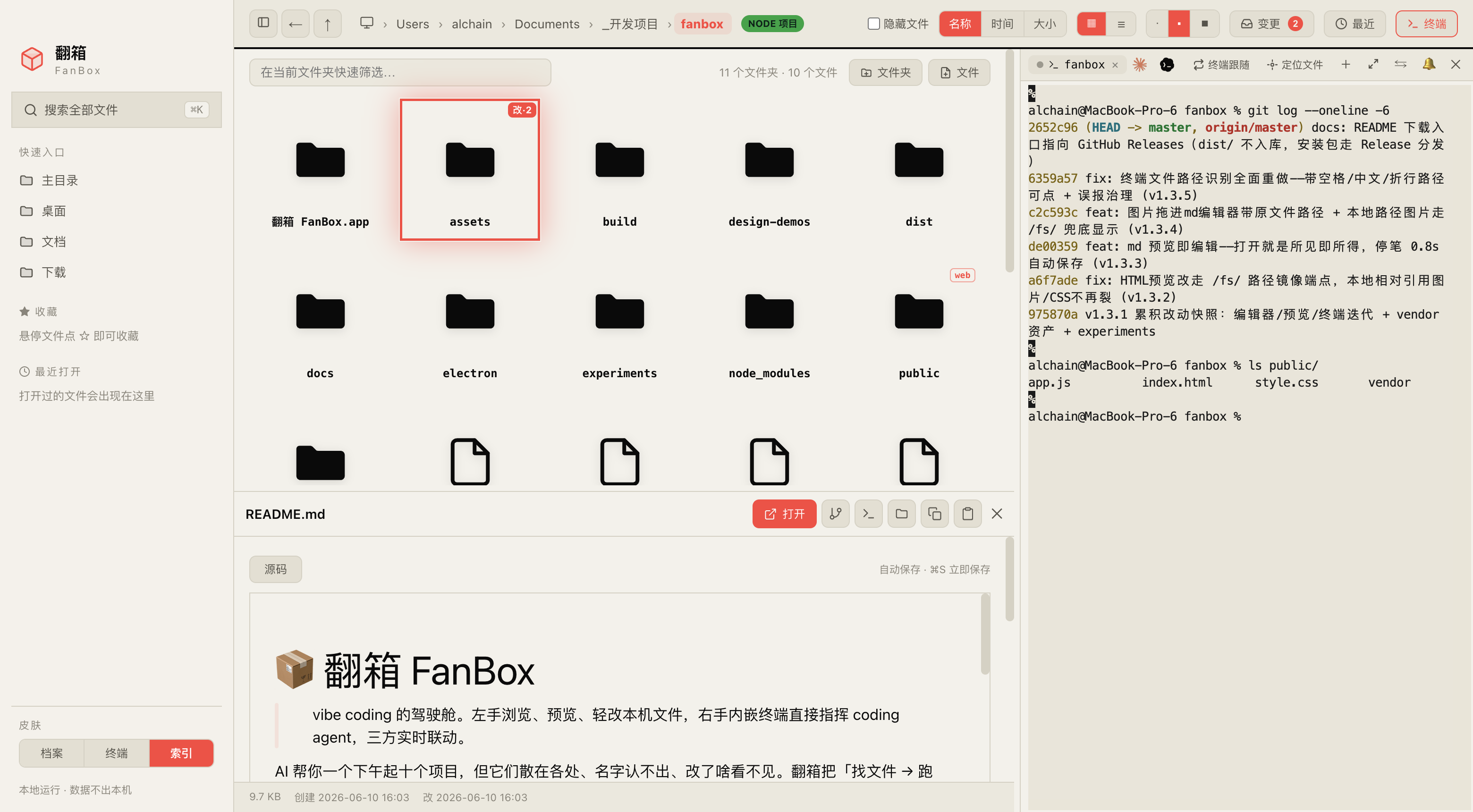 |
索引 · Index · 黑白 × 信号红/绿 × 巨号字,编辑式索引日报 Index · black & white × signal red/green × oversized type, editorial index daily |
What it does · 能做什么
Files · find & preview / 文件 · 找回与预览
- ⌘K 全局模糊搜索 / Global fuzzy search — 记得名字片段就行;
⌘↵用编辑器整包打开项目;内容:关键词切全文搜索。 A fragment of the name is enough;⌘↵opens the project in your editor;content:keywordswitches to full-text search. - 强色实体图标 / Bold solid icons — 每种文件「长得像它自己」:PDF 红、JS 黄、Markdown 蓝;照片视频按真实比例呈现。 Every file type "looks like itself": red PDFs, yellow JS, blue Markdown; photos and videos render at true aspect ratio.
- 原地预览 / Preview in place — Markdown 渲染、HTML 实时成品、代码语法高亮、图片/视频/PDF 内嵌(HEIC 直接显示)、压缩包内容清单、透明图棋盘格垫底。 Rendered Markdown, live HTML, syntax-highlighted code, inline images/video/PDF (HEIC included), archive content listing, checkerboard backing for transparent images.
- 缩略图加速 / Thumbnail speed — 大文件夹滚动和点击都在 0.1 秒内。 Scrolling and clicking through large folders stays under 0.1s.
- 项目徽章 / Project badges — 文件夹卡片标 node / web / py / rs / go 徽章,一下午起的十个项目一眼认出类型。 Folder cards show node / web / py / rs / go badges, so ten projects from one afternoon are recognizable at a glance.
Watch what the agent changed · 看 agent 改了什么
- 活的仪表盘 / A live dashboard — agent 每写一个文件,那张卡片当场荡开涟漪、按改动频率发光呼吸,agent 写到哪光走到哪。 Every file the agent writes makes its card ripple and glow by change frequency; the light follows wherever the agent goes.
- 跟随模式 / Follow mode — 一键让文件视图 + 预览跟踪 agent 正在编辑的文件:代码随新写行高亮闪烁,HTML 边写边实时渲染(双缓冲、零白闪),Markdown 实时渲染。任何手动浏览立即把控制权交还给你。 One click and the file view + preview track whatever file the agent edits: code scrolls with freshly written lines flashing, HTML renders as a live web page while it's being written (double-buffered, zero white flash), Markdown renders live. Any manual browsing hands control back to you instantly.
- 会话回放 / Session replay — 像刷视频一样拖时间轴,重现这段时间 agent 一步步改了哪些文件。 Drag the timeline like scrubbing a video to replay which files the agent touched, step by step.
- 变更收件箱 / Change inbox — 跨多个项目汇总本会话所有被改动的文件,多项目并行跑 agent 不再各看各的。 All files modified this session, aggregated across projects, for parallel agent runs.
- Git 改动 diff / Git diff — Monaco 只读 DiffEditor 并排展示 HEAD vs 当前工作区,看清 agent 到底改了哪几行。 Monaco read-only DiffEditor, HEAD vs working tree side by side.
Agent cockpit · Agent 驾驶舱
- 项目记忆 / Project memory — 点开任何项目文件夹,看 AI 在这里干过什么:历史会话(你的第一句话当标题)、每次会话改过的文件、触发过的 skill;「▶ 续上」一键在内嵌终端
claude --resume/codex resume接上当时的上下文。 Open any project folder and see what AI did there: past sessions (your first message as the title), the files each session changed, the skills it triggered — and a "resume" button that reconnects the context viaclaude --resume/codex resumein the embedded terminal. - 截图直通车 / Screenshot express — 系统截屏落盘即浮出直通卡:喂给终端里的 agent、收进项目
素材/、或先标注再发。 Take a system screenshot and a card pops up in the corner: feed it to the terminal agent, file it into the project's素材/(assets) folder, or annotate before sending. - AI 整理 / AI organize — AI 只看元数据出整理提案(不读内容、不碰文件系统),每条建议带理由、逐条勾选过人,FanBox 执行并写回滚日志、一键整体撤销。引擎可选(Claude Code / Codex),策略提示词随便改。 AI proposes a cleanup plan from metadata only (it never reads content or touches the filesystem); you approve each move; FanBox executes with a rollback log and one-click undo. Engine selectable (Claude Code / Codex), strategy prompt fully editable.
- 发版向导 / Release wizard — node 项目一键串起版本号、CHANGELOG、打包、推送、GitHub Release,整条命令序列在内嵌终端可见地跑。 For node projects: version bump, CHANGELOG promotion, build, push and GitHub Release composed into one command sequence that runs visibly in the embedded terminal.
- Skills 透视 / Skills X-ray — 本机全部 agent skills 一个视图:触发统计、健康检查、context 预算、不删文件的启停开关。 Every agent skill on your machine in one view: trigger statistics, health checks (description truncation, missing frontmatter), context budget, enable/disable without deleting.
- Agent 用量 / Agent usage — Claude Code 官方 5h 窗口/周配额(和
/usage同源)+ 本地 token 统计;Codex 限额快照 + 窗口重置识别。 Claude Code official 5h window / weekly quota (same source as/usage) plus local token statistics; Codex window snapshots with reset detection. - 磁盘占用透视 / Disk usage lens —
du口径的真实占用条形榜,可下钻,专治「电脑空间又满了」。du-accurate bars per folder, drill-down, for the "my disk is full again" moments.
Terminal · command the agent / 终端 · 指挥 agent
- 真实内嵌终端 / A real embedded terminal — node-pty + xterm.js(WebGL 渲染),跑 Claude Code / vim / htop 不花屏,中文宽字符正确。 node-pty + xterm.js (WebGL). Claude Code / vim / htop render correctly, CJK wide characters included.
- 拖文件进终端 / Drag files in — 从文件列表拖文件/文件夹进终端,自动插入路径喂给 agent 当上下文。 Drop a file or folder into the terminal to insert its path as agent context.
- 路径可点击 / Clickable paths — 终端里出现的文件路径直接点击在 FanBox 打开;带空格的 macOS 截屏名、中文文件名、折行的长路径都能识别(空格边界由文件系统 stat 验证,不靠猜)。 File paths appearing in terminal output open in FanBox on click; macOS screenshot names with spaces, Chinese filenames and wrapped long paths are all recognized (space boundaries verified by stat, not guessed).
- 选中即甩给终端 / Send selection — 预览里选一段文字,一键以「文件出处 + 围栏」格式发进终端(bracketed paste 包裹,不会被逐行误执行)。 Select text in a preview and fling it into the terminal with file provenance + fencing (bracketed paste, never executed line by line).
- 态势感知 / Situational awareness — 标签圆点显示 agent 运行/空闲/退出;agent 把球踢回给你时终端边缘呼吸提示「轮到你」,长任务完成发系统通知。 Tab dots show running/idle/exited; when the agent hands the ball back, the terminal edge breathes; long tasks fire a system notification.
Editing · WYSIWYG / 编辑 · 所见即所得
- Markdown — Milkdown Crepe 提供 Notion 式所见即所得,打开就是编辑态,停笔 0.8 秒自动保存。 Milkdown Crepe, Notion-style WYSIWYG; opens in edit mode, auto-saves 0.8s after you stop typing.
- 代码/JSON / Code/JSON — Monaco 编辑器(VS Code 同款内核),随皮肤切换主题。 Monaco (the VS Code core), themed per skin.
- 图片标注 / Image annotation — 画笔/箭头/文字/打码、格式转换、压缩、调分辨率,覆盖原图前有确认。 Pen/arrow/text/redaction, format conversion, compression, resizing; overwriting the original asks first.
- 未保存守卫 / Unsaved guard — 三种编辑器统一拦截未保存退出,Esc 旁路也堵死。 All three editors intercept unsaved exits, including the Esc bypass.
Install · 安装
桌面版(推荐)/ Desktop (recommended)
从 Releases 下载最新 .dmg,拖进「应用程序」即可。Apple Silicon (arm64) 原生。
Download the latest .dmg from Releases and drag it into Applications. Native Apple Silicon (arm64).
已用 Apple Development 证书签名 + hardened runtime。首次打开若提示「未验证的开发者」:右键 → 打开 → 确认即可。 Signed with an Apple Development certificate + hardened runtime. If macOS warns about an unverified developer on first launch: right-click → Open → confirm.
应用内置更新提醒:检测到 GitHub 上有新 Release 时,右下角会弹一条提示引导下载,不强更、可对单个版本「不再提醒」。 Built-in update notifications: when a new release lands on GitHub, a capsule appears at the bottom right. Never forced; individual versions can be muted.
网页版(不打包,直接跑)/ Web (no packaging)
node server.js
浏览器打开 http://localhost:4567。零依赖、零 build,clone 下来就能跑。网页版只有文件浏览/搜索/预览(内嵌终端和编辑器靠 Electron 提供)。
Open http://localhost:4567. Zero dependencies, zero build — clone and run. The web version covers browsing/search/preview (the embedded terminal and editors need Electron).
开发模式 / Development
npm install
npm run app          # electron . 启动完整桌面版 / full desktop app
npm run dist         # 打包签名 .dmg(产物在 dist/,不入 git)/ build & sign the .dmg (output in dist/)
打包遇到 Electron 下载被墙:
ELECTRON_MIRROR="https://registry.npmmirror.com/-/binary/electron/" npm run dist
Shortcuts · 快捷键
| 操作 / Action | 键 / Key | 操作 / Action | 键 / Key |
|---|---|---|---|
| 全局搜索 / Global search | ⌘K |
用编辑器打开 / Open in editor | ⌘↵ |
| 折叠侧栏 / Toggle sidebar | ⌘B |
后退 / Back | ⌘[ |
| 当前目录筛选 / Filter current folder | / |
打开/预览 / Open/preview | ↵ |
| 结果上下选择 / Navigate results | ↑ ↓ |
关闭 / Close | Esc |
Privacy & security · 隐私与安全
- 后端只在本机回环地址监听 + 校验 Host 头(挡 DNS rebinding),数据不出本机。 The backend listens on loopback only and validates the Host header (anti DNS-rebinding). Data never leaves your machine.
- 全部前端资源(含渲染器、字体)本地内置,离线完全可用。仅有的出网请求:Claude 用量接口(可选)和 GitHub 更新检查。 All frontend assets (including renderers and fonts) are vendored locally — fully usable offline. The only outbound calls: the Claude usage API (optional) and the GitHub release check.
- HTML 预览在隔离 origin 的沙箱 iframe 里渲染,预览不可信网页也碰不到终端能力。 HTML previews render in a sandboxed iframe with an opaque origin; an untrusted page can never reach terminal capabilities.
- 配置写入走串行化读-改-写 + 原子写(temp + fsync + rename),不丢数据、不留半截 JSON。 Config writes are serialized read-modify-write with atomic persistence (temp + fsync + rename) — no data loss, no truncated JSON.
- 删除走系统废纸篓(可恢复);缩略图缓存按最旧优先自动裁剪,上限 400MB。 Deletions go to the system Trash (recoverable); the thumbnail cache prunes oldest-first with a 400MB cap.
Design & acceptance · 设计与验收
界面设计在 huashu-design 辅助下完成——三套皮肤的方向探索、组件质感、反 AI slop 审查都出自它的工作流。图标是档案暖色陶土箱体 + 米纸 squircle,从 SVG 一路生成到 icns。
The UI was designed with huashu-design — skin direction exploration, component polish and anti-AI-slop review all come from its workflow. The icon is a terracotta archive box on a rice-paper squircle, generated from SVG all the way to icns.
每个开发阶段由 5 个独立 subagent 扮演不同角色(重度 vibe coder / 原生审美设计师 / 零文档新用户 / 终端十年老兵 / 破坏性质量官),审「成品 + 真机截图 + 代码」打分,全部 ≥90 分且无红线才算达标。评分标准见 docs/05-验收角色与评分标准.md。
Each development phase is reviewed by 5 independent subagents playing different roles (heavy vibe coder / native-taste designer / zero-docs newcomer / ten-year terminal veteran / destructive QA), scoring the product + live screenshots + code. Everything ships at ≥90 with zero red lines. See docs/05-验收角色与评分标准.md.
Standing on the shoulders of giants · 建在巨人肩膀上
FanBox 的核心能力来自这些出色的开源项目:
FanBox's core capabilities come from these excellent open-source projects:
| 项目 / Project | 用在哪 / Used for | License |
|---|---|---|
| Electron | 桌面壳,让零依赖 Node 后端长出真实终端和原生能力 The desktop shell that gives a zero-dependency Node backend a real terminal and native powers |
MIT |
| node-pty | 伪终端,内嵌终端的「真 shell」来源 The pseudo-terminal behind the embedded "real shell" |
MIT |
| xterm.js | 终端渲染(含 addon-webgl GPU 加速、addon-fit 自适应、addon-unicode11 CJK 宽字符) Terminal rendering (addon-webgl GPU acceleration, addon-fit, addon-unicode11 for CJK) |
MIT |
| Monaco Editor | 代码/JSON 编辑与 Git diff 视图,VS Code 同款内核 Code/JSON editing and Git diff view, the VS Code core |
MIT |
| Milkdown(Crepe) | Markdown 所见即所得编辑 Markdown WYSIWYG editing |
MIT |
| marked | Markdown 预览渲染 Markdown preview rendering |
MIT |
| highlight.js | 代码语法高亮 Syntax highlighting |
BSD-3-Clause |
| esbuild | 把 Milkdown 打成单文件本地 vendor,运行时保持 no-build Bundling Milkdown into a single local vendor file, keeping runtime no-build |
MIT |
| electron-builder | 打包签名 dmg Packaging and signing the dmg |
MIT |
| Playwright | 驱动 Electron 实拍本 README 截图 + UI 验证 Driving Electron for README screenshots + UI verification |
Apache-2.0 |
所有前端依赖都 vendor 到本地(public/vendor/),这是「离线完全可用」的底气,也意味着上面每个项目的代码真实地跑在你机器上。谢谢它们。
Every frontend dependency is vendored locally (public/vendor/) — that's what makes "fully usable offline" true, and it means each project above actually runs on your machine. Thank you.
Architecture · 技术架构
| 层 / Layer | 用什么 / Stack |
|---|---|
| 后端 / Backend | 零依赖 Node.js server.js(文件 API + 静态服务 + 缩略图)Zero-dependency Node.js server.js (file APIs + static serving + thumbnails) |
| 桌面壳 / Desktop shell | Electron 33 + node-pty(asarUnpack 原生模块) Electron 33 + node-pty (asarUnpack native module) |
| 终端 / Terminal | xterm.js + WebGL + unicode11 |
| 编辑器 / Editors | Monaco(代码)+ Milkdown Crepe(Markdown) Monaco (code) + Milkdown Crepe (Markdown) |
| 打包 / Packaging | electron-builder → 签名 arm64 .dmg electron-builder → signed arm64 .dmg |
项目结构 / Project layout
fanbox/
├── server.js               # 零依赖 Node 后端(文件 API + 缩略图 + 静态服务)
│                           # Zero-dependency Node backend (file APIs + thumbnails + static)
├── electron/
│   ├── main.js             # 主进程(窗口/pty/剪贴板/fs.watch/菜单)
│   │                       # Main process (window/pty/clipboard/fs.watch/menu)
│   └── preload.js          # 暴露 fanboxPty / fanboxFs / fanboxClipboard
│                           # Exposes fanboxPty / fanboxFs / fanboxClipboard
├── public/
│   ├── index.html
│   ├── style.css
│   ├── app.js              # 前端单页应用 / Frontend single-page app
│   └── vendor/             # xterm / monaco / milkdown 本地资源
│                           # xterm / monaco / milkdown local assets
├── src-vendor/             # esbuild 入口,产出 public/vendor/milkdown
│                           # esbuild entries producing public/vendor/milkdown
├── build/                  # 图标 + entitlements / Icons + entitlements
├── docs/                   # 概念/PRD/路线图/验收标准
│                           # Concepts/PRD/roadmap/acceptance criteria
└── experiments/            # 实验脚本(含 README 截图脚本)
                            # Experiment scripts (incl. README screenshot script)
Author · 关于作者
花叔 Huashu——AI Native Coder,独立开发者。代表作:小猫补光灯(App Store 付费榜 Top1)。
Huashu (花叔) — AI Native Coder, indie developer. Known for Cat Light (App Store paid chart Top 1).
| 平台 / Platform | 链接 / Link |
|---|---|
| 🌐 官网 / Web | bookai.top · huasheng.ai |
| 𝕏 Twitter | @AlchainHust |
| 📺 B站 / Bilibili | 花叔 |
| 📕 小红书 / Xiaohongshu | 花叔 |
| 💬 公众号 / WeChat | 微信搜「花叔」 / Search "花叔" |
更多 AI 造物:
More AI creations:
- 女娲.skill(蒸馏任何人的思维方式 / distill anyone's way of thinking)
- huashu-design(一句话拿回一份能交付的设计 / a deliverable design from one sentence)
Finder 帮你管理文件。IDE 帮你写代码。FanBox 帮你看清 AI 在你机器上干了什么。
Finder manages your files. IDEs write your code. FanBox shows you what AI did on your machine.
MIT License © 花叔 Huashu
Comments