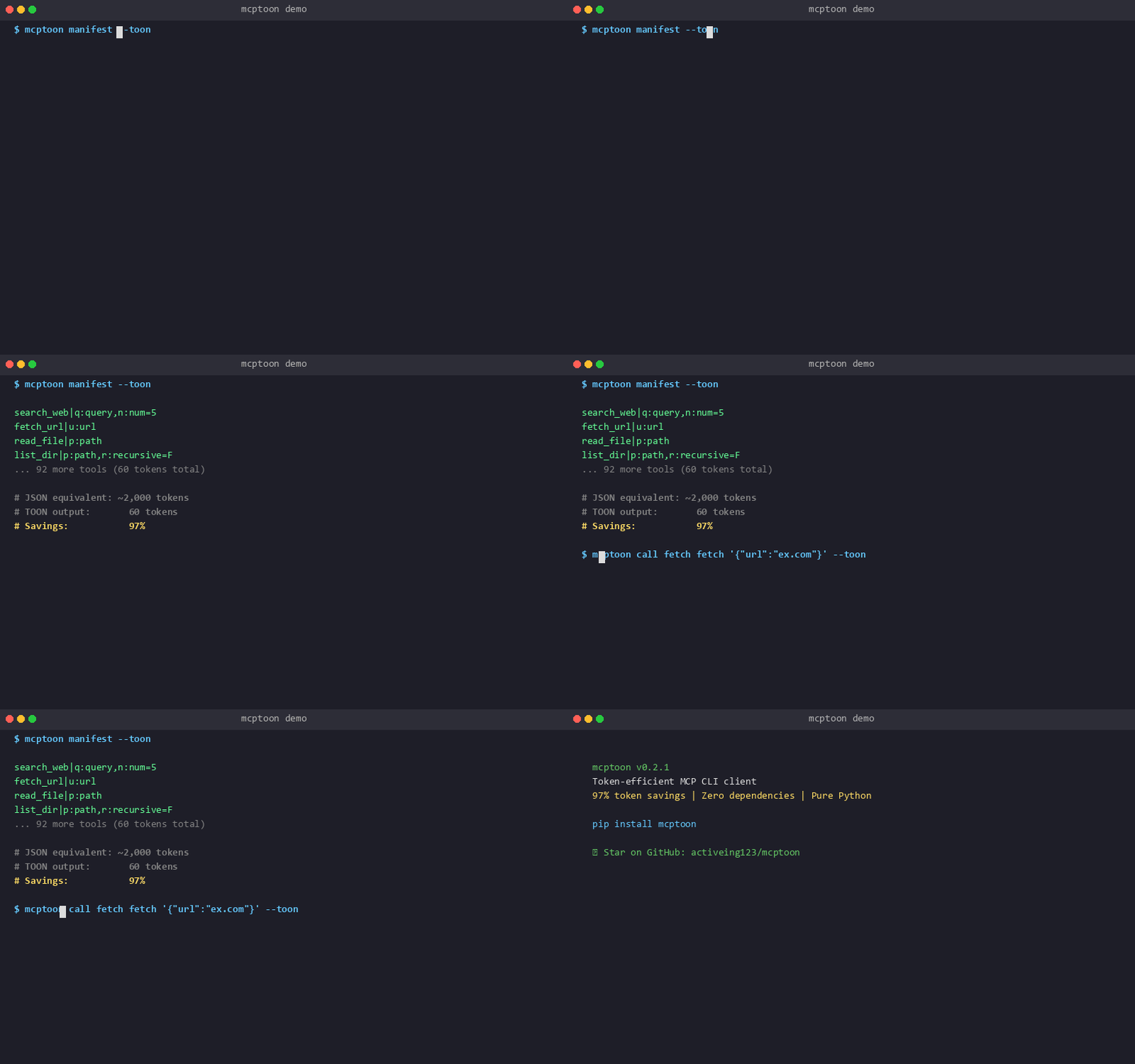
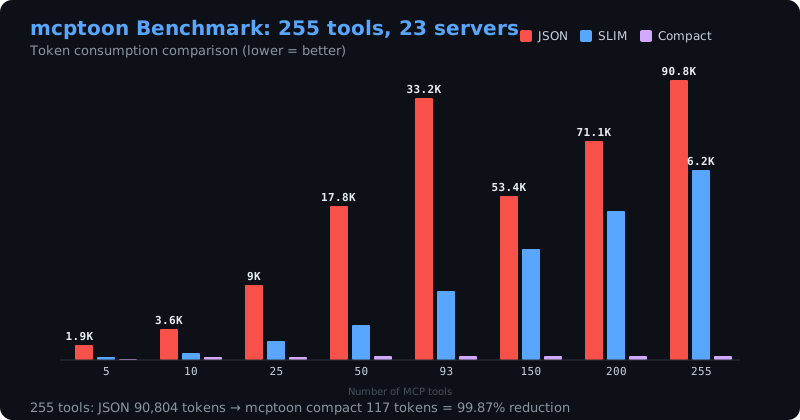
Add 255 MCP tools → 90,804 tokens gone. Add mcptoon → 117 tokens.
Keep 100+ MCP servers always configured. Zero context pollution. No loading. No unloading. One CLI for every agent.
If this saves you tokens, please star the repo — it helps others discover it.
English | 中文文档 | 🌐 Ecosystem | 📦 Profiles | Report Bug | Request Feature
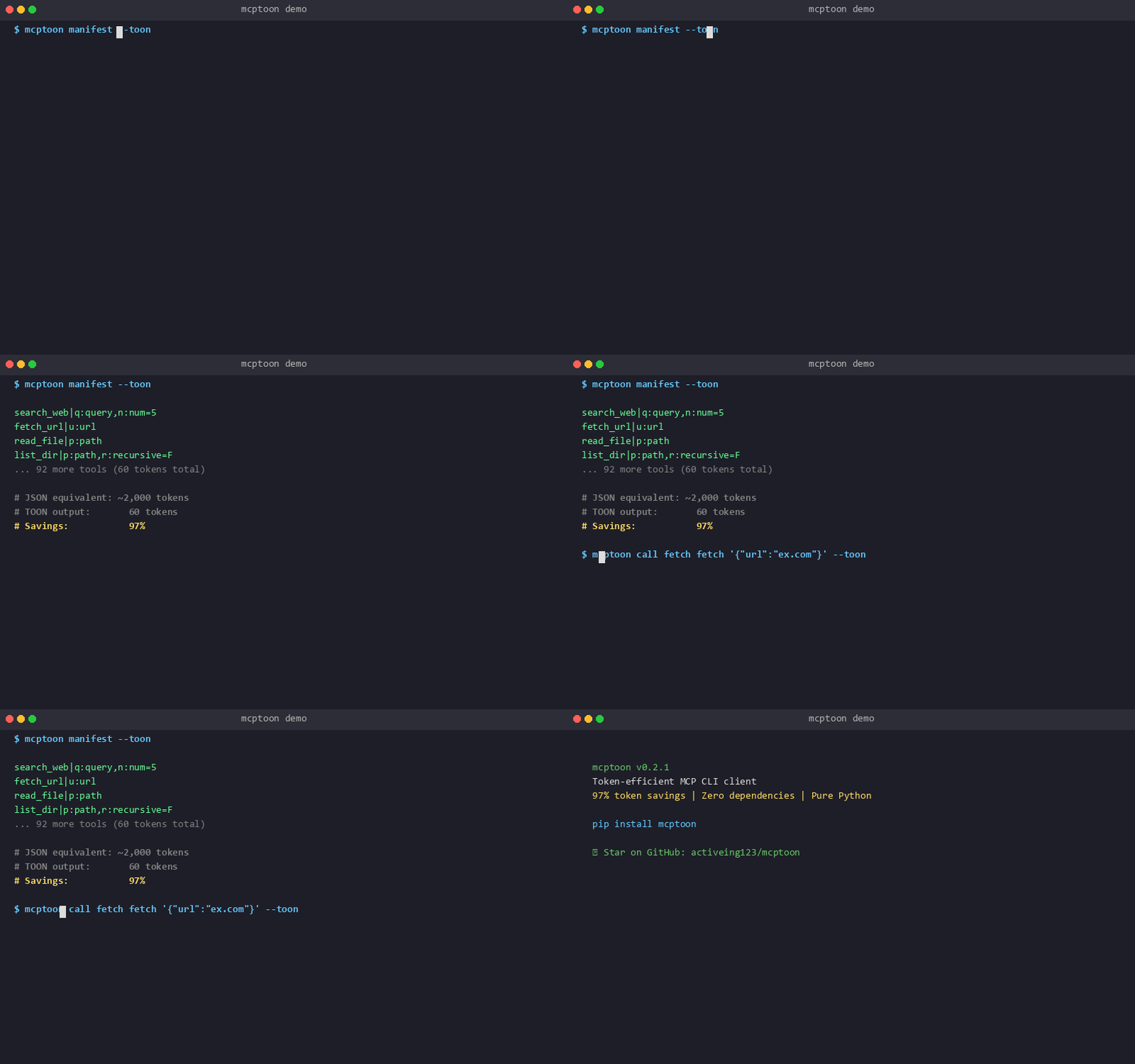
The problem
Every MCP-enabled agent loads all tool schemas into your context — before any work starts.
Add 10 MCP servers (especially browser tools like puppeteer/playwright)
  → Each server returns tools/list with full JSON schemas
  → ALL schemas injected into your context
  → 50,000-100,000+ tokens consumed
  → 128K context: 40-80% gone before you even ask a question

Add 100 servers → 200,000+ tokens → context is dead.
So you unload servers when not needed. Reload when needed. Repeat. Forever.
And when you want to add a new MCP server? You manually edit JSON config files (claude_desktop_config.json, etc.). One syntax error, wrong path, or missing env var — MCP won't load. You debug for hours.
You're managing MCP servers instead of doing work.
The solution
mcptoon keeps all your MCP servers configured — but their schemas never enter your agent's context.
😤 5 pains. ✅ 5 kills.
😤 Context death → ✅ 0 tokens, forever
Add 10 MCP servers — especially browser tools like puppeteer (47 tools, 23K tokens of schemas) or playwright (52 tools, 28K tokens). Before you ask a single question, 50-100K tokens of {"type":"object","properties":...} are squatting in your context. Your AI forgets what you were talking about. So you uninstall servers to make room. Then you need one — reinstall, wait, reconfigure. You're playing Tetris with MCP servers inside your context window. This is why people say "MCP is unusable past 5 servers."
→ mcptoon: 100 servers configured, 0 tokens in context. Use any tool, anytime. No Tetris.
😤 Config hell → ✅ One command, done
Want to add a server? Hand-edit claude_desktop_config.json. Miss a comma → MCP won't load. Wrong path → won't load. Missing env var → won't load. Sometimes it loads but tools silently don't appear — no error, no log, just nothing. You stare at a blank tool list and debug for an hour.
→ mcptoon: mcptoon add myserver --stdio npx -y @package. One command. Something's wrong? mcptoon doctor checks Python, config syntax, server connectivity — tells you exactly what.
😤 Agent can't self-serve → ✅ AI installs its own tools
Your agent is mid-task and says "I need GitHub search to finish this." It can't install tools — it's an AI, not an admin. So you stop coding, go edit JSON, restart the agent, wait for it to reconnect. Your AI forgot what it was working on. Momentum — dead.
→ mcptoon: Your AI runs mcptoon add github ... itself, and keeps going. No human in the loop. No context lost.
😤 Reconfigure per agent → ✅ One config, all agents
You set up 15 MCP servers for Claude Code. Now you try Cursor — different config format, different file location, redo all 15 from scratch. Then OpenCode. Then Codex. Same servers, 4× the work, 4× the chances to miss a comma.
→ mcptoon: One config file, every agent. ~/.mcptoon/config.json. Switch agents in seconds. Config follows you.
😤 Paying for JSON garbage → ✅ TOON, 30-97% smaller
Every MCP result looks like {"content":[{"type":"text","text":"{\"name\":\"react\",\"stars\":219000}"}]} — 80 tokens of braces, quotes, and type declarations to deliver 6 tokens of actual data. Over a session with 200 tool calls, that's 15,000 tokens of pure syntax waste.
→ mcptoon: Returns name: react\nstars: 219000 — same data, 30-60% fewer tokens on results (standard TOON), 97% fewer on discovery, 93% fewer on schemas. tiktoken-verified.
100 MCP servers. 0 context waste. Use any tool, anytime. No loading. No unloading. No JSON config errors.
How? CLI mode.
mcptoon is a CLI tool, not an MCP client library. Your agent doesn't connect to MCP servers — it just runs mcptoon commands. MCP schemas live on disk in ~/.mcptoon/config.json, not in your context window. Only the compact output you request enters context — and TOON encoding makes it 30-97% smaller than JSON.
Show me
JSON (287 tokens) — what every other MCP client puts in your context:
[
  {"name": "search_web", "description": "Search the web for information",
   "inputSchema": {"type": "object", "properties": {"query": {"type": "string", "description": "Search query"}, "num_results": {"type": "number", "default": 5}}, "required": ["query"]}},
  {"name": "fetch_url", "description": "Fetch content from a URL",
   "inputSchema": {"type": "object", "properties": {"url": {"type": "string"}}, "required": ["url"]}}
]
TOON (5 tokens) — what mcptoon returns:
search_web fetch_url
Measured benchmark (255 tools, 5 formats)
| Tools | JSON | Std TOON | mcptoon | SLIM | Compact |
|---|---|---|---|---|---|
| 5 | 1,897 | 981 (-48%) | 785 (-59%) | 111 (-94%) | 16 (-99%) |
| 10 | 3,567 | 1,757 (-51%) | 1,391 (-61%) | 235 (-93%) | 34 (-99%) |
| 25 | 9,009 | 4,491 (-50%) | 3,580 (-60%) | 595 (-93%) | 97 (-99%) |
| 50 | 17,790 | 8,776 (-51%) | 6,981 (-61%) | 1,203 (-93%) | 117 (-99%) |
| 93 | 33,191 | 16,426 (-51%) | 13,086 (-61%) | 2,231 (-93%) | 117 (-100%) |
| 150 | 53,350 | 26,326 (-51%) | 20,958 (-61%) | 3,626 (-93%) | 117 (-100%) |
| 200 | 71,135 | 35,106 (-51%) | 27,952 (-61%) | 4,842 (-93%) | 117 (-100%) |
| 255 | 90,804 | 44,863 (-51%) | 35,735 (-61%) | 6,174 (-93%) | 117 (-100%) |
Standard TOON (--toon): 51% smaller than JSON (round-trip safe).
mcptoon format (--mcptoon): 61% smaller (round-trip safe).
SLIM format (--slim): 93% smaller for full schemas.
Compact (--compact): 100% smaller for tool names only.
Reproduce: python _benchmark.py → outputs assets/benchmark_data.json. Token count: chars ÷ 4 (GPT BPE approximation).
Third-party research & context window economics
| Source | Finding | Why it matters |
|---|---|---|
| Anthropic, Context Windows for Agents | “Context window is a scarce resource. Every token of schema is a token stolen from the user's actual task.” | MCP schemas are the #1 source of context waste in agent workflows |
| OpenAI, Function Calling Guide | Tool definitions consume context tokens proportional to schema complexity | 100+ tools with full schemas can eat 40-80% of a 128K context window |
| Cursor Team, Context Engineering | “The difference between a good and bad agent is almost always context management, not model intelligence.” | Token optimization at the transport layer (like TOON) directly improves agent quality |
| Latent Space, MCP Ecosystem Analysis | “The MCP protocol injects full JSON schemas into every request — this is by design, but it creates a scaling cliff around 20-30 tools.” | Confirms the problem mcptoon solves: 20-30 tools is the pain point, not 100+ |
| Simon Willison, LLM Tooling | “JSON is the least token-efficient format possible for structured data sent to an LLM.” | Validates TOON's approach: any non-JSON encoding saves tokens |
| GitHub Issues | Puppeteer MCP (47 tools) + Playwright MCP (52 tools) = ~50K tokens of schemas alone | Two browser MCP servers consume more context than this entire README |
Quick start
pip install mcptoon
Zero dependencies. ~65KB. Python 3.10+. Windows, macOS, Linux.
mcptoon init                          # Sample config: ~/.mcptoon/config.json
mcptoon add fetch --stdio npx -y @modelcontextprotocol/server-fetch
mcptoon manifest --compact            # → all tool names, 350 tokens
mcptoon manifest --slim               # → tool schemas, 93% smaller than JSON
mcptoon call fetch fetch '{"url":"https://example.com"}' --toon
Docker
mcptoon is zero-dependency, so the image is small. Build it and run any subcommand. The entrypoint is mcptoon, so args pass through exactly as on the host:
docker build -t mcptoon .
docker run --rm mcptoon help
docker run --rm mcptoon manifest --toon
Server config lives at ~/.mcptoon/config.json on the host. Mount it so the container shares your servers:
docker run --rm -v ~/.mcptoon:/root/.mcptoon mcptoon manifest --toon
manifest, list, inspect, and doctor are config-only and work out of the box. call and add --stdio spawn a server process (for example npx), so they need that runtime available inside the image: extend the Dockerfile with the toolchain your servers require.
Works with every agent
mcptoon is a CLI tool. If your agent can run shell commands, it can use mcptoon. No plugins. No SDK. No per-agent MCP setup. No JSON config editing.
| Agent | How to use |
|---|---|
| Claude Code | Write mcptoon commands in SKILL.md files |
| Codex (OpenAI) | Add mcptoon to AGENTS.md |
| OpenCode | Use mcptoon in custom commands |
| Cursor | Add mcptoon to .cursorrules |
| CatPaw | Write mcptoon commands in skill files |
| Any agent | If it runs shell commands, it can call mcptoon |
Configure once in ~/.mcptoon/config.json. Every agent shares the same servers, the same tools, the same token savings. Switch agents? Config follows you. No migration.
export MCPTOON_AGENT_TYPE=claude # auto-select --toon for all calls
Agent self-service
Your agent can add MCP tools on its own — no human intervention needed:
# Agent wants a web scraper? Just add it:
mcptoon add firecrawl --stdio npx -y firecrawl-mcp

# Agent wants GitHub access? One command:
mcptoon add github --stdio npx -y @modelcontextprotocol/server-github

# Verify everything works:
mcptoon doctor

# Use it immediately:
mcptoon call github search_repos '{"query":"token optimization"}' --toon
No JSON config files. No RPC debugging. No server restarts. Just CLI commands.
How TOON works
mcptoon supports two token-efficient formats:
Standard TOON (--toon)
Implements the TOON (Token-Oriented Object Notation) spec — an open-source format for token-efficient LLM data exchange. Uses YAML-style indentation for objects and CSV-style tabular layout for uniform arrays.
| JSON | Standard TOON | Why |
|---|---|---|
{"name":"search","count":3} |
name: search\ncount: 3 |
Newlines replace braces + quotes |
[{"id":1,"name":"Alice"}] |
[1]{id,name}:\n 1,Alice |
Field declaration once + CSV rows |
[1, 2, 3] |
[3]:\n 1\n 2\n 3 |
Bracket notation for arrays |
true / false / null |
true / false / null |
Kept as-is (1 token each) |
Round-trip safe: decode(encode(x)) == x. URLs, timestamps, and special characters are preserved.
Legacy mcptoon format (--mcptoon)
mcptoon's original pipe-separated format. Simpler but less structured than standard TOON.
| JSON | mcptoon | Why |
|---|---|---|
{"name":"search","count":3} |
name:search|count:3 |
Pipes replace braces + quotes |
[1, 2, 3] |
1 2 3 |
Spaces replace brackets + commas |
"https://example.com" |
https\c//example.com |
Colons escaped as \c (round-trip safe) |
Round-trip safe with mcptoon_decode(). Escape sequences: \c=colon, \p=pipe, \\=backslash.
SLIM format (--slim)
mcptoon-specific ultra-compact tool schema encoding. No external equivalent.
search|q:s*|n:n
fetch|url:s*
tiktoken verification (o200k_base / cl100k_base):
{"content":[{"type":"text","text":"hello"}]}  →  hello         (85% savings)
{"type":"object","properties":{"q":{"type":"string"}}}  →  q:s*        (83% savings)
Token optimization at the transport layer is mcptoon's primary focus.
Output formats
| Flag | What you get | Token footprint |
|---|---|---|
--compact |
Tool names only, space-separated | 97% less than JSON |
--slim |
Ultra-compact schemas (name|param:type*) | 93% less than JSON |
--toon |
Standard TOON (toon-format/toon spec) | 30-60% less than JSON (round-trip safe) |
--mcptoon |
Legacy mcptoon pipe format | 20-40% less than JSON (round-trip safe) |
--json |
Standard JSON (for scripts, CI) | Baseline |
--raw |
Raw response, no parsing | Full size |
--head N |
First N items only | Variable |
--max-chars N |
Hard truncate at N chars | Variable |
--full |
Disable the default 4000-char truncation | Full size |
SLIM mode
When you need tool schemas but want maximum token savings:
$ mcptoon manifest --slim
search|q:s*|n:n
fetch|url:s*
create|meta:o{title,tags}|tags:a[s]
Format: tool_name|param:type*|param:type
s=stringn=numberb=booleana[type]=arrayo{keys}=object*marks required parameters
93% token savings vs JSON for full tool schemas.
Architecture — Three-layer decoupling
mcptoon is built on a three-layer decoupled architecture. Each layer is independent — swap one without touching the others.
┌─────────────────────────────────────────────────┐
│  Layer 1: mcptoon CLI (~~65KB, zero deps)         │
│  ─────────────────────────────────────────────   │
│  Runs in your agent's shell. Token-optimizes     │
│  everything. No schemas in context. Ever.        │
└──────────────────────┬──────────────────────────┘
                       │ reads JSON templates (on disk)
┌──────────────────────▼──────────────────────────┐
│  Layer 2: MCP Server Profiles (~1KB each)         ��
│  ─────────────────────────────────────────────   │
│  23 JSON templates in mcp/stdio/*.json.           │
│  Not installed software — just connection specs.  │
│  Security-audited: credential_safe, env_vars,     │
│  permissions declared per profile.                │
│  Add your own — it just works.                    │
└──────────────────────┬──────────────────────────┘
                       │ spawns on-demand via npx
┌──────────────────────▼──────────────────────────┐
│  Layer 3: Actual MCP Servers (npm packages)       │
│  ─────────────────────────────────────────────   │
│  Real MCP servers (@modelcontextprotocol/server-* │
│  etc). Only launched when you actually call a     │
│  tool. Not installed at config time.              │
│  Not loaded at startup. Zero overhead until use.  │
└─────────────────────────────────────────────────┘
Why three layers?
- Layer 1 (CLI) stays tiny — ~65KB, zero deps. No MCP SDK bloat.
- Layer 2 (Profiles) are editable JSON — add, remove, fork without touching code. Each is a ~1KB file describing how to connect, not the server itself.
- Layer 3 (Servers) spin up lazily — only when
mcptoon callactually runs. No idle processes. No startup tax.
This means:
- 100 servers configured → 0 running until you use one
- Remove a profile → the rest work fine
- Add a profile → no code changes, no rebuild
- mcptoon never bundles MCP servers — you install what you use
Security-audited profiles
Every profile declares its security posture:
// mcp/stdio/puppeteer.json
{
  "name": "puppeteer",
  "security": {
    "audited": true,
    "credential_safe": true,
    "env_vars_required": [],
    "permissions": ["read: web pages, DOM", "write: form inputs, JS execution"]
  },
  "bundled": false,
  "install_method": "on-demand"
}
23 profiles: fetch, github, exa, brave-search, firecrawl, filesystem, memory, sequential-thinking, sqlite, time, puppeteer, playwright, postgres, slack, notion, git, gitlab, tavily, google-maps, docker, aws, cloudflare, tmux. See mcp/README.md.
Features
Tested with 255+ MCP tools across 23+ servers, 30K+ real calls.
--stdin— Pipe large payloads bypassing OS command-line limitsdoctor— One-command self-diagnosis (Python, config, servers, connectivity)discover— Server health check with tool counts- Tool poisoning guard — Detects prompt injection in MCP results (
ignore previous instructions,[INST], data exfiltration attempts) - Credential leak detection — Scans tool results for exposed API keys, AWS keys, GitHub PATs, OpenAI/Anthropic keys, Slack tokens, JWTs, private keys — blocks them before they reach your agent's context
- Fuzzy match — "Did you mean: search, search_all?" on typos
- Cross-agent export —
--format openai|openapi|mcpfor non-CLI agents - Schema cache — 5-min TTL, avoids repeated
tools/listround-trips - Usage tracking — Local-only call statistics and token estimates
- Dangerous-op blocking — Blocks
delete/drop/purgeunless--destructive - Shell completion — bash, zsh, fish, PowerShell
Security layers
| Layer | What it does | Example |
|---|---|---|
| Dangerous-op guard | Blocks delete/drop/purge/kill by default |
docker_remove → blocked unless --destructive |
| Prompt injection guard | Scans results for injection patterns | "ignore previous instructions" → blocked |
| Credential leak guard | Scans results for exposed keys/tokens | sk-abc...xyz → blocked, masked in error message |
# Credential leak detection in action:
$ mcptoon call github get_file --toon
# Error: CREDENTIAL_LEAK — potential OpenAI API Key leak detected: sk-abc...wxyz
# The result never enters your agent's context.
🌐 Ecosystem
| Component | What it is | Status |
|---|---|---|
| 📦 Server Profiles | 23 ready-to-use MCP server profiles (186+ tools) | 23 → 100+ |
| 🔧 Standard TOON | Token-Oriented Object Notation (toon-format/toon spec) | v2, round-trip safe |
| 🔧 mcptoon Format | Legacy pipe-separated notation | v2, round-trip safe |
| 🔧 SLIM Format | Ultra-compact tool schemas | v1, mcptoon-specific |
| 📚 Integration Guides | Agent-specific setup docs | Coming soon |
| 🏷️ Powered by Badge | For MCP servers using mcptoon | Available |
Python API
from mcptoon.client import MCPClient
from mcptoon.output import toon_encode, toon_decode, mcptoon_encode

with MCPClient(stdio=["npx", "-y", "@modelcontextprotocol/server-fetch"]) as c:
    tools = c.list_tools()
    print(toon_encode(tools))         # Standard TOON output
    result = c.call_tool("fetch", {"url": "https://example.com"})
    print(toon_encode(result))        # Standard TOON output
    # Round-trip: decode back to Python dict
    decoded = toon_decode(toon_encode(result))
    assert decoded == result          # ✅ Round-trip safe
Config
# stdio (any npx MCP server)
mcptoon add fetch --stdio npx -y @modelcontextprotocol/server-fetch
mcptoon add github --stdio npx -y @modelcontextprotocol/server-github

# HTTP
mcptoon add myapi --http http://localhost:3001/mcp --header "Authorization: Bearer xxx"
Config lives at ~/.mcptoon/config.json. Project-level override at ./.mcptoon.json.
Privacy
- No telemetry. No analytics, no crash reports, no phone-home.
- No credential storage. API keys pass through from your config or env vars.
- No dependencies. Pure Python stdlib. No supply chain to audit.
- Credential leak guard. Scans tool results for exposed API keys/tokens — blocks them before they reach your agent.
Architecture
src/mcptoon/
├── cli.py        # CLI entry + arg parsing
├── client.py     # MCPClient — stdio + HTTP transport
├── router.py     # Tool routing, custom handlers, poisoning + credential leak detection
├── config.py     # Server config
├── manifest.py   # Tool discovery with cache
├── output.py     # Standard TOON + legacy mcptoon + JSON / compact / slim rendering
├── cache.py      # Schema cache (5-min TTL)
├── usage.py      # Local usage tracking
└── errors.py     # Structured error envelopes
~~4,200 lines. 407 tests. Zero third-party imports. ~65KB installed.
Comments