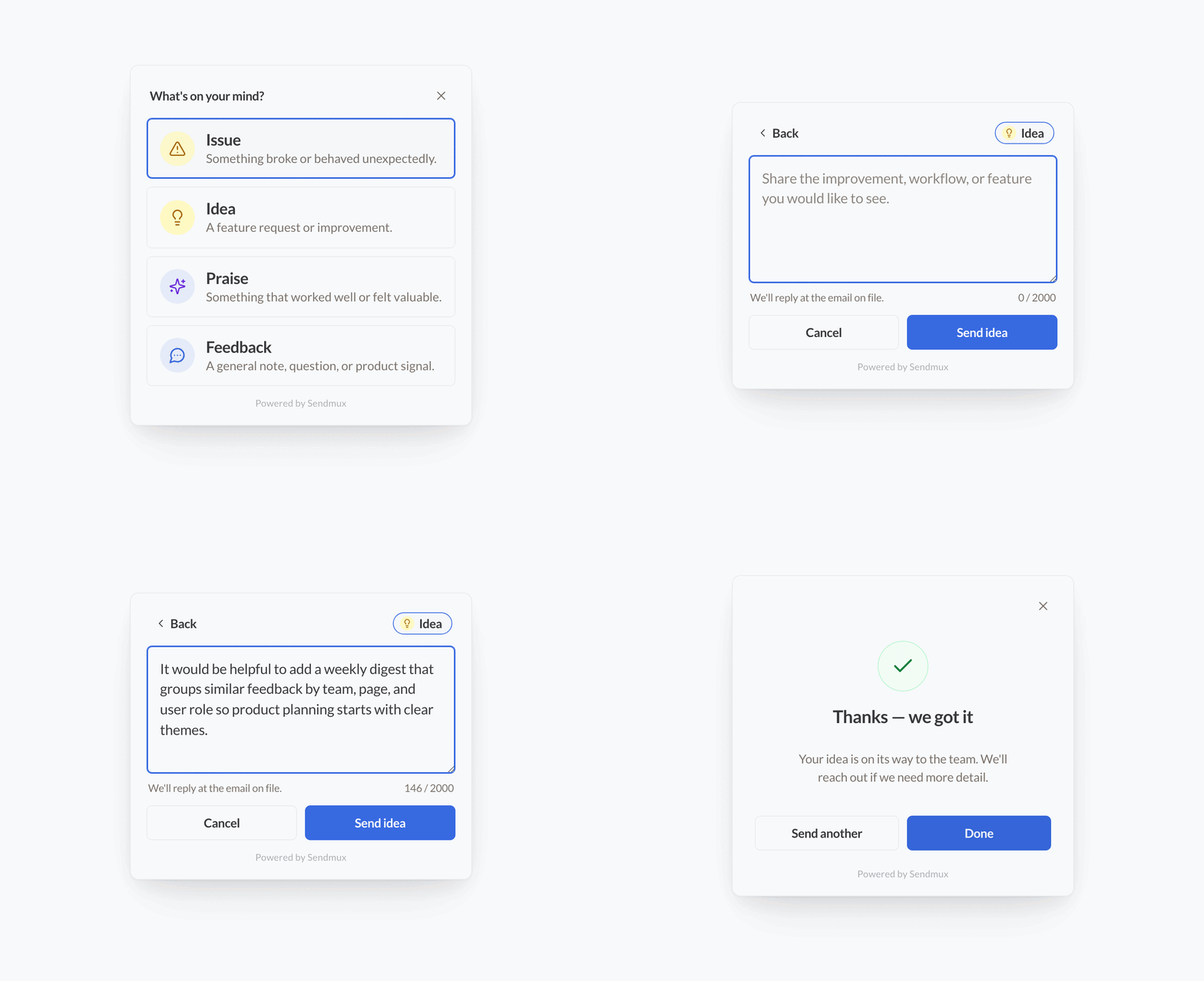
Open-source website and in-app feedback widget for collecting customer feedback, sending it to a webhook or secure Sendmux relay, and turning feedback email into agent-ready workflow input.
Sendmux is email infrastructure for AI agents: outbound sending, inbound agent mailboxes, APIs, webhooks, real-time mailbox events, tenant isolation, and usage-based billing from one control plane. This widget gives your product a small, accessible collection layer that can feed that email infrastructure.
✨ Why Email-First Feedback
Feedback is most useful when it enters a workflow, not a spreadsheet. Send each submission to a normal inbox, a Sendmux agent mailbox, or your own webhook, then let your downstream process triage it.
Once feedback arrives as email, your agent workflow can:
- Classify issues, ideas, praise, and account-specific requests;
- Group duplicates by URL, user, workspace, plan, or message content;
- Summarise threads and route them to support, product, or engineering;
- Create or update GitHub issues when the feedback matches your product plan;
- Keep a readable audit trail in an inbox your team can inspect.
This repository does not ship the agent that reads email or creates GitHub issues. It ships the widget, payload contract, secure relay pattern, and playbook for building that workflow.
⚡ Features
- Drop-in custom element:
<sendmux-feedback>. - Works with package installs or a CDN bundle after release.
- Sends JSON to your own endpoint, any webhook, or a server-side Sendmux relay.
- Supports logged-in user context and metadata without exposing secrets.
- Configurable position, brand colour, font family, label, heading, minimum message length, and powered-by link.
- System font by default, with optional Google Font support if your site already uses one.
- Accessible modal behaviour, labelled controls, keyboard support, visible focus states, dark mode, and reduced-motion support.
- Shadow DOM styles to avoid clashing with host apps.
- SSR-safe import for modern app frameworks.
🚀 Install
pnpm add @sendmux/feedback-widget
import "@sendmux/feedback-widget";
<sendmux-feedback endpoint="/api/feedback" position="bottom-right"></sendmux-feedback>
For a CDN build after release:
<script src="https://unpkg.com/@sendmux/feedback-widget/dist/sendmux-feedback.iife.js" defer></script>
<sendmux-feedback endpoint="/api/feedback" position="bottom-right"></sendmux-feedback>
🧩 Quick Start
Add the widget:
<sendmux-feedback
  endpoint="/api/feedback"
  position="middle-right"
  brand-colour="oklch(0.556 0.19 264)"
></sendmux-feedback>
Open it from your own button:
<button data-sendmux-feedback-button>Send feedback</button>
Pass signed-in user context without exposing secrets:
<script>
  window.sendmuxFeedback = {
    config: {
      endpoint: "/api/feedback",
      position: "middle-right",
      user: {
        id: "user_123",
        email: "customer@example.com",
        name: "Customer Name"
      },
      metadata: {
        account_id: "acct_123",
        plan: "pro"
      }
    }
  };
</script>
<script src="https://unpkg.com/@sendmux/feedback-widget/dist/sendmux-feedback.iife.js" defer></script>
🔐 Sendmux Delivery
Do not put a Sendmux API key in browser code. Keep the key on your server, receive the widget payload, validate it, and send the email from a server-only relay.
You can receive feedback in any inbox. A Sendmux mailbox is useful when you want a dedicated agent inbox with mailbox APIs, scoped credentials, webhooks, and real-time mailbox events, but it is not required.
Example relay:
export async function POST(request) {
const feedback = await request.json();
if (!isValidFeedback(feedback)) {
return Response.json({ ok: false }, { status: 400 });
}
const response = await fetch("https://smtp.sendmux.ai/api/v1/emails/send", {
method: "POST",
headers: {
Authorization: `Bearer ${process.env.SENDMUX_API_KEY}`,
"Content-Type": "application/json"
},
body: JSON.stringify({
from: { email: process.env.FEEDBACK_FROM_EMAIL, name: "Product feedback" },
to: { email: process.env.FEEDBACK_TO_EMAIL },
subject: `Product feedback: ${feedback.feedback_type}`,
text_body: [
feedback.message,
"",
`URL: ${feedback.url}`,
`Title: ${feedback.title}`,
`Submitted: ${feedback.timestamp}`,
`User: ${JSON.stringify(feedback.user ?? {})}`,
`Metadata: ${JSON.stringify(feedback.metadata ?? {})}`
].join("\n"),
html_body: `<p>${escapeHtml(feedback.message)}</p>`
})
});
if (!response.ok) {
return Response.json({ ok: false }, { status: 502 });
}
return Response.json({ ok: true });
}
function isValidFeedback(feedback) {
return (
feedback &&
["issue", "idea", "praise", "feedback"].includes(feedback.feedback_type) &&
typeof feedback.message === "string" &&
feedback.message.trim().length > 0 &&
feedback.message.length <= 2000
);
}
function escapeHtml(value) {
return value.replace(/[&<>"']/g, (char) => {
return {
"&": "&",
"<": "<",
">": ">",
'"': """,
"'": "'"
}[char];
});
}
Environment variables:
SENDMUX_API_KEY=smx_...
FEEDBACK_FROM_EMAIL=feedback@yourdomain.example
FEEDBACK_TO_EMAIL=feedback-agent@yourdomain.example
Create the API key in your Sendmux team and keep it server-only. Create a Sendmux mailbox if you want feedback to land in an agent inbox, or point FEEDBACK_TO_EMAIL at any address your team already uses.
🪝 Webhook Mode
Set endpoint to any webhook URL that accepts JSON:
<sendmux-feedback endpoint="https://example.com/webhooks/feedback"></sendmux-feedback>
Payload:
{
  "feedback_type": "issue",
  "message": "The export button failed.",
  "url": "https://app.example.com/settings",
  "title": "Settings",
  "timestamp": "2026-05-25T06:38:00.000Z",
  "user": {},
  "metadata": {}
}
feedback_type is one of issue, idea, praise, or feedback.
⚙️ Options
| Option | Attribute | Default |
|---|---|---|
endpoint |
endpoint |
"" |
position |
position |
bottom-right |
brandColor |
brand-color / brand-colour |
oklch(0.556 0.19 264) |
fontFamily |
font-family |
system font |
poweredBy |
powered-by |
true |
buttonLabel |
button-label |
Feedback |
title |
heading |
Send feedback |
minMessageLength |
min-message-length |
1 |
Canonical JavaScript positions: center, top-left, top-center, top-right, middle-left, middle-right, bottom-left, bottom-center, bottom-right.
HTML attributes also accept compatibility aliases and normalise them at runtime: centre, middle, middle-centre, top-centre, top-middle, left-middle, right-middle, bottom-centre, bottom-middle. Use brandColor in JavaScript config; brand-colour and legacy JavaScript brandColour are accepted only as compatibility aliases.
To use a Google Font, load it in your page and set font-family:
<link rel="stylesheet" href="https://fonts.googleapis.com/css2?family=Nunito:wght@400;700&display=swap">
<sendmux-feedback font-family="'Nunito', system-ui, sans-serif"></sendmux-feedback>
Disable the powered-by link:
<sendmux-feedback powered-by="false"></sendmux-feedback>
🤖 AI Agent Playbook
Use this prompt for an AI agent adding the widget to an app:
Add Sendmux Feedback Widget using a secure server relay.

Rules:
- Install `@sendmux/feedback-widget` and import it once in the browser entrypoint.
- Add `<sendmux-feedback endpoint="/api/feedback" position="middle-right"></sendmux-feedback>`.
- Pass only non-secret user context through `window.sendmuxFeedback.config.user`.
- Add useful metadata such as account, workspace, plan, route, or feature flag state.
- Create `POST /api/feedback` server-side.
- Validate the payload, cap message length, and rate-limit the endpoint.
- Store `SENDMUX_API_KEY`, `FEEDBACK_FROM_EMAIL`, and `FEEDBACK_TO_EMAIL` as server-only environment variables.
- The browser must never receive or render the Sendmux API key.
- The relay sends feedback through `POST https://smtp.sendmux.ai/api/v1/emails/send`.
- Route feedback to a Sendmux mailbox if an email-reading agent will triage it later.
- Return generic success or failure JSON to the widget.
- Do not claim email triage or GitHub issue creation exists unless that backend workflow has been built.
🛡️ Security Checklist
- Keep Sendmux API keys on the server.
- Validate
feedback_type,message, URL fields, and maximum message length before sending. - Rate-limit by signed-in user, team, or IP address.
- Keep CORS same-origin unless you intentionally support another origin.
- Escape HTML before putting user content into
html_body. - Return generic errors to the browser and log details server-side.
- If your site has a strict Content Security Policy, self-host the bundle and allow only your feedback endpoint in
connect-src.
♿ Accessibility And Compatibility
- Uses a native dialog with a non-modal fallback for older browser environments.
- Supports keyboard open, submit, Escape close, and visible focus states.
- Uses labelled controls,
role="alert"for errors, androle="status"for success. - Respects
prefers-reduced-motionand light/dark colour schemes. - Uses safe-area-aware fixed positioning for mobile devices.
- Uses CSS fallbacks before newer colour and viewport features.
- Uses Shadow DOM to keep widget styles isolated from host pages.
🛠️ Development
pnpm install
pnpm dev
pnpm typecheck
pnpm test
pnpm test:e2e
pnpm build
📦 Release
Releases are tag-driven through GitHub Actions.
- Update
package.jsonversion andCHANGELOG.md. - Run
pnpm typecheck,pnpm test,pnpm build,pnpm test:e2e, andnpm pack --dry-run. - Commit manually with
chore: release vX.Y.Z. - Create and push a matching tag, such as
v0.1.0. - CI verifies the tag, builds the package, publishes to npm, and creates the GitHub Release.
For the first npm publish, add a temporary GitHub Actions secret named NPM_TOKEN. After @sendmux/feedback-widget exists on npm, configure npm Trusted Publishing with workflow filename publish.yml and remove the token.
If this saves you time, star the repo and share how you are routing feedback into your own agent workflows.
Comments