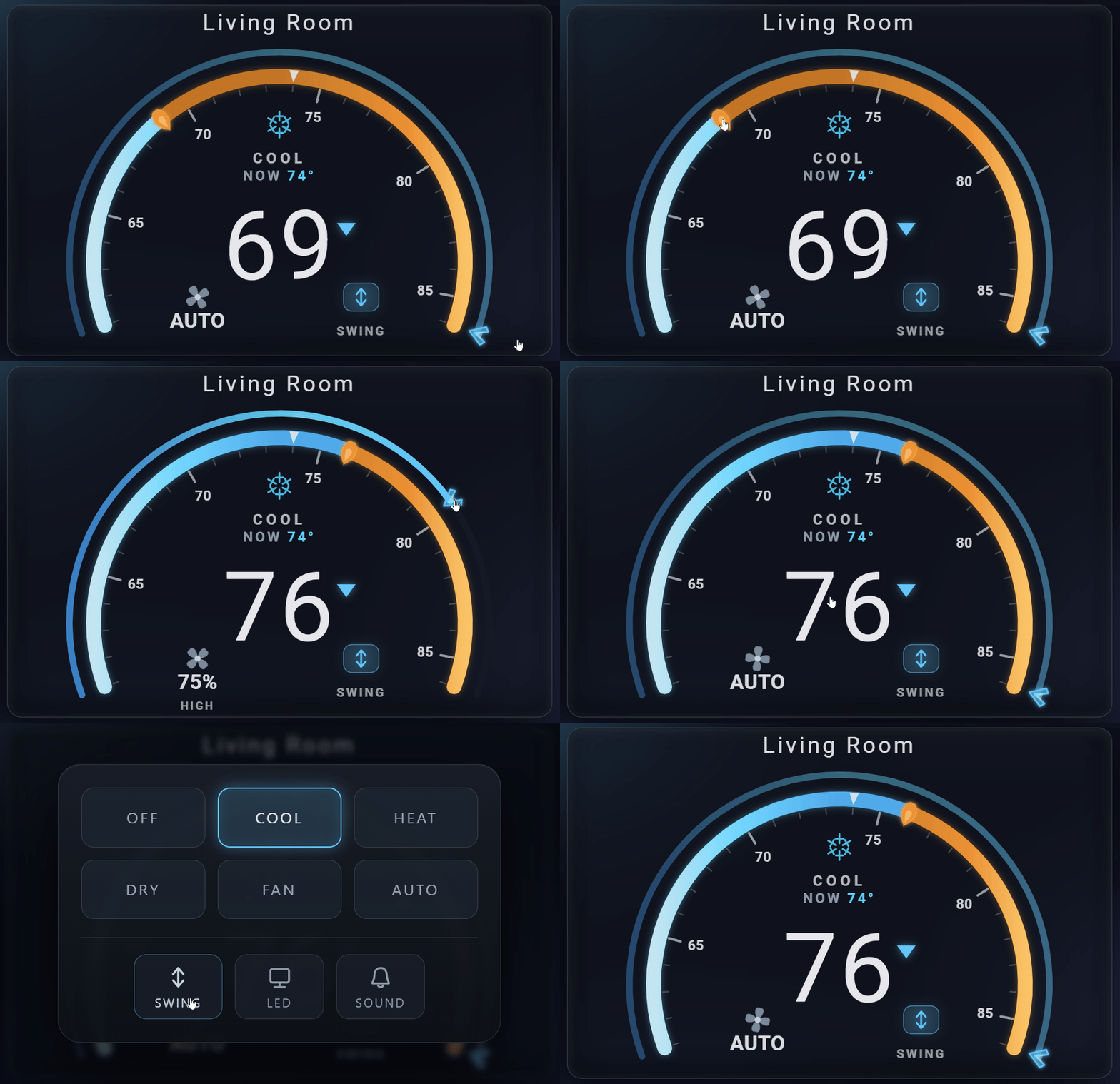
An instrument-cluster climate dial for Home Assistant that follows your theme.
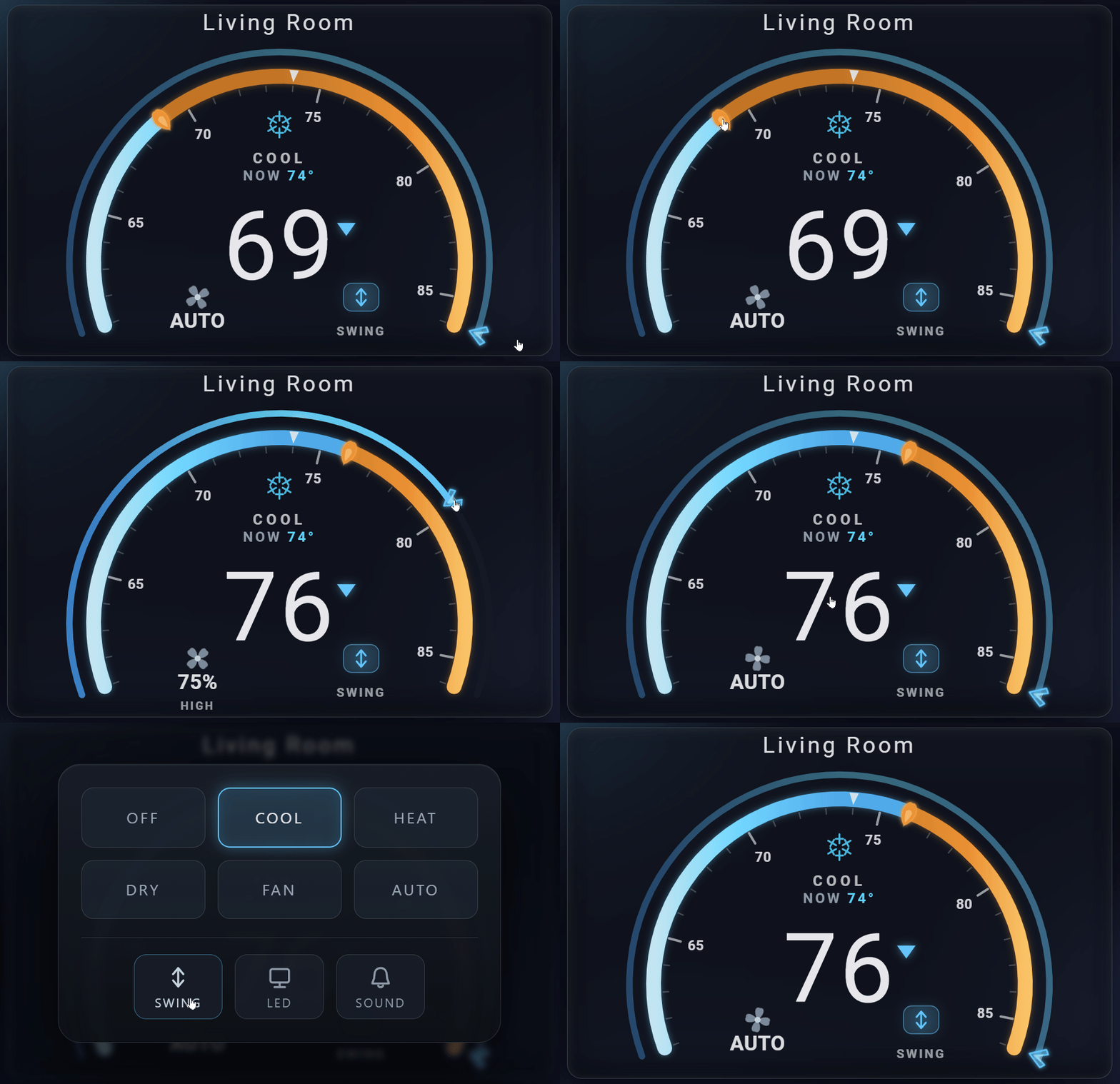
The dual-ring AC control card: drag the inner ring for temperature and the outer ring for fan speed at once, in a wide-arc automotive instrument-cluster face, with a glass mode popup, swing / LED / sound toggles, a numbered gauge scale, and a full visual editor. Built for and tested with Midea (midea_ac_lan), and works with any climate.* entity. Vanilla single-file web component, no dependencies, no build step.
Demo
Demo
Features
What's new in v1.4.0
- Rename the mode buttons - a new
mode_namesoption, and a "Mode labels" section in the visual editor, lets you relabel the OFF / COOL / DRY / and other mode buttons (for examplemode_names: { fan_only: Fan }). Any mode you leave unset keeps its default label. - Rename extra toggles in the editor - each
extra_toggleschip now has its own name field in the visual editor, so you can give it a short label without editing YAML.
No breaking changes, safe to update via HACS. Hard-refresh your browser (Ctrl+F5 / Cmd+Shift+R) after updating so the new build loads.
What's new in v1.3.1
- Select chips in
extra_togglesfixed - aselectyou added (for example a Tuya "smart wind" or mode select) that has options but no option chosen yet no longer renders greyed out and unresponsive. It stays a live cycle chip, a tap picks the first option, and it shows its name until you choose one.
No breaking changes, safe to update via HACS. Hard-refresh your browser (Ctrl+F5 / Cmd+Shift+R) after updating so the new build loads.
What's new in v1.3.0
- Custom toggle chips - a new
extra_togglesoption adds your own controls to the mode popup. Point it at anyswitch,input_boolean,select, orinput_selectentity and each renders as a chip: two-state entities toggle on and off, selects cycle through their options. Handy for device functions the card does not auto-detect, like anti-mildew, UV, or a gentle-wind mode. - Swing position picker - the swing chip now shows the active swing position, and a long-press opens a picker of the entity's real swing options, so vane-position units can jump straight to a position instead of only cycling. The chip label and accent update the moment you tap.
- Swing fix for vane-position units - swing now works on climate entities whose swing options are vane positions (for example MelCloud / Mitsubishi
["Auto", "1".."5", "Swing"]) or use a capitalizedOff. The card previously sent a hardcoded lowercaseoffthat those units reject, so the chip stopped responding; it now resolves a real off member from the entity's ownswing_modes, or cycles to the next position when there is no off member. Midea switch-backed swing is unchanged.
No breaking changes, safe to update via HACS. Hard-refresh your browser (Ctrl+F5 / Cmd+Shift+R) after updating so the new build loads.
What's new in v1.2.1
- Reliable center tap on touch - on iPhone and iPad the dial center now opens the mode popup every time, instead of leaving a stray focus outline with no popup.
- Scroll past the dial - a vertical swipe anywhere on the card scrolls the dashboard; only the two arc rings still capture the drag to set temperature and fan.
- No focus square - tapping the center no longer flashes a white outline around the temperature.
Touch-only fixes, no config changes, safe to update via HACS.
What's new in v1.2.0
- Light-theme legibility - the gesture hints and numbered tick scale stay readable on light themes, with a card-colored knockout halo so the labels never wash out over the arc.
- Frosted glass appearance - a new
appearanceoption (glass-dark/glass-light) turns the card into a translucent panel that frosts your dashboard wallpaper behind it. - Glass tint and opacity -
glass_colortints the panel andglass_opacitysets how solid it looks (0clear to1solid). - Editor "Reset styling" button - one click clears every styling override (appearance, glass, accent, font, mode colors) back to theme defaults.
- Dial polish - lighter setpoint numerals, a refined current-temp marker, and an accent-tinted needle for a cleaner face.
No breaking changes, safe to update via HACS.
- Wide-arc instrument dial - a car-cluster gauge with a numbered tick scale, a glowing setpoint needle, and a current-temp marker.
- Two-ring control - drag the inner ring to set the target temperature and the outer ring to set the fan speed.
- Glass mode popup - tap the center to open a frosted mode picker (
cool/heat/heat_cool/dry/fan_only/auto/off) with per-mode glyphs; the center caret followshvac_action(down = cooling, up = heating). - Discoverable gestures + custom actions - faint MODE / FAN / AUTO hints and press feedback show the dial is interactive; the center supports the standard
tap_action/hold_action/double_tap_action(hold opens more-info by default). - On-card feature toggles - swing, LED display, and beep/sound toggles, auto-wired to Midea sibling entities when present.
- Swing position picker - the swing chip shows the active swing position, and a long-press opens a picker of the entity's real swing options, so vane-position units (MelCloud / Mitsubishi and the like) can jump straight to a position instead of only cycling.
- Custom toggle chips -
extra_togglesputs your ownswitch,input_boolean,select, orinput_selectcontrols in the mode popup for features the card does not auto-detect; switches toggle and selects cycle their options. - Fan animation - a clover fan that can spin proportional to the fan value, at a constant rate, or off.
- Fahrenheit & Celsius - unit, range, and step auto-detected from Home Assistant (or set them explicitly).
- Fully GUI-configurable - every option is exposed in a visual editor; no YAML required.
- Glass theme - translucent card that blends with dashboard wallpapers.
Screenshots
Screenshots
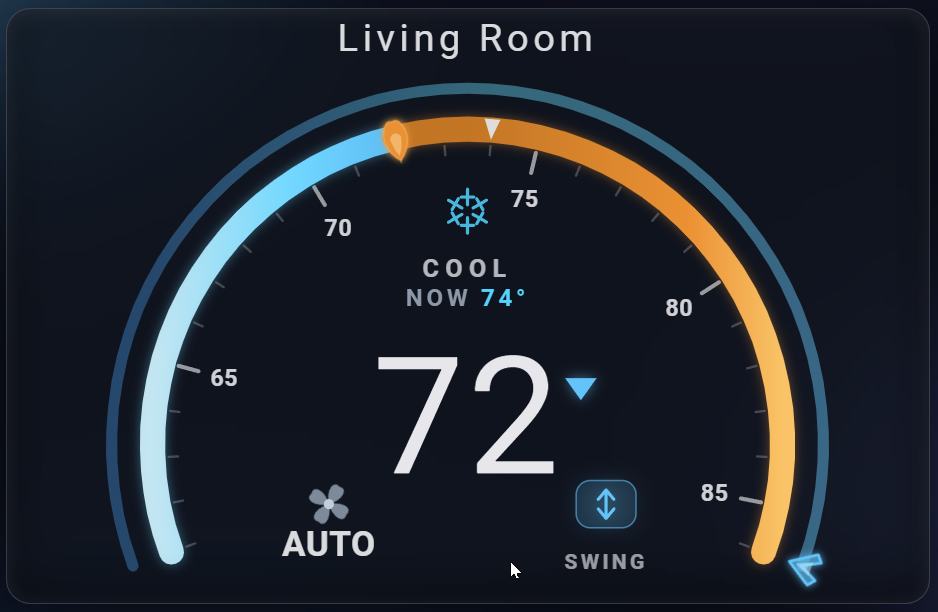 Two-ring dial - inner=temp, outer=fan |
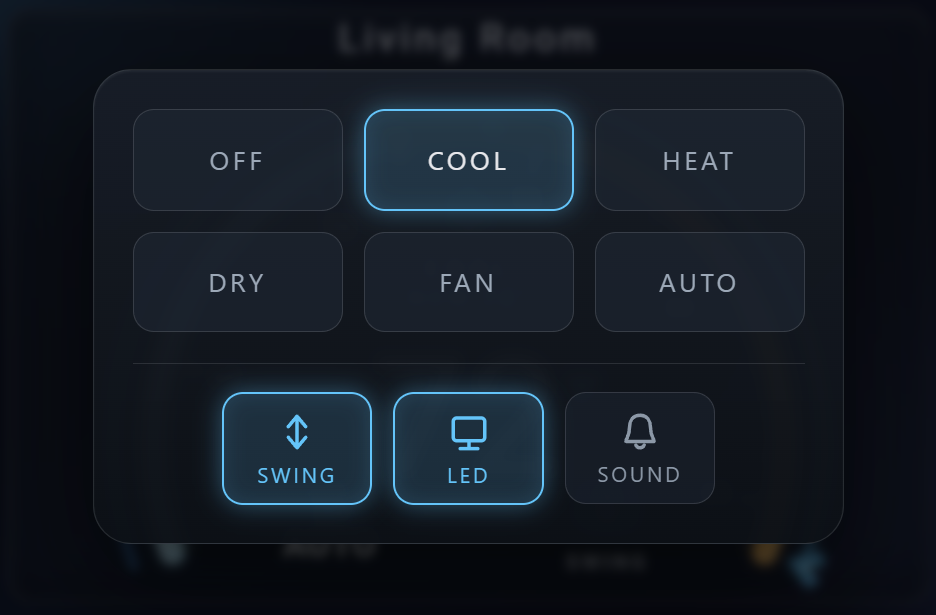 Mode popup - modes + Swing/LED/Sound |
Theming and frosted glass
The card renders inside a standard Home Assistant ha-card, so it follows your active theme automatically in both light and dark, picking up the theme's card background, text, and font variables. The dial now reads on light themes too: the gesture hint labels and the numbered tick scale stay legible against a light background. Drop it on any dashboard and it blends in with no configuration.
When you want to deviate from the theme, three options override the defaults:
accent- the primary UI accent color.mode_colors- per-mode color overrides (e.g.cool: "#4fc3f7").font(and optionalfont_url) - the font family for the numerals.
type: custom:climate-cluster-card
entity: climate.living_room
accent: "#ffb74d"
mode_colors:
  cool: "#4fc3f7"
  heat: "#ff7043"
Light and dark theme
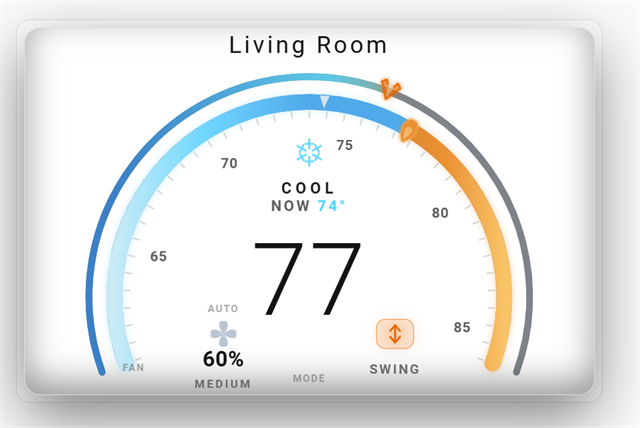 Light theme |
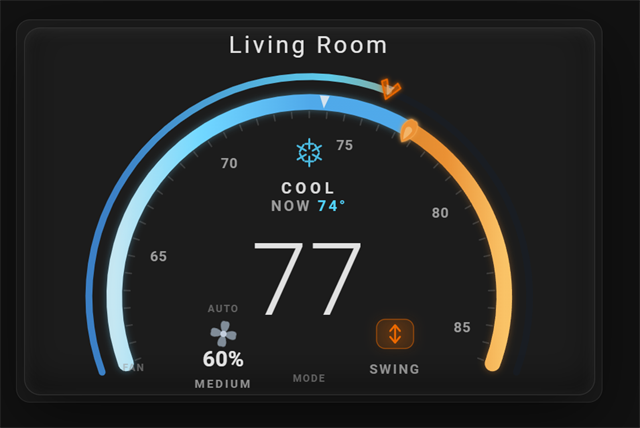 Dark theme |
Frosted glass
By default appearance: theme keeps the themed card. Set appearance to glass-dark or glass-light to force a translucent frosted-glass panel that frosts the dashboard wallpaper behind it and holds its look on any theme: glass-dark is a dark indigo finish, glass-light a bright one.
Two more options tune the panel:
glass_color- tints the frosted-glass panel (frosted-glass appearances only).glass_opacity- how solid the panel is,0clear to1solid (frosted-glass appearances only).
type: custom:climate-cluster-card
entity: climate.living_room
appearance: glass-dark
glass_color: "#2a6f6a"
glass_opacity: 0.6
Frosted glass variations
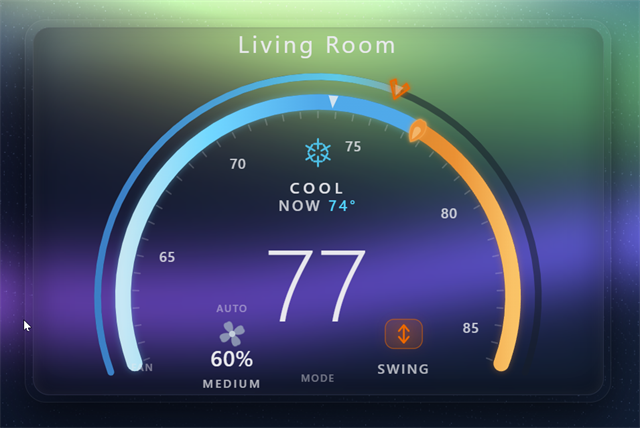 Aurora glass |
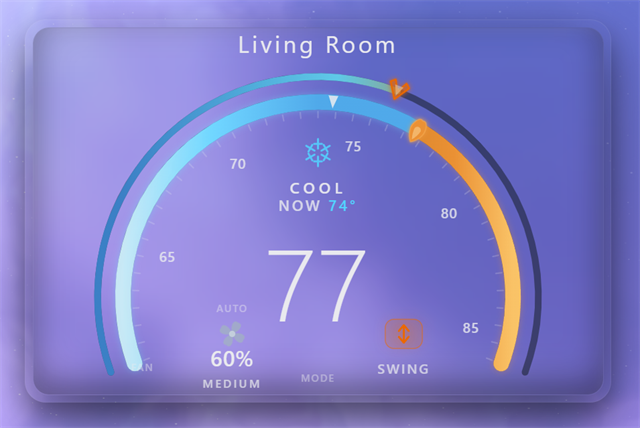 Purple glass |
Requirements
- Home Assistant with any
climate.*entity. - Requires Home Assistant 2024.1.0 or newer (matches
hacs.json). - Built for and tested with Midea units via
midea_ac_lan. It works with any climate entity, but auto-discovery of the fan / swing / LED / sound siblings is tuned for Midea. - The fan ring needs one of:
- a
number.*_fan_speed(percent) entity, a smooth draggable 1-100 % ring, or - named
fan_modeson the climate entity, driven as discrete stops. - If neither exists, the fan ring is hidden automatically.
- a
Installation

One-click: the My Home Assistant badge above opens this repository directly in HACS on your own instance. Otherwise follow the manual HACS steps below.
HACS (recommended)
- In Home Assistant, open HACS.
- Click the ⋮ menu (top right) → Custom repositories.
- Add
https://github.com/rickyfont94/climate-cluster-card, set Category to Dashboard, and click Add. - Find Climate Cluster Card in HACS and click Download.
- Hard-refresh your browser.
HACS registers the resource as type: module automatically, no manual resource entry or ?v= cache-buster needed.
After updating in HACS, hard-refresh the browser (Ctrl+F5 / Cmd+Shift+R) or clear its cache so the new version loads. A cached old build is the usual reason an update looks like it did nothing.
Manual
- Download
climate-cluster-card.jsfrom the latest release. - Copy it to
config/www/climate-cluster-card.js. - Add a resource under Settings → Dashboards → ⋮ → Resources: URL
/local/climate-cluster-card.js, type JavaScript Module. - Hard-refresh your browser.
Usage
A full visual editor is built in, add the card from the dashboard UI and click Edit to configure everything below without YAML.
Minimal
type: custom:climate-cluster-card
entity: climate.living_room
Midea (with title + height cap)
type: custom:climate-cluster-card
entity: climate.living_room
name: Living Room
max_height: 34vh
Generic climate with an explicit fan entity
type: custom:climate-cluster-card
entity: climate.bedroom
fan_entity: number.bedroom_fan_speed
Customized (accent, unit, mode subset, animation)
type: custom:climate-cluster-card
entity: climate.office
accent: "#4fc3f7"
temperature_unit: F
modes: [cool, dry, fan_only, "off"]
fan_animation: true
fan_animation_speed: dynamic
Fan control (Midea and generic)
The outer ring sets fan speed. How that speed is sourced depends on the entity.
Midea (midea_ac_lan) - auto-wired
With a Midea unit the card discovers the number.*_fan_speed sibling on its own, so the outer ring is a smooth 1-100 % control with no extra config.
type: custom:climate-cluster-card
entity: climate.living_room
Generic climate - explicit fan entity
For a non-Midea entity, point fan_entity at a percent number.* helper, or rely on the entity's named fan_modes, which the ring drives as discrete stops.
type: custom:climate-cluster-card
entity: climate.bedroom
fan_entity: number.bedroom_fan_speed
show_fan controls the ring's visibility. Left unset it auto-detects (shown when a percent entity or fan_modes exist, hidden otherwise); set show_fan: true or false to force it.
Options
All options are optional except entity. Defaults reproduce sensible behavior, and the visual editor exposes every option.
| Option | Type | Default | Description |
|---|---|---|---|
entity |
climate.* |
required | The climate entity to control. |
name |
string | entity friendly name | Card title. |
Appearance
| Option | Type | Default | Description |
|---|---|---|---|
accent |
color | #4fc3f7 |
Primary UI accent color. |
mode_colors |
map | built-in | Per-mode color overrides (e.g. cool: "#4fc3f7"). |
font |
string | unset | Font family prepended to the default stack (Rajdhani-if-installed, then your HA theme font). |
font_url |
string | unset | Optional stylesheet URL (e.g. a Google Fonts link) that loads the font. No font is fetched by default. |
appearance |
theme | glass-dark | glass-light |
theme |
Card background. theme follows your active Home Assistant theme (light and dark); glass-dark / glass-light force a translucent frosted-glass panel that frosts the dashboard wallpaper behind it. |
glass_color |
color | per-variant | Tint for the frosted-glass panel. Applies only to the glass-dark / glass-light appearances. |
glass_opacity |
number 0..1 |
per-variant | How solid the frosted-glass panel is, 0 clear to 1 solid. Applies only to the frosted-glass appearances. |
temperature_unit |
auto | F | C |
auto |
auto uses HA's unit system / the entity's temperature_unit. |
min_temp |
number | entity min_temp |
Lower bound of the dial. |
max_temp |
number | entity max_temp |
Upper bound of the dial. |
temp_step |
number | entity target_temp_step |
Setpoint step increment. |
show_scale |
bool | true |
Show the numbered tick scale. |
show_current |
bool | true |
Show the current ("NOW") reading. |
show_hints |
bool | true |
Show the faint MODE / FAN / AUTO gesture hint labels. |
Modes
| Option | Type | Default | Description |
|---|---|---|---|
modes |
list | entity hvac_modes |
Which HVAC modes appear in the popup. |
mode_names |
map | unset | Rename the mode buttons. A map of hvac_mode: "Label", for example mode_names: { fan_only: Fan, cool: Cooling }. Any mode you do not list keeps its default localized label. Also editable in the visual editor under Modes. |
Fan
| Option | Type | Default | Description |
|---|---|---|---|
fan_entity |
number.* |
auto-discovered | Percent entity for the draggable fan ring. |
show_fan |
bool | auto-detect when unset | Force show/hide the fan ring. |
fan_animation |
bool | true |
Enable the clover spin. |
fan_animation_speed |
dynamic | constant | off |
dynamic |
Spin behavior. |
Features
| Option | Type | Default | Description |
|---|---|---|---|
swing_entity |
switch.* |
Midea sibling | Swing toggle override. |
led_entity |
switch.* |
Midea sibling | LED-display toggle override. |
sound_entity |
switch.* |
Midea sibling | Beep/sound toggle override. |
show_swing / show_led / show_sound |
auto | true | false |
auto |
Force show/hide each toggle. A forced (true) chip with no resolvable entity still renders, but as a disabled, dimmed, inert chip. |
extra_toggles |
list | unset | Extra chips added to the mode popup, for functions the card does not auto-detect. Accepts a list of switch, input_boolean, select, or input_select entities, each as a bare domain.object_id string or a { entity, name, icon } object. Switch and boolean chips toggle on and off; select chips cycle through their options. Set each chip's name in the visual editor (Extra toggles section), or its name and icon in YAML. A missing or unavailable entity renders as a dimmed, inert chip. |
Layout
| Option | Type | Default | Description |
|---|---|---|---|
max_height |
CSS length | unset | Caps the card height. |
Actions
The center disc supports the standard Home Assistant action config. Each takes an action object (e.g. action: more-info, action: navigate, action: call-service, action: toggle, action: url, action: none).
| Option | Type | Default | Description |
|---|---|---|---|
tap_action |
action | open the mode popup | Action on a single center tap. Leave unset to keep the mode menu. |
hold_action |
action | more-info |
Action on a center press-and-hold. Defaults to the more-info dialog (history, attributes, presets). |
double_tap_action |
action | none |
Action on a center double tap. Off by default. |
type: custom:climate-cluster-card
entity: climate.living_room
hold_action:
  action: more-info
double_tap_action:
  action: toggle
Dragging the rings and tapping the clover are unaffected by these actions; the tap/hold/double-tap detector lives on the center disc and respects the drag threshold, so a swipe is never read as a tap.
All three center gestures are configurable together. Leave tap_action unset to keep the default mode popup:
type: custom:climate-cluster-card
entity: climate.living_room
tap_action:
  action: more-info
hold_action:
  action: navigate
  navigation_path: /lovelace/climate
double_tap_action:
  action: toggle
Resolution order (everywhere): explicit config → auto-discovered Midea sibling → generic climate attribute → hide.
Sections view
In the grid Sections layout the card fills its grid cell width and scales the dial to fit, so it sits flush next to other cards instead of overflowing the column. Use max_height to cap how tall it grows in a tall cell:
type: custom:climate-cluster-card
entity: climate.living_room
max_height: 34vh
Troubleshooting
- Blank card. The resource must be registered as
type: module(HACS does this automatically). A stale manual resource of the wrong type is the usual cause, fix it and hard-refresh. - Fan ring missing. The entity has neither a
number.*_fan_speednor namedfan_modes. Setfan_entityexplicitly or add a percent number helper. - A toggle (swing/LED/sound) doesn't appear. Nothing resolved, set the matching
*_entity, or setshow_swing/show_led/show_soundtotrue. - An update did not take effect. The browser is serving a cached build. Hard-refresh (Ctrl+F5 / Cmd+Shift+R), or clear the cache, after updating in HACS.
FAQ
How does the fan ring map to speeds?
When the fan is a percent entity (number.*_fan_speed), the outer ring is a continuous 1-100 % control that reads back into named bands:
| Fan ring position | Band |
|---|---|
| <= 20% | Silent |
| 21-40% | Low |
| 41-60% | Medium |
| 61-80% | High |
| 81-100% | Full |
| Lower-left clover tap | Auto |
Dragging a percent nudges the climate fan_mode off auto so the chosen speed actually applies (a unit left on auto overrides a manual percent). Tapping the lower-left clover returns the fan to auto; tapping the center opens the mode popup.
If the climate entity exposes named fan_modes instead of a percent entity, the ring drives those discrete stops rather than a 1-100 % sweep.
What gestures does the dial support?
- Tap the center - opens the mode popup (or runs your
tap_action). - Press and hold the center - opens the more-info dialog by default (or runs your
hold_action). - Double tap the center - runs your
double_tap_action(off by default). - Drag the inner ring - sets the target temperature.
- Drag the outer ring - sets the fan speed.
- Tap the lower-left clover - returns the fan to
auto.
Faint MODE / FAN / AUTO labels hint at these on a wall tablet where you cannot hover; turn them off with show_hints: false.
Known limitations
- Tuned for
midea_ac_lan. The swing / LED / sound toggles and the fan / swing / LED / sound auto-discovery target Midea units. For a genericclimate.*entity, setswing_entity/led_entity/sound_entity/fan_entityexplicitly. - Fan ring needs a source. The fan ring is hidden unless a
number.*_fan_speedentity or namedfan_modesexist. - Limited feature surface. Only the Swing / LED / Sound toggles are surfaced on the card. Expose any other features (boost, eco, sleep, and so on) with your own cards.
- Rajdhani font not bundled. The card prefers the Rajdhani font for its numerals but does not bundle or fetch it. If you have Rajdhani installed locally it is used; otherwise the card falls back to your Home Assistant theme font, then to the system UI font. Nothing 404s and no network request is made by default. To force a specific font, set
font(and optionallyfont_url); see the configuration options.
Notes
The card prefers the Rajdhani font for its numerals when it is installed locally, but does not bundle or download it. Without Rajdhani the card uses your Home Assistant theme font (--ha-card-header-font-family), then a system UI font, so the default never depends on a missing font. Set font to prepend your own family to that stack, and font_url to point at a stylesheet (for example a Google Fonts link) that loads it.
Midea is a trademark of its respective owner. This project is independent and unaffiliated.
Translations
English and Spanish ship built in and auto-select from your Home Assistant language; everything else falls back to English.
The card follows your Home Assistant language. HVAC mode names and fan mode names are localized through Home Assistant itself, so they always match the rest of your dashboard. The card's own labels (NOW, SWING, LED, SOUND, AUTO), tooltips, screen-reader text and editor labels ship with English and Spanish, and numbers (temperatures, the tick scale) are formatted with your locale's decimal separator and grouping.
To add a language, edit the LOCALE map near the top of climate-cluster-card.js:
- Add a new two-letter key (for example
de) alongsideenandes. - Mirror the keys under
en, including the nestededitorLabelsandeditorHelpersmaps. - Any key you leave out falls back to English, so a partial translation is fine.
The active language is read from hass.language (then hass.locale.language); a region subtag is stripped, so es-419 resolves to es. Do not translate mode or fan mode names here; those come from Home Assistant. Keep values free of em dashes. A pull request with a new language is welcome.
Comments