The open-source, self-hostable AI coding agent.
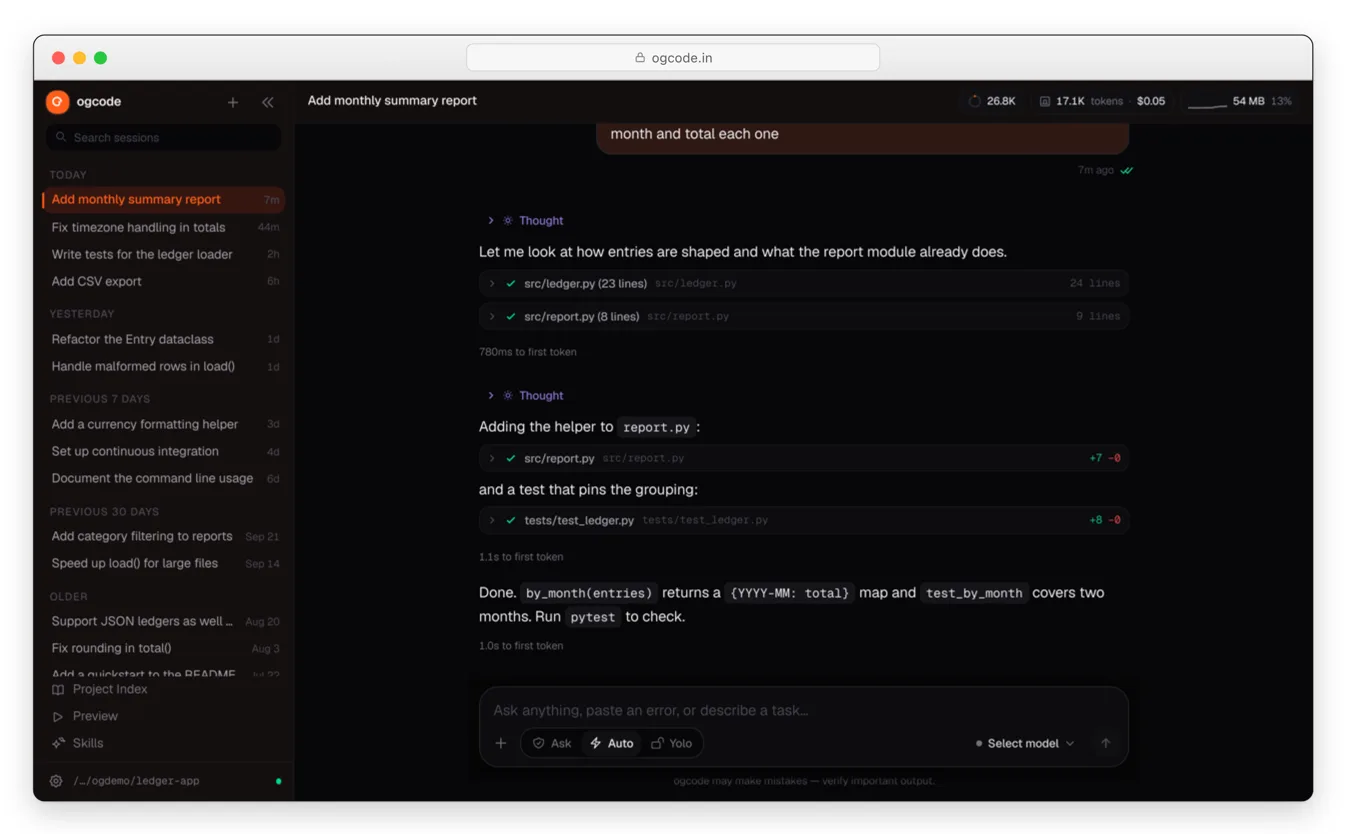
Ogcode is an AI agent that understands your codebase, uses real tools, researches the web, remembers decisions, plans complex work, and ships changes — from your browser. Your computer, your models, your data, your rules.
Installation
curl -fsSL https://ogcode.in/install.sh | sh

# Package managers
brew tap prasenjeet-symon/tap && brew install ogcode   # macOS and Linux
winget install prasenjeet-symon.ogcode                 # Windows
go install github.com/prasenjeet-symon/ogcode@latest   # any OS with Go
[!TIP]
CGO_ENABLED=1is required when building from source — the Swift tree-sitter binding is cgo.
On Windows without winget:
irm https://ogcode.in/install.ps1 | iex
Or run the container:
docker run -p 9595:9595 \
  -v ~/.ogcode:/root/.ogcode \
  -v "$(pwd):/workspace" -w /workspace \
  ghcr.io/prasenjeet-symon/ogcode:latest
The image is also on Docker Hub as prasenjeetsimon/ogcode:latest.
Start it and open the web interface:
ogcode # serves the UI on http://localhost:9595
Use a local model with Ollama — no API key needed:
ollama serve
ogcode
Permissions are per session: Ask (approve each step), Auto (risk-gated), or Yolo (no prompts). Learn more about permissions.
What you can do with Ogcode
- Understand unfamiliar code — Ogcode maps a project before reading it, outlines files with exact line ranges, and reads only what matters. Core concepts →
- Build and fix software — implement features and fixes across files, run your builds and tests, and investigate failures instead of retrying blindly.
- Deliver a whole feature — turn an objective into tasks, run independent ones in parallel, and open pull requests for review. Plan mode & tasks →
- Stay in control — choose Ask, Auto, or Yolo per session, and approve or remember each decision. Permissions →
- Keep context that fits — recall past decisions instead of replaying the whole transcript, so long sessions stay focused and affordable. Memory & context →
- Research as you go — built-in web search and page reading, reusable
SKILL.mdworkflows, and external MCP servers. Search, skills & MCP → - See more than text — Mermaid diagrams, LaTeX and rendered PDFs, Plotly charts, sandboxed HTML, and downloadable artifacts. Rich results & preview →
Documentation
For configuration, providers, skills, remote deployment, and everything else, head over to our docs.
Configuration
Ogcode detects your provider from the environment. Set at least one:
| Variable | Provider |
|---|---|
ANTHROPIC_API_KEY |
Anthropic / Claude |
OPENAI_API_KEY |
OpenAI / GPT |
OPENROUTER_API_KEY |
OpenRouter |
OLLAMA_BASE_URL |
Ollama, or an OpenAI-compatible local endpoint |
Settings can also live in ogcode.json at the project root (project settings) and ~/.config/ogcode/config.json (global settings); environment variables override both.
{
  "providers": {
    "ollama": { "baseUrl": "http://localhost:11434" },
    "anthropic": { "apiKey": "sk-ant-..." }
  },
  "skills": {
    "paths": ["./team-skills"],
    "permissions": { "deploy-prod": "ask" }
  }
}
OGX is a subscription plan from OG Lab. Connect it from the settings screen and the plan's models run through OG Lab's gateway — no environment variable needed.
Remote deployment and security
Ogcode can run on a remote machine and be reached from a browser — but it can read and modify files and run commands. Never expose it directly to the public internet without authentication.
Recommended boundaries:
- Bind to localhost and reach it over an SSH tunnel.
- Put a reverse proxy with HTTPS and authentication in front of it.
- Use a VPN such as WireGuard or Tailscale.
- Run high-risk work in Docker, a VM, or an isolated worker.
ssh -L 9595:localhost:9595 user@your-server
Working setups — SSH tunnel, reverse proxy, and Docker — are in the remote deployment guide. For a hosted, multi-user deployment, see the control-plane documentation.
Security
Treat Ogcode like a powerful automation process:
- Review permissions before enabling write or shell access.
- Keep API keys and secrets out of prompts, repositories, and public artifacts.
- Use isolated environments for untrusted code.
- Do not expose an unauthenticated server to the internet.
- Report vulnerabilities privately through the project's security channels.
Your code and session data stay local; only conversation content is sent to the model provider you configure, where that provider's privacy policy applies.
Comments