OpenMake LLM
An open-source, local-first, self-hosted AI workspace for open-weight and BYOK models.
vLLM/LiteLLM inference · autonomous AI agents · MCP tools · deep research · Docker sandboxes.
Homepage · Live demo · Self-hosting guide · 한국어 · 日本語
Overview
OpenMake LLM is a self-hosted AI assistant you run on your own hardware. It serves a local model through vLLM behind a LiteLLM proxy (OpenAI-compatible) and routes the same abstraction to external providers you register with your own keys (OpenRouter, NVIDIA NIM, Ollama local/cloud — all OpenAI-compatible; an Anthropic adapter is also built in) — so your data stays on your machine by default.
Every request flows through a lightweight message pipeline that applies the provider gate, security and language policy, and prompt/tool assembly without an extra LLM routing round-trip. Local and external models then share the same execution path and always-on tool loop. The current ExecutionPlanBuilder is intentionally narrow: it loads an authorized custom agent when one is selected. Behavior is controlled by orthogonal axes only — Model · Style · Mode toggles · Custom Agent — instead of opaque presets. Power users can go further with role-based model orchestration — assigning a different model (local or external) to each functional role (agent, judge, research, parallel sub-agents, review, thinking-summary). Beyond chat, it adds autonomous agents, a deep-research pipeline, and an MCP tool system — all behind JWT auth and role-based access control.
Single-host design: the application (API + web) runs under PM2, while stateful dependencies (PostgreSQL / Redis) and sandboxed agent / MCP / artifact processes run in Docker for isolation.
At a glance
| 🧠 1 local model, routed per request | qwen3.6-35b-a3b served via vLLM + LiteLLM, with a 262K context-fit safety net |
| 🎛️ Role-based model orchestration | Assign a different model (local or BYOK external) per functional role; per-user + admin-global mappings, server-shared keys with token budgets |
| 🤖 Autonomous agents | Manus-style multi-turn agent in a persistent Docker sandbox (shell · Python · browser · files), with human-in-the-loop approval |
| 🔬 Deep research | Fan-out web search → source fetch → claim verification → cited synthesis |
| 📊 Report pipeline | Report-intent queries render model-produced data through a fixed design template into an HTML artifact — exportable to PDF/DOCX |
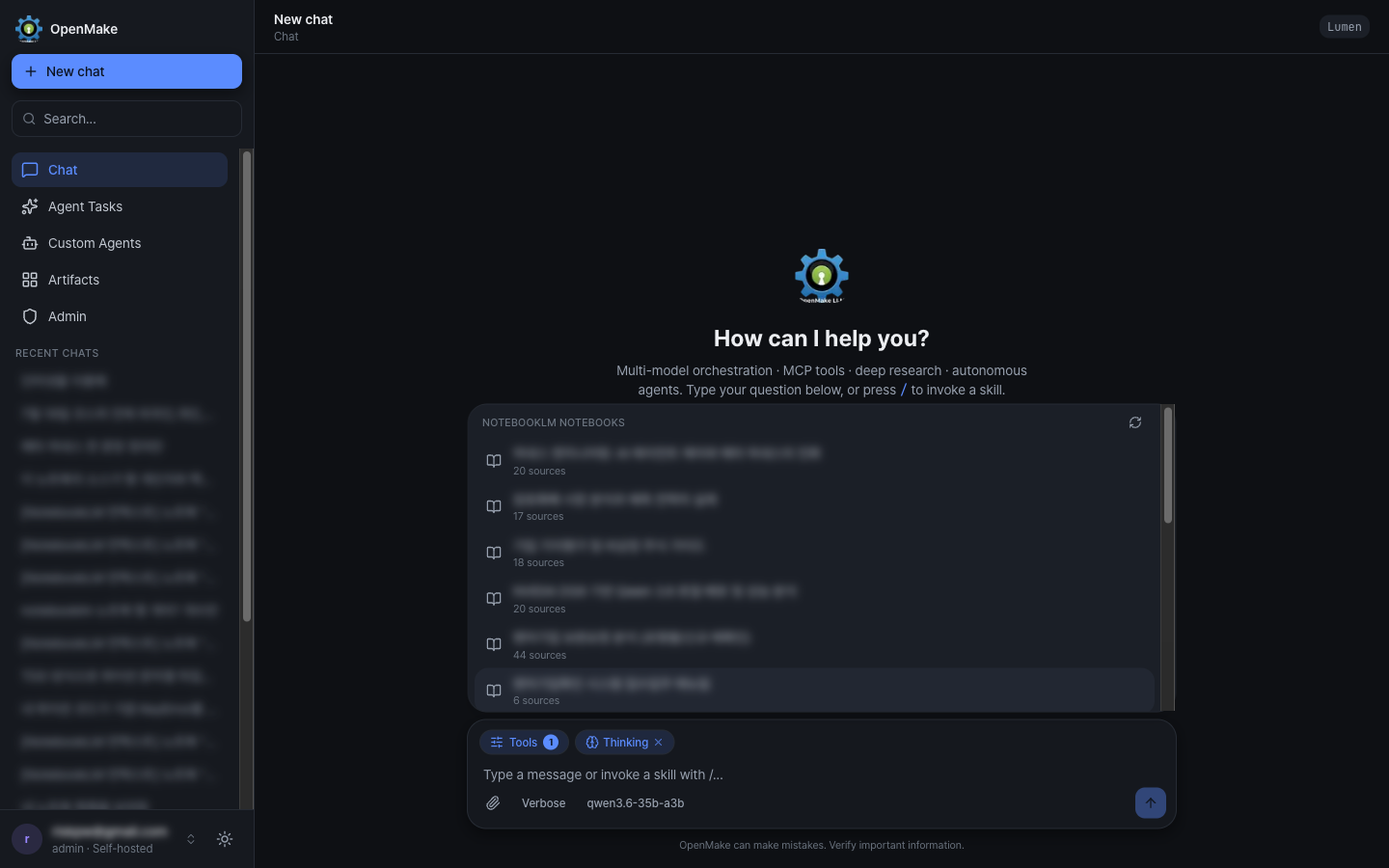
| 📓 NotebookLM grounding | Pin one of your Google NotebookLM notebooks as conversation context, straight from the composer |
| 🧩 22 built-in MCP tools + external MCP servers | Each external server isolated in Docker (--cap-drop ALL, non-root, network policy) |
| 👤 Custom agents & skills | Project-scoped personas (with optional per-agent model) + an auto-selectable skill library + 18 industry agents (100 specialists) |
| 💬 Discord gateway bot | Optional workspace relaying Discord messages to the OpenAI-compatible API, with role/mention access control |
| 🌐 4-language UI | 한국어 · English · 日本語 · 简体中文 (next-intl, cookie locale, browser auto-detect) |
| 🔒 Security-first | JWT (HttpOnly), Google OAuth 2.0, RBAC, per-route rate limiting, SSRF guard, Audit ↔ Alert |
Screenshots
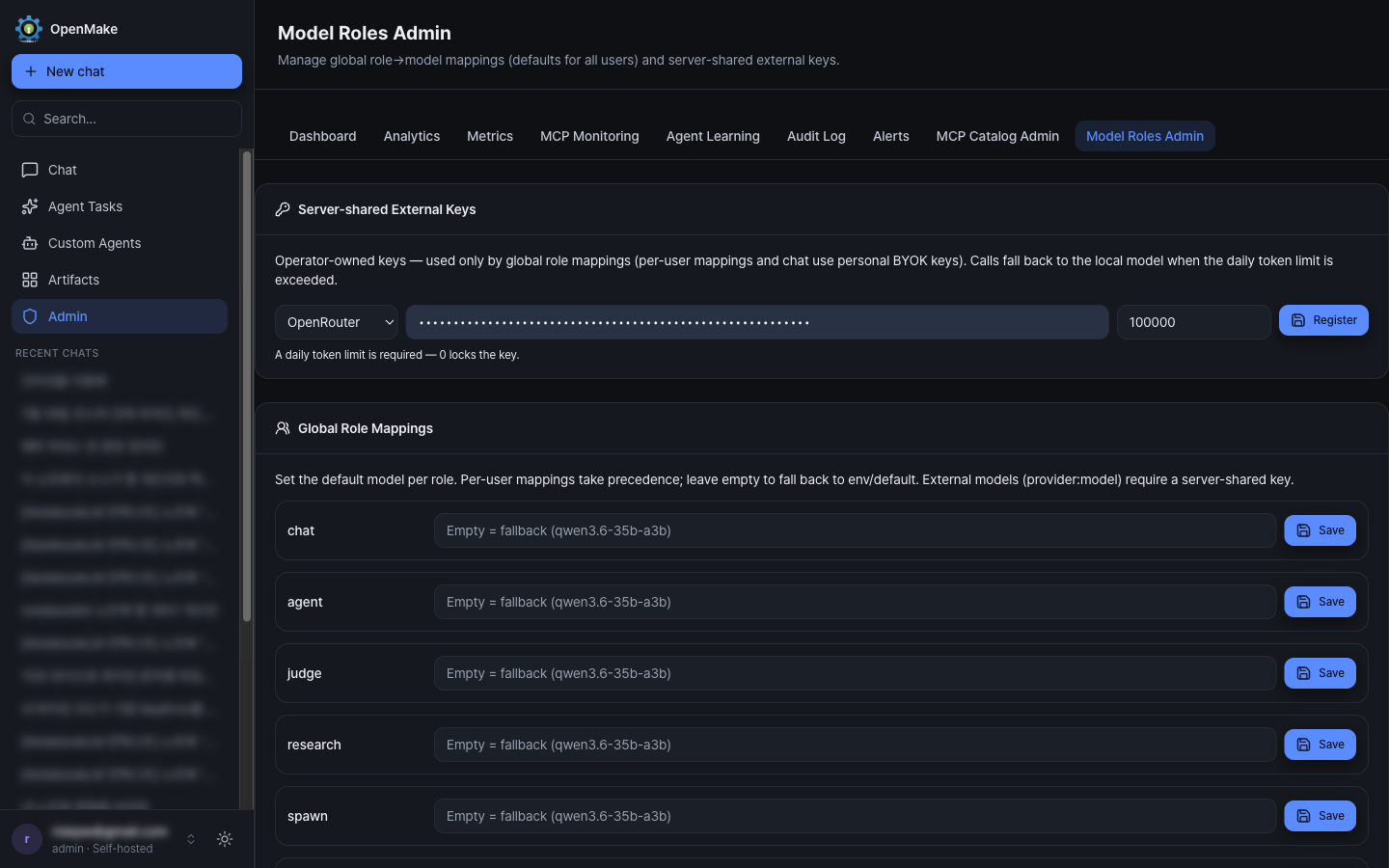
Conversation titles, notebook names, and the account email are blurred — everything else is the running app.
Chat workspace — a five-item workspace nav, model selector, response style, and slash-invoked skills:
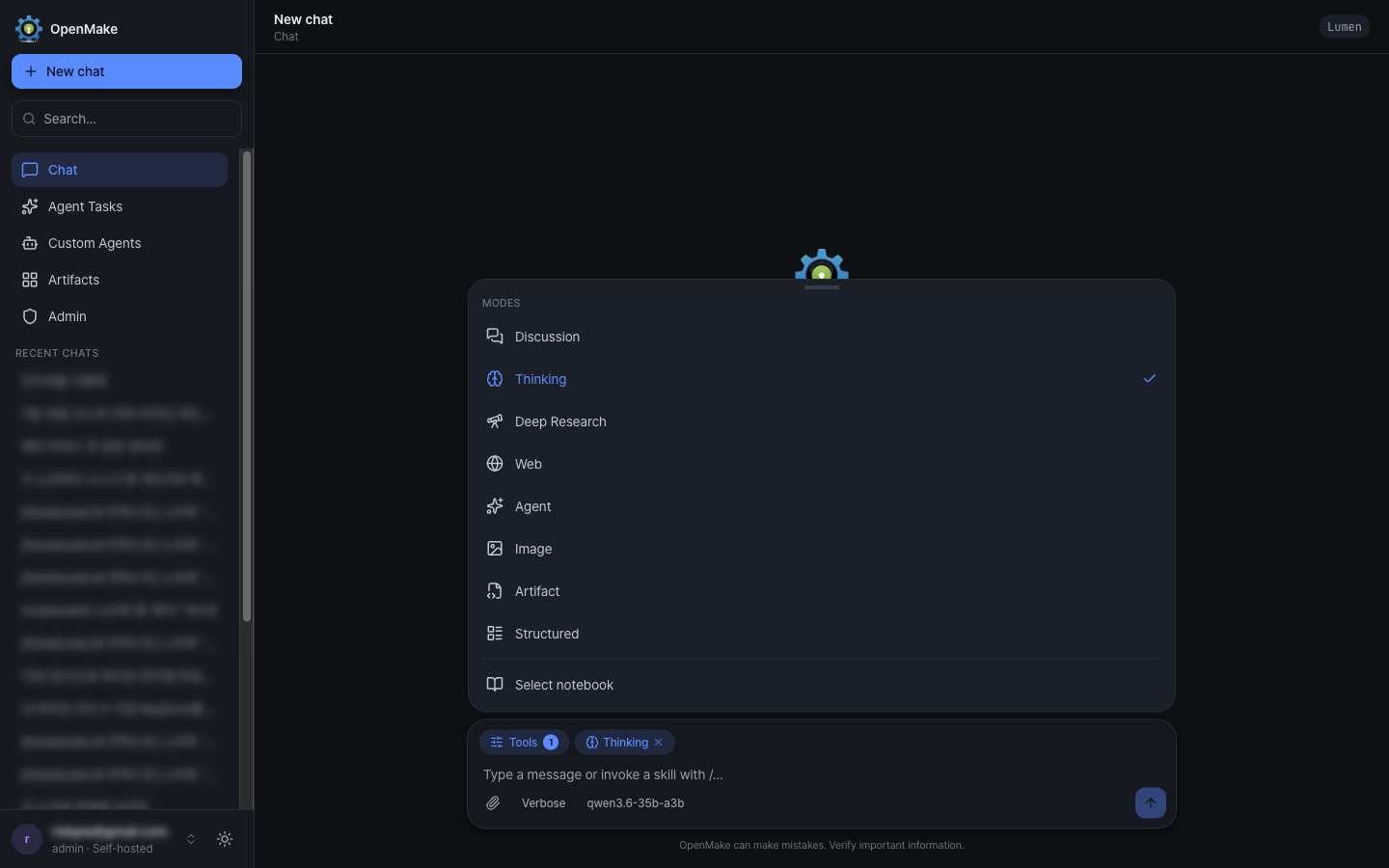
| Mode menu — Discussion / Thinking / Deep Research / Web / Agent / Image / Artifact / Structured | NotebookLM picker — pin a notebook as conversation context |
|---|---|
 |
 |
Agent tasks — autonomous multi-turn runs with live progress, token accounting, recurring schedules, and reusable task templates:
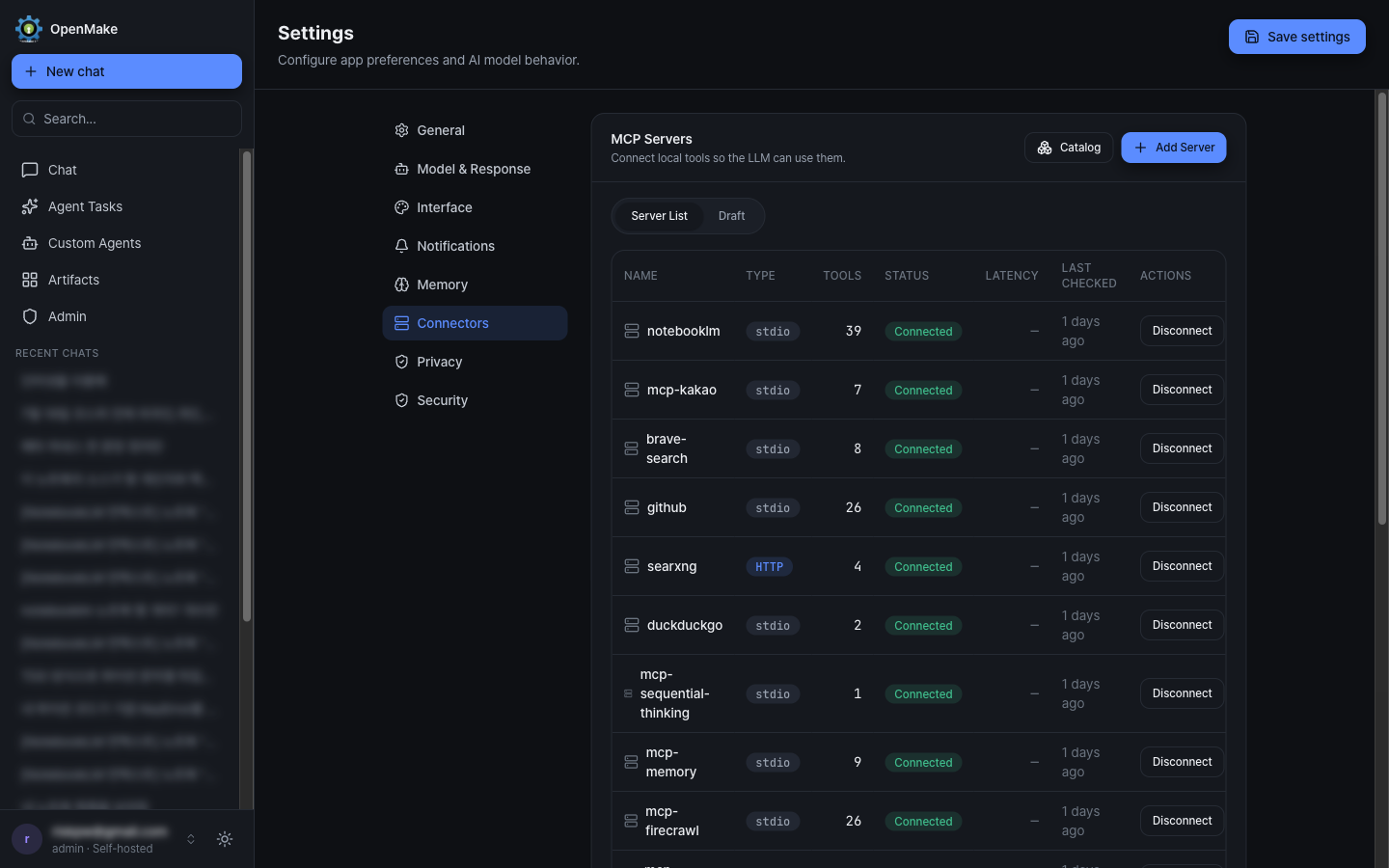
| Connectors — external MCP servers, each Docker-isolated | Model Roles Admin — global role→model mappings |
|---|---|
 |
 |
Skill Library — reusable manifests with tool bindings, importable from Git or generated by the model:
Multilingual UI (한국어 · English · 日本語 · 简体中文) — switch the interface language in Settings, or let it follow your browser (Accept-Language). AI response language independently follows the message language:
Architecture
OpenMake separates policy (deciding how to answer) from execution (actually calling the model) — a SQL planner/executor split. The two layers are kept deliberately independent.
                          WebSocket / REST
                                  │
                    ┌─────────────▼─────────────┐
  Query ───────────►│      message-pipeline     │  request processing
                    │                           │  · provider gate
                    └─────────────┬─────────────┘  �� security & language policy
                                  │                · prompt & tool assembly
                                  │                · authorized custom-agent load
                    ┌─────────────▼─────────────┐
                    │ streamFromExternalProvider│  single path — local & external alike
                    │   (always-on tool loop)   │  · 5 tool turns max
                    └─────────────┬─────────────┘  · special modes intercept earlier
                                  │
                    ┌─────────────▼─────────────┐
                    │       LLMClient.chat      │  execution — per call
                    │  (context-fit safety net) │  · token estimate → truncate → cap
                    └─────────────┬─────────────┘  · overflow → 413 + audit + alert
                                  │
           vLLM serve → LiteLLM proxy (OpenAI-compatible endpoint)
- One execution path — the former per-strategy layer (generate-verify, agent-loop, thinking, direct) was retired:
message-pipelinesends local and external models through a singlestreamFromExternalProviderdispatch with an always-on MCP tool loop.ExecutionPlanBuildernow only loads an authorized custom agent. Discussion and Deep Research remain separate modes intercepted before dispatch. - Context-fit safety net — on entry, prompt tokens (images included) are estimated; if the effective 262K window is exceeded, input is truncated →
max_tokensreduced → in the extreme, aContextOverflowErrorreturns HTTP 413 with an audit record and an automatic webhook alert. - User customization (4 orthogonal axes) — Model (selector) · Style (Concise / Default / Verbose) · Mode (Discussion / Thinking / Deep Research / Web / Agent Task) · Custom Instructions & Agents. System-prompt assembly order:
memory + custom-instructions + style. - Role-based model orchestration — every LLM-calling subsystem resolves its model through a single role registry with a fail-open fallback chain: per-user mapping → admin-set global (DB) → global env → local default. External models per role run on the user's BYOK key, or on a server-shared operator key (with daily/monthly token budgets) for global roles. Custom agents can also pin their own model.
- Cross-conversation memory — explicit long-term memories are injected into the system prompt; a privacy toggle lets a user exclude them per session.
- Thinking display (Claude-web style) — when Thinking mode is on, the reasoning stream renders as a live timeline; a dedicated
summary-role model generates a one-line headline (streaming interim → final), and both the reasoning and headline are persisted so re-opening a conversation restores the timeline.
Features
▸ Models & routing
- Local and external models share the provider-gated
message-pipelineand tool loop; behavior is controlled by orthogonal axes (Model · Style · Mode · Custom Agent). - Self-hosted vLLM + LiteLLM (default
qwen3.6-35b-a3b) with a context-fit safety net that protects output tokens and degrades gracefully on overflow. - Bring-your-own external keys — OpenRouter, NVIDIA NIM, Ollama (local + cloud), all OpenAI-compatible (an Anthropic adapter is built into the provider abstraction) — AES-256-GCM encrypted at rest. Guests use the default local model only — external providers require sign-in.
- Role-based model orchestration — assign a different model (local or BYOK external) to each functional role (
agent,judge,research,spawn,review,summary) via Settings; admins set org-wide defaults and register server-shared external keys with per-key token budgets in an admin console. Resolution is fail-open (falls back to the local default on any failure). Model lists filter down to what is actually reachable and role-capable. - Tail routing (opt-in, off by default) — a lightweight gate scores each query's error likelihood; when it judges a query as factual tail (likely to be answered wrong, externally verifiable),
web_searchis deterministically forced on the first turn. Ships with a shadow mode (TAIL_ROUTING_SHADOW_ENABLED) that records gate decisions without changing behavior, so thresholds can be tuned on real traffic beforeTAIL_ROUTING_STAGE2B_ENABLEDis switched on.
▸ Agents & research
- Autonomous agent tasks — a Manus-style agent pursues a goal across multiple tool-calling turns inside a persistent Docker sandbox (shell, Python, browser, file, planning tools) with human-in-the-loop approval. It records file attachments, injects images through a vision channel, produces deliverables including Excel (.xlsx) and PDF (with Korean/CJK fonts), and honestly reports non-achievement (
[GOAL_INCOMPLETE]marker + goal judge) instead of falsely marking "done". Tasks can be saved as reusable templates or put on a recurring schedule. - Deep research — fan-out web search → source fetch → claim verification → cited synthesis.
- Report pipeline — on report-intent queries ("research X and write a report") the model produces data (JSON) only; the server renders it through a fixed design template into an HTML artifact (renderer owns design — consistent editorial layout, KPI tiles, tables, dependency-free SVG charts, cited sources; all model strings escaped). Self-contained research-style report requests auto-delegate to an agent task for more research turns, and the same contract applies to agent-task deliverables. Failures are fail-open: without a valid data block the reply streams as ordinary chat.
- Custom agents & skills — project-scoped agents (claude.ai Projects equivalent) selectable directly from the composer, each optionally pinned to its own model, plus an auto-selectable skill library and 18 built-in industry agents (100 specialists).
▸ Tools & extensibility
- MCP tool system — 22 built-in tools (web search, fact-check, web scrape/map/crawl, image analysis, agent-task control, skill/agent/MCP git-ingest, …) plus external MCP servers, each isolated in Docker (
--cap-drop ALL, non-root,--memory+--memory-swap, network policy, realpath-guarded mounts). Install servers from the MCP catalog in Settings → Connectors; a catalog-level tool allowlist keeps chat auto-exposure focused (a 39-tool server need not dump 39 schemas into every prompt) while REST execution and the explicit tool picker keep full access. - NotebookLM grounding — install the NotebookLM connector with your own Google session cookie (AES-256-GCM encrypted, injected only at spawn), then pin a notebook from the composer. The grounding prefix rides an LLM-only channel, so stored messages and sidebar titles stay clean, and the pin is scoped to one conversation.
- Artifacts — live sandboxed iframe rendering, optional Docker code execution (Python / JS), a resizable side panel, and a separate-origin strict-CSP shared viewer for publishing. The OpenAI-compatible API returns artifacts as a
message.artifactsextension, andpublish_artifacts: truemakes the server mint share links for API-key clients that cannot publish themselves. - PDF / DOCX export — any HTML artifact (chat or agent-task deliverable) exports to PDF via headless Chromium print (CJK fonts included); report artifacts keep their structured source data (
artifacts.source_data), enabling high-fidelity DOCX generation withpython-docx. Both conversions run one-shot in the Docker sandbox (--network none,--cap-drop ALL, memory/pids caps) behind owner-scoped rate-limited endpoints. - Memory & instructions — persistent cross-conversation memory (with a per-session usage toggle) and always-on custom instructions.
- Thinking display — Claude-web-style reasoning timeline with a live one-line headline (generated by a dedicated summary model), persisted and restored on re-open.
- Multilingual UI — Korean, English, Japanese, and Simplified Chinese via
next-intl(cookie-based locale, browser auto-detect, locale-aware date/number formatting).
▸ Integrations
- Discord gateway bot (
apps/discord-bot) — an optional standalone workspace that relays Discord messages to/api/v1/chat/completions, with per-user session isolation (/reset), role/mention access control, and API-key auth. Generated images and artifacts come back as real Discord file attachments (with share links), since Discord cannot render the API's relative paths or placeholders. Runs as its own PM2 process. - NotebookLM —
GET /api/mcp/notebooklm/notebooksbacks the composer picker (per-user cache, upstream failures converged to502 NOTEBOOKLM_UPSTREAMso the UI can prompt a reconnect when the Google cookie expires).
▸ Security
- JWT in HttpOnly cookies, Google OAuth 2.0, RBAC, per-user & per-route rate limiting, SSRF guard, Helmet headers, and a unified Audit ↔ Alert pipeline.
Tech Stack
| Layer | Technologies |
|---|---|
| Backend | Node.js (≥24), Express 5, TypeScript (strict, CommonJS), Zod, Winston |
| Frontend | Next.js 16, React 19, Zustand 5, Tailwind CSS 4, next-intl |
| Database | PostgreSQL via pg — raw, parameterized SQL (no ORM) |
| Realtime | WebSocket (ws) streaming chat |
| LLM backend | vLLM + LiteLLM (OpenAI-compatible); @anthropic-ai/sdk, openai for external providers |
| Agents / Tools | Model Context Protocol (@modelcontextprotocol/sdk), Docker-isolated sandboxes |
| Integrations | Discord gateway bot (discord.js) �� optional standalone workspace |
| Auth / Security | jsonwebtoken, Google OAuth 2.0, Helmet, AES-256-GCM |
| Infra | PM2 (API · web · Discord bot) + Docker (PostgreSQL/Redis, MCP / agent / artifact sandboxes) |
| Testing / CI | Jest/ts-jest, Playwright, ESLint, GitHub Actions (CI Gate) |
Getting Started
Supported platforms: Linux and macOS (Intel & Apple Silicon).
Install (one command)
curl -fsSL https://raw.githubusercontent.com/openmake/openmake_llm/main/install.sh | bash
No clone needed — when the installer detects it is running outside the repo, it fetches
the source into ~/openmake_llm (override with OMK_HOME=...; OMK_REF=... picks a
branch or tag) and re-enters itself there. Piped runs still prompt you interactively via
/dev/tty; in a non-terminal context (CI) prompts are auto-approved. Prefer the classic
way? It works exactly as before:
git clone https://github.com/openmake/openmake_llm.git
cd openmake_llm
./install.sh
On Windows, run the same one-liner inside WSL2 (Ubuntu) — the installer detects native Windows shells and prints the WSL2 setup steps instead.
That's it. The installer checks your toolchain (Node 24, Docker, PM2 — installing what's
missing, without sudo where possible), generates a .env with freshly random secrets,
installs dependencies, starts PostgreSQL + Redis, applies all migrations, builds both apps,
launches them under PM2, and waits for /health. It prints your web URL and the generated
admin password at the end.
It asks one question — which OpenAI-compatible LLM endpoint to use (Ollama / OpenRouter / custom / decide later). To skip every prompt:
curl -fsSL https://raw.githubusercontent.com/openmake/openmake_llm/main/install.sh | bash -s -- --yes

./install.sh --yes                                    # placeholder LLM, fill in .env later
./install.sh --yes \
  --llm-base-url https://openrouter.ai/api/v1 \
  --llm-api-key  sk-or-... \
  --llm-model    qwen/qwen3-235b-a22b
Re-running ./install.sh is safe — it repairs rather than overwrites. Useful flags:
--skip-docker (you run Postgres/Redis yourself), --skip-build, --no-start,
--force-env, and the port overrides below. See ./install.sh --help.
Already running Postgres or Redis on the default ports? Move the containers instead of
fighting over 5432/6379 — the ports land in .env, and openmake_llm.sh reads them back:
./install.sh --yes --postgres-port 55432 --redis-port 56379
On macOS the installer works with Docker Desktop, OrbStack, or Colima
(brew install colima docker docker-compose — headless, no GUI). If Homebrew's compose
plugin isn't registered with the docker CLI, the installer adds cliPluginsExtraDirs to
~/.docker/config.json for you.
Updating an installed instance
./openmake_llm.sh update            # git pull (ff-only) → build → migrate → restart
./openmake_llm.sh update --yes      # skip the migration confirmation (non-interactive)
update refuses to touch a tree with uncommitted changes or diverged local commits — it
never overwrites your edits. If nothing new was pulled it skips the redeploy (--force to
redeploy anyway). Tarball installs (no git) should re-run install.sh instead, which
repairs in place.
To pin an install to a release instead of main, set OMK_REF on the one-liner:
curl -fsSL https://raw.githubusercontent.com/openmake/openmake_llm/main/install.sh \
  | OMK_REF=v1.31.1 bash -s -- --yes
Prerequisites (handled by the installer)
- git — on a fresh macOS, the very first
git clonetriggers the Xcode Command Line Tools install dialog; approve it once (or download the source as a zip instead).install.shitself tolerates a missing git (build metadata falls back tounknown) - Node.js
>=24 <25— provisioned viamise/fnm/nvm, Homebrew, or a local~/.openmake/nodetarball if none of those exist - Docker — required for PostgreSQL/Redis and the MCP/agent sandboxes. On Linux the
installer offers to run the official
get.docker.comscript; on macOS you need Docker Desktop or OrbStack. Note: Docker Desktop's first launch may ask for GUI approval (privileged helper) and can outlast the installer's ~60s daemon wait — if that happens, wait for Docker to finish starting and re-run./install.sh(safe to repeat) - An OpenAI-compatible LLM endpoint: a local vLLM + LiteLLM stack, Ollama, or an external provider key
Manual setup
If you'd rather wire it up yourself, install.sh is a readable transcript of these steps:
npm install
node scripts/setup/gen-env.mjs        # minimal .env with generated secrets
docker compose --env-file .env -f infra/docker-compose.yml up -d postgres redis
npx ts-node apps/api/src/data/migrations/cli.ts migrate
npm run build && pm2 start ecosystem.config.js
The
--env-file .envis not optional: Compose resolves its default.envrelative to the compose file's directory (infra/), so without itPOSTGRES_PASSWORDis empty and startup fails.
gen-env.mjs writes only the keys required to boot. .env.example is the full reference —
copy optional blocks (OAuth, web search, MCP sandbox, Discord bot) out of it as you need them:
| Variable | Purpose |
|---|---|
PORT |
API port (default 52416) |
DATABASE_URL |
PostgreSQL connection string (password must match POSTGRES_PASSWORD) |
JWT_SECRET |
JWT signing secret (≥32 chars) |
API_KEY_PEPPER |
API-key hashing pepper — required in production |
TOKEN_ENCRYPTION_KEY |
AES-256-GCM key for external provider credentials (exactly 64 hex) |
ADMIN_PASSWORD |
Bootstrap admin account password — required in production |
LLM_BASE_URL / LLM_API_KEY / LLM_DEFAULT_MODEL |
LiteLLM proxy endpoint, master key, default model |
GOOGLE_CLIENT_ID / GOOGLE_CLIENT_SECRET |
Google OAuth (optional) |
Run
Day-to-day operation goes through openmake_llm.sh, which sequences the three layers
(PostgreSQL → Redis → app) on both Linux and macOS:
./openmake_llm.sh start     # bring everything up, then stream logs
./openmake_llm.sh status    # port + docker + PM2 state for every layer
./openmake_llm.sh logs      # live PM2 logs
./openmake_llm.sh health    # GET /health
./openmake_llm.sh deploy    # build + migrate + restart (apply code changes)
./openmake_llm.sh stop      # reverse-order shutdown
Or drive the pieces directly:
# Development
npm run dev                 # API + frontend together
npm run dev:api             # backend only (ts-node)
npm run dev:frontend-next   # frontend only (next dev)

# Production
npm run build               # backend + frontend
npm start                   # node apps/api/dist/server.js
To survive reboots, register PM2 with your init system — pm2 startup (prints a command to
run: launchd on macOS, systemd on Linux), then pm2 save.
Test & lint
npm test                    # Jest unit tests (apps/api)
npm run test:e2e            # Playwright (chromium + webkit)
npm run lint                # ESLint
apps/apiunit tests are git-ignored (local-only), sonpm testreports "0 matches" on a fresh clone — that's expected, not a broken install. CI skips the gate the same way.
Database migrations
Files in db/migrations/ are applied automatically on boot — after the db/init/ baseline schema, pending migrations run under a PostgreSQL advisory lock (serializing multi-instance startups) and failures fail fast. Set DB_AUTO_MIGRATE=false to opt out and run them manually with the CLI:
npx ts-node apps/api/src/data/migrations/cli.ts status    # show pending
npx ts-node apps/api/src/data/migrations/cli.ts migrate   # apply
Rollback scripts live under db/migrations/rollbacks/ (kept out of the forward-migration scan).
Project Structure
openmake_llm/
├── apps/
│   ├── api/          # Express 5 + TypeScript API server (strict, CommonJS)
│   │   └── src/
│   │       ├── routes/ controllers/ services/   # REST + business logic
│   ���       ├── chat/                            # ExecutionPlanBuilder, classifiers, prompts
│   │       ├── agents/                          # 18 industry agents, router, discussion engine
│   │       ├── llm/ providers/ cluster/         # LLM client, provider abstraction, node routing
│   │       ├── mcp/                             # MCP tool router, external client, Docker sandbox
│   │       ├── sockets/                         # WebSocket chat handler
│   │       ├── auth/ security/ middlewares/     # JWT/OAuth, SSRF guard, rate limiting
│   │       └── data/                            # PostgreSQL (raw SQL), migrations, repositories
│   ├── web/          # Next.js + React frontend (the operating UI)
│   ├── cli/          # OpenMake Code — local bridge CLI (run agent tasks in your own folder)
│   │                 # private workspace: build from source, see apps/cli/README.md
│   ├── discord-bot/  # Optional Discord gateway bot (relays to /api/v1/chat/completions)
│   └── legacy-web/   # Static asset host (e.g. /generated) — legacy SPA retired
├── db/               # init schema + migrations (+ rollbacks/) — read at runtime
├── packages/         # shared-types, config, api-client (shared workspaces)
├── infra/            # Dockerfiles & compose (mcp-runtime, task-runtime, artifact-viewer, egress-proxy)
├── scripts/          # setup/ (gen-env.mjs) + host setup for the LLM backend — vLLM/LiteLLM
│                     # systemd units, serve scripts, litellm.config.yaml, Caddyfile, diagnostics
├── tests/            # Playwright E2E
├── install.sh        # one-shot installer (Linux/macOS): toolchain → .env → DB → build → PM2
├── openmake_llm.sh   # service manager: start/stop/restart/deploy/status/logs/health
└── ecosystem.config.js  # PM2 process definitions (API, Next frontend, optional Discord bot)
What the running server actually needs: the built apps/api/dist + apps/web/.next, db/ (the boot path applies db/init/, and the migration CLI resolves db/migrations/ from the working directory), and infra/ for the Docker-isolated sandboxes. scripts/ and tests/ are not loaded by any runtime code — but scripts/vllm/ and scripts/caddy/ are the deployment artifacts you copy onto the GPU host when standing up or rebuilding the inference backend, so keep them with the repo.
Build, migration, and CI entry points live elsewhere: build in each workspace's package.json, migrations in apps/api/src/data/migrations/cli.ts, CI in .github/workflows/.
Comments