Proqi
The terminal-native prompt composer for power users running multiple coding agents.
Serious prompting deserves more than a send box.
Why Proqi · Workflow · Install · Controls · Screenshots · Herdr · CLI · Privacy · Configuration
Proqi is a terminal-native power-user prompt composer that keeps every next instruction, screenshot, and alternative as an independent, resumable thought— ready to refine, reorder, copy, or send to the right coding agent without interrupting its current work.
Do you hate this editor?
Not the agent.
The input field.
Codex, Claude Code, and similar CLI harnesses are excellent. Their input still belongs to one live stream. Draft the next prompt there and an agent question or wrong turn forces you to cut it out, clear the field, steer, and paste it back. Alternatives, later prompts, and screenshots spill into temporary files.
An unsent harness draft is not isolated from other senders either. If another agent submits through Herdr while text is waiting in that input field, the harness can concatenate both independent instructions and submit them as one accidental prompt. What looked like a safe draft becomes part of another agent's message without a distinct turn boundary.
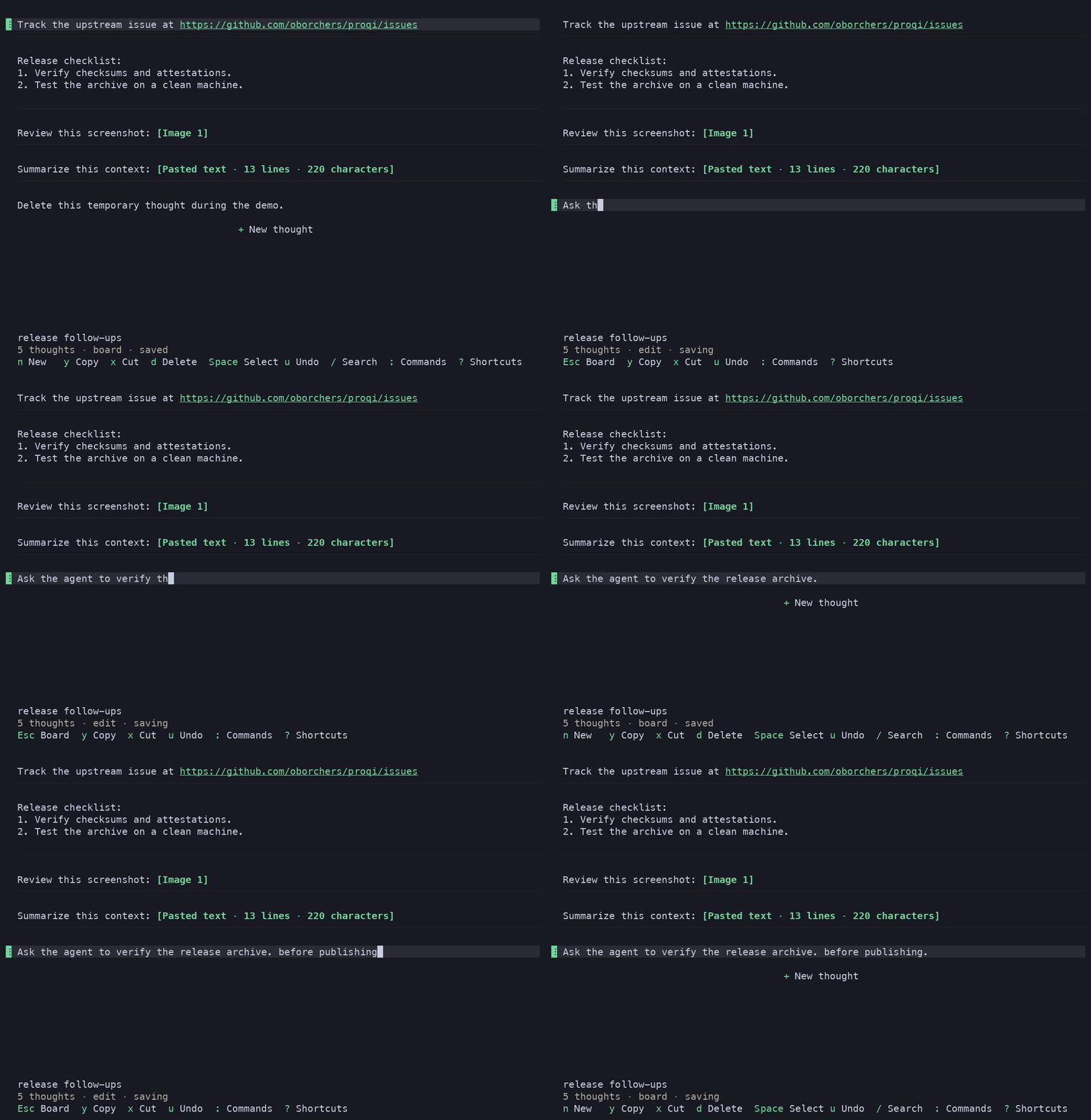
Proqi is the solution: an agent-ready prompt editor on steroids, built for power users. Capture independently; edit, select, duplicate, reorder, recover, and discover local skills and commands later.
On macOS, the same board becomes a Screenshot Inbox. Captures arrive as private, annotatable thoughts: no dragging across panes and no accidental drop into the agent.
One board, many prompts
Every thought stays editable. Keep alternatives and choose the next submission only when ready.
- Keep working in your terminal while coding agents continue.
- Define each next work piece in Proqi—not in a live Codex or Claude input.
- Capture text and screenshots, then edit, annotate, select, and order them.
- Copy one thought, a range, or the whole board; or submit the ordered board to a verified adjacent agent through Herdr.
Proqi is a prompt composer—not a task manager, Markdown IDE, or agent harness. Standalone work uses the clipboard. Native submission works only through verified Herdr, never arbitrary terminals, agents, or multiplexers.
Install
Homebrew is recommended:
brew install oborchers/tap/proqi
Scope Homebrew trust to this formula:
brew trust --formula oborchers/tap/proqi
brew upgrade --formula oborchers/tap/proqi
Or use Rust 1.88+:
cargo install proqi --locked
The latest release has
checksummed macOS/Linux archives and an amd64 Debian package. Proqi never runs
sudo, package managers, or updates implicitly. Uninstalling preserves data.
Start and resume
proqi                         # new board
proqi -c                      # latest inactive board here
proqi -r                      # searchable session browser
proqi -r <id-or-name>         # exact session
proqi sessions                # list and search
Run proqi -c in the agent's project and its last board returns. No temporary
prompt files or unsaved Sublime scratch document.
Changes autosave; exit prints the resume command. Boards rename, trash, restore, and run in parallel; one lease prevents concurrent editing.
A genuinely empty board opens with + Start typing. Type or paste immediately
to create the first thought, or click the insertion row to reveal the ordinary
empty editor first. Nothing is saved until content is produced. Press Esc to
use Board controls instead. Returning focus to the pane does not override that
Board choice.
Primary means logical Cmd (Super or Meta) on macOS and logical Ctrl
elsewhere. Proqi receives modifiers only after the operating system, keyboard
remapper, and terminal have handled the key. Raw Ctrl is not a second Primary
modifier on macOS.
The tables below describe the factory map. The complete stable action and context inventory is in context/KEYMAP_ACTIONS.md. Help and footer labels always show the bindings resolved from the active configuration.
Board controls
| Input | Action |
|---|---|
n, Enter on + New thought, paste, or click |
Create a thought |
Primary+V / p with no selection |
Paste exactly as a new thought |
j / k or arrows |
Focus next / previous; twice at a blocked bottom / top edge creates there |
Ctrl+↓ / ↑ or Ctrl+j / k |
Focus the last / first live thought without wrapping |
macOS Ctrl+N / Ctrl+Shift+N; elsewhere Alt+↓ / ↑ or Alt+j / k |
Insert a blank below / above the focused thought and edit it |
Page Up / Page Down |
Move five thoughts previous / next |
Enter or e |
Edit |
macOS Option+Shift+↓ / ↑; Primary+J / Primary+K, Primary+Shift+↓ / ↑, or drag |
Reorder |
Primary+C / y; Primary+X / x |
Copy; safe cut |
d or Del (Entf on German keyboards) |
Delete |
Space; Primary+A / a |
Toggle selection; select all |
Shift+↑ / ↓, K / J, or Shift+Page Up / Shift+Page Down; v then move |
Extend by one, extend by five, or latch a range |
macOS Ctrl+Shift+↓ / ↑ or Ctrl+Shift+J / K |
Extend the anchored range to the last / first live thought |
Primary+D / Shift+D |
Duplicate thought or selection |
Primary+Enter / s; Primary+Shift+Enter / Shift+S; then arrows or h / j / k / l if needed |
Submit and remove after acceptance; submit and keep |
Primary+Z / u |
Undo a board operation |
Primary+Shift+Z / Primary+Y |
Redo a board operation |
Primary+Shift+V / Shift+P |
Paste and clean up spacing |
f |
Clean up spacing in the focused thought |
c; /; :; i; ? |
Collapse; search; commands; Screenshot Inbox; help |
Esc; Primary+Q / q |
Clear selection; exit after durable flush |
Editor controls
| Input | Action |
|---|---|
Esc |
Return to the board |
Primary+A; Primary+U |
Select all; delete logical line |
Primary+Shift+U |
Delete containing sentence |
Primary+Z; Primary+Shift+Z / Primary+Y |
Undo; redo |
Primary+C / X; Primary+V |
Native copy / safe cut; paste exactly |
Primary+Shift+V |
Paste and clean up spacing |
Ctrl+Shift+F |
Clean up spacing in the complete active thought |
macOS: Cmd+← / → |
Move to the current wrapped visual-row start / end |
macOS: Option+← / →; elsewhere: Ctrl+← / → |
Move by word |
macOS: Ctrl+← / →; elsewhere: Alt+← / →; Home / End |
Move to the logical line start / end |
Shift + movement |
Extend text selection |
macOS: Cmd+Shift+← / → |
Extend to the current wrapped visual-row start / end |
Alt+↑ / ↓ or Page Up / Page Down; Ctrl+↑ / ↓ |
Jump five rows; complete thought start / end |
Enter; Tab; Shift+Tab |
Continue lists; nest a recognized list or insert spaces; outdent a recognized list while leaving ordinary text unchanged |
↑ / ↓ twice at a boundary |
Focus the adjacent thought, or create at the top / bottom board edge |
Primary+Enter; Primary+Shift+Enter |
Submit and remove after acceptance; submit and keep |
Type $name, /name, or supported @name |
Fuzzy-find and complete a local invocation |
↑ / ↓ or Primary+P / Primary+N; Enter / Tab; Esc |
Navigate, insert, or close invocation results |
Overlay and input controls
| Active owner | Factory controls |
|---|---|
| Help, update, Screenshot Inbox, release highlights | ↑ / ↓ or k / j; Page Up / Page Down; Enter when a choice is offered; Esc |
| Commands, search, transfer, global-delivery query | Type to filter; ↑ / ↓; Alt+↑ / ↓ or Page Up / Page Down; Enter; Backspace / Delete; text cursor keys; Esc |
| Invocation and invocation query | Type to filter; ↑ / ↓ or Primary+P / Primary+N; Alt+↑ / ↓ or page keys; Enter / Tab; Esc |
| Direction chooser | Arrows or h / j / k / l; Enter; Esc |
| Global-delivery disposition | ↑ / ↓ or k / j; page keys; Enter; Esc |
| Session Browser and Browser query | Type to filter; ↑ / ↓; Home / End; Alt+↑ / ↓ or page keys; Enter; Backspace / Delete; F2 rename and F8 trash while the query is empty; Esc |
| Rename and Browser rename | Type and use text cursor, Backspace, or Delete; Enter confirms; Esc cancels |
| Recovery | r retry storage; w export recovery; q or Primary+Q exits through durability handling; Esc remains the invariant close route |
| Empty insertion boundary | Board controls remain available; Enter or n creates; range and reorder actions are thought-only no-ops; Esc returns to the final thought |
By default, unmodified Del and d share the Board delete action. The versioned
keymap can replace or disable either alias. Modified Del is unbound on the
Board by default. Text contexts reserve ordinary, shifted, Option/Alt and
AltGr-compatible printable input. Named editing keys remain contextual.
The session Browser uses F2 to rename and F8 to trash while its query is empty;
uppercase R and D remain search text. List and direction defaults preserve
symmetric arrow and Vim-style navigation.
Primary chords and Board characters such as y, x, u, s, Shift+S, and q
are ordinary aliases of the same configurable actions. A host can consume a
chord before Proqi receives it. A host-performed bracketed paste stays exact.
For Ghostty, this explicit binding emits logical Super+Shift+v for Smart Paste:
keybind = super+shift+v=csi:118;10u
The example passes Ghostty's config validator and its emitted bytes are covered by real macOS PTY tests. It is not a guarantee for every keyboard layout or host mapping. Proqi never modifies host configuration. To inspect delivery:
proqi diagnostics keypress --context board,edit --timeout-ms 5000
proqi --json diagnostics keypress --context board --defaults
Capture reports the logical key, exact modifiers, phase, state, selected context
and configured action. Escape cancels. --defaults works even with invalid
configuration. A timeout reports no key event received; Proqi cannot know which
layer, if any, consumed the chord. It records no paste, session content or raw
terminal responses. Use the Board fallback or Commands when delivery is blocked.
Ghostty's macOS defaults assign application behavior to many Command chords,
including Cmd+Q, Cmd+A, Cmd+D, Cmd+J, Cmd+K, Command plus vertical
arrows, submission chords, and clipboard/history chords. Those bindings run
before the PTY, so Herdr and Proqi receive no key event. performable: only
passes through when the Ghostty action is unavailable and is not a general TUI
fallthrough. See Ghostty keybindings.
Ghostty also maps Cmd+Left and Cmd+Right to raw Ctrl+A and Ctrl+E by
default. If a keyboard remapper maps Home and End to those same Command
arrows, both physical routes become identical downstream. Proqi does not guess
their origin. Logical-line movement therefore prefers Ctrl+Left and
Ctrl+Right on macOS, and Alt+Left and Alt+Right elsewhere. Named Home
and End remain compatible aliases when those events actually arrive.
Exact paste is always the default. Explicit spacing cleanup preserves authored line breaks, collapses repeated spaces and tabs, and reduces multiple blank lines to one paragraph break. It preserves recognized list structure and leaves code, tables, quotes, paths, URLs, controls, and annotated semantic ranges unchanged. Large-paste folds are recomputed from the transformed content.
Mouse input covers the same core workflow. Images, files, and large pastes fold
into compact annotations while their content stays intact. In Edit mode, an
unmodified Space on one completely selected collapsed annotation inserts a
space immediately before it without replacing it. See
invocation compatibility.
Invocation lookup accepts compact ordered abbreviations such as $aos-ce for
$aos-communication-email. Exact and prefix matches remain strongest, followed
by contiguous and separator-aware fuzzy matches. The typed sigil remains a hard
namespace boundary, so slash, dollar, and at forms never mix.
Inside Herdr, opening the same invocation picker also discovers recognized live coding agents across the server. Selecting one inserts an inert collaborator location and displays it as a compact inline mention. It never focuses or submits to that agent.
Screenshot Inbox on macOS
From + Start typing, press Esc, then i: new Desktop screenshots become
annotatable image thoughts. From an ordinary Board, press i directly. Proqi
never takes, uploads, analyzes, copies, or configures them.
One process listens. It pauses after 10 unattended captures or 20 inactive minutes. Resume ignores the gap; failed imports require explicit retry.
macOS may request terminal Files & Folders access—not Screen Recording or Accessibility. Linux reports macOS-only availability.
[screenshot_inbox]
capture_all_new_images = false
notify_terminal_on_auto_pause = false
Native submission with Herdr
In Herdr, Proqi finds verified adjacent agents. In Board mode, s or
Primary+Enter submits the selected thought or selection in visible order and
removes after acceptance; Shift+S or Primary+Shift+Enter keeps it. While editing,
the same Primary chords submit only the active thought. The palette submits the
whole board. With several verified adjacent agents, either edit
chord opens the temporary direction chooser; press an arrow or h, j, k,
or l next to choose the target. Those keys select a direction instead of
moving or inserting text while the chooser is open. Esc cancels the chooser
and returns to the unchanged editor.
When an accepted submission removes the final thought, Proqi returns to the
passive + Start typing board. It does not create a replacement blank thought;
the next typed or pasted content creates the next thought directly.
Busy receivers decide whether input steers or queues. Any failed verification leaves the board unchanged.
Keep deferred prompts in Proqi rather than in the native harness input when other senders can target that agent. When two submissions overlap, the harness may not keep them in separate turns, so text already waiting in its input can merge with an incoming message. Proqi preserves its verified submission flow, but it cannot separate content after the receiving harness has combined it.
Proqi never invokes a shell, injects keys, reads chats, or waits. Herdr is optional.
Protocol 19 supports Claude Code, Codex, Pi, and Hermes. OpenCode and Kilo are conditional; Cline is deferred.
JSON CLI and agent skill
The CLI also exposes versioned JSON:
proqi --json capabilities
printf '%s' 'Review this.' | proqi --json thoughts add <session-id>
proqi --json thoughts send <source> <thought-id> <destination> --remove
The Proqi skill uses it without scraping the TUI:
npx skills add oborchers/proqi --skill proqi -g --agent codex --agent claude-code
The skill does not install the Proqi executable. Run capabilities first.
For read-only-first failure investigation:
npx skills add oborchers/proqi --skill proqi-debug -g
Privacy, durability, and recovery
Thoughts, attachments, settings, and redacted logs stay local. No telemetry, cloud sync, collaboration service, or upload.
The footer reports durability. Failures block destructive exit and remain retryable/exportable. Editor and board history survive restart.
proqi doctor
proqi diagnostics collect --output proqi-diagnostics.json
Diagnostics are redacted and local; review before sharing. See
SECURITY.md. Disable content-free update checks with
check_for_updates = false.
Collected update diagnostics include only closed lifecycle stages, aggregate
participant and replacement counts, stable failure codes, and convergence.
Finalization diagnostics distinguish unavailable control, unavailable private
cache state, and an exact-state mismatch without recording local identifiers.
Configuration
Optional platform-native config.toml:
check_for_updates = true
theme = "auto" # auto, light, dark, limited, or a bounded local theme file
density = "comfortable" # or compact
merge_separator = "\n\n" # one blank line between merged thoughts

[keymap]
schema_version = 1

[keymap.bindings.board]
"submission.submit_remove" = [
  { key = "Enter", modifiers = ["Primary"] },
  { key = "s" },
  { key = "F5" },
]
"submission.submit_keep" = [] # keyboard aliases disabled; Commands stays available
"thought.delete" = [{ key = "d" }, { key = "Delete" }]

[keymap.macos.edit]
"submission.submit_remove" = [{ key = "Enter", modifiers = ["Super", "Alt"] }]

[keymap.portable.edit]
"submission.submit_remove" = [{ key = "F5" }]
Each supplied context/action list replaces all its default aliases. Omitted pairs retain defaults; platform overrides replace common lists. Control, Alt, Shift, Super, Meta and Hyper are independent logical modifiers. Primary expands to Super/Meta on macOS and Control elsewhere. Unknown identifiers, collisions, text theft, and removal of Escape or required recovery routes fail before terminal setup.
The legacy [keybindings] table remains accepted through explicit translation,
including its historical aliases. It cannot be mixed with [keymap]. See the
versioned contract and migration guide and
complete action/context inventory.
Thought transformations retain their default Primary+T and Board t behavior;
Commands remains available for split, extract and merge when a chord is unbound.
Unsafe theme contrast is rejected. See the
theme example. Invocation roots stay local.
Sentence deletion uses a documented Unicode profile with unavoidable ambiguity.
See sentence deletion.
Visual-row selection uses the current rendered width and folded presentation.
On macOS, Cmd plus horizontal arrows uses the current wrapped row and
Option retains word movement. Elsewhere, Ctrl plus horizontal arrows retains
word movement, including with Shift. If the terminal intercepts the macOS
Cmd-arrow selection chords, use the command palette or the configured
versioned editor.extend_visual_row_start and editor.extend_visual_row_end aliases.
Compatibility and contributing
Proqi supports macOS and x86-64 GNU/Linux; only the latest 0.x is supported.
It is an MIT-licensed binary. Contributors: CONTRIBUTING.md,
PRODUCT.md, ARCHITECTURE.md.
cargo build --locked
cargo run --bin proqi
cargo xtask check # canonical local gate
The demos use the release binary; the assets gate checks dimensions, links, and privacy.
Comments