 Home Assistant client">
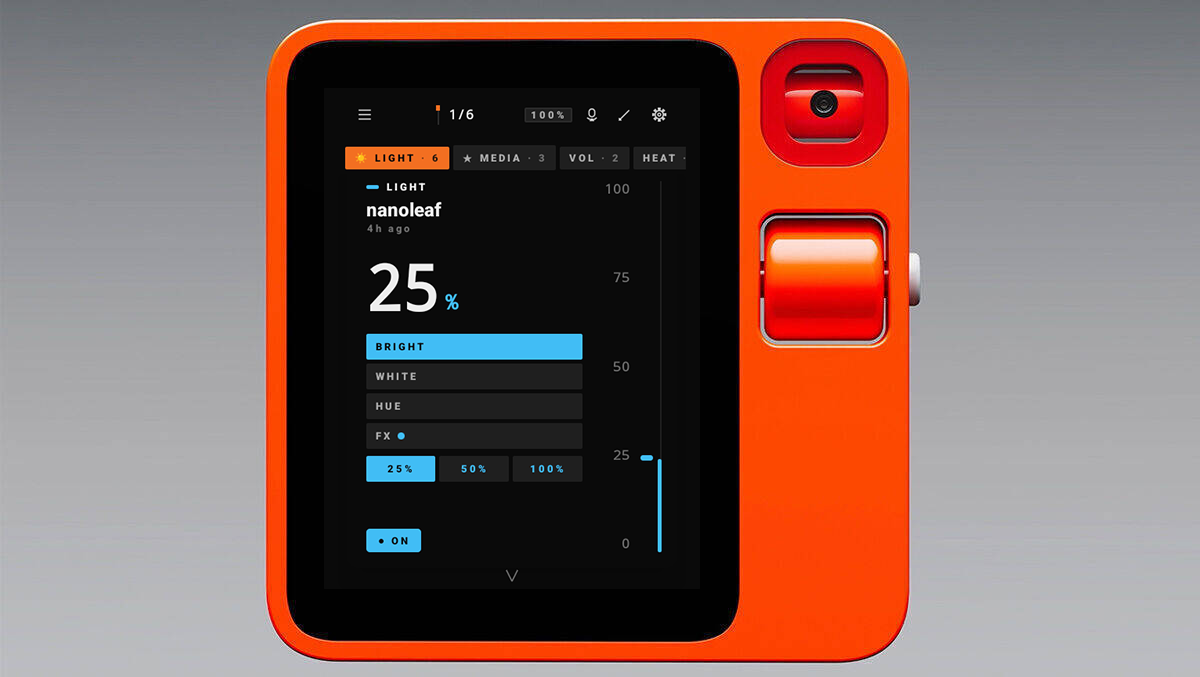
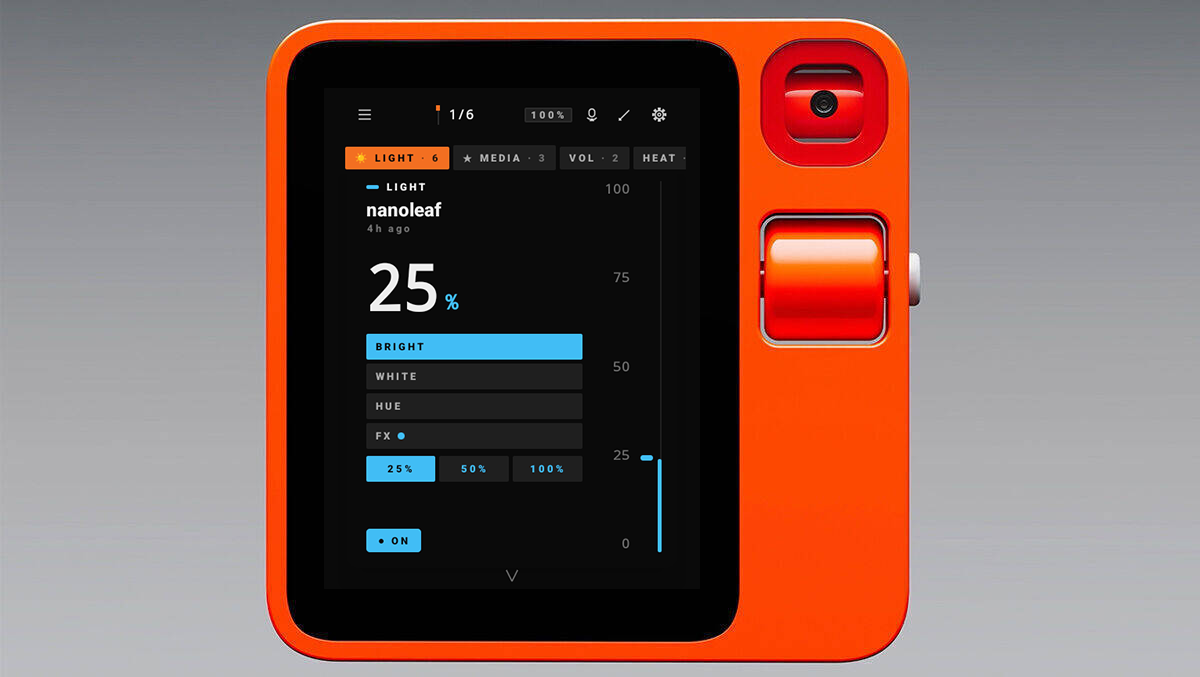
A native Home Assistant client originally built for the Rabbit R1, and equally at home on any Android 11+ phone or tablet. On the R1 the physical scroll wheel adjusts every scalar HA entity (light brightness, fan speed, cover position, media volume); on touch devices the same controls respond to drag and tap.
Where the official Home Assistant Companion app is fundamentally a WebView wrapped around HA's Lovelace frontend, this client renders everything natively in a Compose-first idiom and falls back to a Lovelace WebView only for the long tail that doesn't fit (HACS cards, automation editor, configuration panel). The card stack + scroll-wheel idiom is tuned for the R1's portrait display, but the layout adapts cleanly to handheld phones, wall-mounted tablets, and kiosk installs; touch replaces the wheel without the UI feeling like an afterthought. The trade-off: this client requires Android 11 or newer, where the official Companion app reaches back to Android 8.
Features
Awareness: the at-a-glance surfaces
- TODAY dashboard: single screen with time-of-day greeting, current outdoor weather (with condition glyph + temperature), sun position (above/below horizon, next rise/set), active HA timers with remaining time, currently-playing media with prev/play/next transport, who's home, the next calendar event, DRAW (total power consumption summed from every power-class sensor), LIGHTS ON / CAMERAS / ALERTS metrics row, a BATTERIES LOW alert card surfaced when any battery sensor drops below 20%, and a preview of any HA persistent alerts. Pull-to-refresh; auto-refreshes every 60 s. Reachable from Settings → Dashboard or from Quick Actions (long-press hamburger). Can be set as the launch screen for kiosk-style installs via Settings → Behaviour → Start on Dashboard.
- Quick Search: substring search across every HA entity (name / entity_id / area), with ALL / CONTROLS / SENSORS / ACTIONS filter chips. Tap a result to fire (scenes / scripts / buttons), toggle (lights / switches / etc.) or surface a detail toast (sensors). Long-press to drill into that entity's
/historyview in HA's web UI. Settings → Quick Search. - Cameras: live polling snapshots from every
camera.*entity. LIST view shows the directory + state chip; GRID view shows 2-column polling tiles with 8 s cadence. Tap any camera for a fullscreen overlay at 4 s polling cadence. - Weather: every
weather.*entity with condition glyph (☀ ⛅ ☁ ☂ ❄ ⚡ …), temperature, humidity, wind, pressure, and a 7-day daily forecast strip when HA exposes the legacyforecastattribute. - Who's home:
person.*+device_tracker.*in one directory, home / away coloured per state, with GPS-accuracy chip and source-type chip on device_trackers. - Calendars:
calendar.*entities with NOW pill for currently-happening events. Tap a row to drill into the next 14 days of events via HA's/api/calendars/<id>endpoint. - Recent Activity: HA's logbook reverse-chronologically, 12 h / 24 h / 3 d windows, full-text search. Tap a row to drill into that entity's history; long-press to open it in HA's web UI.
- Notifications: every
persistent_notification.*entity with title, message, timestamp, and DISMISS chip. Auto-refreshes every 30 s while open. - Areas: HA's area registry with entity count per area, expandable rows showing the full entity list. Powered by a server-side Jinja template against
/api/template. - Zones:
zone.*registry with an abstract Canvas map at the top (each zone a circle sized by its radius, positioned by its lat/lon, occupied zones filled in accent), plus a per-zone occupancy list (which persons / device_trackers are in each zone right now). An OUTSIDE bucket collectsnot_homepeople. - Energy: DRAW (sum of every
device_class=powersensor), PRODUCTION (heuristic sum of solar / pv / grid_export / production sensors), TODAY's kWh (sum ofdevice_class=energytotal_increasingsensors), and the top 5 current consumers ranked by W draw. Native: no WebView, no Lovelace bundle. - History drill-in: full-screen view of any entity's recent state-change history, with a 1 h / 6 h / 24 h / 7 d window picker, a 180-dp Compose Canvas chart with explicit min/max axis labels, and a 5-row numeric summary (current / min / max / avg / sample count). Reachable via the 📈 glyph on Search rows OR by tapping any row in Recent Activity.
Control: the things you act on
- Scroll wheel control: spin to adjust any scalar HA entity (lights, fans, covers, media players). Spring-animated slider gives a satisfying overshoot-and-settle on each turn.
- Card stack UI with tabs: one full-screen card per favourite entity; swipe up/down to flip between them, swipe left/right (or wheel-flick) to switch between rearrangeable tab groups.
- Per-card customization: long-press the card-stack hamburger to open a per-card CUSTOMIZE sheet, organised as nested submenus (NAME / GLYPH / POSITION / TAP / LIGHTING / LOCK / RESET). Each section ships an INHERIT chip, a DEFAULT chip, and per-field overrides; a live preview shows your changes in place. Includes a 9-way POSITION-PIP picker, per-card glyph override, and tap-action override (toggle / fire / noop / open-detail).
- Native dashboards: read your HA
lovelace/configand render every supported card type natively in Compose. Thirteen card types (Entities, Tile, Button, Light, Gauge, Markdown, Heading, Glance, Weather Forecast, Horizontal Stack, Vertical Stack, Grid, Conditional). Drag-and-drop dashboard editor with per-view overrides; an UNSUPPORTED placeholder surfaces anything we don't render yet with a one-tap fallback into the Lovelace WebView. Reachable from Settings → Dashboards. - HA Assist: type or 🎤 dictate a prompt and HA's conversation engine handles it; multi-turn context threaded across calls. The mic button uses the system speech recognizer so no
RECORD_AUDIOpermission is needed. - Scenes & Scripts launcher: tap-fire access to every
scene.*/script.*, with substring search, kind filter chips, pull-to-refresh, and long-press for theentity_id+ service name. - Automations: list of every
automation.*entity with enabled-state chip, mode badge (single / parallel / queued / restart), running-instance count, and a relativelast_triggeredtimestamp. Tap to toggle enable/disable; tap the right-edge RUN to fireautomation.triggerwithskip_condition: true; ★ to pin to the card stack. RELOAD chip in the top bar firesautomation.reload. - Helpers: every HA helper domain (
input_booleantoggles,input_numbersteppers,counter,input_selectcycle-through-options,input_text/input_datetimeread-only,input_buttonpress,timerstart/pause/cancel). Bucket-chip filters at the top group by helper kind; ★ pins frequently-used helpers to the card stack. - Master OFF actions: one-tap mass off for all lights, all media, or all switches from the Scenes & Scripts screen. HA's
entity_id: "all"trick under the hood. - Alarm control panel card: native
alarm_control_panel.*card with ARM HOME / ARM AWAY / ARM NIGHT / DISARM actions and an optional per-entity PIN keypad that gates every state change. PIN stored encrypted at rest alongside OAuth tokens. - Quick Actions drawer (long-press chrome hamburger): also doubles as the navigation drawer with a 2×4 BROWSE grid (Today · Assist · Search · Scenes · Automations · Energy · Alerts), so every major surface is one long-press + one tile-tap away.
- App shortcuts (long-press launcher icon): Search · Assist · Today · Automations land directly on those surfaces.
- Quick Settings tiles: bind up to four HA entities to Android's notification-shade quick-settings panel; each tile toggles its bound entity from anywhere on the phone without opening the app. Configured via Settings → Behaviour → Quick Settings tile (slots A through D).
Power tools: for the long tail
- Templates evaluator: POST a Jinja2 template to HA's
/api/templateand render against live state. Side-by-side example chips (Sun elevation, On lights count, Unavailable, Areas) for one-tap discovery. RECENT history recalls past renders; tap COPY to write the result to the clipboard. - Service Caller: fire any HA service (
automation.reload,homeassistant.check_config,persistent_notification.create, …) without leaving the device. JSON data payload editor with PASTE chip, RECENT history, result panel with copy-to-clipboard. - Services Browser: discoverable directory of every service HA exposes via
/api/services, grouped by domain, with substring search and tap-to-copy to populate the Service Caller. - Updates: surface every HA
update.*entity (HA Core, Supervisor, OS, add-ons, integration firmware) with installed→latest version diff, release notes, AUTO badge for entities withauto_updateenabled, and a one-tap INSTALL action (with optional pre-install backup for CORE entries). - Repairs: HA's repairs/issues feed (the same set the HA frontend shows under Settings → System → Repairs). Severity-coloured rows; IGNORE / RESTORE buttons fire
repairs/ignoreserver-side. Pulled live over the WebSocket. - Devices: native browser for HA's device registry. Substring search across name / manufacturer / model / area, expandable rows with full device metadata + the entity list each device contributes. Rename inline.
- Integrations: native browser for HA's
config_entries(Z-Wave, Zigbee, every cloud integration, every YAML-loaded platform). Per-entry RELOAD chip firesconfig_entries/reload; entries surface error reasons when HA flags them. Filter by domain. - Blueprints: list every imported blueprint (automation + script), preview the YAML, IMPORT a blueprint by URL through HA's
blueprint/importWS command. - Logs: full HA log viewer with level filter (DEBUG / INFO / WARNING / ERROR / CRITICAL). Tail-aware: shows the last N bytes the server returned, with a COPY chip that hands the currently-filtered text to the clipboard. Auto-refreshes every 10 s.
- Users: read-only browser for HA's user registry. Shows display name, owner flag, active flag, system-generated flag, and the auth providers associated with each user.
- Tags: native NFC and QR tag registry editor. List every tag HA knows, rename inline, delete, and see when each tag was last scanned.
- Statistics: native long-term recorder chart. Pick any statistic-tracked entity, choose a period (5m / hour / day / week / month), and render a Compose Canvas chart with explicit min/max axes.
- Backups: list every backup HA's
backup/infoendpoint knows about (HA Core 2024.4+) with name, timestamp, size, and protected flag; CREATE BACKUP NOW button firesbackup.createand refreshes the list once HA writes the new backup. - Media Browse: navigate any media_player's library via
media_player/browse_media. Type the entity_id, drill into folders, tap to play on the bound player. - System Health: HA's
/api/config(version, location, timezone, components, internal/external URLs), a NETWORK SECURITY panel showing the current TLS pinning + mTLS state, an inline PING chip that measures round-trip latency to/api/config, and the last ~32 KB of/api/error_log. COPY chip writes the full log to the clipboard for bug reports. - Lovelace WebView: in-app fallback to HA's own frontend for features we don't render natively (HACS custom cards, automation visual editor, full configuration panel). Token handoff via injected
localStorage.hassTokensso no second OAuth round-trip. System back navigates the WebView's history first; only falls through to popBackStack when there's no history left. - External automation intent: Tasker / MacroDroid / Automate can fire HA service calls through this app by broadcasting
com.github.itskenny0.r1ha.action.HA_SERVICE_CALLwithha_domain/ha_service/ha_entity_id/ha_data_jsonextras. Opt-in via Dev menu so the surface stays closed on fresh installs. - HA notification mirror: opt-in posting of HA persistent_notifications into the Android system notification shade, with a DISMISS action that fires
persistent_notification.dismissserver-side. - Live template subscriptions: Templates screen has a LIVE toggle that subscribes to HA's
render_templateWS command. Every state change that affects the template re-renders in place. - Live activity tail: Recent Activity screen has a TAIL toggle that subscribes to HA's
logbook_entryevent stream. New entries prepend in real time while the REST window query still backs the initial fill. - NFC tag scanning: opt-in foreground reader. Tap an NFC tag against the device while R1HA is open and the app fires HA's
tag_scannedevent with the tag UID astag_id. - iBeacon advertiser: opt-in BLE peripheral that broadcasts as an iBeacon (configurable UUID + major + minor). HA's iBeacon integration picks the device up as a device_tracker for presence / proximity automations.
- Zigbee pairing: opens the network for joins on whichever Zigbee backend HA is using (ZHA, Zigbee2MQTT, or deCONZ), surfaces newly-discovered entities as they enrol, and lets you rename + assign an area from a single sheet without leaving the app.
- Webhook receiver: opt-in foreground TCP listener. HA's webhook automations can POST at
http://<device-ip>:<port>/webhook/<id>and the body shows up as an expandable toast. Useful for triggering on-device feedback from a server-side rule. - MQTT publish: one-shot client that connects to any broker, fires a single publish (configurable topic, payload, retain flag, TLS, auth), and disconnects. Implemented by hand so the APK doesn't pick up a daemon-style dependency for what's really a fire-and-forget message.
- Voice satellite: push-to-talk surface that pipes mic audio at HA's assist pipeline (STT, conversation, TTS) over the existing WebSocket and plays the response. No wake-word yet; that needs an on-device model and is a separate cycle's work.
- Home-screen widget: single-tile launcher widget. Tap to open the app, drop it anywhere on your launcher for one-touch access.
- Background entity-cache refresh: opt-in JobService warms the entity cache every ~15 min while the app is closed so Quick Tile state and cold-start paint stay fresh.
- Long-lived access token entry: alternative to OAuth for kiosk-style R1s. Paste an HA long-lived access token; stored encrypted at rest with the same AndroidKeystore-wrapped AES-256/GCM key as OAuth tokens.
- Gesture-first navigation: swipe left for Settings, right for the Favourites picker, tap the value area to toggle on/off; small chevron-back buttons on every sub-screen plus full system-back support.
- OAuth sign-in: enter your HA URL once and authenticate in an in-app WebView; tokens encrypted at rest with an AndroidKeystore-wrapped AES-256/GCM key.
- Three themes: Pragmatic Hybrid (default), Minimal Dark, Colourful Cards. Switch live in Settings with a side-by-side preview.
- Backup & restore: export/import your favourites, tabs, and settings as a single JSON file from Settings.
- Fully configurable: wheel step (1/2/5/10%) and acceleration, haptics, keep-screen-on, display mode, on/off pill, area labels, position dots.
- Built for the R1, scales beyond it: designed around the R1's small portrait display and physical scroll wheel (handles both
DPAD_UP/DOWNandVOLUME_UP/DOWNkeycodes so it works across ROM variants); on phones and tablets the same layout responds to touch + gesture so the wheel-less devices don't feel like an afterthought.
Requirements
- Android 11 or newer on any phone, tablet, or wall-mounted kiosk display.
- The Rabbit R1 (primary target) running LineageOS 21 GSI (Android 14) or CipherOS (Android 16).
- A reachable Home Assistant instance (local network or remote URL).
- For sane UI scaling on R1 LineageOS GSI:
adb shell wm density 180.
Install
Download the latest r1ha-YYYY.MM.DD.apk from the Releases page and install:
adb install r1ha-YYYY.MM.DD.apk
Or copy the APK to the device and open it with a file manager.
Build from source
Prerequisites: JDK 17+, Android SDK with platforms;android-35 and build-tools;35.0.0.
git clone https://github.com/itskenny0/Rabbit-R1-HA.git
cd Rabbit-R1-HA
./gradlew :app:assembleDebug
adb install app/build/outputs/apk/debug/app-debug.apk
The local build uses today's date as the version (YYYYMMDD for versionCode, YYYY.MM.DD for versionName); CI passes APP_VERSION_CODE / APP_VERSION_NAME from the release tag.
Releasing
Releases are date-tagged. Push a tag in the form r1ha-YYYYMMDD:
git tag "r1ha-$(date +%Y%m%d)"
git push origin "r1ha-$(date +%Y%m%d)"
The release workflow builds the APK, renames it to r1ha-YYYY.MM.DD.apk, generates release notes from git log since the previous tag, and attaches the APK to a stable GitHub Release; no keystore management or repository secrets required.
Comments