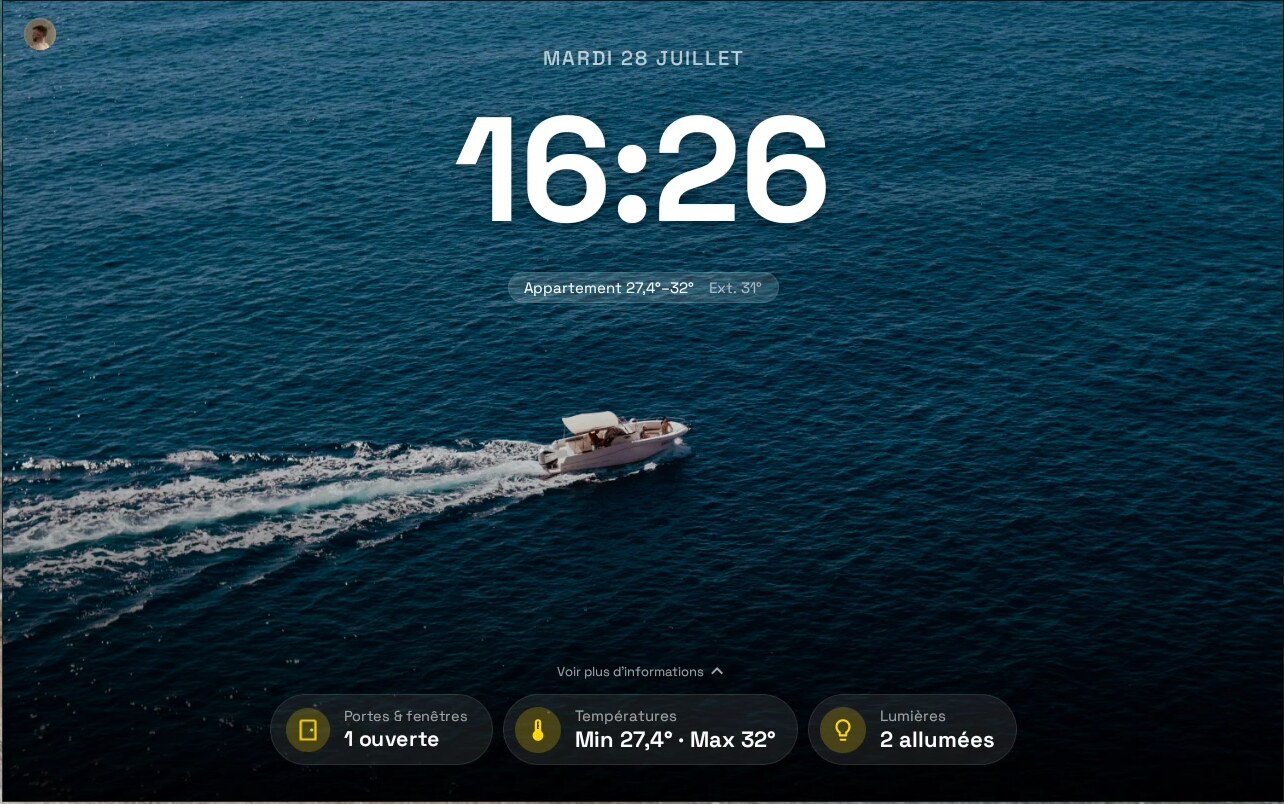
A real Android launcher that behaves like an appliance — and hands you Home Assistant in one tap.
A phone app on a wall is still a phone app: a scrolling page of cards, three feet away, lit up at 2am. This is built to be the other thing — an appliance. Dark and still when nobody is near it. One glance tells you what matters. One tap takes you as deep as you want.
That is the experience a smart display gives you out of the box, and what a wall panel usually loses: anyone in the house can read it at a glance, without learning a dashboard. No grid of forty tiles, no graphs, no cards to scroll.
It is a real launcher, not a dashboard app. It takes the home role and does the whole job — swipeable pages, icons placed exactly where you drop them, widgets, app shortcuts on long-press, back that behaves. Its default screen just happens to be a full-screen clock over your wallpaper instead of a grid of icons. Tap that screen and it opens the app you designate — Home Assistant by default, but it is your choice.
Home Assistant is the integration, not the requirement. Point it at your instance and the clock screen grows a row of live controls ranked by what actually matters right now — an unlocked door outranks the living-room lamp, automatically — and the device publishes its own sensors back over MQTT. Skip it and you still have a launcher with a beautiful idle screen.
It runs on any Android device. Android 9 and up: a small smart clock, a 10" tablet, a large wall-mounted panel. It was built on a Meta Portal — the name is where it started, not where it runs.
Status: used daily on real hardware, actively developed, rough edges documented below. Not yet on any store — you sideload it with
adb. Heads-up: the UI is currently French-only. i18n is the #1 wanted contribution.
Screenshots
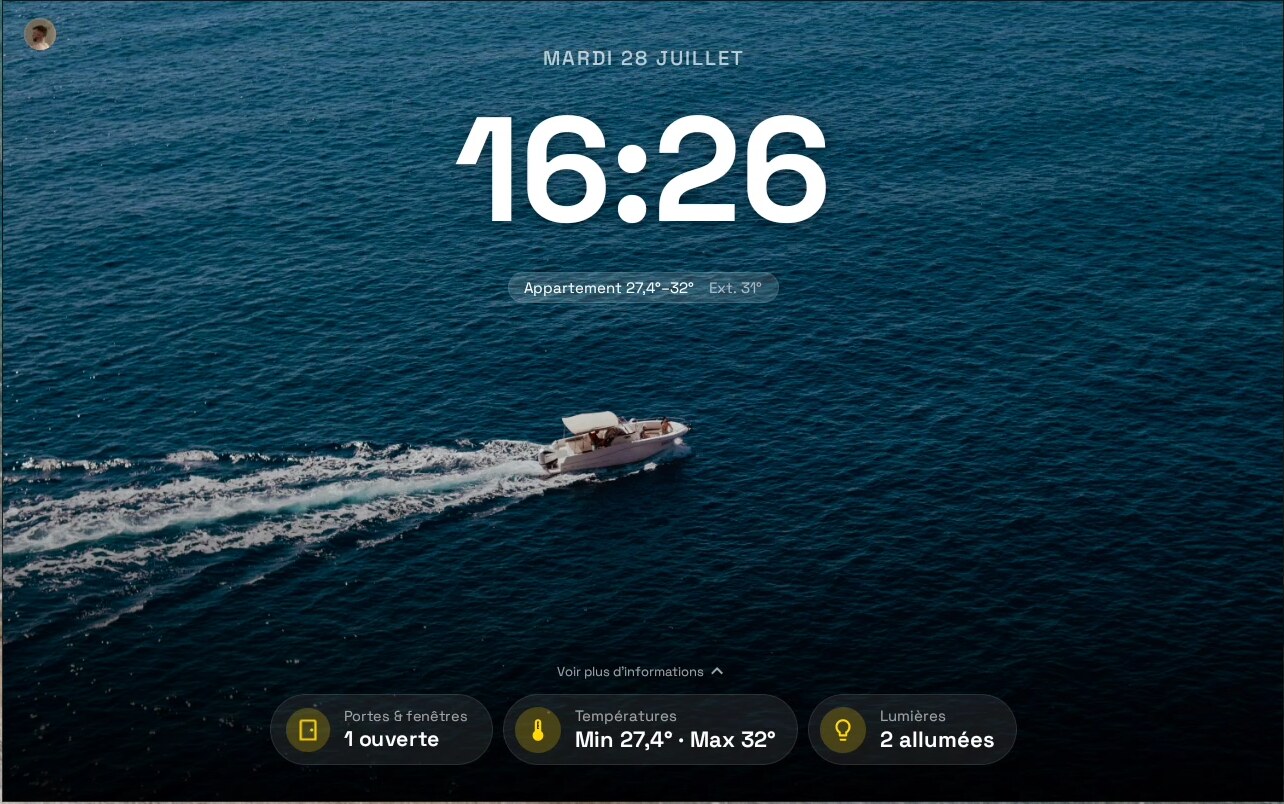
Idle — clock over your wallpaper, with the three pills that matter.
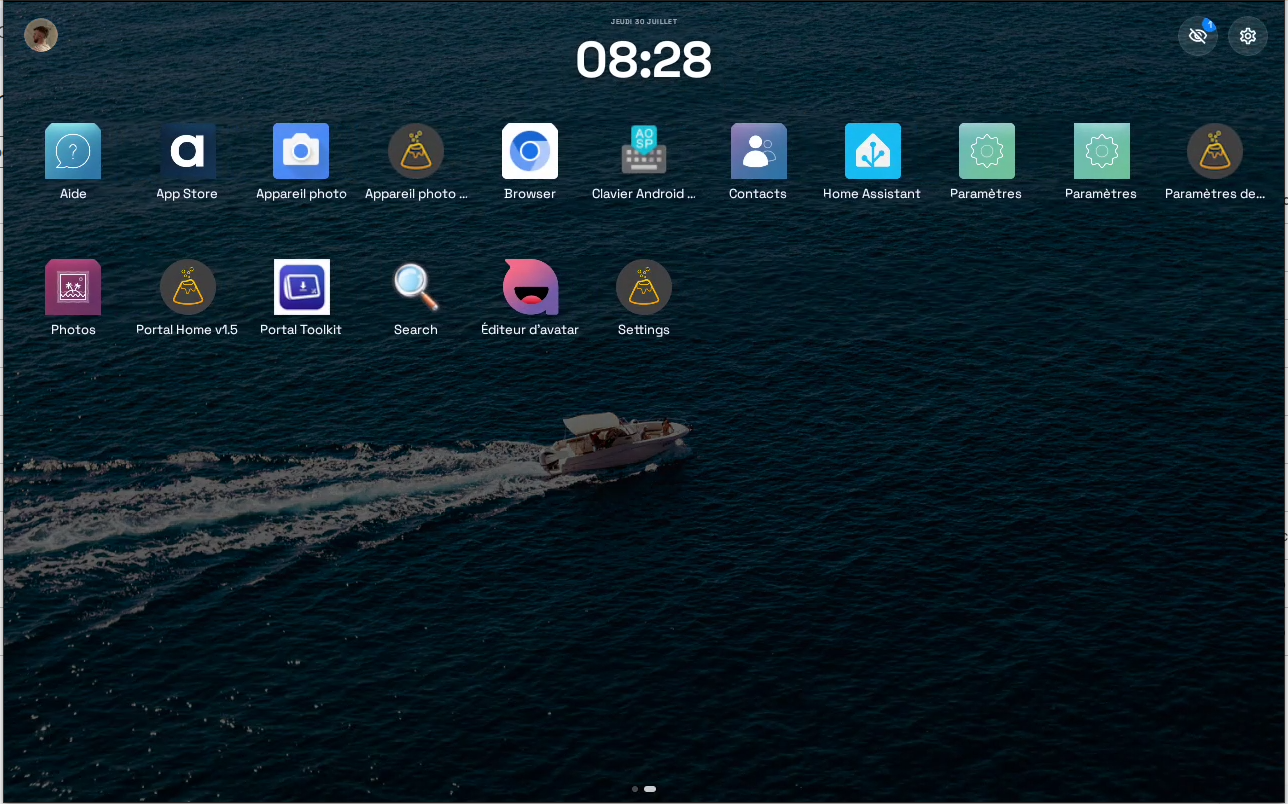
Swipe left and the clock shrinks into the top bar — the rest is a real app grid, icons placed exactly where you drop them, hidden apps and Settings tucked into the top bar instead of eating a tile.
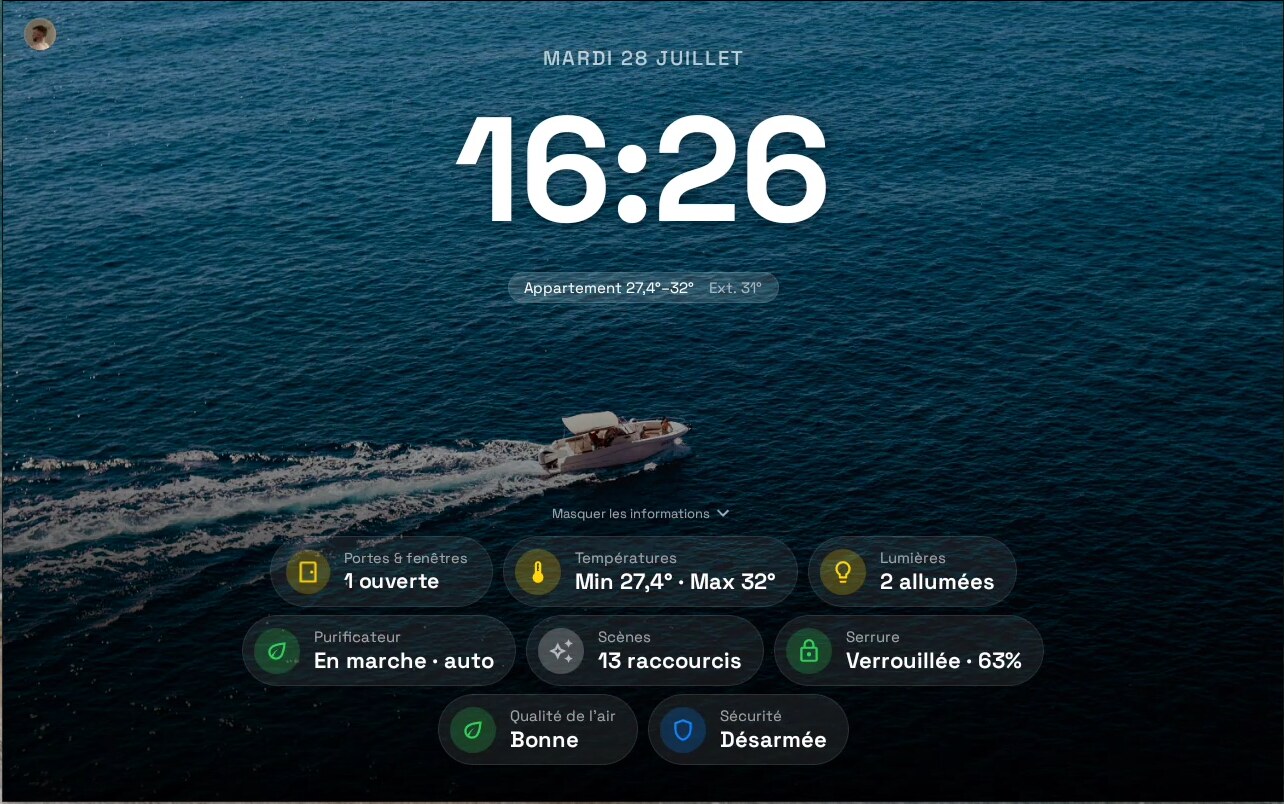
One tap on "Voir plus d'informations" and the full tray unfolds — openings, temperatures, lights, purifier, scenes, lock, air quality, alarm — ranked by urgency, not by config order.
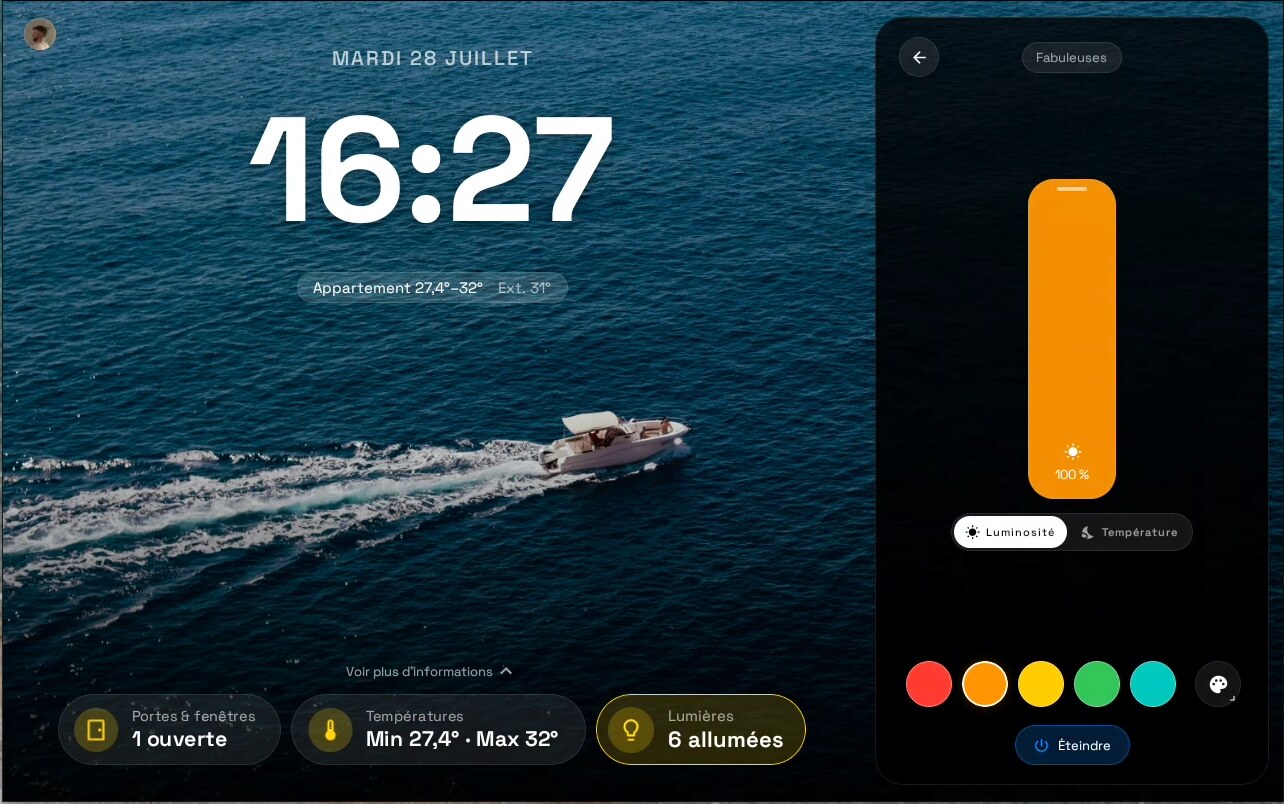
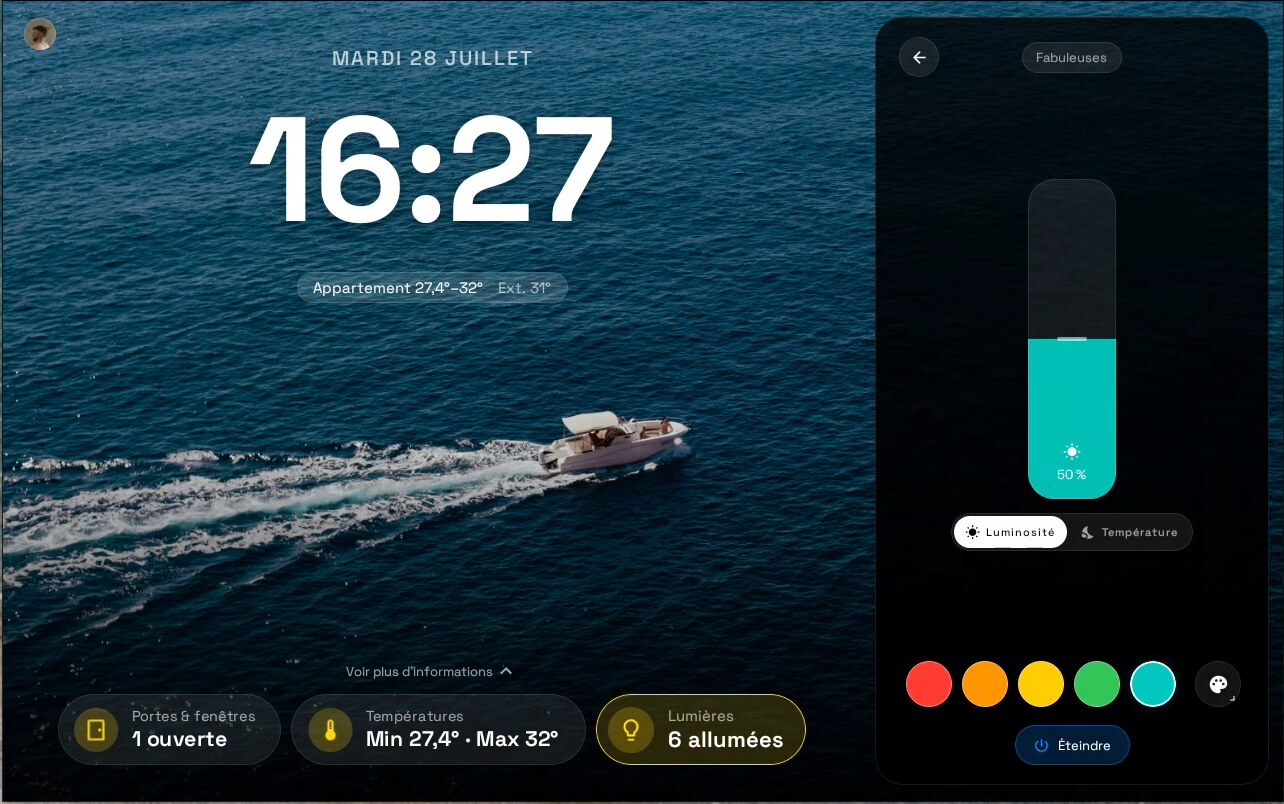
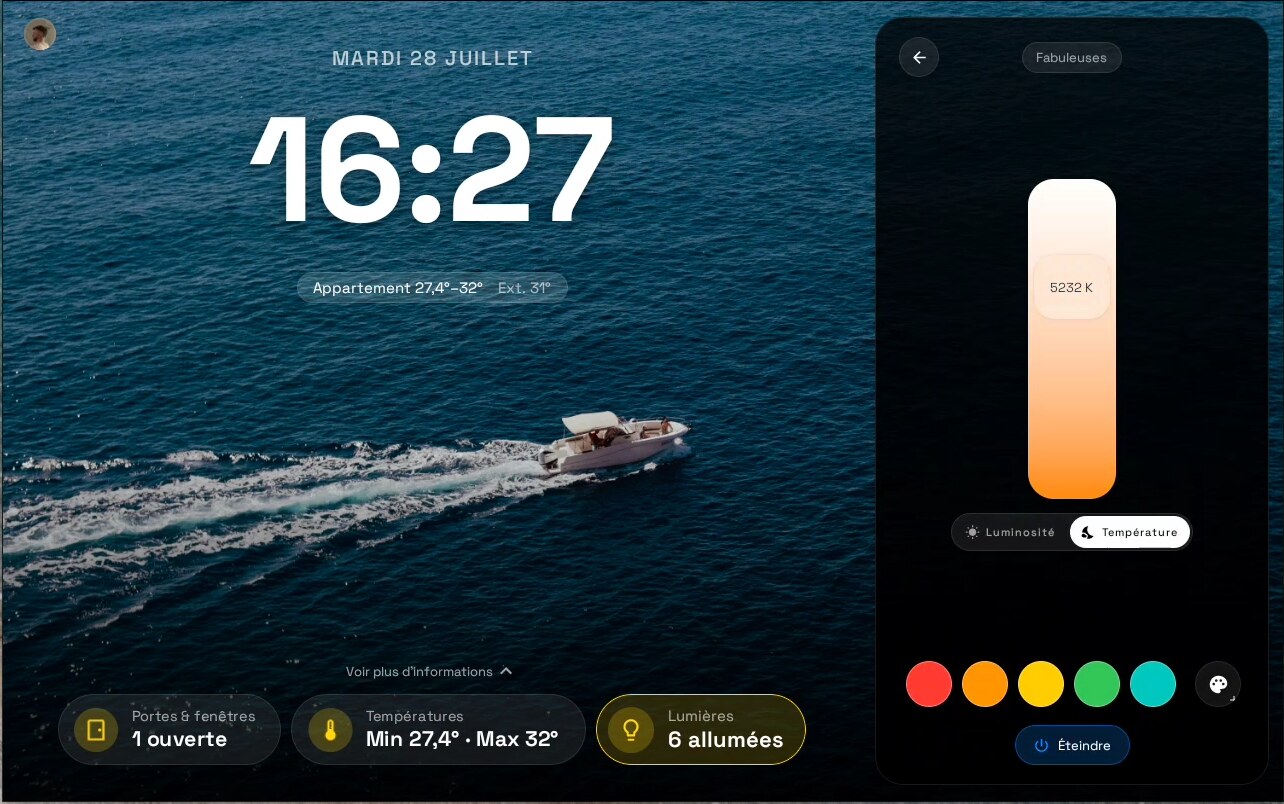
Light panel — brightness, then color temperature, then the color row. The slider is the light: it fills with the colour the bulb is actually set to.
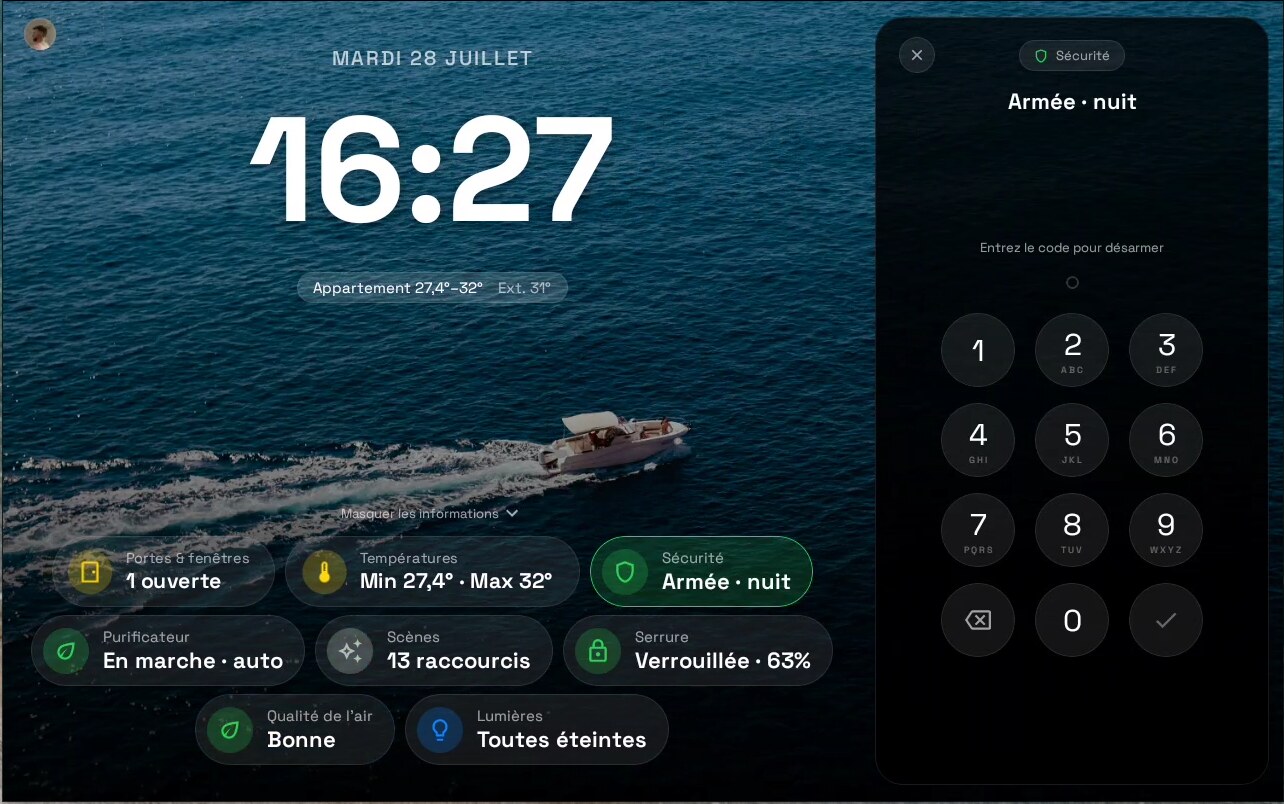
Alarm — arm/disarm with a real keypad, not a dropdown.
Media — cover art, transport, multi-room volumes.
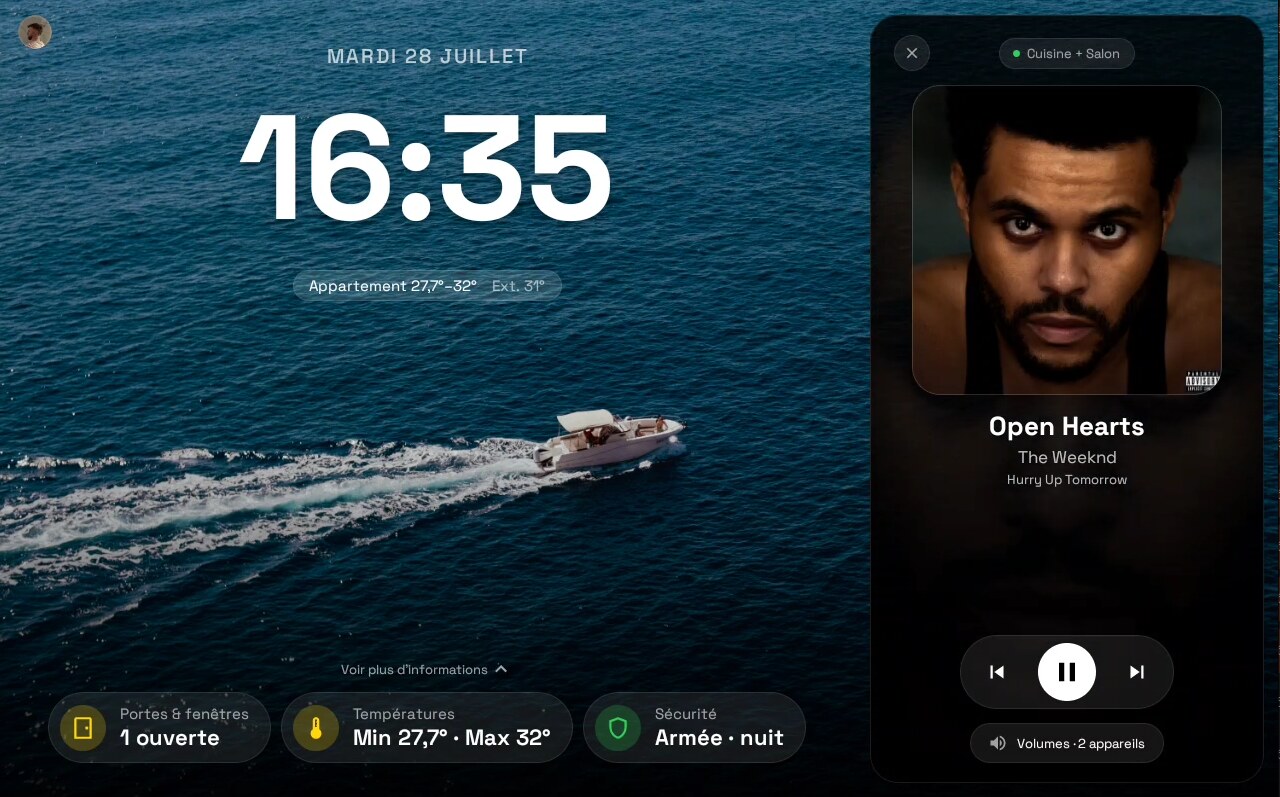
Still missing: thermostat panel in situ, vacuum, energy gauge, presence, clock-theme editor. If you run this on a device, screenshots are a genuinely useful PR.
Design
The reference is Apple, not Home Assistant's own dashboards. Three rules:
- Simple. One thing per screen. The idle screen is a clock; the tray shows three pills until you ask for more; a panel controls one device and nothing else. No grids of 40 tiles.
- A bit frozen. Dark, cold, still. True-black OLED background, translucent frosted surfaces over the wallpaper, wide soft radii (28dp panels, 40dp tray), no gradients screaming for attention, no bouncy animation — one spring (damping 0.7, medium stiffness) for everything that moves. The panel slides in, it doesn't pop. State changes fade.
Caveat: real Gaussian blur needs API 31, so on API 28–30 devices (the Portal included) the frosted surfaces are translucent fills, not live blur (ui/theme/DesignTokens.kt,blurCompat). - The control looks like the thing it controls. A brightness slider fills with the bulb's actual colour. A colour-temperature slider is the Kelvin ramp. A thermostat is a dial with two handles. That's the Apple Home idea, applied per-domain.
Everything is Compose, dark-only for now, with tokens in ui/theme/DesignTokens.kt. A light theme and accent colours are on the roadmap.
Component library
The panels are built on a set of Apple Home-inspired primitives, each written from scratch in Compose — no Material widgets restyled into submission. They live in ui/components/ and are exercised in isolation by PlaygroundActivity, which is where these captures come from.
Vertical slider — fill from bottom or top, live value inside, disabled state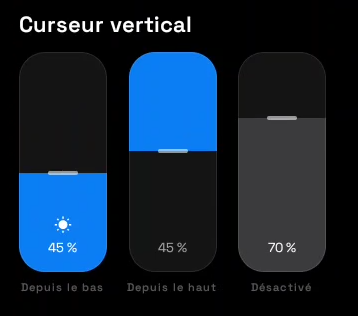 |
Gradient slider — the track is the value range (Kelvin ramp)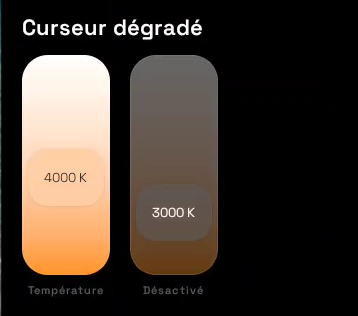 |
Selector — 2..n options, stacked-icon variant, scrollable list variant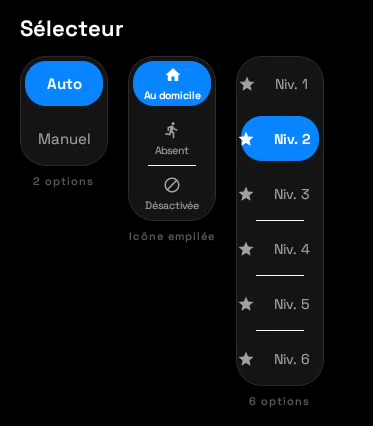 |
Switch — tall pill toggle, on / icon+text / disabled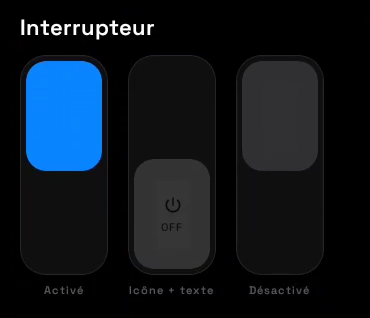 |
Keypad — dot feedback, letters under digits, shake on a wrong code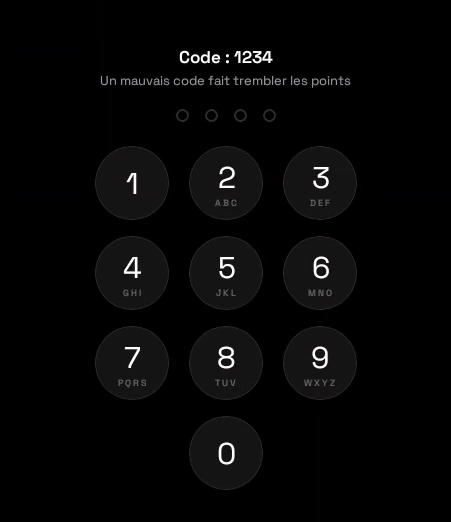 |
Thermostat dial — dual setpoint handles, heat / cool / auto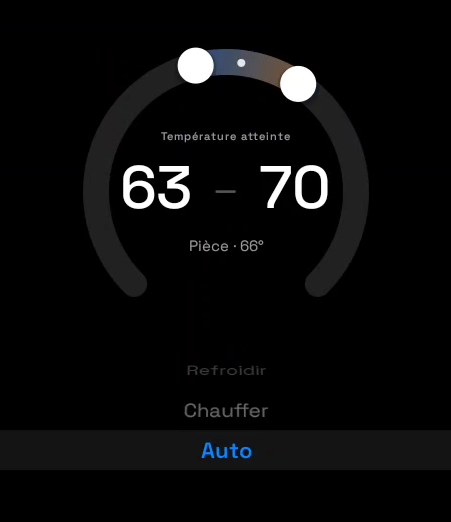 |
Vacuum controls — big play/pause, clean-mode list, dock action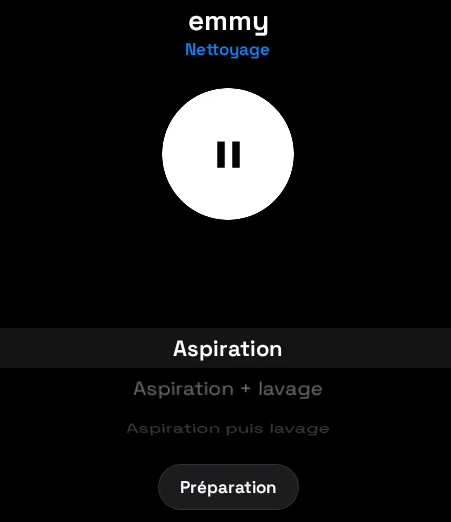 |
The launcher
It takes CATEGORY_HOME and does the full job, so it can be the only launcher on the device.
- Pages — one flat pager: the clock, then as many app pages as you fill. Swipe right-to-left to leave the clock; the clock shrinks into the top bar and stays there, so you never lose the time.
- Free placement — an icon stays in the exact cell you drop it in, holes included. Nothing is auto-arranged, nothing is alphabetised behind your back. Drop on an occupied cell and the two swap.
- New pages on demand — hold an icon against the edge, the page turns under your finger; an empty page appears only while you are dragging, so there is never a dead page to swipe through.
- The clock never disappears — it just shrinks into the top bar once you leave the home page, so you always know what time it is.
- Widgets — bound through the launcher's own
AppWidgetHost, sized in cells, moved and resized like anything else. - Long-press an icon — the app's own shortcuts (the ones you get on a phone), rename, hide, app info, uninstall. Long-press empty space for wallpaper and settings.
- Tap the clock — opens the app you chose. Long-press it for the launcher's own menu.
- Auto-return — leave it on an app page and it drifts back to the clock on its own. It is a wall panel; its resting state is the clock, not wherever you left it.
Installed apps that you do not want on the grid can be hidden and brought back from the top bar. Everything — placement, sizes, renames, hidden apps — survives a reboot.
What it does
Idle: screensaver that is actually useful
- Full-screen clock, dark by default, wallpaper of your choice
- Clock theming — 10 bundled variable fonts, weight / size / letter-spacing, 6 color tints, 12h/24h, with a live preview over your real wallpaper
- Live weather tile driven by your HA
weather.*entity, plus hourly/daily forecast strip - Offline banner — "stale since Xs" instead of silently lying to you with frozen values
- Wallpaper opacity preview so you can tune legibility against your own image
Awake: dashboard
Priority pills — the top row is computed, not configured: an unlocked door or a triggered alarm outranks the living-room lamp automatically
Real control panels, not just read-outs — dimming and color for lights, thermostat setpoints, media transport, lock/unlock, cover open/close/stop, alarm arm/disarm, vacuum start/dock, fan speed, switches
Energy — power + daily-energy sensors auto-detected into a live auto-scaling gauge
Scenes & scripts — one tap
Presence — who's home, as overlapping avatars, with each person's status
Air quality — full-screen panel when you have the sensors for it
Underneath
- HA WebSocket for live state, with a liveness watchdog: Portal doze used to silently kill the socket without firing a callback, so the app pings every 30 s and force-reconnects after 75 s of silence
- MQTT bridge with HA MQTT Discovery — the Portal shows up in Home Assistant on its own, as a device with sensors, switches and sliders
- Presence proxy — infers room occupancy from Portal's dream/sleep lifecycle, no privileged permissions needed
- Power modes —
follow presence(lets the Portal sleep, saves the panel) oralways on(wall clock)
Supported Home Assistant entities
| Domain | Shown | Interactive |
|---|---|---|
light |
✅ | ✅ on/off, brightness, color temp, RGB |
media_player |
✅ | ✅ transport, volume, source |
lock |
✅ | ✅ lock / unlock |
cover |
✅ | ✅ open / close / stop |
climate |
✅ | ✅ setpoint, HVAC mode |
alarm_control_panel |
✅ | ✅ arm / disarm, keypad with masked digits |
vacuum |
✅ | ✅ start / stop / return to dock |
switch |
✅ | ✅ on / off |
fan |
✅ | ✅ speed, oscillate |
scene / script |
✅ | ✅ one-tap activation |
person |
✅ | — home / away only, no zones |
weather |
✅ | — current + hourly/daily forecast |
| sensor / binary_sensor | ✅ | — incl. energy, air quality, battery, openings |
| button, input_*, number, select | ❌ | ❌ — planned |
Quick start
You need: any Android 9+ device. For the Home Assistant half: an instance on the same LAN, a long-lived access token, and — optional but recommended — an MQTT broker. Without them you get the launcher and the clock, which is a perfectly good place to start.
Landscape is what it is designed for today; a portrait layout is on the roadmap.
1. Build
./gradlew assembleDebug
2. Install and make it the launcher
adb install -r app/build/outputs/apk/debug/app-debug.apk
Then pick it as your home app. On a normal device: press home and choose it, or Settings → Apps → Default apps → Home app. The launcher also offers the shortcut itself — long-press the clock, "Définir comme launcher par défaut".
On a device with no such screen (a Portal, most AOSP panels):
adb shell cmd package set-home-activity com.iblu01.portallauncher/.LauncherActivity
Being the selected home app is not cosmetic: app shortcuts and widget pinning only work for the real launcher.
3. Grant the optional extras
adb shell pm grant com.iblu01.portallauncher android.permission.RECORD_AUDIO
adb shell pm grant com.iblu01.portallauncher android.permission.ACCESS_COARSE_LOCATION
adb shell appops set com.iblu01.portallauncher WRITE_SETTINGS allow
adb shell pm grant com.iblu01.portallauncher android.permission.WRITE_SECURE_SETTINGS
Each one only unlocks a feature — none are required to boot:
| Permission | Unlocks |
|---|---|
RECORD_AUDIO |
sound-level sensor |
ACCESS_COARSE_LOCATION |
— reserved |
WRITE_SETTINGS (appop) |
brightness control |
WRITE_SECURE_SETTINGS |
auto-enables the screen-control accessibility service (otherwise: enable it by hand) |
4. Point it at Home Assistant
Open Settings from the dashboard → HA base URL + long-lived token → MQTT broker. The token is stored in EncryptedSharedPreferences and is never read back out by the config API.
5. Run the tests (all JVM, no emulator, no device)
./gradlew test
113 tests. There is no androidTest source set — the two Compose tests run under Robolectric. Covered: the panel state machine (16 cases), the pill priority engine (18), chip mapping, the media session builder, the ViewModel's stream composition (Turbine), the PillRepository transform, plus two targeted recomposition-regression guards. Not covered: the HA/MQTT connectivity layer, the presence proxy and sensor bridge, the clock/idle screen, and every rendered panel. Help wanted.
Configuration
Everything is reachable from the on-device Settings screens: a first-run wizard (mDNS instance discovery + token), HA connection, MQTT broker, per-entity pill enable/disable with search and bulk toggles, background mode + scrim opacity, clock theme, power mode, screen timeout, auto-return delay, temperature offset, and a Developer page (wireless ADB, permission grants, reboot).
The tap-sensitivity slider is currently inert (the accelerometer is no longer registered — see the sensors note below).
Sensors published to Home Assistant
Via MQTT Discovery, the Portal registers itself as a device exposing:
Sensors: screen state (off / screensaver / app / dreaming) · presence, with confidence + source · ambient light (lux) · temperature, on hardware that has the sensor · sound level · IP address
Controls it exposes back to HA: screen on/off · brightness · volume · volume mute · microphone mute · power mode (follow presence / always on) · screen timeout on/off + minutes · temperature offset · doorbell and alert buttons (synthesised chime + on-screen overlay) · free-text notification topic
Accelerometer X/Y/Z, the Portal's RGB light sensor and tap/tilt events were implemented and then retired — the sensors are no longer registered (
SensorBridge.kt:66-75) and their discovery configs are actively retracted on connect (HaDiscovery.ktstaleTopics()). The code is still there if someone wants to bring them back.
Roadmap
Legend: ✅ shipped · 🔨 in progress · ⬜ open · 🙋 good first issue / help wanted
✅ Done
Live HA WebSocket state with reconnect + staleness watchdog
MQTT bridge with HA MQTT Discovery, both directions
Priority engine — pills ranked by what actually matters right now
Control parity for
light,media_player,lock,cover,climate,alarm_control_panel,vacuum,switch,fanScenes / scripts, presence, energy gauge, air quality
HA
weatherentity with hourly + daily forecastPresence proxy + power modes + configurable screen timeout
Secrets in
EncryptedSharedPreferences(HA token, MQTT password)Offline / stale banner and per-panel unavailable states
Clock theming — fonts, weight, size, spacing, tint, 12h/24h, live preview
Alarm keypad — masked digits, variable-length codes, shake on a wrong code (inferred, since HA reports nothing)
First-run setup wizard — mDNS instance discovery → token → verify (
ui/screens/SetupWizard.kt)Dead-code purge (legacy widget subsystem, orphaned overlays)
Real launcher surface — swipeable pages, free cell placement, cross-page drag
Widgets via the launcher's own
AppWidgetHost— pick, place, move, resize, removeLong-press menus — app shortcuts, rename, hide, app info, uninstall
Home-role plumbing — back handling, pin-shortcut requests, wallpaper picker, default-home prompt
🔨 Now
- Clock theme + opacity preview: land on
main, add tests - Screenshots + component gallery in this README
- Remaining screenshots (thermostat, vacuum, energy, presence, clock theme) + a demo recording 🙋
- Unit tests for the clock theme (
fromKeyfallbacks) and the opacity mapping — the two shipped features with zero coverage
⬜ Next — the big three
1. i18n 🙋 — highest-impact contribution available
res/values/strings.xml currently holds 3 strings (the app name and two accessibility labels). Everything else is a Kotlin literal: roughly 590 user-facing French strings across ~25 files.
- Extract the UI strings into
strings.xml— the long tail is mechanicalstringResource(...)work - Deal with the two hard cases first:
PillPriorityEngine.kt(72 strings) andPillRules.kt(47) are domain logic, not Compose — they generate labels with noContext. Either they take a resource lookup, or they return keys resolved at the Compose boundary. That's a design decision, not a find-and-replace. -
ClockFont/ClockTintstore their labels asStringfields on an enum — enum constructors can't call@Composable, so those need a mapping function instead of a stored property - ⚠️ Fix
EnergyPanel.kt:37-38before translating anything: it finds its sensors by matching the literal French labels"Puissance"and"Aujourd'hui". Translate those and the energy panel silently goes blank. - English translation, then other locales
2. Portrait & small screens — the layout assumes Portal's landscape 10"
- Portrait layout
- Phone / small-tablet breakpoints
- Adaptive grid: reflowing pills, resizable panels
3. Configuration UI — the data model is ready, the screens are not
- Pill reorder + per-entity label/kind editing (
PillRules.ktalready haslabel,kind,priorityBoost,relatedEntityIds— but a settings refresh currently overwrites all three from the live HA scan, so that has to be fixed first) - Pin a pill always-visible, and an affordance for the pills the top-9 cap silently drops
- Wire
priorityBoostto a UI, and make the grouped pills honour it (today it's parsed, clamped, and ignored by 9 of 20 kinds) - Light theme + accent color — the widest-blast-radius item on this list:
ui/theme/Theme.ktis a single hardcodeddarkColorSchemeand most components reach straight forAppleColors.*
⬜ Later
-
button/input_*/number/selectentity support 🙋 - Reconnection tuning — the HA WebSocket retries on a flat 5 s with no backoff or cap, unlike the MQTT bridge's 2→60 s
- Richer error states — only the 7 single-entity panels show "Appareil indisponible"; lights, purifier, air, energy, scenes, presence and weather degrade silently 🙋
- Test coverage for the untested subsystems: the whole HA/MQTT connectivity layer, the presence proxy and sensor bridge, the clock/idle surface, and every rendered panel have zero tests today 🙋
- Widget bar v2 — user-defined MQTT-pushed tiles (washer timer, 3D printer, door sensors)
- Prebuilt APK releases so non-developers can install without a toolchain
- Hardware compatibility matrix (Portal 10 / Portal+ / Portal Go / Portal TV — needs testers) 🙋
🧊 Deliberately not doing
- HTTPS-only enforcement — local HA is plain
http://on a user-configured host; can't be pinned at build time - Removing the optional
supath used to toggle wireless ADB — that's a feature for this hardware, not a defect
Troubleshooting / FAQ
Pills are frozen on old values.
The watchdog should catch this (30 s ping, 75 s force-reconnect). If it doesn't, the offline banner tells you how long state has been stale — open an issue with logcat around HaStateRepository.
Nothing connects to Home Assistant.
Check the base URL includes scheme and port (http://192.168.1.10:8123) and that the long-lived token was pasted whole. There's also mDNS discovery (HaMdnsDiscovery) if you'd rather not type an IP.
The screen never turns off / never stays on.
That's power mode. follow presence lets the Portal sleep; always on doesn't. Screen timeout is 1–240 minutes.
Screen control does nothing.
The accessibility service isn't enabled. Grant WRITE_SECURE_SETTINGS and the app enables it itself, or turn it on manually in Android settings.
Can I use it without MQTT? Yes. You lose the published sensors and the HA-side device, not the dashboard.
Is it locked to Meta Portal? No. It is a normal Android 9+ launcher and runs on any Android device — the name is just where the project started. Two caveats: the layout is built for a landscape display (portrait is on the roadmap), and the presence proxy infers occupancy from the Portal's dream/sleep lifecycle, so on other hardware you get the launcher and the dashboard but not that particular trick.
Do I need Home Assistant? No. Without it you have a launcher with a full-screen clock and your wallpaper. HA is what makes the clock screen show live state and controls.
What does tapping the home screen open? Whatever you point it at — Settings → Application → "Tap sur l'écran d'accueil". Home Assistant is the default, not a hard-coded destination.
Tech stack
| Layer | Technology |
|---|---|
| Language | Kotlin 2.0 |
| UI | Jetpack Compose + Material 3 |
| Architecture | Modern Android Development — StateFlow, ViewModel, structured concurrency |
| DI | Hilt + KSP |
| HA API | OkHttp WebSocket |
| MQTT | Paho |
| Storage | EncryptedSharedPreferences |
| Tests | JUnit 4 + Robolectric + Turbine + Compose UI Test (JVM only) |
docs/FEATURES.md — exhaustive feature reference: every behaviour, threshold and HA service call with file:line evidence, plus a frank list of dead code and rough edges. Start there before touching anything. The roadmap in this README is the single source of truth for what's next.
Where the name comes from
Meta discontinued the Portal and left ADB open on it, so a pile of well-built 10" touchscreens with decent speakers and ambient sensors ended up running software that talks to a service nobody uses. That is where this started, and it is why the baseline is API 28 and landscape.
The device it was born on is not the point any more. Anything running Android 9 or later can be the appliance: the same launcher on a smart clock, a tablet or a wall-mounted panel.
Comments