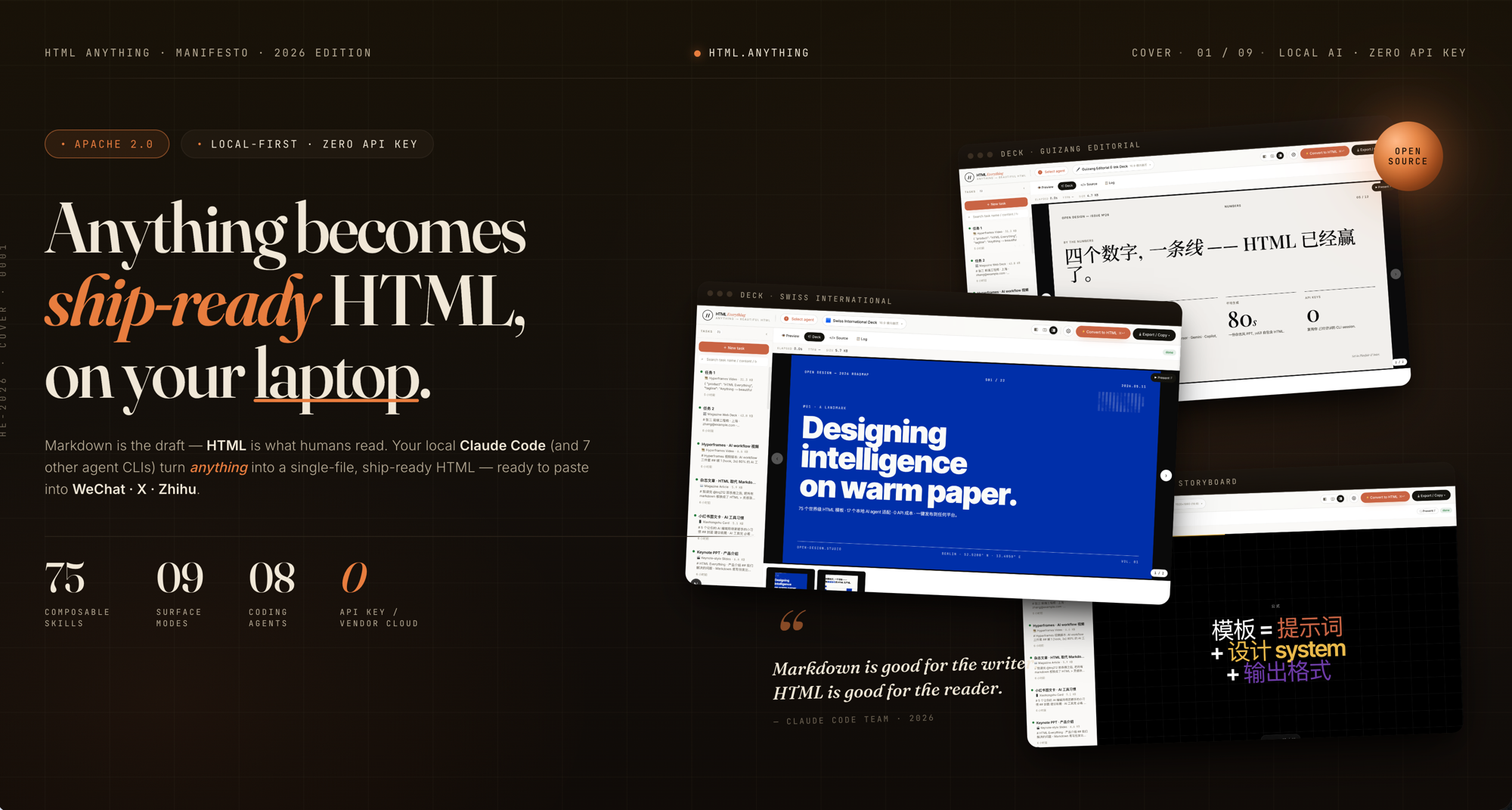
The problemthis project solves is concrete: a marketer with a handful of bullet points for a new product launch wants a ready‑to‑post image for X, but spending time to hand‑code HTML and CSS feels wasteful. The same tension appears when a writer needs a polished newsletter article, a designer drafts a poster, or a developer builds a quick web prototype. All of these use cases share a common friction point: turning raw input into HTML that already looks like the final medium, without manual styling or platform‑specific tweaks.
The approach
html‑anything positions itself as an agentic HTML editor that runs locally on the user’s machine. It detects any of eight coding‑agent CLIs that are already on the PATH — Claude Code, Cursor Agent, Codex, Gemini CLI, GitHub Copilot CLI, OpenCode, Qwen Coder, and Aider — and uses the session the user has logged into for each service. Because the agent reuses that existing authentication, no API key is required and the only cost is the marginal compute of the local AI model.
The design leans on 75 composable skill templates that map to nine deliverable surfaces — magazine articles, keynote decks, résumés, posters, Xiaohongshu cards, tweet cards, web prototypes, data reports, and Hyperframes videos. Each skill ships an example.html that can be opened directly from the repository, so users can preview the output without any setup. The editor accepts Markdown, CSV, TSV, JSON, SQL, and plain text, parsing tabular data in‑browser with papaparse and xlsx. Rendering happens through a sandboxed <iframe> that isolates scripts and cookies while still allowing CDN resources, enabling true “ship‑ready” HTML that can be pasted instantly into WeChat, X, Zhihu, or downloaded as a high‑DPI PNG. Streaming SSE lets the user watch the AI generate the page line by line, and a one‑click export step applies platform‑specific formatting (juice‑inlined CSS for WeChat, 2× PNG for X, etc.) before the artifact is sent.
What you actually get
- Eight coding‑agent CLIs detected automatically – the tool scans the user’s environment, including hidden bin directories, and swaps the active agent from the top‑bar picker.
- Zero API key requirement – the existing login for Claude, Cursor, Gemini, or any of the supported services handles authentication; the local run costs only compute time.
- 75 skill templates – organized by mode (prototype, deck, frame, social, office, doc, mockup, vfx) and scenario, each providing a ready‑made layout that can be customized.
- Nine surface modes – magazine article, keynote deck, résumé, poster, Xiaohongshu card, tweet card, web prototype, data report, Hyperframes video, each with multiple concrete skills.
- One‑click export – WeChat (juice‑inlined CSS), X/Weibo/Xiaohongshu (2× PNG → ClipboardItem), Zhihu (LaTeX placeholders), plain
.htmldownload, and high‑DPI.pngdownload. - SSE streaming render – the agent’s stdout JSON‑line stream is parsed for text deltas and appended to the iframe
srcdocin real time, so the page updates as the AI “writes.” - Sandboxed preview – the generated HTML runs in an isolated origin, allowing Tailwind CDN, Google Fonts, and inline scripts while restricting cookies and localStorage.
- Format auto‑detect – input can be Markdown, CSV, TSV, JSON, SQL, or raw text without any upload step.
- Deployable locally – run
pnpm devon a laptop; the agent stays on the user’s machine, with optional Vercel hosting for the web layer. - Apache‑2.0 license – permits reuse and modification under permissive terms.
What it doesn’t do
The project does not provide a cloud‑hosted service; the AI agent must be installed and run on the user’s own hardware, which means the experience depends on the machine’s resources and the availability of a compatible CLI. It only supports the input formats listed above, so users cannot feed it PDFs, images, or proprietary file types without first converting them to a supported text representation. The editor does not include a built‑in design system beyond what is supplied by the underlying open-design library, so custom branding or complex style guides must be handled separately. Collaboration features, such as real‑time co‑editing or version control integration, are also absent; each run is a solitary session. Finally, while the tool can output a PNG, it does not generate vector graphics or animated assets beyond the static frames required for Hyperframes videos.
Trying it out
Getting started is straightforward: clone the repository, install the required dependencies, and run the development command shown in the README. Because the setup steps are detailed there, readers should follow the linked instructions for the exact commands and environment configuration.
The closing thought is simple: if your workflow regularly moves from raw notes to a platform‑specific visual asset and you prefer to stay on your own machine without paying for API calls, html‑anything offers a focused, agent‑driven path to a ship‑ready HTML file that can be exported in a single click. For teams that need deeper collaboration, cloud hosting, or extensive custom design systems, other solutions may still be preferable. The source is on GitHub.
Comments