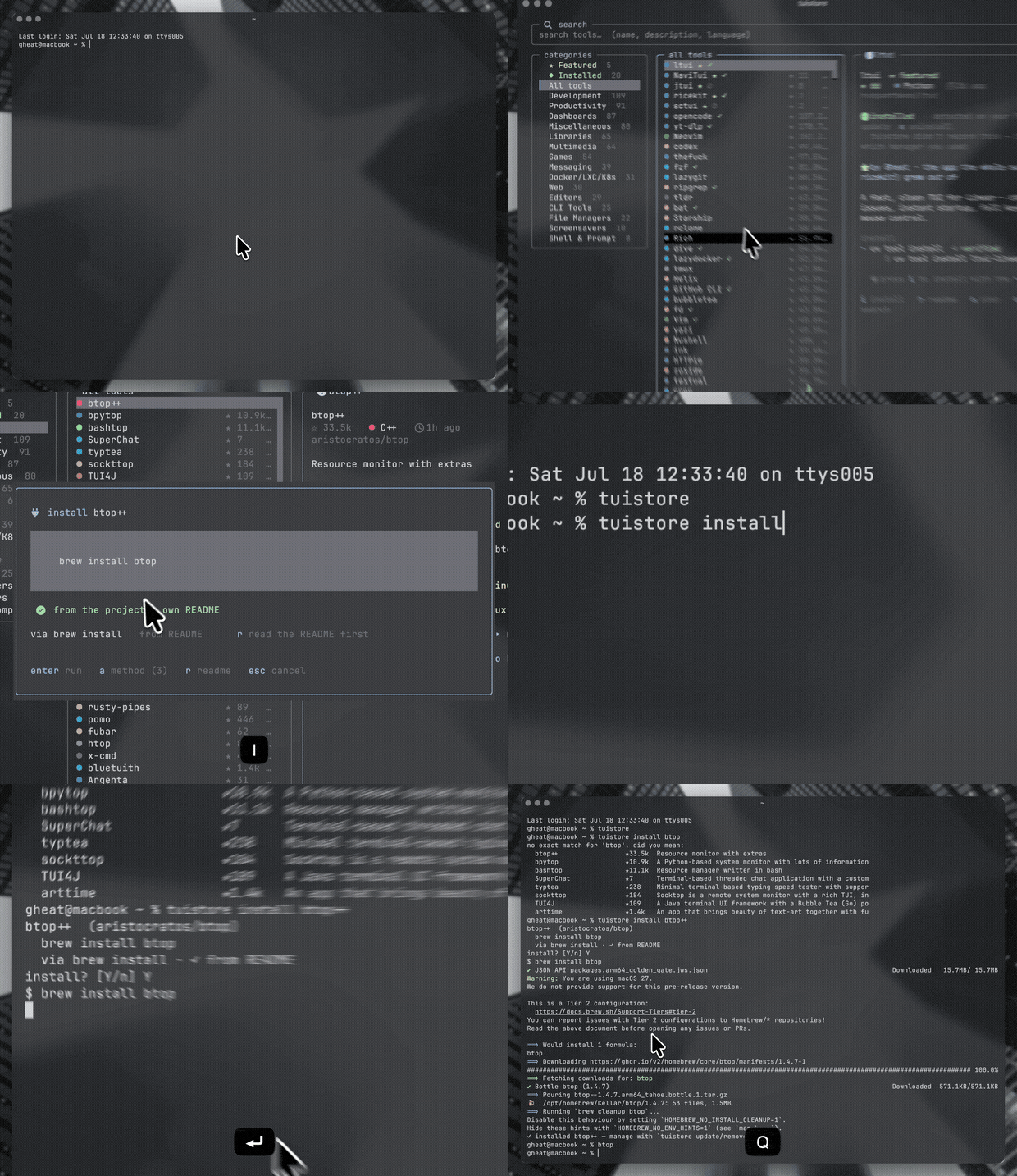
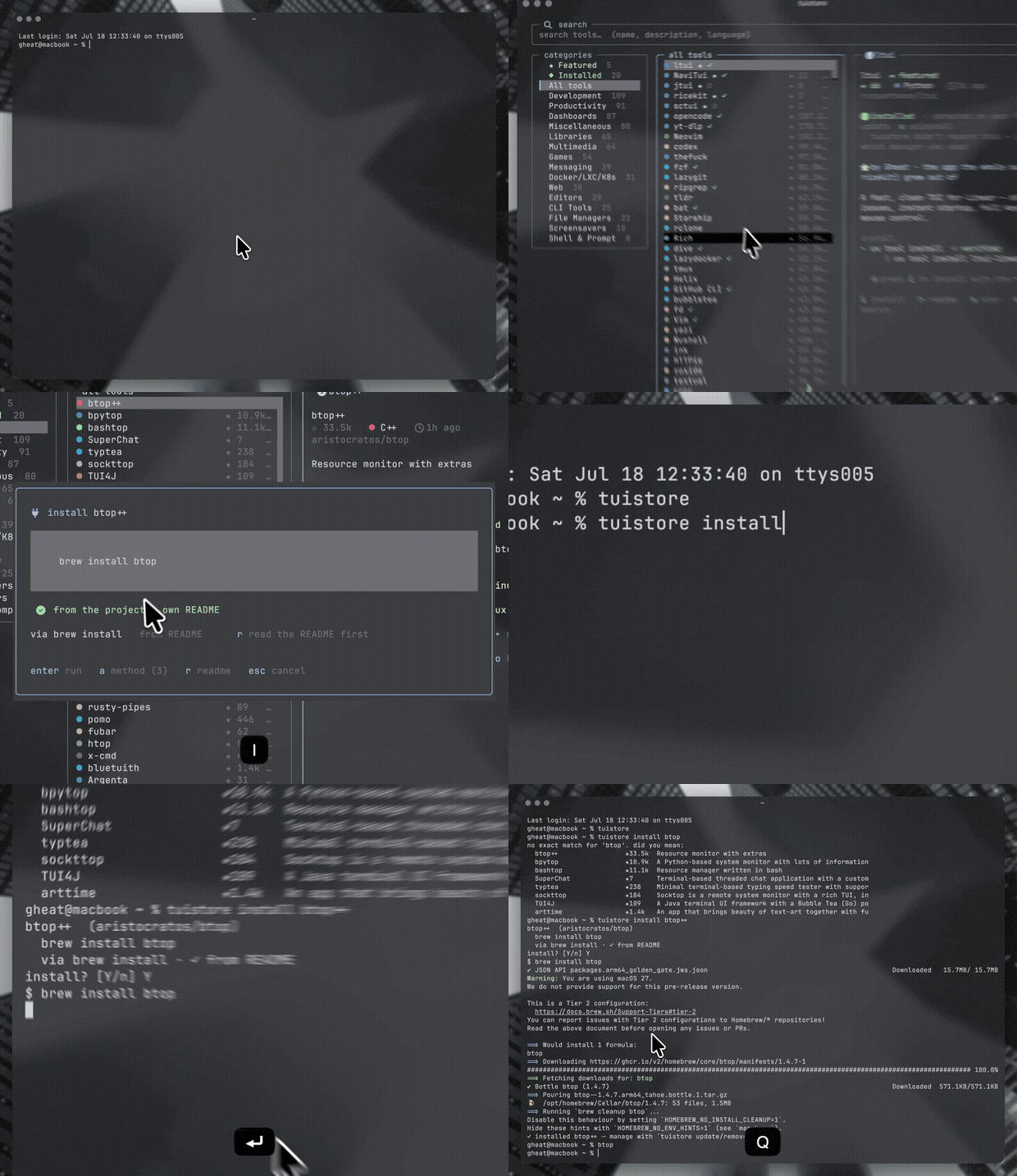
The TUI app store: find, search, and one-key-install hundreds of terminal apps, without leaving the terminal.
Browse a curated catalog of TUIs, read the details, and install with a single key — tuistore figures out how to install each one on your machine (cargo, brew, pacman, uv, go, docker…) so you never paste a command your box can't run. Star the ones you love straight to GitHub.
Want your TUI featured? Go here -> gheat.net/#p/tuistore
Built on 🍚 ricekit · seeded from awesome-tuis · made by @Gheat1
what it is
Finding good terminal apps means trawling GitHub and awesome-lists; installing
them means guessing whether it's cargo install, brew install, pacman -S,
uv tool install, a curl | sh script, or building from source — and half the
commands in a README are for the wrong OS.
tuistore fixes both. It's a fast, mouse-and-keyboard TUI that:
- puts 740+ curated terminal apps one fuzzy-search away — full-screen TUIs and the modern CLI toolkit (fastfetch, neovim, ripgrep, bat, eza, starship, zoxide, fzf…),
- shows you the install commands that actually work on your machine, ranked,
- installs them with one key and streams the output live,
- and lets you ★ star anything you like on GitHub, from the store.
install
One-liner (picks the best of uv / pipx / pip automatically, installs uv first if none are found):
curl -fsSL https://raw.githubusercontent.com/Gheat1/tuistore/main/install.sh | sh
Homebrew:
brew install gheat1/tuistore/tuistore
Or straight from PyPI:
uv tool install tuistore     # recommended
pipx install tuistore
pip install tuistore
Latest main instead of the last release:
uv tool install git+https://github.com/Gheat1/tuistore
pipx install git+https://github.com/Gheat1/tuistore
Arch Linux (AUR):
yay -S tuistore # or paru, or any other AUR helper
Then just run:
tuistore
Starring uses the gh CLI if you have it
(gh auth login); everything else works without it. tuistore itself installs
nothing but itself — it drives the package managers you already have.
use it
Dead simple: type to search, arrow to browse, i to install.
 /            focus search — type a name, description, or language
 ↑ ↓ · j k    move through the list        g / G   jump to top / bottom
 enter        open / focus a tool
 i            install  (press a to pick a different method)
 r            read the README in-app (inspect before you install)
 u            update  ·  x  uninstall   (tools you installed via tuistore)
 s            star / unstar on GitHub    o       open the repo in your browser
 ,            manage (update tuistore · refetch catalog · update all)
 f            features / about            t       cycle theme
 ?            all keybindings             q       quit
Everything clicks, too — rows, the hint bar, and the draggable pane dividers.
how the install engine works
This is the hard part, and it's the point of tuistore.
- It reads your machine. OS, Linux distro family (Arch, Debian, Fedora,
SUSE, Void, Alpine, Gentoo…), CPU arch, and every package manager /
toolchain actually on your
PATH. - Every tool carries platform-gated install methods. A method knows what
binaries it needs and where it's allowed to run, so
pacman -Sonly appears on Arch,brewonly where brew exists,cargoonly where cargo is. - Methods come from three places, and the UI labels which is which:
- ✓ official — commands the project itself documents (hand-verified for the featured suite),
- ✓ from README — scraped straight out of each repo's README (kept only when the command actually names the tool, so dependency lines don't leak),
- ⚠ unverified — a best-guess from the repo's language, flagged so you know to check it.
- It ranks what's runnable and offers the winner as the default — a clean
managed install (brew / cargo / uv) before a
curl | sh, verified before guessed — with every alternative one keypress (a) away. - Before you commit, you can look. The install screen shows the exact
command with a clear ✓ verified / ⚠ unverified badge (and a loud warning
on remote
curl | shscripts), andropens the project's README right in the store so you can inspect a tool before you install it. - It runs in your login shell and streams the output live — nothing is ever run silently; you always see the exact command and confirm it.
installed, updates & uninstall
tuistore isn't just a browser — it's a package manager for the tools it installs.
- It remembers what it installed (which manager, which command) and also
detects what you already have — not just by binary on your
PATH, but by asking brew, uv, npm, cargo, pipx what they've installed (soripgrep→rg,bottom→btm,git-delta→deltaall show up). The ◆ Installed filter lists everything you've got. - On any installed tool,
uupdates it andxuninstalls it in place, with the right command for the manager (brew upgrade …,uv tool upgrade …,cargo uninstall …), streamed live. For a tool tuistore didn't install, it asks which manager you used. ,opens the manage menu with update everything — a one-shotbrew upgrade+uv tool upgrade --all+npm update -g… that upgrades all your packages, including ones installed outside tuistore — plus update tuistore itself, refetch the catalog, and clear cache.
it's a CLI package manager too
Everything works from the shell, so tuistore drops straight into dotfiles, setup scripts, and READMEs:
tuistore install lazygit     # resolve + install (platform-aware, confirmed)
tuistore install btop++ -y   # -y to skip the prompt (great for scripts/CI)
tuistore remove lazygit      # uninstall a tool you installed via tuistore
tuistore update lazygit      # update one tool
tuistore search git          # search the catalog
tuistore info btop++         # details + every install method

tuistore installed           # list what tuistore installed
tuistore upgrade             # update EVERYTHING (brew, uv, npm… all packages)
tuistore update              # update tuistore itself
tuistore update installed    # update only what tuistore installed
tuistore refetch catalog     # pull the latest catalog
tuistore --doctor            # what your machine looks like to the install engine
A shell install uses the same engine (verified-before-guessed, platform-gated)
and is recorded in the same ledger — so tuistore installed, update,
remove, and the TUI's ◆ Installed view all stay in sync.
the catalog
- ★ Featured. Gheat's suite — ltui, NaviTui, ricekit — plus a few hand-picked community tools, all pinned to the top.
- 740+ tools — rothgar/awesome-tuis
plus a curated set of terminal essentials (the fetchers, editors, and modern
CLI utilities people actually
brew install), in browsable categories, each enriched with live GitHub stars, language, and freshness.
Refresh or grow the catalog any time — it's a single re-runnable script:
uv run python tools/build_catalog.py            # refresh stars + installs
uv run python tools/build_catalog.py --scrape 300   # scrape more READMEs
It parses awesome-tuis, batches a GraphQL sweep for stars/language/freshness, scrapes install commands for the most-starred tools, and infers the rest.
built on ricekit
tuistore is part of a family. It's built on
🍚 ricekit — the themes, widgets,
modals, icons, and design doctrine behind the whole suite — so it shares the
five themes (mocha · void · onyx · clear · system), the vim-and-mouse
navigation, the drag-to-resize panes, and the cache-first speed.
If you like tuistore, you'll probably like the rest of the suite:
| ltui | a fast, clean TUI for Linear |
| jtui | the same, for Jira |
| sctui | the same, for Shortcut |
| NaviTui | an animated terminal player for Navidrome |
| ricekit | the design system all of them share |
config & data
XDG dirs, via ricekit's AppDirs:
| what | where |
|---|---|
| state (theme, layout) | ~/.local/state/tuistore/state.json |
| cache (scraped installs) | ~/.cache/tuistore/ |
| the catalog | shipped in the package (tuistore/data/catalog.json) |
tuistore --doctor prints what your machine looks like to the install engine.
Comments