The AI communication tool for Gmail and Slack.
🚀 Try the Dashboard · 🧩 Install Chrome Extension · If this project helps you, consider giving it a ⭐
A self-hostable Chrome Extension + SaaS monorepo that injects an AI communication toolbar into Gmail and Slack. Select text → pick a rewrite mode → done. Supports custom prompt templates per user/org, streaming responses, and a full writing history.
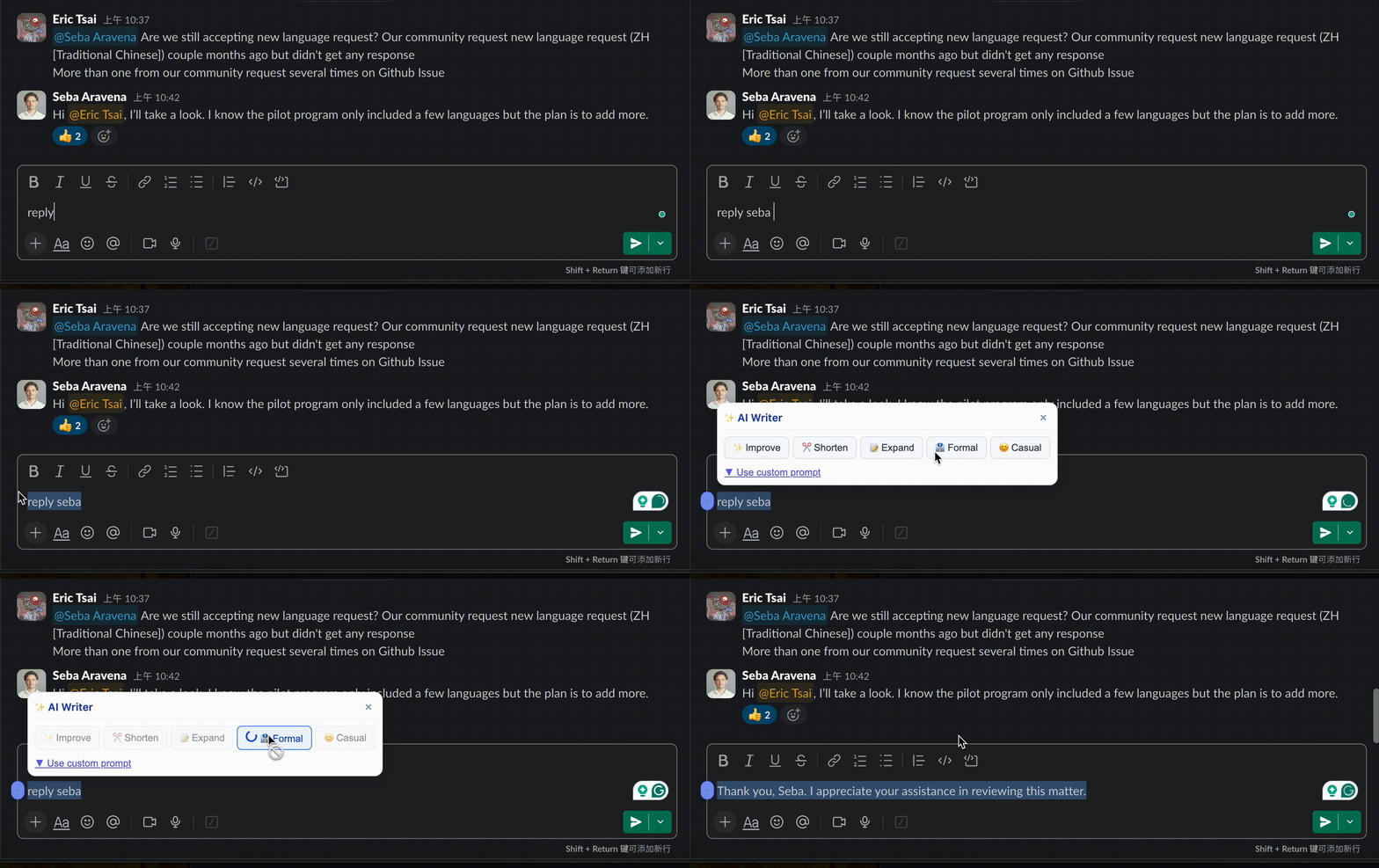
Demo
| Slack | Gmail |
|---|---|
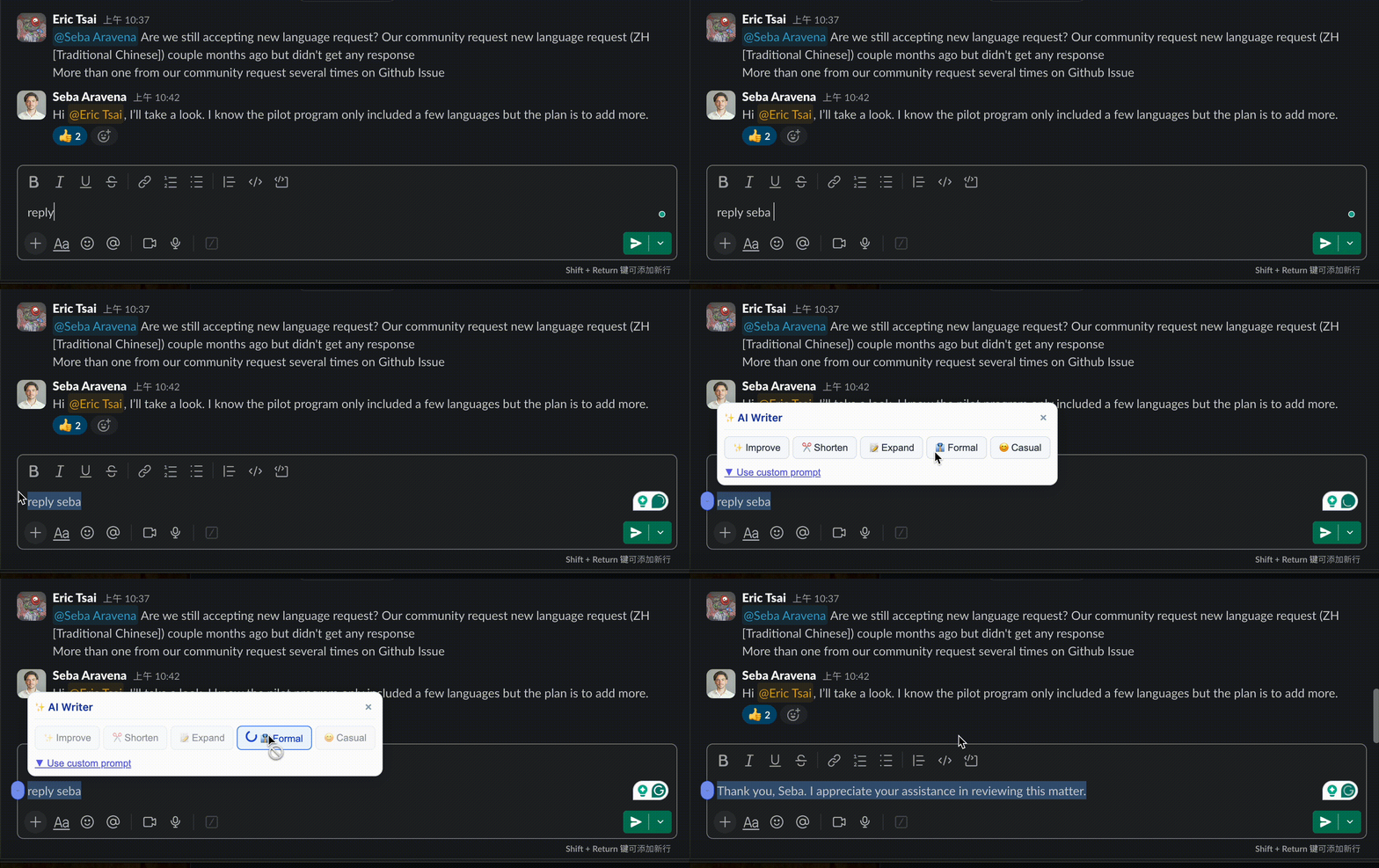 |
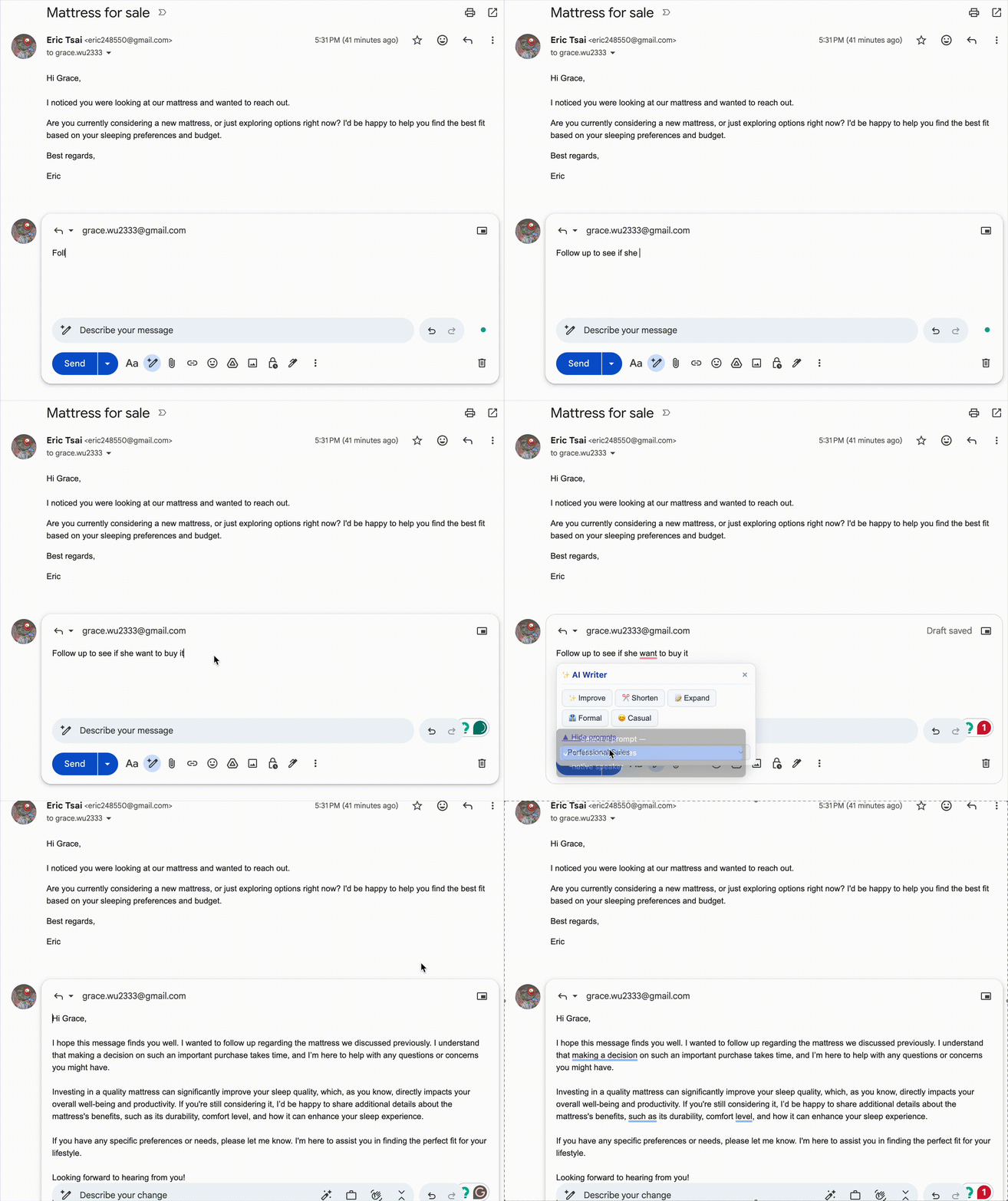 |
| Rewrite messages before sending | Compose & reply with AI drafts |
Features
- Gmail toolbar — select text in any compose window, get instant AI rewrites (improve, shorten, expand, formal, casual)
- Custom prompt templates — save reusable prompts per user or organization
- Org writing tone — set a baseline writing style that applies to all rewrites
- Streaming rewrites — real-time token streaming via SSE
- Writing history — every session saved, browsable in the dashboard
- Multi-platform ready — architecture designed to add Slack, LinkedIn, etc. with minimal code
Web Dashboard
The web app (apps/web) is your control center for ComCom. Sign in at http://localhost:3000 (or your deployed URL) to access it.
Overview (/dashboard)
- Stats — prompt template count, rewrites today, total rewrites
- Recent Rewrites — last 5 rewrite sessions with mode and date
- Quick Actions — shortcuts to create a prompt, configure tone, or install the extension
Prompt Templates (/dashboard/prompts)
Create and manage reusable AI prompts that appear inside the ComCom toolbar in Gmail and Slack.
Each template has:
- Title — displayed in the extension toolbar
- System Prompt — the instruction sent to the AI. Use
{{variable_name}}placeholders for dynamic values - Variables — define named placeholders with a label and optional default value
- Share with organization — toggle to make the prompt available to all org members
Example system prompt:
Rewrite the following email in a {{tone}} tone, keeping it under {{max_words}} words.
Writing History (/dashboard/history)
Every rewrite is logged automatically. The history page shows:
- Original text vs. rewritten text side by side
- Rewrite mode (improve, shorten, expand, formal, casual, or custom prompt)
- Source (gmail, slack)
- Timestamp and token usage
Settings (/dashboard/settings)
Set your organization's default writing tone applied to all AI rewrites:
- Voice — professional, friendly, casual, authoritative, or empathetic
- Formality — formal, semi-formal, or informal
- Additional instructions — free-text style rules (e.g. "Always sign off with Best regards. Avoid jargon.")
Architecture
Chrome Extension ──────────────────────────────────┐
                                                    ↓
Next.js frontend ──────────────── Cloudflare Worker API
                                         ↓               ↓
                                    OpenAI API       Neon DB (Prisma)
Key principle: All business logic lives in the Cloudflare Worker. Next.js is frontend-only (no API routes except the Clerk webhook).
Stack
| Layer | Technology |
|---|---|
| Monorepo | Turborepo + pnpm workspaces |
| Web App | Next.js 14 App Router + TypeScript |
| Backend API | Cloudflare Workers + Hono + TypeScript |
| UI | Tailwind CSS + shadcn/ui |
| Chrome Extension | Plasmo + React + TypeScript |
| Database | PostgreSQL (Neon) via Prisma + Neon adapter |
| Auth | Clerk (JWT verified in Worker) |
| AI | OpenAI API (gpt-4o-mini) |
| Validation | Zod |
Project Structure
comcom/
├── apps/
│   ├── web/              # Next.js frontend (Vercel) — NO API routes
│   ├── worker/           # Cloudflare Worker backend (Hono)
│   └── extension/        # Chrome Extension (Plasmo)
├── packages/
│   ├── ai/               # OpenAI wrapper + prompt builder
│   ├── db/               # Prisma schema + edge client + repositories
│   ├── prompts/          # Default prompt templates
│   ├── types/            # Shared TypeScript types + Zod schemas
│   └── ui/               # Shared React components
API Reference
| Method | Path | Auth | Description |
|---|---|---|---|
GET |
/health |
None | Health check |
POST |
/api/rewrite |
JWT | Sync AI rewrite |
POST |
/api/rewrite/stream |
JWT | Streaming AI rewrite (SSE) |
GET |
/api/prompts |
JWT | List user + org prompts |
POST |
/api/prompts |
JWT | Create prompt template |
PATCH |
/api/prompts/:id |
JWT | Update prompt |
DELETE |
/api/prompts/:id |
JWT | Delete prompt |
GET |
/api/history |
JWT | Writing session history |
POST |
/api/history |
JWT | Create session record |
GET |
/api/tone |
JWT | Get org writing tone |
PUT |
/api/tone |
JWT | Update org writing tone |
Next.js retains only: POST /api/webhooks/clerk (user/org sync).
Self-Hosting
Prerequisites
- Node.js >= 20
- pnpm >= 9 (
npm install -g pnpm) - Neon PostgreSQL database (or any Postgres — Neon is recommended for its edge-compatible pooler)
- Clerk account
- OpenAI API key
- Cloudflare account
1. Clone & install
git clone https://github.com/eric248550/comcom.git
cd comcom
pnpm install
2. Configure environment variables
Copy the example files and fill in your values:
cp .env.example .env
cp packages/db/.env.example packages/db/.env
cp apps/web/.env.local.example apps/web/.env.local
cp apps/worker/.dev.vars.example apps/worker/.dev.vars
cp apps/extension/.env.example apps/extension/.env.development
| File | Used by | Key variables |
|---|---|---|
.env |
Turborepo (all tasks) | All vars — source of truth |
packages/db/.env |
Prisma CLI | DATABASE_URL (pooled) + DIRECT_URL (direct) |
apps/web/.env.local |
Next.js | Clerk keys, WORKER_URL |
apps/worker/.dev.vars |
Wrangler dev | All secrets (Wrangler ignores root .env) |
apps/extension/.env.development |
Plasmo | PLASMO_PUBLIC_* vars only |
Neon DB URLs: DATABASE_URL uses the pooled endpoint (-pooler in hostname) for runtime queries. DIRECT_URL uses the direct endpoint (no -pooler) for Prisma migrations — PgBouncer does not support DDL.
3. Set up the database
Required before building the Worker. The Worker bundles the Prisma edge client at build time; skipping this step causes
Could not resolve "./generated/prisma"errors.
pnpm db:generate   # Generate Prisma client
pnpm db:push       # Push schema to database (requires DIRECT_URL)
4. Run in development
# Terminal 1 — start the Worker first (web app depends on it)
pnpm worker:dev    # → http://localhost:8787

# Terminal 2 — Next.js web app
cd apps/web && pnpm dev   # → http://localhost:3000

# Terminal 3 — Chrome extension (hot-reload)
cd apps/extension && pnpm dev
Or run everything in parallel:
pnpm dev
5. Load the extension in Chrome
- Open
chrome://extensions→ enable Developer mode - Click Load unpacked → select
apps/extension/build/chrome-mv3-dev - Open Gmail, compose an email, select any text — the ComCom toolbar appears
Deployment
Cloudflare Worker
# Set production secrets
wrangler secret put DATABASE_URL
wrangler secret put CLERK_SECRET_KEY
wrangler secret put CLERK_PUBLISHABLE_KEY
wrangler secret put OPENAI_API_KEY
wrangler secret put ALLOWED_ORIGINS

# Deploy
pnpm worker:deploy
# → https://comcom-api.<your-subdomain>.workers.dev
Vercel (Next.js)
Set these environment variables in the Vercel dashboard:
WORKER_URL=https://comcom-api.<subdomain>.workers.dev
NEXT_PUBLIC_WORKER_URL=https://comcom-api.<subdomain>.workers.dev
NEXT_PUBLIC_CLERK_PUBLISHABLE_KEY=pk_live_...
CLERK_SECRET_KEY=sk_live_...
CLERK_WEBHOOK_SECRET=whsec_...
DATABASE_URL=<pooled neon url>
Also configure a Clerk webhook pointing to https://your-vercel-app.vercel.app/api/webhooks/clerk with the user.created, organization.created, and organizationMembership.created events.
Chrome Web Store
The extension is published at: https://chromewebstore.google.com/detail/comcom/dpmfokapmmmahdkaphlgodghojcdhigo
To publish a new version:
cd apps/extension && pnpm build
# Zip apps/extension/.plasmo/chrome-mv3-prod/ and submit to CWS
Data Flow
1. User selects text in Gmail compose
2. Extension sends POST /api/rewrite to Worker (with Clerk JWT)
3. Worker verifies JWT → resolves user + org from DB
4. Worker fetches prompt template + org tone from Neon DB
5. Worker builds final system prompt
6. Worker calls OpenAI API (streams or sync)
7. Worker saves WritingSession to DB
8. Extension receives result → replaces selected text in place
Extending to New Platforms
To add Slack, LinkedIn, or any other platform:
- Add a content script:
apps/extension/src/contents/<platform>.tsx - Implement
getSelectedText()andreplaceSelectedText()for that platform's DOM - Reuse
src/lib/api.ts— it's already Worker-agnostic - Update
PlasmoCSConfig.matchesfor the new URL pattern
After making changes, verify nothing is broken
pnpm type-check pnpm lint pnpm build
For extension changes, run the [verify script](https://github.com/eric248550/comcom/blob/main/verify-extension.mjs) to walk through the auth flow manually:

```bash
node verify-extension.mjs
Package Scripts
| Command | Description |
|---|---|
pnpm dev |
Start all apps in dev mode |
pnpm build |
Build all packages and apps |
pnpm worker:dev |
Start Worker dev server on :8787 |
pnpm worker:deploy |
Deploy Worker to Cloudflare |
pnpm db:generate |
Regenerate Prisma client |
pnpm db:push |
Push schema changes to DB |
pnpm db:studio |
Open Prisma Studio |
pnpm lint |
Lint all packages |
pnpm type-check |
Type-check all packages |
pnpm format |
Format all files with Prettier |
Author
Eric Tsai — eric248550@gmail.com · GitHub @eric248550
Comments