⚠️ Disclaimer. Flashing third-party firmware modifies your device and may void your warranty. Incorrect flashing can brick your device. Always back up your original firmware before proceeding. You assume all responsibility for any damage, data loss, or device failure. This project is not affiliated with Shelly, Allterco Robotics, CSA, or Espressif Systems.
Open source Matter over Thread firmware for the Shelly 1 Gen4. Works natively with Apple Home, Google Home, Alexa, and Home Assistant — no WiFi, no cloud, no Shelly app, no subscription. The Gen4's ESP32-C6 has an 802.15.4 radio used for Zigbee on stock firmware — this firmware reconfigures it to run Thread instead, unlocking Matter over Thread.
Shelly 1 Gen4 running v1.0.0 of this firmware, commissioned to Apple Home. Manufacturer: AUTOMATOUS.IO, Model: Shelly 1 Gen4 MoT Light.
This release is the Light variant — Matter
On/Off Lightdevice type with latching relay behavior. The relay holds whatever state you set (on or off) until you change it again. The Shelly appears as a light bulb icon in your smart home app, and the relay can switch any "set and hold" load.Power-on behavior: Defaults to off at power-up. Configurable via the Matter StartUpOnOff attribute (off, on, toggle, restore last state) — Home Assistant users can write this attribute directly via Matter cluster editing. Apple Home and Google Home have limited Matter attribute UIs currently, so the firmware default applies in those ecosystems until their Matter attribute UIs improve.
A future Switch variant will add momentary relay pulse behavior for applications that expect a brief contact closure — garage door openers, doorbells, gates, and similar pulse-activated devices. Variants are separate firmware builds because Matter device types are declared at compile time and cannot be changed in the smart home app after commissioning.
⚠️ Uses ESP-Matter SDK test credentials (not VID/PID-certified). Functional for personal use; not suitable for resale as a certified Matter product.
Quick Start
Have a Thread Border Router, USB-UART adapter and 1.27mm to 2.54mm adapter? Flash and go.
- Download the latest release — grab the
automatous-io-shelly-1-gen4-light-vX.Y.Z.binfile from the assets. - Enter flash mode on your Shelly.
- Back up your original firmware and flash the latest release with ESPConnect.
- Commission with your smart home app.
Features
- ✅ Matter over Thread — no WiFi required
- ✅ Compatible with Apple Home, Google Home, Alexa, Home Assistant
- ✅ Multi-fabric — commission to multiple hubs simultaneously
- ✅ Physical button toggle (onboard relay button)
- ✅ External wall switch input (SW terminal)
- ✅ State sync across all controllers
- ✅ Full Thread Device mode — extends your Thread mesh network for other devices
- ✅ Factory reset via long press (onboard relay button)
- ✅ Configurable power-on behavior via Matter StartUpOnOff attribute
- ✅ Status LED indication (BLE advertising, Thread connecting, Thread connected)
- ✅ Blink LED on command from any Matter controller using Identify for physical device identification
Note: This firmware is best suited for lights, fans, outlets, heaters, and other "set and hold" loads. It is not suitable for garage door openers, doorbells, gates, or any device that expects a brief contact closure — see the variant note at the top for details on the future Switch variant.
Compatible Hubs
Requires a Thread Border Router. A Thread Border Router is required for any Matter-over-Thread device. See the table below for tested and supported options.
| Hub | Thread Border Router | Tested |
|---|---|---|
| Apple HomePod mini | ✅ | ✅ |
| Apple HomePod (2nd gen) | ✅ | ✅ |
| Apple TV 4K (3rd gen) | ✅ | Untested |
| iPhone 15 Pro + | ✅ | ✅ |
| Google Nest Hub (2nd gen) | ✅ | Untested |
| Home Assistant (SkyConnect / Yellow) | ✅ | ✅ |
| Amazon Echo (4th gen) | ✅ | Untested |
Power Consumption
A common assumption is that Matter over Thread devices use significantly less power than Matter over WiFi. That's true for Thread devices running in Sleepy End Device (SED) mode, but not for always-on devices like the current variant of this firmware.
Measured consumption at 12V DC input (Shelly itself, no load on relay)
| Firmware | Relay Off | Relay On |
|---|---|---|
| Automatous (v1.2.0, Matter over Thread) | 26 mA / 0.3W | 43 mA / 0.5W |
| Stock Shelly (Matter over WiFi) | 29 mA / 0.3W | 44 mA / 0.5W |
Numbers are nearly identical because both radios stay continuously awake. The Shelly's connected load (light, fan, appliance) adds to the "Relay On" numbers in real installations.
Why no power savings on this variant?
This firmware runs the Shelly as a Thread Router (Full Thread Device mode) so it actively participates in routing packets for other Thread devices on your mesh. Router mode requires the radio to stay awake to relay traffic, so the device doesn't get the sleep-mode power savings that Thread is known for.
This design choice prioritizes mesh extension: each Shelly running this firmware adds a Thread router to your network, improving coverage, reliability, latency, and network capacity for other Thread devices nearby.
When does Thread save real power?
Thread power savings come from devices running in Sleepy End Device (SED) mode, where the radio sleeps between brief wake-ups. Battery powered sensors, locks, and buttons typically run as SEDs and can last years on a coin cell.
For an AC powered device like the Shelly installed at home, the savings of SED mode are less compelling. You have unlimited power available and you'd lose the mesh extension benefit.
Flashing
Have a Thread Border Router, USB-UART adapter, and 1.27mm to 2.54mm adapter? You're ready.
The flashing process takes about 15 minutes total: 5 minutes to wire up, 5–10 minutes for the original firmware backup, and 1–2 minutes to flash the new firmware.
⚠️ Before you start: Never connect the Shelly to AC mains while flashing. The programming header is not galvanically isolated from mains circuitry. See the full safety warning for details.
→ Full Flashing Guide — step-by-step instructions with safety warnings, wiring diagrams, photos, and command-line alternatives.
Commissioning
Status LED Reference
Follows Shelly's standard convention — solid LED means connected and working.
| LED Pattern | Timing | Meaning |
|---|---|---|
| Off | — | Device starting up |
| Rapid blink | ~200ms on / 200ms off | BLE advertising — ready for commissioning |
| Slow blink | ~1s on / 1s off | Joining Thread network |
| Solid on | Continuous | Connected and operational |
| Identify blink | 100ms on / 900ms off | Identify command active |
Before Commissioning
- Commission devices ONE AT A TIME.
- Power off or move away other un-commissioned devices while setting up each one.
- All devices share the same pairing code, so the controller may get confused if multiple are advertising simultaneously.
- Once commissioned, each device gets a unique identity on your network.
- Disconnect UART from the Shelly and install wherever you need to.
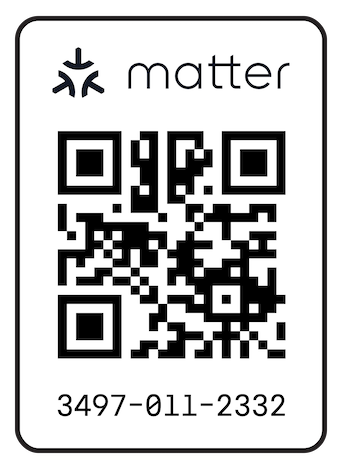
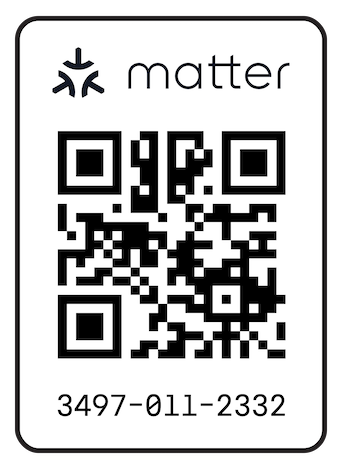
Setup code: 3497-011-2332
Apple Home
Scan the QR code above with the Home app, or enter the setup code manually:
- Open the Home app.
- Tap + → Add Accessory.
- Scan the QR code above, or tap More Options to enter the setup code manually.
- Press Add Anyway when prompted (this is expected — see Matter and Thread Certification).
- Name the device and place it in a room.
Note for users coming from HomeKit Bridge / Home Assistant setups: HomeKit's "reclassify as Fan / Light / Switch" option (available when bridging a stock Shelly through Home Assistant) is not available with native Matter devices. The Matter device type is declared by the firmware at flash time and cannot be changed in the Apple Home app. If you need a different device type, flash the corresponding variant when one is available.
⚠️ This is the ESP-Matter SDK test setup code, used by all devices running this firmware. Once a device is commissioned to your Matter fabric, the setup code is no longer used for authentication — your Matter ecosystem manages credentials going forward. Multiple uncommissioned devices broadcasting the same setup code is why the commissioning instructions specify one device at a time.
Google Home / Alexa / Home Assistant commissioning
Google Home and Alexa support Matter commissioning via their respective apps. Use setup code `3497-011-2332` or the QR Code above when prompted. Google and Alexa hubs have not been directly tested but the firmware should work with any Matter-compliant hub. Let me know and we'll update compatible hubs section!Troubleshooting
Commissioning hangs in Home Assistant
If Home Assistant's Matter integration hangs during commissioning or shows "setting up" indefinitely, restart the Matter Server add-on:
- Settings → Apps → Matter Server → Restart
- Wait 60 seconds for full restart.
- Factory reset the Shelly.
- Retry commissioning.
Factory Reset
Hold the onboard relay button for several seconds. The device will reset and re-enter BLE commissioning mode. The LED will return to the rapid blink pattern from the Status LED Reference, confirming the reset worked. Make sure to remove the device from whatever ecosystems you've added it to before re-commissioning.
Known Issues / Roadmap
- OTA updates (exploratory) - Currently users must reflash via USB-UART for updates.
- Switch variant — momentary relay pulse (~500ms) for garage door openers, doorbells, gates, and similar pulse-activated devices. Separate firmware build since Matter device types are declared at compile time.
- Thermal protection validation — the firmware reads ESP32-C6 die temperature and includes logic to cut off the relay above 75°C, but this has not been validated under controlled thermal conditions. Feature is implemented but not confirmed working as documented.
Roadmap Input
Have a firmware variant or feature you'd like to see prioritized? Vote on the roadmap discussion or open an issue with your use case.
Building from Source
Want to compile your own firmware? See the Building Guide for setup, build commands, and binary merging.
Most users don't need to build from source — download the latest release and skip to Flashing.
Matter and Thread Certification
This firmware is not Matter Certified or Thread Certified. It uses Espressif's ESP-Matter SDK and OpenThread but has not been submitted to the CSA or Thread Group for certification. During commissioning, expect a one-time "Add Anyway" or similar uncertified device warning — this is normal and expected.
See docs/CERTIFICATION.md for full details on what uncertified status means, test credentials, and trademark notices.
Why?
The Shelly 1 Gen4 ships with an ESP32-C6 that includes an 802.15.4 radio capable of running both Thread and Zigbee. Shelly's stock firmware uses this radio for Zigbee and runs Matter over WiFi — Thread is not used. Shelly has stated they have no plans to add Thread support. This firmware reconfigures the radio to run Thread (OpenThread), unlocking Matter over Thread.
Why Matter over Thread, and not ESPHome or Tasmota?
ESPHome and Tasmota are excellent firmware projects, but both effectively assume you have a central controller — Home Assistant for ESPHome, an MQTT broker plus a controller for Tasmota. They're great if that's your setup. They're a problem if it isn't.
This firmware speaks Matter directly. There's no middleware required, no HA instance, no MQTT broker, no ESPHome dashboard, no YAML configs, no bridge:
- Apple Home user without Home Assistant? It just works. Commission directly from the Home app.
- Google Home or Alexa user? Same — direct Matter commissioning, no third-party hub.
- Home Assistant user? Also works — commission via HA's Matter integration.
- Multi-ecosystem household? Multi-fabric commissioning lets the same device live in Apple Home, HA, and Google Home simultaneously.
Matter is an industry-standard protocol — your devices work with the ecosystems you have today, and remain compatible with new Matter ecosystems as they appear.
Why Thread instead of WiFi?
Matter over Thread offers several benefits over Matter over WiFi:
- Mesh networking — Thread devices form a self-healing mesh that doesn't depend on your WiFi infrastructure. Devices can use any compatible Thread Border Router (iPhone 15 Pro+, HomePod mini, Apple TV 4K, Nest Hub 2nd gen, HA SkyConnect/Yellow) and continue to function even if your WiFi is down or congested.
- Lower latency for local commands like "toggle a light," compared to WiFi-based Matter.
- Reduced WiFi network burden — every Matter over Thread device is one fewer device on your WiFi.
- Power consumption — Thread devices CAN run with significantly lower power consumption than WiFi devices, but only when configured as Sleepy End Devices (SEDs). This firmware currently runs the Shelly as a Thread Router (Full Thread Device), which trades sleep-mode power savings for mesh extension benefits. See Power Consumption for measured numbers and design rationale.
I built this because I needed reliable smart home devices in my Sprinter van where WiFi isn't always available. Battery and solar capacity can be limiting factors in van life, which is why a future SED variant may be added to the roadmap, but this current variant prioritizes Thread mesh extension, that serves a broader audience. Vote on the roadmap discussion if this is your use case. If you're an off-grid, smart-home tinkerer, or Thread-curious user, you might find this useful too.
About
This firmware was created from inside an old Mercedes Sprinter T1N named Mabel, parked somewhere in the USA.
I put many sleepless nights obsessing about Thread support that kickstarted me into writing custom firmware and testing using ESP-IDF, ESP-Matter, and ESPHome examples — figuring out Shelly's custom partition offsets, GPIO quirks specific to this device, and getting Matter over Thread commissioning working on non-devkit hardware.
If it saved you the same headache, consider leaving a ⭐ on the repo — it helps the project show up in GitHub search and signals to other Shelly 1 Gen4 owners that this firmware exists and works.
Comments