A safety-first GUI and CLI for auditing, backing up, cleaning, importing, and trimming Codex conversations.
English · 简体中文 · Bilingual GUI guide
Long-running Codex work spreads conversations across projects and lets context grow unchecked. CodexSessionManager brings review, encrypted backup, guarded cleanup, and non-destructive context trimming into one auditable desktop tool.
✨ Key features
- Group and search Codex conversations by project, activity, source, and relationship.
- Create streaming, age-encrypted
.csmbackuparchives with full integrity verification. - Back up selected tasks and complete derived closures from the GUI, then enter archive planning as a separate step.
- Plan archive, restore, import, trim, and purge operations before any write occurs.
- Generate redacted App Server schema audits; unknown profiles stay read-only and are never trusted automatically.
- Reduce context through a derived task while keeping the original conversation unchanged.
- Review model-visible content, Markdown, hidden tags, dependencies, and estimated token savings.
- Scan locally for likely credentials and personal data with bounded background workers, cancellable modal progress, and highlighted matches.
- Use the GUI, CLI, explicit Codex Skill, or optional fail-open PreCompact/PostCompact Hooks.
- Run self-contained macOS arm64 and Windows x64 builds without installing Python, Qt, uv, or age.
Safer defaults at a glance
| Need | Ad hoc workflow | CodexSessionManager |
|---|---|---|
| Review many conversations | Search projects and raw history separately | Project-grouped inventory and timeline review |
| Clean old work | Delete or archive without a reproducible decision record | Dry-run plan, fingerprint checks, descendant expansion, then App Server write |
| Reduce context | Rewrite history or accept all-or-nothing compaction | Keep, exclude, summarize, or protect content in a new derived task |
| Back up and migrate | Copy internal files and hope versions match | Encrypted logical records, checksums, provenance, verification, and new IDs on restore |
⚙️ Quick start
[!WARNING]
v1.0.0is a test prerelease. The macOS build is ad-hoc signed and not notarized; the Windows build is unsigned. Verify the matching SHA-256 file before launch and do not treat either build as production-ready.
[!NOTE] The current
mainsource reports1.1.0as a first-delivery candidate, but no matching binary has been published. The links below still point to the releasedv1.0.0test build.
Requirements
- Release build: Apple Silicon macOS or Windows x64, plus a local Codex App/CLI installation for App Server access.
- Source build: uv and Git. uv manages the pinned CPython 3.13.14 environment.
1. Download a test build
Download the archive and its .sha256 file from the v1.0.0 test release:
2. Verify and launch
macOS arm64:
shasum -a 256 -c CodexSessionManager-macOS-arm64-1.0.0-test.zip.sha256
ditto -x -k CodexSessionManager-macOS-arm64-1.0.0-test.zip .
"./CodexSessionManager.app/Contents/MacOS/CodexSessionManager" cli doctor
"./CodexSessionManager.app/Contents/MacOS/CodexSessionManager"
Windows x64 PowerShell:
$Archive = ".\CodexSessionManager-Windows-x64-1.0.0-test.zip"
$Expected = ((Get-Content "$Archive.sha256").Trim() -split '\s+')[0]
$Actual = (Get-FileHash $Archive -Algorithm SHA256).Hash
if ($Actual.ToLower() -ne $Expected.ToLower()) { throw "SHA-256 mismatch" }
Expand-Archive $Archive -DestinationPath . -Force
PowerShell -NoProfile -ExecutionPolicy Bypass -File .\CodexSessionManager-Windows-x64\Install-CodexSessionManager.ps1
& "$env:LOCALAPPDATA\CodexSessionManager\CodexSessionManager.exe"
Or run the basic GUI and CLI directly from source:
uv sync --locked --compile-bytecode
uv run csm --help
uv run CodexSessionManager
Backup verification and a complete doctor check also require an age executable. The platform build scripts fetch and verify the pinned binary; development environments may instead provide CSM_AGE_BIN.
3. Try the minimum GUI workflow
- Search for a project/conversation, or enter a complete conversation ID.
- Select a turn or item, then choose Keep, Exclude, Summary, or Protect.
- Use Save plan to store the reviewed plan without changing Codex, or Create trimmed task to create a new derived conversation.
- In Cleanup mode, adjust the final candidates and use Backup & archive. The app fully verifies the age backup before rebuilding the final plan and archiving. Ordinary task management still supports separate backup and archive operations.
Build and release status
[!NOTE] The repository's code was generated entirely by ChatGPT. Human review, automated tests, and target-platform validation are still required; inspect the code independently before relying on write operations.
📌 Use cases
| Scenario | What CSM provides |
|---|---|
| Many long-running Codex projects | One project-grouped list with conversation search, relative activity, multi-selection, and relationship tracking |
| Context approaching compaction | Manual review or an optional PreCompact prompt before native compaction proceeds |
| Old or inactive conversations | Rule-based candidates, dry-run archive plans, batch limits, and human confirmation |
| Backup or account migration | Encrypted CSM backups, logical restore, Codex rollout import, and ChatGPT export branch expansion |
| Sensitive-data review | Bounded background scanning, cancellable progress, and red highlighting without uploading conversation content |
| Auditable maintenance | Immutable plan hashes, source fingerprints, capability checks, and a CSM-owned audit chain |
The primary audience is developers and maintainers who use Codex across multiple repositories, keep long-lived conversations, or need a reviewable alternative to manipulating Codex's internal storage.
Safety model
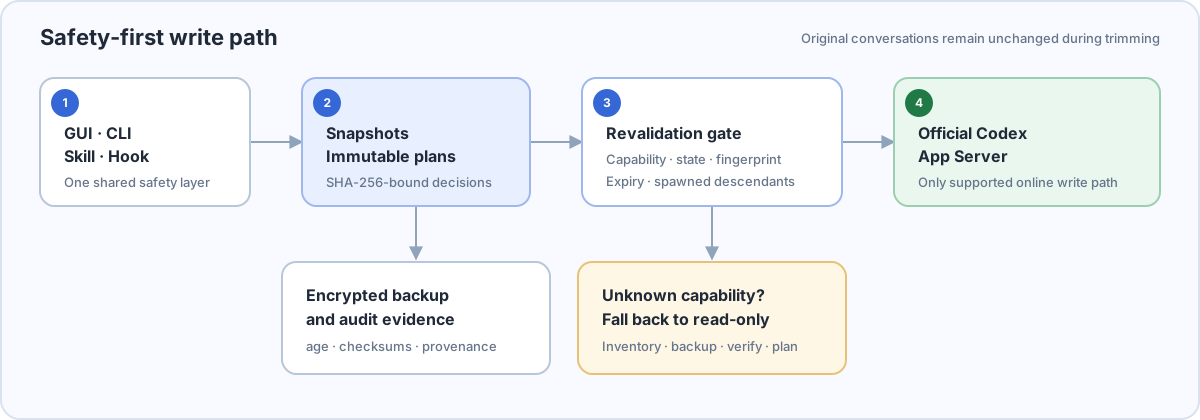
- Online Codex reads and writes use the official App Server. CSM does not rewrite Codex JSONL or SQLite.
- Unknown, incomplete, or unaudited protocol capabilities disable writes and leave inventory, backup, verification, and planning available.
- Schema audits classify stable/experimental additions, removals, stability changes, and critical fields. Writes require an exact version and schema-hash match to a human-approved profile.
- Every write consumes a SHA-256-bound plan and re-checks state, content fingerprints, capabilities, expiry, and spawned descendants.
- Automatic operations stop at archive. Permanent purge requires a separate single-root plan, verified backup evidence, trusted archive history, and explicit confirmation.
- Context trimming creates a new task. The source task remains unchanged and system/developer instructions are reloaded from the current project.
- Tool calls/results and file changes/verifications are retained or summarized as groups, not split into unsafe fragments.
- Hook failures are fail-open: timeout, close, crash, or launch failure continues native compaction.
📖 Documentation
Stable user installation
Launching the extracted macOS App directly does not install the Skill or CLI launcher. From a checkout matching the release tag, install it into the stable user path with:
scripts/install_user.sh /absolute/path/to/CodexSessionManager.app
~/.local/bin/csm doctor
The installer atomically replaces ~/Applications/CodexSessionManager.app, retains the previous App for rollback, creates ~/.local/bin/csm, and links the bundled Skill. The Windows installer shown in Quick start provides the equivalent user-level installation under %LOCALAPPDATA%\CodexSessionManager. Neither installer enables Hooks automatically.
GUI workflow
Launching CodexSessionManager opens the existing Projects & Tasks, Timeline, Context, and Actions review GUI. Context optimization keeps using this complete interface. A cleanup request injects and preselects the LLM/Skill shortlist while also listing locally safe roots from the current inventory that the user may explicitly add. Purge-eligible roots that satisfy trusted 14-day archive history and current backup evidence are shown only in a separate read-only, unselected group and never enter the archive flow. The second button in the left rail switches the same window into Memory Management mode. It loads only explicitly registered UTF-8 Markdown/text files, segments them structurally, supports Keep/Delete/Replace/Protect, shows the complete diff, creates a private version, rechecks concurrent drift, atomically replaces the file, and rereads it for verification. Pending Plans and Backup & Restore remain auxiliary entries rather than replacing the primary review GUI.
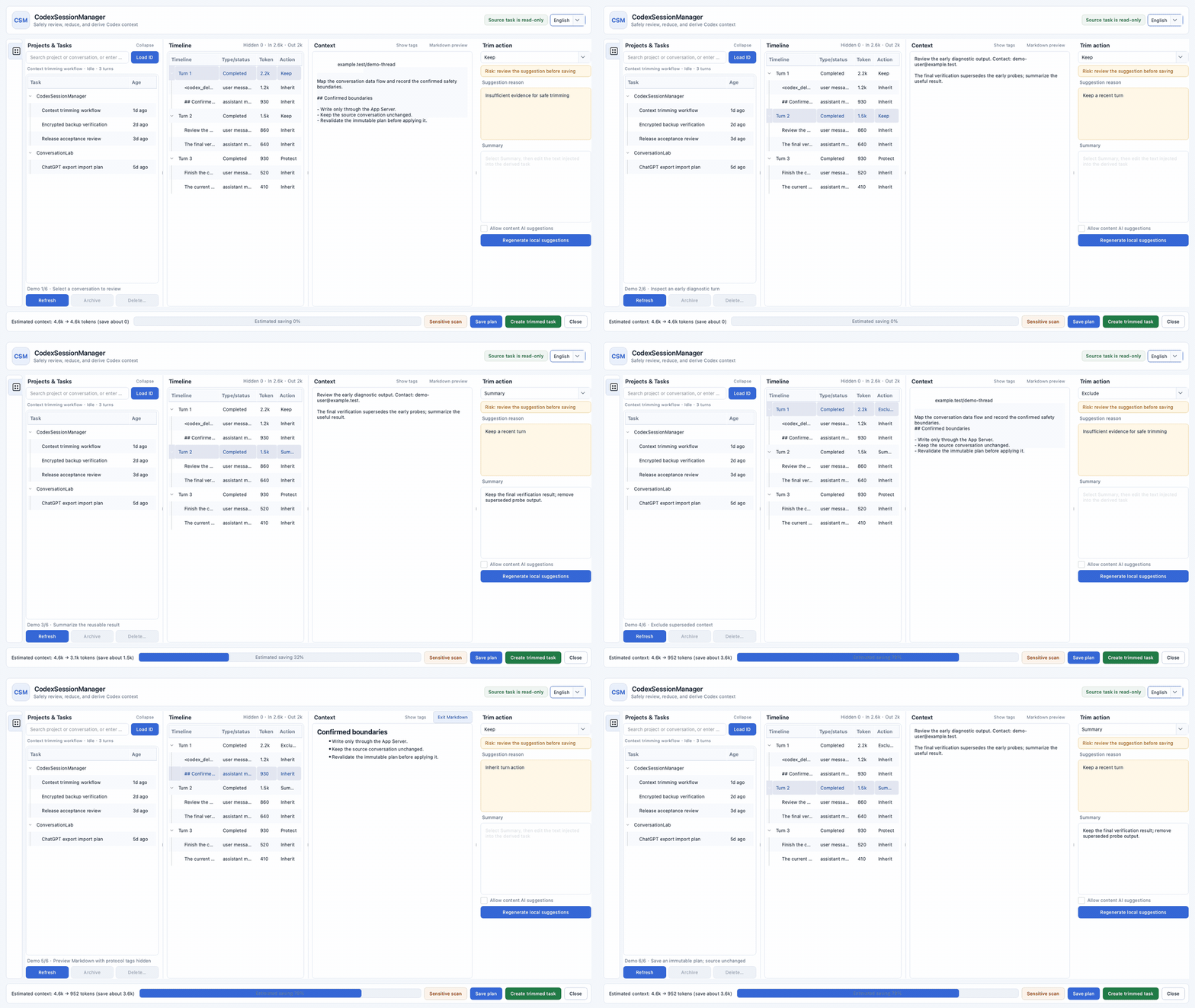
12-second deterministic demo · fictional IDs, paths, repository, and conversation content
- Projects & Tasks groups conversations by project cwd or Git remote. Search and complete-ID loading share one field; multi-selection supports guarded batch actions.
- Timeline shows model-visible turns/items and hides empty internal events by default. Token totals use compact units.
- Context is editable and supports hidden-tag display, segmented source rendering, Markdown preview, and local sensitive-range highlighting.
- Trim actions apply
keep,exclude,summary, orprotect. Hard-protected requests, active turns, goals, unresolved errors, and unknown items cannot be silently removed. - Cleanup supplementation distinguishes LLM suggestions from current local safe roots: LLM suggestions are preselected, safe additions are not, and both are rechecked against the complete descendant closure before planning and backup.
- Purge eligibility is read-only and includes only roots archived for at least 14 days with trusted archive history and a current verified backup. No purge plan is created here; permanent deletion still requires its separate flow and exact confirmation.
- External suggestion injection only accepts locally rebound conversation, turn, or item IDs with current fingerprints; hard protection and
validate_selectionsretain final veto power. - Memory Management uses the second left-rail button and the same window shell. Only registered sources are visible. LLM suggestions are rebound to current segment IDs and content SHA-256 values; headings, front matter, fenced code, and structural whitespace retain local hard protection. Confirmed writes create a version before atomic replacement and reread verification.
- Backup & archive in Cleanup mode freezes the root/descendant scope, creates and fully verifies the age backup, then re-reads state and suggestion fingerprints, rebuilds the final plan, and archives it. Drift or verification failure stops the archive step. The ordinary Backup & verify action still never archives implicitly.
Saving a plan only persists the reviewed TrimPlan; it does not write to Codex. Creating a trimmed task first revalidates the plan, waits for the source to be idle or notLoaded, and then creates a new derived task.
CLI workflows
csm doctor
csm schema audit --output schema-audit-v1.json
csm threads list
csm threads show CONVERSATION_ID --include-content
csm gui open --page pending
csm trim review CONVERSATION_ID
csm memory sources
csm memory review SOURCE_ID
csm acceptance run --output acceptance-first-delivery.json
csm audit show
You can generate non-executing cleanup suggestions before entering the plan-and-backup workflow:
csm cleanup review --older-than-days 90
csm backup create backup.csmbackup \
  --thread CONVERSATION_ID \
  --recipient age1... \
  --identity /secure/path/identity.txt
csm cleanup plan --action archive --older-than-days 90
csm cleanup apply PLAN.json --confirm PLAN_ID
Important command groups:
| Command | Purpose |
|---|---|
csm threads list|show |
Read-only inventory and content inspection |
csm schema audit |
Write a versioned protocol-difference report without private paths or conversation content |
csm acceptance report |
Record fixed stages, hashed task IDs, and evidence hashes; always non-production |
csm backup create|verify |
Streaming age-encrypted backup and full verification |
csm cleanup review |
Create sealed cleanup suggestions and inject them into the original task GUI for final user selection |
csm cleanup eligible-purge |
Read-only list of purge roots satisfying trusted archive-age and current backup gates |
csm cleanup plan|apply |
Plan-based archive/unarchive workflow |
csm purge plan|apply |
Separately gated permanent deletion workflow |
csm restore plan|apply |
Logical restore with new conversation IDs |
csm import {chatgpt|codex} ... |
Plan and apply imports from official ChatGPT exports or Codex rollout data |
csm trim review|suggest|apply |
GUI/manual review, local suggestions, and derived trimming |
csm memory ... |
Register, segment, review, diff, version, atomically edit, and restore local memory files |
csm gui open |
Open an original-GUI review mode or sealed request; pending/backup use auxiliary entries |
csm acceptance run|release |
Run isolated first-delivery checks; release also requires age and the stable installed app |
csm hook install|status|uninstall |
Optional PreCompact/PostCompact integration |
csm audit show|verify |
Inspect and verify the CSM audit chain |
Passphrase mode reads the secret directly from the terminal. Do not place backup passphrases in command arguments, environment variables, logs, issues, or model context. GUI and unattended workflows use age recipients instead.
Codex Skill
The stable installers place manage-codex-sessions under ~/.agents/skills. Restart Codex, then invoke it explicitly:
$manage-codex-sessions open context trimming for this conversation
The Skill does not run automatically during ordinary coding work. It resolves the stable csm launcher or bundled executable and follows the same plan and safety gates as the GUI and CLI.
Codex desktop local MCP
CSM provides a read-only orchestration MCP server over stdio for Codex desktop/CLI. Add
it to the Codex config.toml so Codex starts the stable launcher itself:
[mcp_servers.codex_session_manager]
command = "/Users/test-user/.local/bin/csm"
args = ["mcp", "stdio"]
The test kit's configure-codex-mcp.sh adds the actual absolute paths and binds
CODEX_HOME plus the CSM private directories to the same isolated test environment.
After configuring, restart Codex desktop and check Settings → MCP servers or /mcp in
the composer. The stdio path does not require HTTPS, a public endpoint, a Bearer token,
or an OpenAI Secure MCP Tunnel.
The server only inspects bounded metadata, prepares structured suggestions, opens the local human-review GUI, and reports review status. It never exposes archive, purge, trim-application, or memory-write executors.
For a separate HTTP compatibility diagnostic, keep a long random Bearer token in the local environment and bind only to loopback:
export CSM_MCP_BEARER_TOKEN='a-long-random-value-generated-locally'
csm mcp serve --host 127.0.0.1 --port 8765 --path /mcp
The health endpoint is /healthz and the MCP endpoint is /mcp. --allow-unauthenticated-local
is only for explicit loopback testing and must not be used for a public service. The
desktop app's CSM_MCP_AUTO_START=1 is an optional HTTP diagnostic switch; Codex desktop
starts csm mcp stdio itself for the local MCP path.
Registered tools:
inspect_conversation_inventory
prepare_cleanup_suggestions
open_cleanup_review
prepare_context_suggestions
open_context_review
inspect_memory_source
prepare_memory_suggestions
open_memory_review
get_pending_review_status
open_review_demo
Every suggestion and review request still requires final confirmation in the original GUI. Memory tools accept only registered source IDs, never arbitrary filesystem paths, and expose no write executor. Codex desktop local MCP, real Cocoa GUI behavior, account integration, and installed-app testing remain separate target-machine acceptance steps.
Optional Hooks
csm hook status
csm hook install --yes
csm hook uninstall --yes
Installation does not silently enable Hooks. After installation, review and trust the exact command in Codex /hooks. PreCompact shows a lightweight prompt; it returns continue: false only after a plan is safely persisted, and never creates a derived task inside the active turn.
Further reading
- Bilingual GUI guide (PPTX)
- Skill command workflows
- Skill safety invariants
- Domain language and relationships
- Architecture decision records
- Final phase-two implementation plan (v1.2.0—v1.5.0)
- Human App Server schema approval process
v1.1.0first-delivery acceptance runbookv1.1.0local two-step controlled acceptance planv1.1.0pre-release manual acceptance runbookv1.1.0first-delivery candidate notesv1.0.1macOS real-account acceptance runbookv1.0.1hardening-candidate notesv1.0.0test-release notes- Project development constraints
🔧 Configuration
CSM uses platform-native user directories by default. Environment variables are intended for explicit account selection, isolated tests, or advanced installations.
| Variable | Purpose |
|---|---|
CSM_CODEX_HOME |
Explicit Codex data root used by CSM |
CODEX_HOME |
Codex's official data-root override; if both home variables are set, they must resolve to the same path |
CSM_CODEX_BIN |
Absolute path or command name for the Codex CLI/App Server launcher |
CSM_APP_PATH |
Stable installed App root or executable used when generating Hook commands |
CSM_DATA_DIR |
Plans, imports, backups, and audit database root |
CSM_CONFIG_DIR |
CSM configuration root |
CSM_CACHE_DIR |
Cache root |
CSM_LOG_DIR |
Application and Hook log root |
CSM_AGE_BIN |
Development-only age executable override; standalone builds use their verified bundled binary |
If CSM_CODEX_HOME and CODEX_HOME point to different roots, every entry point refuses to continue. This prevents one account's task state from being combined with another account's plans or audit evidence.
Stable installation paths are ~/Applications/CodexSessionManager.app on macOS and %LOCALAPPDATA%\CodexSessionManager on Windows. Hooks must target these stable locations, never a source checkout or .venv.
Development, testing, and packaging
Development setup
git clone https://github.com/Aiyawoc/CodexSessionManager.git
cd CodexSessionManager
uv sync --locked --compile-bytecode
scripts/check.sh
scripts/check.sh verifies generated Qt files, Ruff formatting/lint, strict mypy, offscreen PySide6 tests, and the Skill contract. More focused workflows are available for source, installation, Skill, Hook, and lifecycle checks:
scripts/test_source_workflow.sh
scripts/test_install_workflow.sh dist/CodexSessionManager.app
scripts/test_skill_workflow.sh dist/CodexSessionManager.app
scripts/test_hook_workflow.sh dist/CodexSessionManager.app
scripts/test_full_workflow.sh
These checks use isolated temporary data. They do not replace real-account App Server testing, physical-device UI testing, signing/notarization, SmartScreen reputation, or production acceptance.
The CI workflow runs the complete source workflow on macos-15 after asserting arm64, while retaining Windows checks. The manual build-macos workflow always invokes scripts/test_full_workflow.sh from current source and never uses --reuse-app; hosted runners do not assume Codex is installed, so only the in-bundle App Server connectivity check is skipped there and this is not real-account acceptance.
To test a macOS App against a copy of the current Codex home:
scripts/install_test_app.sh
scripts/launch_test_app.sh /absolute/path/printed/as/TEST_ROOT
The copied test root may contain authentication data. Close Codex before copying when possible, and remove only the exact TEST_ROOT printed by the installer.
Desktop packaging
macOS arm64, on real Apple Silicon hardware:
scripts/build_macos_app.sh
scripts/accept_macos_bundle.sh dist/CodexSessionManager.app
TEST_HOME=/private/tmp/csm-first-delivery-home
mkdir -m 700 -p "$TEST_HOME"
HOME="$TEST_HOME" CSM_INSTALL_SKIP_APP_SERVER=1 \
  scripts/install_user.sh "$PWD/dist/CodexSessionManager.app"
HOME="$TEST_HOME" scripts/accept_first_delivery.sh \
  --evidence-dir build/first-delivery-bundle-$(date +%Y%m%d-%H%M%S) \
  --app dist/CodexSessionManager.app \
  --stable-app "$TEST_HOME/Applications/CodexSessionManager.app"
scripts/package_macos_release.sh --app dist/CodexSessionManager.app
The final script validates the source .app, creates a ZIP and .sha256, extracts it into a clean temporary directory, and validates the extracted bundle again without overwriting existing artifacts. Test-channel filenames include -test; public release still requires Developer ID signing, notarization, and stapling.
Windows x64, on Windows AMD64 or the manual GitHub Actions workflow:
.\scripts\check_windows.ps1
.\scripts\build_windows_app.ps1 -Version 1.1.0
Both builds use pyside6-deploy / Nuitka standalone mode and include pinned Python, Qt, plugins, application dependencies, and a verified age binary. Formal public distribution still requires Developer ID signing/notarization/stapling on macOS and an appropriate Authenticode signature on Windows.
❓ FAQ
Does CSM modify Codex's JSONL or SQLite files?
No. Online reads and writes use the App Server. Raw rollout data may be retained inside an encrypted disaster-recovery backup, but CSM does not treat direct internal-file editing as a supported restore or trimming API.
Do end users need Python, uv, Qt, or age?
No for standalone builds. The macOS and Windows bundles carry their own runtime and verified age executable. Source development requires uv; uv obtains the pinned Python version without changing the system Python.
Why does Gatekeeper or SmartScreen warn about the download?
v1.0.0 is explicitly a test release. macOS is ad-hoc signed and not notarized; Windows has no Authenticode signature or SmartScreen reputation. Verify the published checksum and source before evaluating it. Do not bypass a warning for an unverified file.
Why is the conversation list empty or App Server unavailable?
Run csm doctor. Confirm the Codex CLI is installed and reachable, or set CSM_CODEX_BIN to its absolute path. Also verify that CODEX_HOME and CSM_CODEX_HOME refer to the intended, identical data root.
What is the difference between “Save plan” and “Create trimmed task”?
Save plan only writes a reviewed immutable plan to CSM's data directory. Create trimmed task revalidates that plan and creates a new Codex task; the original remains unchanged.
Can CSM permanently delete conversations?
Yes, but never automatically. Purge requires a separate immutable plan, a verified encrypted backup, trusted archive evidence, waiting-period checks, descendant expansion, and explicit human confirmation. Archive is the maximum automatic action.
Does sensitive scan prove that a secret is valid or leaked?
No. It uses deterministic local patterns and checksum validation where applicable. It can produce false positives and miss unusual formats; it is a review aid, not a credential-validation service.
Can I merge conversations from another account?
CSM can plan logical imports from CSM backups, Codex rollout data, and official ChatGPT exports. Imported conversations receive new IDs, keep source provenance, and never replay tool calls. Uncertain project mappings remain quarantined for review.
Which platforms are currently released?
The test release covers macOS arm64 and Windows x64. There is no released Intel macOS or Linux build. Target-platform acceptance must be performed on the corresponding real platform or hosted Windows runner.
🤝 Contributing
Focused issues and pull requests are welcome.
- Describe the problem, expected behavior, reproduction scope, and platform without attaching credentials or real conversation data.
- Add or update tests for behavior changes; keep GUI, CLI, Skill, and Hook entry points on the shared plan/safety layer.
- Run
scripts/check.shand the relevant focused workflow before opening a pull request. - Update both README files when user-visible commands, platform support, or safety behavior changes.
Read AGENTS.md before making implementation changes. Do not add direct Codex JSONL/SQLite writes, implicit network installation in Hooks, or write paths that bypass immutable plans.
The current project code was generated entirely by ChatGPT, but generated code is not self-validating. Contributions of any origin still require human review, reproducible tests, and honest target-environment evidence.
📄 License
CodexSessionManager is released under the MIT License. Bundled dependencies and tools retain their own licenses; see THIRD_PARTY_NOTICES.md.
⭐ If this project is useful to you, consider giving it a Star. Continued maintenance and iteration are planned.
🗺️ Memory-file management status
The first-delivery implementation now includes explicit source registration, path/symlink boundaries, UTF-8 Markdown/text segmentation, stable segment IDs, KEEP/DELETE/REPLACE/PROTECT, LLM suggestion fingerprint binding, final confirmation in the original GUI, unified diff, private versions, concurrent-drift detection, atomic writes, reread verification, audit, and plan-based restore. It does not manage ChatGPT account-side Memory.
Future enhancements include full-text search, richer Markdown semantics, optionally encrypted memory versions, multi-file plans, and focused UI acceptance in a real Windows bundle.
Comments