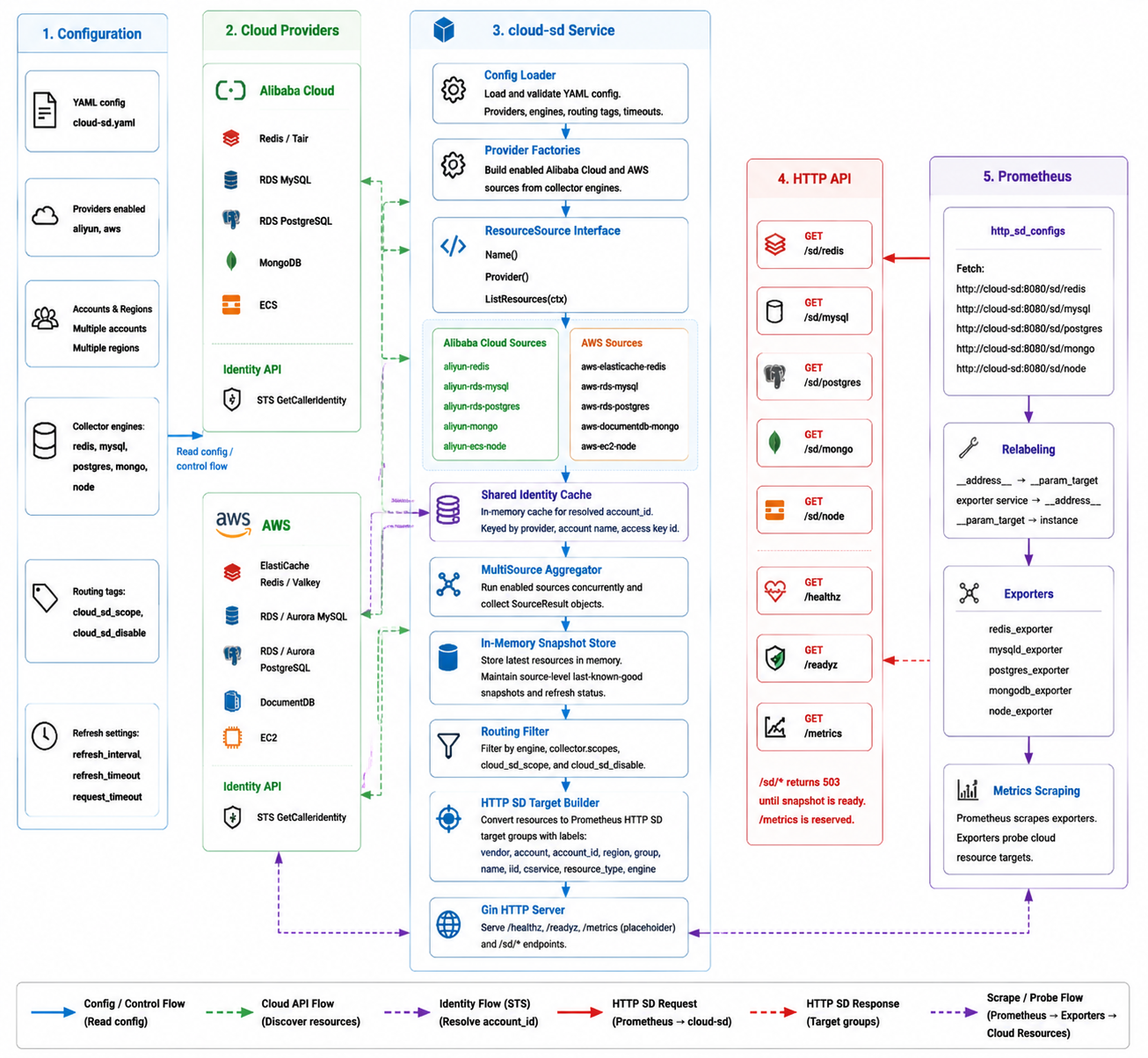
prometheus-cloud-sd is a multi-cloud resource discovery service for Prometheus HTTP Service Discovery. It discovers cloud databases, middleware, and compute resources from Alibaba Cloud and AWS, converts them into Prometheus http_sd_configs target groups, and lets Prometheus scrape them through exporters.
中文文档 | Prometheus integration | Kubernetes manifests | Example config
Status
v0.1.1 is the current release. v0.1.0 was the first usable release.
Included:
- Alibaba Cloud: Redis/Tair, RDS MySQL, RDS PostgreSQL, MongoDB, ECS
- AWS: ElastiCache Redis/Valkey, RDS/Aurora MySQL, RDS/Aurora PostgreSQL, DocumentDB, EC2
- Prometheus HTTP SD endpoints for Redis, MySQL, PostgreSQL, MongoDB, and Node Exporter targets
- tag/scope filtering with
cloud_sd_scopeandcloud_sd_disable - Kubernetes manifests for prometheus-cloud-sd and exporters
- GHCR image publishing workflow
Still intentionally out of scope for v0.1.1:
- UI
- database storage
- HTTP auth
- persistent cache
Quick Start
Kubernetes
- Publish or select an image.
The default manifest uses:
ghcr.io/ylighgh/prometheus-cloud-sd:v0.1.1
The image is built by .github/workflows/docker.yml. It runs on v* tags and can also be triggered manually.
- Update credentials and config.
Edit deploy/prometheus-cloud-sd/prometheus-cloud-sd.yaml:
- replace every
CHANGE_ME - review enabled providers, accounts, regions, scopes, and engines
- update the image if you publish it somewhere else
- Deploy prometheus-cloud-sd.
kubectl apply -f deploy/prometheus-cloud-sd/prometheus-cloud-sd.yaml
kubectl -n monitoring rollout status deploy/prometheus-cloud-sd
- Deploy exporters if needed.
kubectl apply -f deploy/exporters/
Detailed deployment docs:
Local Run
export ALIYUN_PROD_ACCESS_KEY_ID="your-access-key-id"
export ALIYUN_PROD_ACCESS_KEY_SECRET="your-access-key-secret"
export AWS_ACCESS_KEY_ID="your-access-key-id"
export AWS_SECRET_ACCESS_KEY="your-secret-access-key"

go run ./cmd/prometheus-cloud-sd -config examples/config.yaml
Check the service:
curl http://localhost:8080/healthz
curl http://localhost:8080/readyz
curl http://localhost:8080/sd/redis
Supported Resources
| Endpoint | Engine | Alibaba Cloud | AWS |
|---|---|---|---|
/sd/redis |
redis |
Redis / Tair | ElastiCache Redis / Valkey |
/sd/mysql |
mysql |
RDS MySQL | RDS MySQL / Aurora MySQL |
/sd/postgres |
postgres |
RDS PostgreSQL | RDS PostgreSQL / Aurora PostgreSQL |
/sd/mongo |
mongo |
MongoDB | DocumentDB |
/sd/node |
node |
ECS | EC2 |
/sd/node does not filter by instance status. Stopped instances remain visible to Prometheus as unreachable targets so power state changes can become monitoring signals.
Architecture
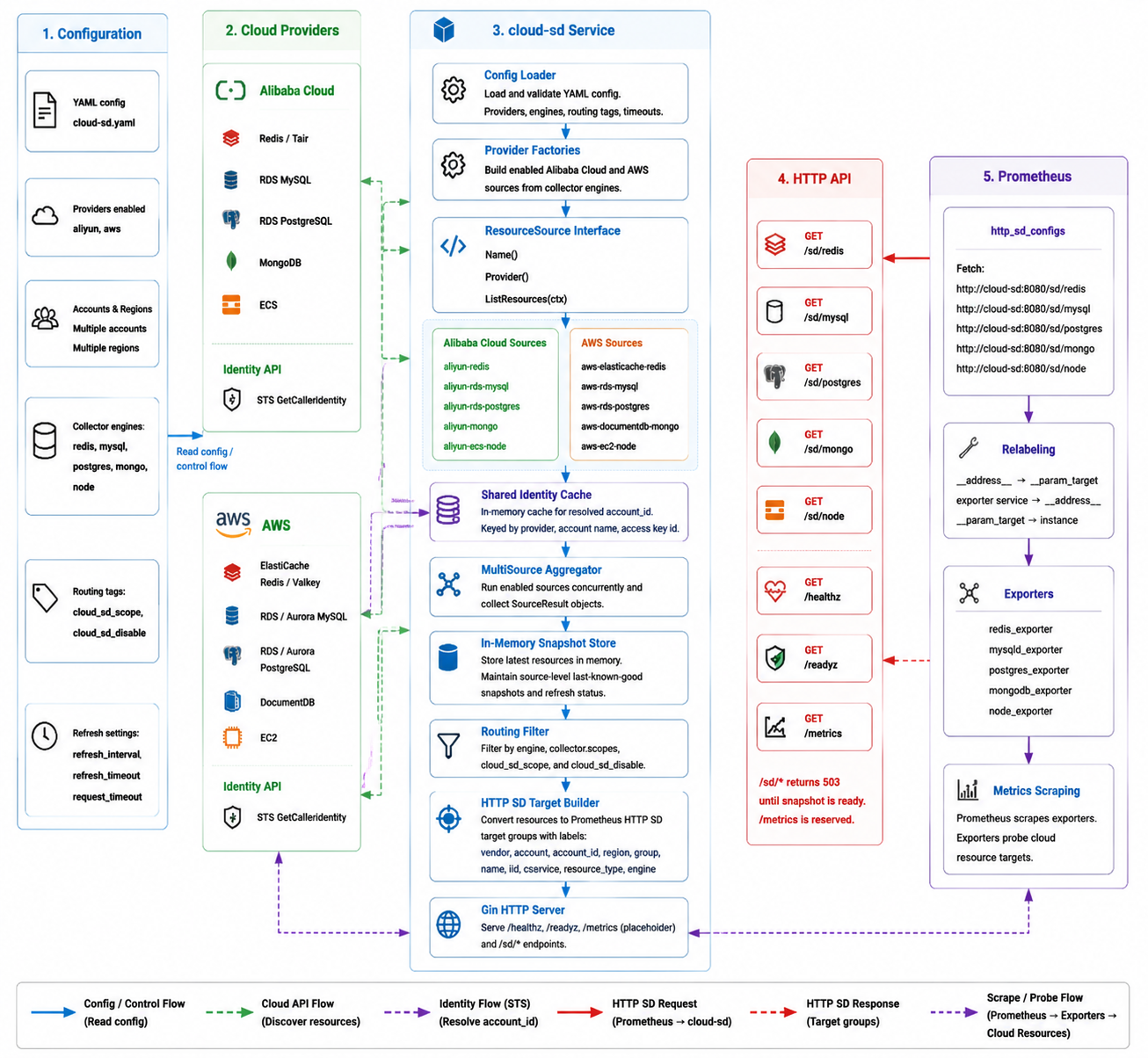
Cloud APIs
   |
   v
ResourceSource adapters
   |
   v
MultiSource aggregator
   |
   v
In-memory snapshot store
   |
   v
Prometheus HTTP SD endpoints
Every provider adapter implements:
type ResourceSource interface {
    Name() string
    Provider() core.Provider
    ListResources(ctx context.Context) ([]core.Resource, error)
}
Provider factories build enabled sources from YAML config. Future Huawei Cloud, CMDB, MCP, or other inventory adapters can use the same interface without changing the Prometheus-facing API.
Configuration
prometheus-cloud-sd uses YAML. Start from examples/config.yaml or the ConfigMap in deploy/prometheus-cloud-sd/prometheus-cloud-sd.yaml.
Minimal shape:
server:
  listen: ":8080"

collector:
  scopes: []
  engines:
    redis: true
    mysql: true
    postgres: true
    mongo: true
    node: true
  refresh_interval: 5m
  refresh_timeout: 1m
  request_timeout: 20s

routing:
  scope_tag: cloud_sd_scope
  disable_tag: cloud_sd_disable

aliyun:
  enabled: true
  accounts:
    - name: prod
      regions: [ap-southeast-1]
      access_key_id_env: ALIYUN_PROD_ACCESS_KEY_ID
      access_key_secret_env: ALIYUN_PROD_ACCESS_KEY_SECRET
Notes:
- Empty
collector.scopesmeans discover all non-disabled resources. account_idis resolved through cloud STS APIs and cached in memory.- Use environment variables or Kubernetes Secrets for AK/SK in production.
HTTP API
| Endpoint | Description |
|---|---|
GET /sd/redis |
Redis-compatible targets |
GET /sd/mysql |
MySQL-compatible targets |
GET /sd/postgres |
PostgreSQL-compatible targets |
GET /sd/mongo |
MongoDB-compatible targets |
GET /sd/node |
Node Exporter targets |
GET /healthz |
Liveness check |
GET /readyz |
Readiness and refresh status |
GET /metrics |
Reserved metrics endpoint |
Example target group:
[
  {
    "targets": ["redis.example.com:6379"],
    "labels": {
      "vendor": "aliyun",
      "account": "prod",
      "account_id": "123456789",
      "region": "cn-hangzhou",
      "group": "id1",
      "name": "prod-redis-cache",
      "iid": "r-bp123",
      "cservice": "redis",
      "resource_type": "redis_instance",
      "engine": "redis"
    }
  }
]
Prometheus
Prometheus reads prometheus-cloud-sd through http_sd_configs, then relabels discovered resource addresses into exporter probe targets.
Use cloud-neutral job names:
cloud-redis
cloud-mysql
cloud-postgres
cloud-mongo
cloud-node
Detailed examples:
Labels
prometheus-cloud-sd emits dashboard-friendly labels:
vendor, account, account_id, region, group, name, iid, cservice, resource_type, engine
The label set is designed for Grafana variable chains such as:
vendor -> account -> group -> name -> instance
Permissions
Use least-privilege read-only cloud credentials.
Alibaba Cloud needs STS identity, resource listing, resource details, and tag read permissions for Redis/Tair, RDS, MongoDB, and ECS.
AWS needs STS identity, EC2 DescribeInstances, ElastiCache DescribeReplicationGroups / ListTagsForResource, RDS DescribeDBInstances, and DocumentDB DescribeDBClusters / ListTagsForResource.
Development
make test
make build
make run
The binary is written to bin/prometheus-cloud-sd.
Roadmap
- Huawei Cloud adapter
- Prometheus
client_golangmetrics - HTTP endpoint auth
- optional read-only UI
- optional disk cache for the latest successful snapshot
- finer-grained per-account and per-region last-known-good cache
- identity resolution singleflight to reduce STS calls
Comments