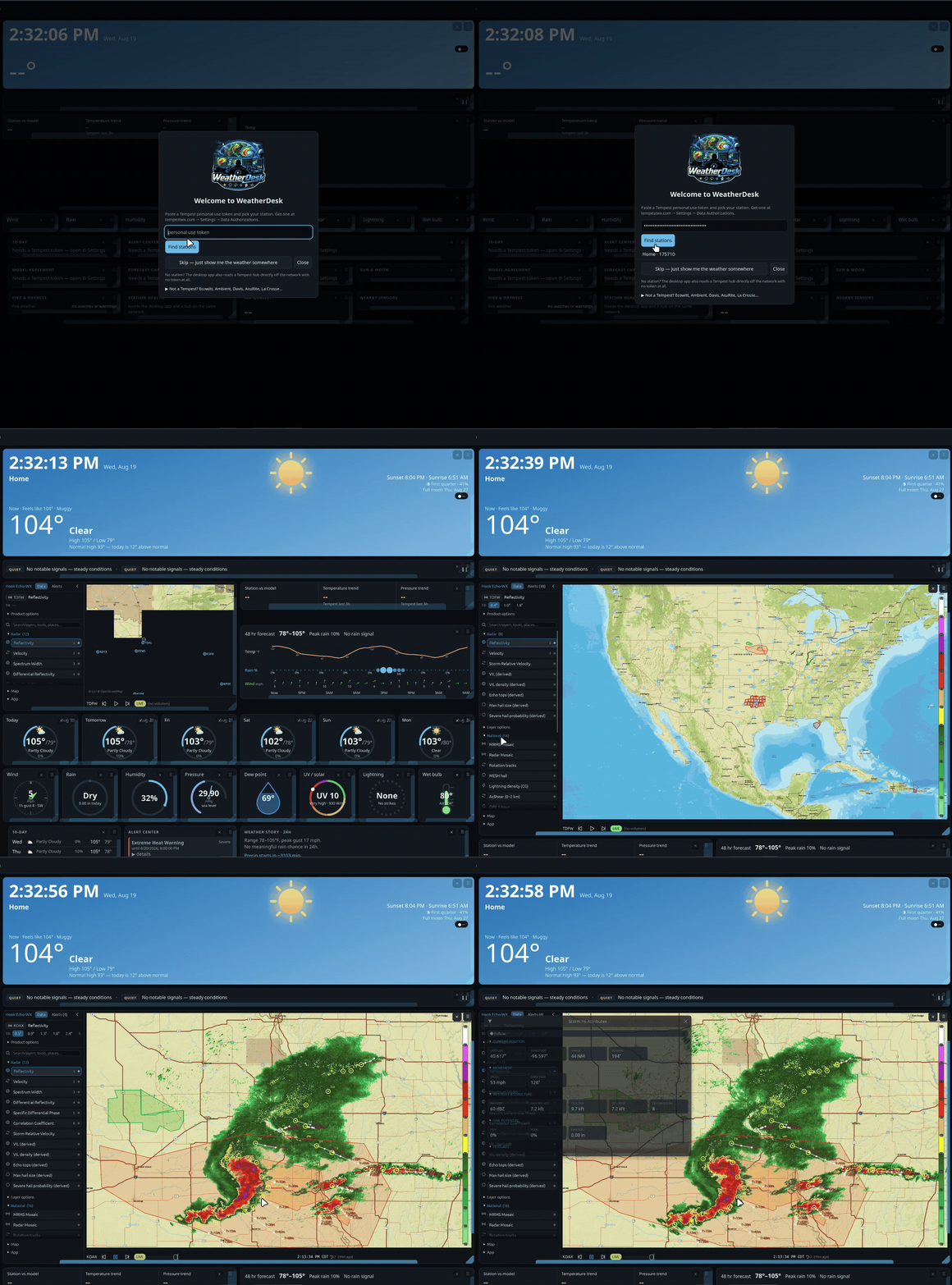
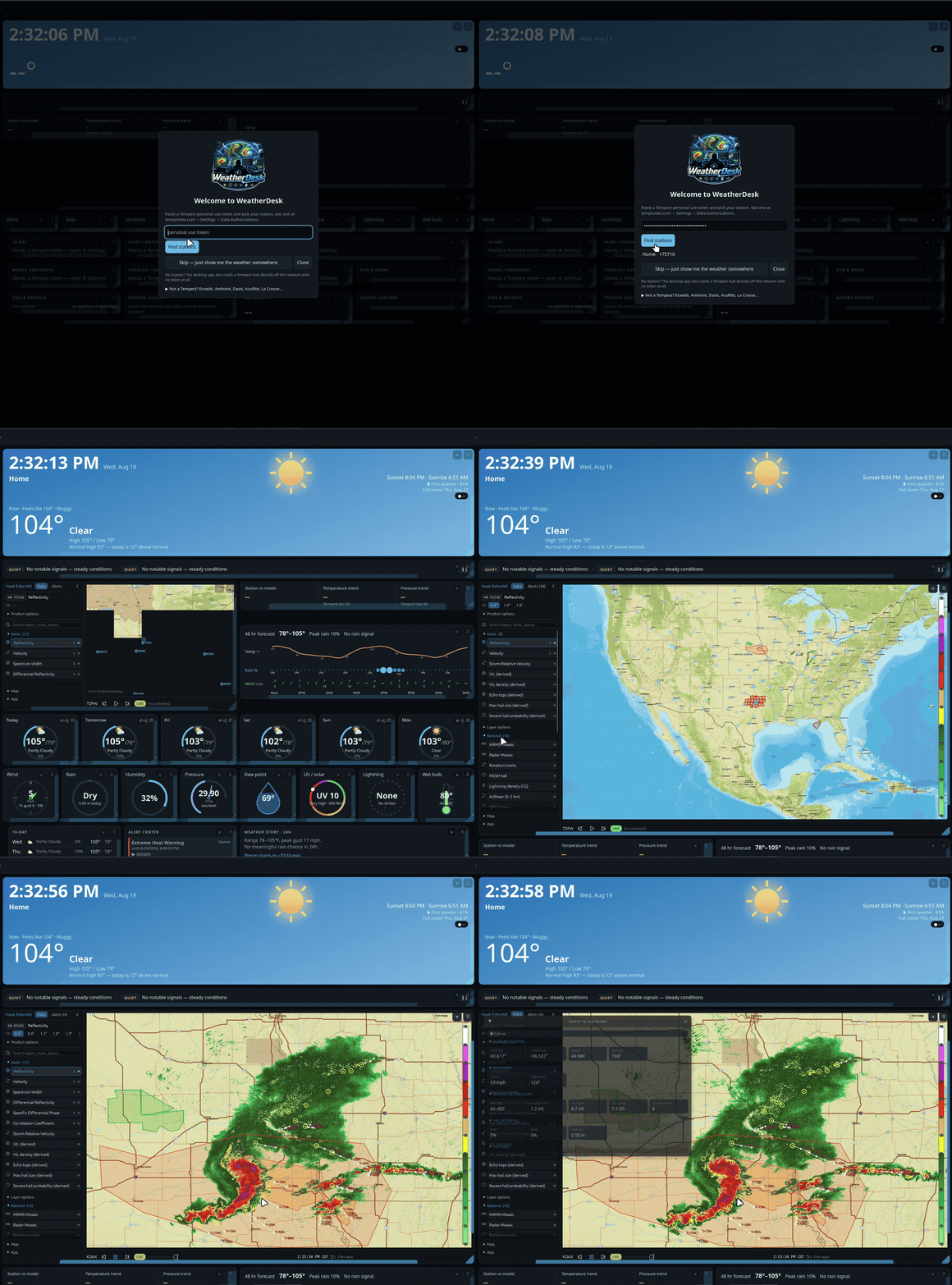
A self-hosted weather dashboard for your own weather station, built for a wall tablet on the LAN. WeatherFlow Tempest, Ecowitt, Ambient Weather, Davis, AcuRite, La Crosse and any Weather Underground-protocol console all work; with no station at all it runs on a forecast for a place you name. Vanilla JS, native ES modules, no build step, no framework, no chart library, no backend — every call goes browser-direct to a free public API.
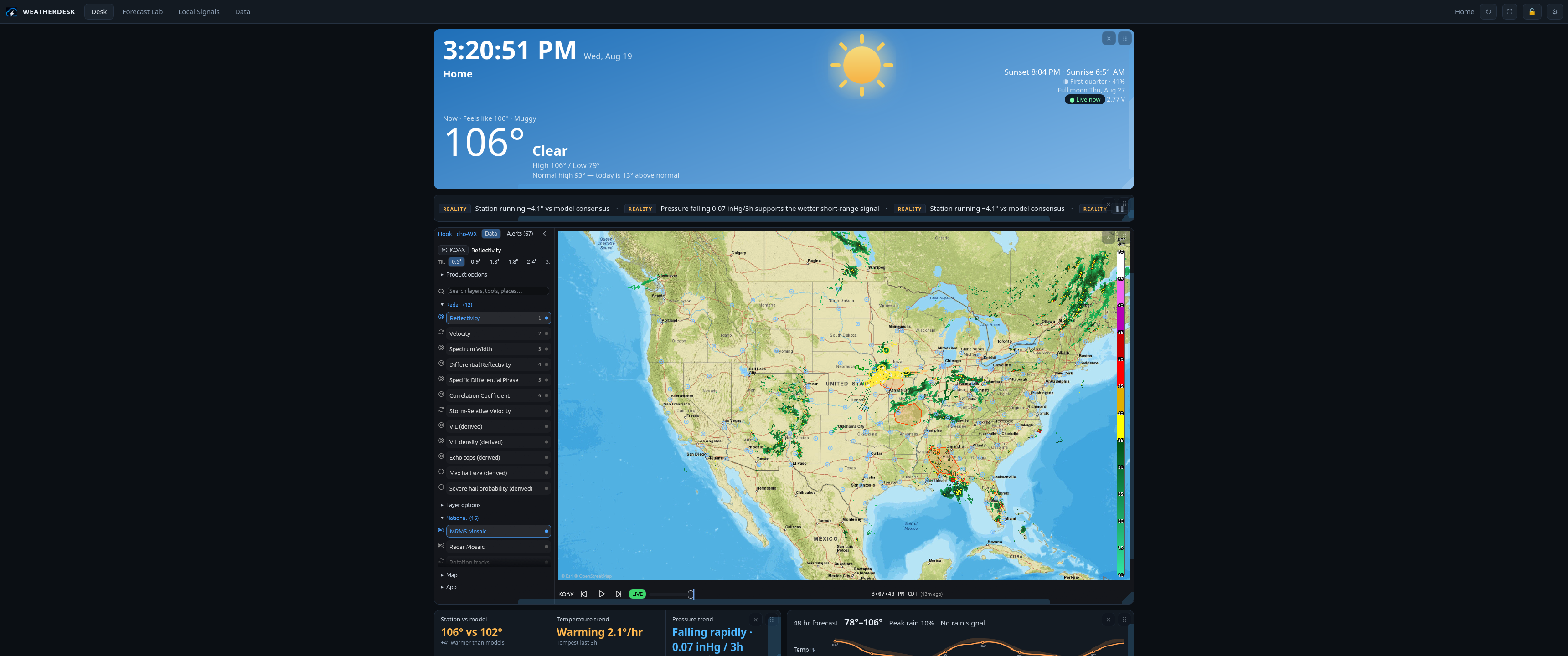
Radar comes from Hook Echo-WX — my own NEXRAD viewer, embedded here and centered on the station.
Sections
- Desk — every panel drags by its grip and resizes from its corner, with the arrangement kept
in
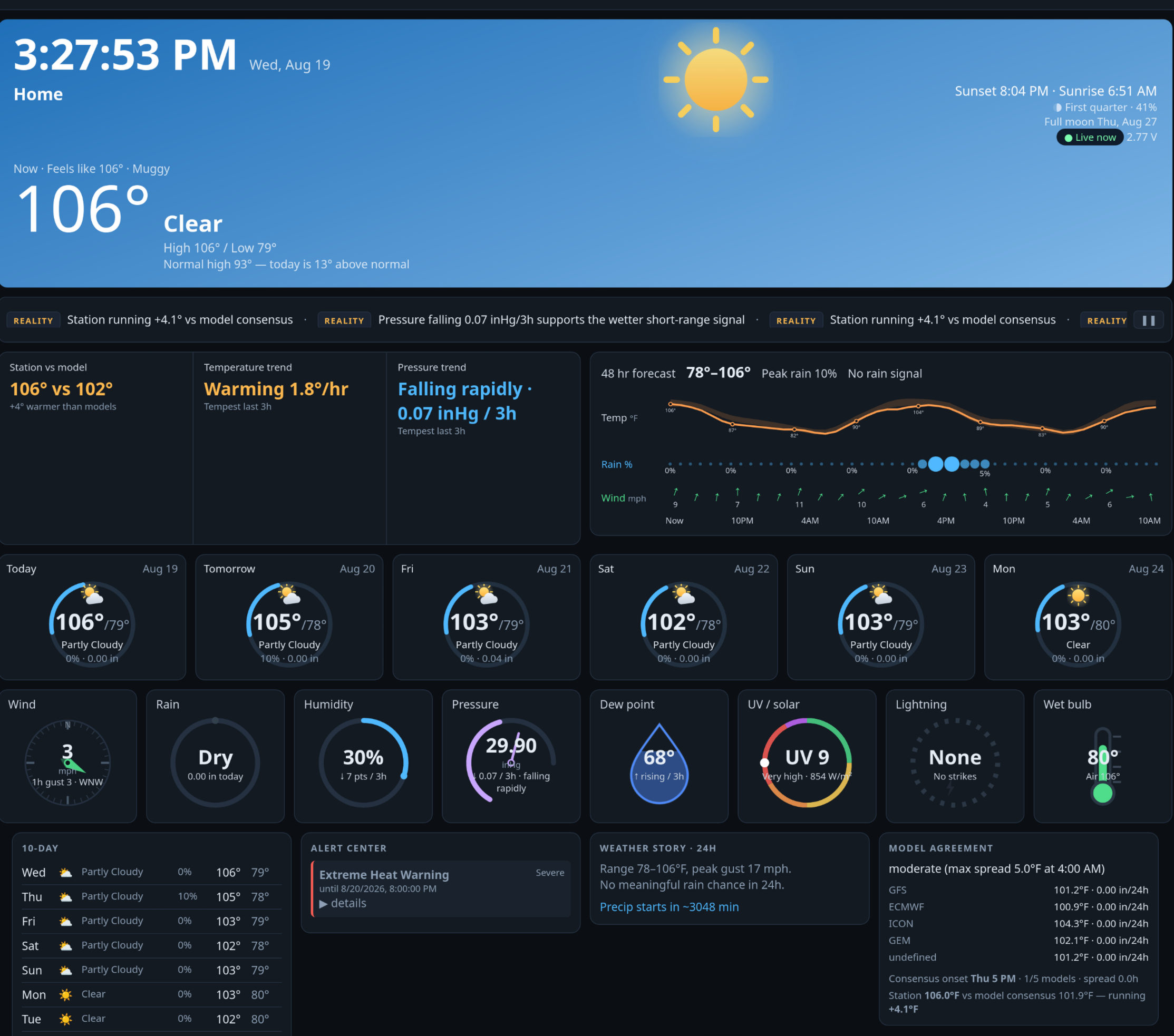
localStorage; sky-gradient hero (astro + moon phase + battery + live-observation age), signal ticker, station-vs-model trend strip, 48h temp/rain/wind chart, inline radar, six day cards with temperature arcs, eight dial gauges, 10-day list, alert center, weather story, model agreement, forecast changes, forecast accuracy, air quality, sun & moon detail (golden hour, day-length change, moonrise/set), fire weather & dryness, and station health (battery, signal, sensor faults, time since the last report). - Forecast Lab — radar, embedded from Hook Echo-WX.
The Desk radar loads itself, in Hook Echo's embedded mode: no chrome, and one frame a minute until you touch it. That matters because a live radar loop repaints ten times a second, and the WebKit webview the desktop app uses on Linux and macOS redraws the whole Desk on every one of those frames — enough to saturate a CPU core. Touch the map and it animates normally; the Forecast Lab tab is the full-chrome view.
It is also the heaviest thing on the page — megabytes of wasm, sharing one WebKit process with the whole Desk on Linux — so it never loads during startup or while Settings is open, and only once the panel is actually on screen. On a fresh install it starts switched off; Settings → Radar panel on the Desk turns it on. On a slow machine, leave it off and use the Forecast Lab tab instead.
Settings → Radar site picks which radar, out of all 201 WSR-88D and TDWR sites, nearest first; leave it on Nearest to my station and it follows the station. Wherever you leave the map — site, product, tilt, basemap, zoom — is remembered here and handed back to the viewer on the next launch. It has to work that way round: browsers partition an iframe's storage, so the embedded viewer cannot remember anything on its own. The Desk and the Lab share one remembered view.
Is the radar live? It is as live as NEXRAD gets: a WSR-88D takes 4–10 minutes to finish a volume scan, and delivery adds a little more, so the newest frame is always a few minutes behind the sky. Nothing on the internet is fresher — that delay is the radar itself, not the viewer.
- Local Signals — nearby-sensor comparison table, the Tempest live wind feed, a 24-hour lightning-strike log and the notification history. Set a nearby sensor radius in Settings and the airports (NWS/METAR) inside it are added on their own, with the same table on the Desk as a Nearby sensors panel. Other people's Tempest stations can't be read unless they are shared publicly, so those are still added by ID (or by pasting their tempestwx.com link).
- Data — ten boards off 7-day device history, including a wind rose, plus multi-model output and the local verification log, a garden card (growing degree days, evaporation, watering shortfall), the almanac (all-time records, this day last year, rain month by month with last year dashed over it), and an archive explorer: pick any two dates and any column and get the chart, the range and the total.
Three more Desk cards appear only when they have something to say, and hide themselves again afterwards: the severe outlook (SPC categorical risk for your exact point, with the day's peak CAPE and the cap holding it down), snowfall for the week, and the tropics when there is a named storm in the Atlantic or the eastern Pacific.
Every chart has a crosshair — hover, or touch on a tablet, for the value and the time at the nearest real sample. The hero says how today compares with the 1991–2020 normal for the date.
Quiet hours, speech and the panel catalog
Settings → Quiet hours silences the chime and every push channel between two times — Severe and
Extreme warnings still come through, because that is what the setting is for. On a kiosk, Read
severe alerts aloud speaks them. On the desktop, an alert raised while the window is hidden
becomes a real OS notification.
Settings → Panel catalog moves any Desk panel to the Data or Local Signals tab; it keeps working
where it lands. Settings → Palette adds OLED black, Solarized, high contrast and a flat e-ink
mode on top of the light and dark themes.
Settings → LAN dashboard port moves the server off 8088 (restart to apply); the window title
always shows the address a tablet should open.
Alert rules and push
Settings → Alert rules builds thresholds on live readings: a metric (temperature, dew point, gust, wind, humidity, rain rate, UV, 3h lightning count, 3h pressure change), above or below, a value, and how long it has to hold. + AND adds a second condition and then both have to hold — "gust above 25 AND humidity below 40" is a fire day; either half alone is a Tuesday. A rule fires once and re-arms when the reading falls back through 90% of its threshold, so a gust hovering on the line does not notify all afternoon.
Any alert can leave the machine:
- ntfy — put a topic in Settings and install the ntfy app on your phone. The topic is the whole of the security on ntfy.sh, so make it long and unguessable, or run your own server and point the ntfy server field at it.
- Webhook — a POST of
{title, body, category, t}to any URL. Discord and Telegram webhook URLs are recognised from the URL itself and sent in the shape those two accept, so pasting one in is the whole setup. - MQTT — every alert is also published to
weatherdesk/<station>/alertwhen a broker is configured.
None of these ever carry your Tempest token, station ID or broker password — title, body and category only.
Eco mode and pacing
Settings → Eco mode halves how often everything polls, stops the ticker and drops the seconds from the clock. On Auto it turns itself on when the browser reports four cores or fewer, which covers the tablets and old laptops this is often left running on. Overnight (sunset+1h to sunrise−1h) everything slows further on its own, and an active Severe or Extreme NWS alert puts the whole dashboard back to full speed — and brings the radar panel up if it was hidden.
A panel that has stopped updating keeps its last good numbers and marks itself with its age in the corner, rather than blanking or lying. The forecast and current observations are cached, so a reload during an outage still renders something.
Moving things around
The Desk is one 12-column grid and every panel is a free agent. Drag a panel by the grip in its top-right corner to drop it anywhere in the grid; drag its right edge to change how many columns it spans, its bottom edge for height, the corner for both. Double-click the grip to restore one panel, or Settings → Reset panel layout to put everything back.
Name an arrangement in Settings → Save layout to keep it, and load it back from the list below — one layout for the wall tablet, another for the desktop window. The padlock in the header hides every grip and handle, so a mounted tablet can't be rearranged by a passing sleeve.
Both gestures are pointer events, so they work the same with a mouse, a pen or a finger — the tablet case is the one that matters, and HTML5 drag-and-drop never fires for touch.
On a phone-sized screen — the Android app on a handset, or a phone browser — the grips are off until you ask for them: left on, they sit over the panel titles and swallow taps meant for the panel underneath. Settings → Rearrange panels turns them on, and the button turns them off again. Moving and hiding work there; resizing does not, because a phone gives every panel the full width and its natural height anyway. That mode is per-device and lasts until the app is closed — the layout it writes is the shared one, so a panel moved on the phone moves on the wall tablet too.
Data sources
| Feature | Endpoint |
|---|---|
| Station meta, observations, forecast | swd.weatherflow.com/swd/rest/ |
| Live 3-second wind, lightning strikes | wss://ws.weatherflow.com/swd/data |
| The same, straight off the hub's LAN broadcast (desktop app only) | UDP 50222 |
| Watches and warnings, gridpoint forecast | api.weather.gov |
| Multi-model agreement, 15-minute nowcast, AQI | api.open-meteo.com |
| Radar | Hook Echo-WX at hookecho.pages.dev |
| Place search | photon.komoot.io |
| Other brands of station (see below) | your own LAN, rt.ambientweather.net |
Other weather stations
WeatherDesk was written around a Tempest, but the Tempest tuple is only the internal format — the desktop app can take a report from most other consumer stations, convert it once on the way in and drive the whole dashboard from it. Everything downstream (archive, charts, CSV export, MQTT, alert rules, CWOP) works the same, and the forecast comes from open-meteo instead of WeatherFlow.
Pick your brand under Settings → Another brand of station, and set the station's latitude and longitude (the first-run wizard's "Not a Tempest?" section does both at once).
Ecowitt — Wittboy, GW1100 / GW1200 / GW2000 / GW3000. WSView Plus → your gateway → Customized
upload. Protocol Ecowitt, server the app's IP, path /ingest, port 8088, interval 16 s or
slower. Nothing else to fill in here.
Ambient Weather — WS-2902 / WS-2000 / WS-5000 / WS-1550-IP. Console firmware 4.2.8 or newer, then the awnet app → Custom server, same address and path. Ambient's consoles speak their own query-string format; the server recognises it.
Weather Underground protocol. Many other consoles can only be told a WU server. Point them at
the app's IP and port and leave the path alone — /weatherstation/updateweatherstation.php is
answered too, with the success body those clients look for.
Davis — Vantage Pro2, Vantage Pro2 Plus, Vantage Vue. Needs a WeatherLink Live (or a Console 6313) on the network. Put its IP in WeatherLink Live address; the app polls its local API every ten seconds. No cloud, no key.
KestrelMet 6000, or any Ambient console you would rather leave on Ambient's servers. Both keys from ambientweather.net → My devices → API keys, into AWN API key and AWN application key. Polled once a minute.
AcuRite Iris (5-in-1). AcuRite publish no API, local or otherwise. What works is listening to the sensor directly with an RTL-SDR dongle and piping the result in:
rtl_433 -C si -F json | while read -r line; do
  curl -s -XPOST -H 'Content-Type: application/json' --data "$line" http://<host>:8088/ingest
done
Anything rtl_433 decodes lands the same way, so this is also the escape hatch for a station no
other section covers.
La Crosse Technology (C85845 and friends). Account email and password. This one is unofficial — it reads the API their own app uses, and it can stop working without notice. Those readings are tagged separately in the archive so they can be deleted on their own if it ever goes wrong.
Notes that apply to all of them:
- One station per install. The archive keys on the timestamp with no room for a second station; two consoles pointed at one app would interleave.
- Rain and lightning arrive as running daily totals and are stored as per-interval amounts. A restart forfeits one interval — a minute of rain, once.
- Ingest key. Leave it blank on a network you trust (the same trust model as
/config, below). Set it and the console has to report to/ingest/<key>instead. - Battery and sensor health stay blank: every other brand reports a flag rather than a voltage, and the health card's thresholds are a Tempest's.
Smart home
WeatherDesk publishes the station to your own MQTT broker and reads a few Home Assistant entities back. Both halves are dark until you fill them in under Settings → Smart home.
Publishing. Point MQTT WebSocket URL at a broker with a WebSocket listener — mosquitto wants
listener 9001
protocol websockets
— and readings arrive on weatherdesk/<station id>/temp, …/wind, …/gust, …/rain,
…/pressure, and the rest, retained, in SI units (°C, m/s, hPa, mm) whatever the dashboard is
set to display. Events land on weatherdesk/<station id>/event/{lightning,rain,gust} and are not
retained. weatherdesk/<station id>/status is online/offline, the second written by the
broker's last-will when the dashboard goes away.
Alongside the raw readings it publishes what a HA automation would otherwise have to work out:
feels_like, pressure_trend as a word, a storm binary sensor, and one binary sensor per alert
rule you wrote in the drawer.
Broker topics can also be read back: list them under Settings → Broker topics to show
(topic | label | unit, one per line) and their values appear on the Home Assistant card. That is
for the sensors that never went near Home Assistant — a greenhouse probe publishing straight to
mosquitto.
Home Assistant discovers all of it by itself: the retained homeassistant/…/config topics
materialize one device with every sensor under it, and they survive a Home Assistant restart with
no dashboard open. Changing your station ID leaves the old device's retained configs behind —
delete them with mosquitto_pub -t 'homeassistant/sensor/wd_<old id>_temp/config' -r -n, one per
topic, if you care.
Reading back. Home Assistant URL + a long-lived access token + a comma-separated list of
entity ids puts their live states on the Desk. Home Assistant has to allow this origin —
in configuration.yaml:
http:
  cors_allowed_origins:
    - http://tauri.localhost
    - http://<the LAN URL in the window title>
HomeKit, Alexa, Google. Through Home Assistant, which already bridges all three — there is no WeatherDesk-specific code for them and there shouldn't be. Add the MQTT integration (the device above appears), then Settings → Devices & Services → Add Integration → HomeKit Bridge and pick it; Alexa and Google go through Home Assistant Cloud or their own manual setups.
Two limits worth knowing: publishing only happens while the dashboard is open somewhere (leave the
desktop app running — that is the always-on copy), and a browser tab served over https cannot
reach a ws:// broker at all. The desktop app and the LAN URL are both plain origins, so they can.
Quick start
- Token — tempestwx.com → Settings → Data Authorizations → Create Token. Any personal use token works; paste it into Settings → Tempest API token.
- Station ID — the number in your station's URL,
tempestwx.com/station/NNNNN. That number, not the station name and not the serial on the sensor. - Device ID — leave it blank. The station lookup fills it in. (A station ID pasted here is numeric too, and used to break every history chart in silence; the app now corrects it and says so.)
Everything is saved in the browser's localStorage, per install — the desktop app and a browser
tab don't share settings.
Download & run
Grab the installer for your OS from Releases and double-click it. What changed in each version is in CHANGELOG.md. The app opens in its own window and serves the same dashboard to the rest of your network on port 8088 — the wall tablet just opens the URL shown in the window title. Nothing else to install; leave the app running.
One config for the whole house. The desktop app also keeps your settings and dashboard layout
on the host computer. Any browser that opens the LAN URL loads that configuration — no re-typing the
token, no re-arranging panels per device — and a save from any of those browsers writes back, so the
next device to load picks it up. Open sessions don't update live; reload to fetch. Note that this
means anyone on your network can read the Tempest token from the host. Self-hosting the site/
folder statically has no config server, so those browsers keep their own settings as before.
The app also listens for your hub's UDP broadcasts on port 50222 and re-serves them to the tablet, so live wind and lightning keep flowing with the internet unplugged. A browser can't hold a UDP socket, so the no-install option below uses the cloud websocket only. If another Tempest app owns port 50222 first, WeatherDesk skips it and falls back to the websocket by itself.
UDP-only mode — no token at all. On the desktop app, with your hub on the same network, leave the token and station ID empty and the hub's own broadcasts still drive the hero, the wind, rain, humidity, pressure, dew point and UV gauges, the live wind feed and the lightning log — and MQTT publishing, if you use it. What needs the (free) token is everything that isn't your sensor: forecasts, the 10-day list, history charts, model agreement, alerts. The pressure gauge reads station pressure in this mode rather than sea-level pressure, because that is what the hub sends.
- Windows — run the
.msi. The app is unsigned, so SmartScreen shows a warning: More info → Run anyway. Allow the Windows Firewall prompt on first launch, or the tablet can't connect. - macOS — open the
.dmg, drag WeatherDesk to Applications. Unsigned, so on first launch macOS refuses it: System Settings → Privacy & Security → Open Anyway, or in a terminalxattr -dr com.apple.quarantine /Applications/WeatherDesk.app. - Linux —
sudo apt install ./WeatherDesk_*_amd64.deb(Debian, Ubuntu, Mint, Pop!_OS). On other distributions installwebkit2gtk-4.1and build from source, below — there is no AppImage: it has to carry its own WebKitGTK, and that copy crashes on hosts newer than the machine that built it. - Raspberry Pi —
sudo apt install ./WeatherDesk_*_arm64.debon 64-bit Raspberry Pi OS (Bookworm or newer, Pi 4 / Pi 5).uname -mmust sayaarch64; the 32-bit image is not built.
To start it automatically: macOS System Settings → General → Login Items; Windows put a shortcut in
shell:startup; Linux and Raspberry Pi OS add a .desktop file to ~/.config/autostart:
[Desktop Entry]
Type=Application
Name=WeatherDesk
Exec=weatherdesk
A Pi with a screen attached is the whole appliance: it shows the dashboard itself and serves it to any other tablet in the house. A Pi with no screen has no desktop for the window to open on — use the server-only option below, which gives up the hub's UDP feed but nothing else.
No-install / development option
git clone https://github.com/d4vid87/weatherdesk
cd weatherdesk
python3 -m http.server 8088 --bind 0.0.0.0 --directory site
Open http://<box>:8088, then paste a WeatherFlow personal access token
(tempestwx.com → Settings → Data Authorizations) and a station ID into the settings drawer. The
station lookup fills in the name, coordinates and numeric device ID. Everything else — units,
refresh interval, saved places, notification categories, forecast snapshots and the verification
log — lives in localStorage; there is nothing to configure on the server.
Headless / home lab
No screen, no desktop session — just serve site/ and open it from anywhere. Drop this in
~/.config/systemd/user/weatherdesk.service:
[Unit]
Description=WeatherDesk (static site)
After=network-online.target

[Service]
ExecStart=/usr/bin/python3 -m http.server 8088 --bind 0.0.0.0 --directory %h/weatherdesk/site
Restart=on-failure

[Install]
WantedBy=default.target
loginctl enable-linger "$USER"          # keeps it running with nobody logged in
systemctl --user daemon-reload
systemctl --user enable --now weatherdesk
There is no hub UDP feed in this mode — a browser can't hold a UDP socket, so every client rides WeatherFlow's websocket, which means it needs a token and the internet. The desktop app is the only build that listens on 50222.
The desktop app serves from its own origin, so settings saved in a browser install (token included) don't carry over — paste the token once more in the app.
Android / Fire tablets. WeatherDesk.apk is on the same Releases page. Sideload it — the
tablet will ask you to allow installs from whatever app you downloaded it with (on Fire OS:
Settings → Security & Privacy → Apps from Unknown Sources). One APK covers 64-bit and 32-bit
devices, Fire OS 6 and newer. The phone build talks to WeatherFlow's websocket only: it neither
listens for the hub's LAN broadcasts nor serves the dashboard to other devices, both of which stay
desktop jobs. Paste the token once per device.
The observation archive. The desktop app keeps every observation the hub broadcasts in a
SQLite database at <app data>/weatherdesk.db. On first run of v3 it imports the v2 JSONL log and
then leaves those files alone forever as a backup.
About thirty seconds after start it also backfills from WeatherFlow: it walks backwards from the oldest observation it holds, four days at a time, one request a second, until the station's own history runs out. A station that has been up for years gets years of records on the first evening, and the almanac says how much it has and whether it is still fetching. The walk is resumable — kill the app halfway and it picks up from where it stopped.
Settings → History CSV hands the whole archive over as a spreadsheet, and Backup archive
downloads a consistent snapshot of the database itself. To restore one: quit the app, copy the file
over <app data>/weatherdesk.db (delete the -wal and -shm files beside it if they exist), and
start it again.
CWOP. Put a callsign in Settings → CWOP station ID and the app reports your readings to the
Citizen Weather Observer Program every ten minutes, where NOAA's MADIS feeds them to the models
this dashboard reads back out. Callsigns are public by design, so this one is not treated as a
secret.
Live updates. Every screen in the house holds one /events stream, so a gust shows up the
second the hub broadcasts it rather than on the next poll, and a setting changed on one screen
reaches the others without a reload. A browser that can't reach the stream falls back to polling
exactly as before.
Updates. Settings → Check for updates downloads and installs a signed release in place on
Windows, macOS and Linux packages. Flatpak installs update through Flatpak, and Android stays a
sideload.
Docker / no desktop at all
The same binary runs with no window and no Tauri in it:
docker run -d --name weatherdesk --restart unless-stopped \
  --network host -v "$PWD/data:/data" ghcr.io/d4vid87/weatherdesk:latest
or the docker-compose.yml in this repo. Then open http://<host>:8088.
--network host is not optional on Linux. The Tempest hub broadcasts to the subnet, and a
broadcast does not cross a bridged Docker network no matter how many ports you publish — without
host networking the container serves the dashboard but never hears the hub.
Everything lands in /data: config.json and weatherdesk.db. The image is built with
--no-default-features, so there is no GTK, no WebKit and no Tauri anywhere in it.
A local build of the same thing: cargo build --release --no-default-features in src-tauri/,
then run weatherdesk --headless.
Flatpak and AUR
flatpak/io.github.davidmay87.weatherdesk.yml builds the Flathub package (regenerate
cargo-sources.json with flatpak-builder-tools whenever Cargo.lock changes), and PKGBUILD
builds the Arch package from a release tarball. A Flatpak install keeps its data under
~/.var/app/io.github.davidmay87.weatherdesk/ — copy weatherdesk.db across if you are moving
from a .deb.
Building the desktop app yourself: cargo tauri build in src-tauri/ (Rust + the Tauri
prerequisites for your OS). Iterate on the HTML/JS with
the python command above; the app embeds site/ at compile time.
Sharing a read-only dashboard
The desktop app serves http://<host>:8088/public — the same dashboard with the settings drawer
gone and a config the server strips every credential out of before sending. It is the URL to give
a family tablet, a guest, or a reverse proxy pointed at the outside world.
Note the trust model of the ordinary / dashboard: GET /config deliberately serves the whole
settings blob, token included, to anything on the LAN, because that is how a second browser in the
house sets itself up without being configured by hand. Anyone on your network can read your Tempest
token. /public is the address to hand out if that is not what you want, and the only one to put
behind a proxy.
Installing on a phone
The dashboard ships a web manifest, so any phone browser pointed at the LAN URL can add it to the home screen and run it full-screen. There is no service worker and there won't be: the LAN server is plain http, which cannot register one, and a cached copy of a live dashboard would be showing yesterday's weather with today's confidence.
Other devices
- Windows 10 / 11 — the
.msion the Releases page is the whole answer; it's a normal desktop app on both. - iPad, iPhone, Echo Show, any other browser-only screen — there is no native app, and there won't be. Run the desktop app or the headless server on a machine that stays on, then point Safari (or the Show's Silk browser) at that LAN URL. The Echo Show's browser is untested.
- Android TV boxes (onn, Shield, Fire TV) — the APK installs, but the dashboard is built for touch and mouse: a D-pad remote can't reach the settings drawer or drag a panel. Plug in a USB or Bluetooth mouse, or use an air-mouse remote.
- Every public Tempest on a map — that's WeatherFlow's own tempestwx.com/map, which is also where you find the IDs for the Local Signals comparison table.
Troubleshooting
Settings → Diagnostics pings every source and prints ✓/✗ plus latency for each, along with the viewport size. Start there — it separates "my token is wrong" from "NWS is down".
| What you see | What it means |
|---|---|
| token rejected: create or check a personal use token… | The token is wrong, expired, or was never created. tempestwx.com → Settings → Data Authorizations. |
| Token works but has no access to station N | The token is valid but belongs to a different account, or the station ID isn't yours. The ID is the number in your tempestwx.com/station/NNNNN URL. |
| not found: check the station/device ID | A real 404 — usually a station ID typo, or a serial number (ST-00176465) where a numeric ID belongs. |
| Device ID corrected | Something that wasn't one of this station's devices was in the Device ID box. Fixed automatically; leave that box blank. |
| Forecast stale — showing cached copy | The last good forecast is on screen with its age marked; the source is unreachable right now. |
| network unreachable / timed out (15s) | Wi-Fi, DNS or the API itself. Diagnostics will show whether it's one source or all of them. |
| A nearby station row shows an error | Only public stations can be read. Pick one from tempestwx.com/map. |
On Windows, if the tablet can't load the LAN URL, it's the firewall prompt that was dismissed on first launch — allow WeatherDesk on private networks.
Notes
No service worker and no PWA install: the app is useless offline because every source is a cloud API, and the LAN origin is insecure anyway, so the Notification API is unavailable. Alerts render as an in-page banner queue with a WebAudio chime instead. The desktop build does raise real OS notifications, through Tauri rather than the browser API, and only when its window is hidden.
Releasing: the desktop updater needs TAURI_SIGNING_PRIVATE_KEY and
TAURI_SIGNING_PRIVATE_KEY_PASSWORD in the repo secrets, matching the public key in
src-tauri/tauri.conf.json. Lose that private key and no installed copy will ever accept another
update.
The layout follows the shape of myweatherdesk.com. No code was taken from it; this is written from scratch against the same public APIs.
Comments