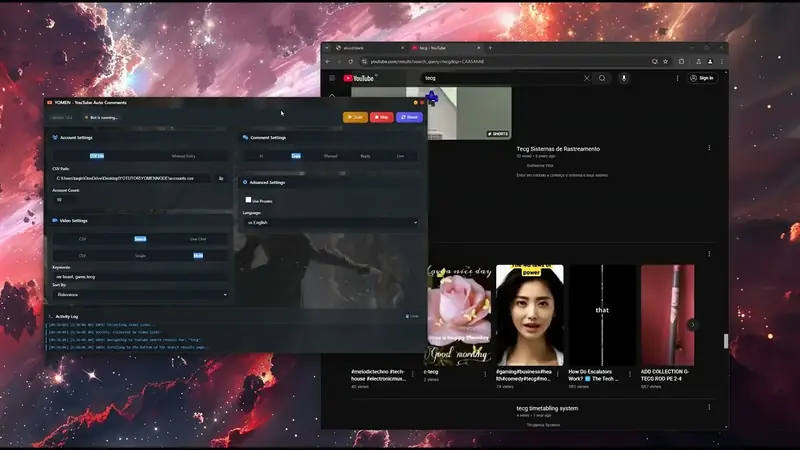
YOMEN - Youtube Bot Auto Comment
YOMEN is an Electron-based desktop application for automated YouTube commenting. It uses Puppeteer browser automation to systematically post comments across YouTube videos using multiple accounts.
Rp1.000.000
Rp1.000.000
Save 0%
Single License
Table of Contents
- Installation
- License Activation
- Quick Start Guide
- Configuration
- CSV File Formats
- Comment Sources
- Video Sources
- Proxy Configuration
- Browser Preview
- Troubleshooting
Installation
Prerequisites
- Windows 10/11, macOS, or Linux
- Internet connection
- Valid license key
Steps
- Download the latest release from the releases page
- Run the installer (
.exefor Windows,.dmgfor macOS,.AppImagefor Linux) - Launch the application
- Activate your license (first-time only)
License Activation
On first launch, you'll see the license activation window:
- Enter your License Key in the input field
- Click Activate License
- The application will verify your license with the server
- Once activated, the main application window will open
Note: License is tied to your hardware ID. Contact support if you need to transfer to a new device.
Quick Start Guide
Minimal Setup to Run the Bot
Prepare accounts file (
accounts.csv):email,password account1@gmail.com,password123 account2@gmail.com,password456Prepare videos file (
videos.csv):url https://www.youtube.com/watch?v=VIDEO_ID_1 https://www.youtube.com/watch?v=VIDEO_ID_2Launch YOMEN and configure:
- Accounts: Select CSV, browse to
accounts.csv - Videos: Select CSV, browse to
videos.csv - Comments: Select AI (auto-generates comments)
- Accounts: Select CSV, browse to
Click Start button
Configuration
Basic Settings
Located in the Basic tab of the settings panel.
Accounts Section
| Option | Description |
|---|---|
| CSV | Load accounts from a CSV file |
| Manual | Enter a single account (email + password) |
| Count | Number of accounts to use from CSV (default: 10) |
Videos Section
| Option | Description |
|---|---|
| CSV | Load video URLs from a CSV file |
| Search | Find videos by keyword search |
| Live | Target live stream chats |
When using Search mode:
- CSV: Load keywords from a CSV file
- Single: Enter one keyword
- Multi: Enter multiple keywords (comma-separated)
- Sort By: Relevance, Date, Views, or Rating
Comments Section
| Option | Description |
|---|---|
| AI | Auto-generate comments using Groq AI (LLaMA 3.1) |
| Copy | Copy random comments from the target video |
| Manual | Use your own comments (CSV or direct input) |
| Reply | Reply to existing comments on videos |
| Live | Post comments in live chat |
Advanced Settings
Located in the Advanced tab of the settings panel.
General Options
| Option | Description |
|---|---|
| Like videos | Automatically like each video after commenting |
| Track history | Save comment history to prevent duplicates |
| Skip commented | Skip videos you've already commented on |
| Use proxies | Route traffic through proxy servers |
| Custom UA | Use custom User-Agent strings |
Language
Choose between English and Indonesia for prompts and messages.
Browser Mode
| Mode | Description |
|---|---|
| Headless | Run browser invisibly (faster, uses preview) |
| Visible | Show browser window (useful for debugging) |
Delays
Configure wait time between video processing:
- Min (seconds): Minimum delay (default: 10)
- Max (seconds): Maximum delay (default: 20)
CSV File Formats
accounts.csv
email,password
user1@gmail.com,mypassword123
user2@gmail.com,anotherpass456
videos.csv
url
https://www.youtube.com/watch?v=dQw4w9WgXcQ
https://www.youtube.com/watch?v=jNQXAC9IVRw
https://youtube.com/shorts/ABC123xyz
keywords.csv
keyword
gaming tutorial
tech review 2024
how to cook
comments.csv
comment
Great video! Really enjoyed this content.
Thanks for sharing, very helpful!
This is exactly what I was looking for.
replies.csv
comment
I totally agree with you!
Great point, thanks for sharing.
This is so true!
livechat.csv
url
https://www.youtube.com/watch?v=LIVE_STREAM_ID
livechat_comments.csv
comment
Hello everyone!
Great stream!
Love this content
proxy.txt
# Format: protocol://user:pass@host:port or host:port
socks5://user:pass@proxy1.example.com:1080
http://proxy2.example.com:8080
192.168.1.100:3128
useragents.txt
Mozilla/5.0 (Windows NT 10.0; Win64; x64) AppleWebKit/537.36 (KHTML, like Gecko) Chrome/132.0.0.0 Safari/537.36
Mozilla/5.0 (Macintosh; Intel Mac OS X 10_15_7) AppleWebKit/537.36 (KHTML, like Gecko) Chrome/132.0.0.0 Safari/537.36
Comment Sources
AI Comments (Recommended)
Uses Groq API with LLaMA 3.1 to generate contextual comments based on video content. Comments are unique and relevant to each video.
Copy Comments
Scrapes existing comments from the target video and randomly selects one to post. Useful for blending in with existing discussions.
Manual Comments
CSV Mode: Load comments from a file, randomly selects one per video. Direct Mode: Type a single comment to use for all videos.
Reply Comments
Posts replies to existing comments on videos instead of top-level comments. Load reply templates from CSV.
Live Chat Comments
For live streams only. Posts messages in the live chat.
Modes:
- Single: Post one comment per account
- Multiple: Post several comments with intervals
- Count: Number of comments per account
- Interval: Seconds between comments (min: 30)
Video Sources
CSV Mode
Load a list of video URLs from a CSV file. Supports:
- Standard YouTube URLs:
https://www.youtube.com/watch?v=VIDEO_ID - Short URLs:
https://youtu.be/VIDEO_ID - Shorts:
https://youtube.com/shorts/VIDEO_ID
Keyword Search Mode
Search YouTube for videos matching keywords.
Keyword Sources:
- CSV: Load keywords from file
- Single: Enter one keyword
- Multi: Enter comma-separated keywords
Sort Options:
- Relevance: Most relevant results
- Date: Newest first
- Views: Most viewed
- Rating: Highest rated
Live Chat Mode
Target live stream videos for chat commenting. Requires separate live stream URL list.
Proxy Configuration
File-Based Proxies
Create a proxy.txt file with one proxy per line:
# Supported formats:
socks5://username:password@host:port
http://username:password@host:port
https://host:port
host:port
Manual Proxy
Configure a single proxy directly in the app:
- Enable Use proxies
- Select Manual
- Choose Protocol: HTTP, HTTPS, SOCKS4, or SOCKS5
- Enter Host and Port
- (Optional) Enable Authentication and enter credentials
Browser Preview
When running in Headless mode, the preview panel shows live screenshots of browser activity.
Controls
- Account Selector: Switch between active browser sessions
- Refresh: Manually refresh the screenshot
- Pause/Resume: Toggle auto-refresh (every 3 seconds)
Note: Preview is disabled in Visible mode since you can see the browser directly.
Activity Log
The log panel displays real-time status updates:
- Blue (Info): General status messages
- Green (Success): Successful operations
- Yellow (Warning): Non-critical issues
- Red (Error): Errors and failures
Click the trash icon to clear the log.
- Account Management
- - Load YouTube accounts from CSV files
- - Manual account entry
- - Batch processing with multiple concurrent accounts (up to 10)
- Video Sources
- - Direct video URLs from CSV
- - Keyword-based video search
- - Trending videos discovery
- - YouTube Shorts support (auto-converted)
- - Live stream chat commenting
- Comment Generation
- - AI-generated comments (Groq API - LLaMA 3.1)
- - Copy existing comments from videos
- - Manual comment input (direct or CSV)
- - Reply to existing comments
- Anti-Detection
- - Undetected-Browser wrapper for Puppeteer
- - Proxy support (SOCKS5/HTTP with authentication)
- - User-Agent rotation
- - Randomized delays and keystroke timing
- Utilities
- - Video tracking database (prevents duplicate comments)
- - License validation system
- - Auto-update functionality
- - Multi-language support (English & Indonesian)
- - Progress tracking and logging
Windows 10+
Table of Contents
- Installation
- License Activation
- Quick Start Guide
- Configuration
- CSV File Formats
- Comment Sources
- Video Sources
- Proxy Configuration
- Browser Preview
- Troubleshooting
Installation
Prerequisites
- Windows 10/11, macOS, or Linux
- Internet connection
- Valid license key
Steps
- Download the latest release from the releases page
- Run the installer (
.exefor Windows,.dmgfor macOS,.AppImagefor Linux) - Launch the application
- Activate your license (first-time only)
License Activation
On first launch, you'll see the license activation window:
- Enter your License Key in the input field
- Click Activate License
- The application will verify your license with the server
- Once activated, the main application window will open
Note: License is tied to your hardware ID. Contact support if you need to transfer to a new device.
Quick Start Guide
Minimal Setup to Run the Bot
Prepare accounts file (
accounts.csv):email,password account1@gmail.com,password123 account2@gmail.com,password456Prepare videos file (
videos.csv):url https://www.youtube.com/watch?v=VIDEO_ID_1 https://www.youtube.com/watch?v=VIDEO_ID_2Launch YOMEN and configure:
- Accounts: Select CSV, browse to
accounts.csv - Videos: Select CSV, browse to
videos.csv - Comments: Select AI (auto-generates comments)
- Accounts: Select CSV, browse to
Click Start button
Configuration
Basic Settings
Located in the Basic tab of the settings panel.
Accounts Section
| Option | Description |
|---|---|
| CSV | Load accounts from a CSV file |
| Manual | Enter a single account (email + password) |
| Count | Number of accounts to use from CSV (default: 10) |
Videos Section
| Option | Description |
|---|---|
| CSV | Load video URLs from a CSV file |
| Search | Find videos by keyword search |
| Live | Target live stream chats |
When using Search mode:
- CSV: Load keywords from a CSV file
- Single: Enter one keyword
- Multi: Enter multiple keywords (comma-separated)
- Sort By: Relevance, Date, Views, or Rating
Comments Section
| Option | Description |
|---|---|
| AI | Auto-generate comments using Groq AI (LLaMA 3.1) |
| Copy | Copy random comments from the target video |
| Manual | Use your own comments (CSV or direct input) |
| Reply | Reply to existing comments on videos |
| Live | Post comments in live chat |
Advanced Settings
Located in the Advanced tab of the settings panel.
General Options
| Option | Description |
|---|---|
| Like videos | Automatically like each video after commenting |
| Track history | Save comment history to prevent duplicates |
| Skip commented | Skip videos you've already commented on |
| Use proxies | Route traffic through proxy servers |
| Custom UA | Use custom User-Agent strings |
Language
Choose between English and Indonesia for prompts and messages.
Browser Mode
| Mode | Description |
|---|---|
| Headless | Run browser invisibly (faster, uses preview) |
| Visible | Show browser window (useful for debugging) |
Delays
Configure wait time between video processing:
- Min (seconds): Minimum delay (default: 10)
- Max (seconds): Maximum delay (default: 20)
CSV File Formats
accounts.csv
email,password
user1@gmail.com,mypassword123
user2@gmail.com,anotherpass456
videos.csv
url
https://www.youtube.com/watch?v=dQw4w9WgXcQ
https://www.youtube.com/watch?v=jNQXAC9IVRw
https://youtube.com/shorts/ABC123xyz
keywords.csv
keyword
gaming tutorial
tech review 2024
how to cook
comments.csv
comment
Great video! Really enjoyed this content.
Thanks for sharing, very helpful!
This is exactly what I was looking for.
replies.csv
comment
I totally agree with you!
Great point, thanks for sharing.
This is so true!
livechat.csv
url
https://www.youtube.com/watch?v=LIVE_STREAM_ID
livechat_comments.csv
comment
Hello everyone!
Great stream!
Love this content
proxy.txt
# Format: protocol://user:pass@host:port or host:port
socks5://user:pass@proxy1.example.com:1080
http://proxy2.example.com:8080
192.168.1.100:3128
useragents.txt
Mozilla/5.0 (Windows NT 10.0; Win64; x64) AppleWebKit/537.36 (KHTML, like Gecko) Chrome/132.0.0.0 Safari/537.36
Mozilla/5.0 (Macintosh; Intel Mac OS X 10_15_7) AppleWebKit/537.36 (KHTML, like Gecko) Chrome/132.0.0.0 Safari/537.36
Comment Sources
AI Comments (Recommended)
Uses Groq API with LLaMA 3.1 to generate contextual comments based on video content. Comments are unique and relevant to each video.
Copy Comments
Scrapes existing comments from the target video and randomly selects one to post. Useful for blending in with existing discussions.
Manual Comments
CSV Mode: Load comments from a file, randomly selects one per video. Direct Mode: Type a single comment to use for all videos.
Reply Comments
Posts replies to existing comments on videos instead of top-level comments. Load reply templates from CSV.
Live Chat Comments
For live streams only. Posts messages in the live chat.
Modes:
- Single: Post one comment per account
- Multiple: Post several comments with intervals
- Count: Number of comments per account
- Interval: Seconds between comments (min: 30)
Video Sources
CSV Mode
Load a list of video URLs from a CSV file. Supports:
- Standard YouTube URLs:
https://www.youtube.com/watch?v=VIDEO_ID - Short URLs:
https://youtu.be/VIDEO_ID - Shorts:
https://youtube.com/shorts/VIDEO_ID
Keyword Search Mode
Search YouTube for videos matching keywords.
Keyword Sources:
- CSV: Load keywords from file
- Single: Enter one keyword
- Multi: Enter comma-separated keywords
Sort Options:
- Relevance: Most relevant results
- Date: Newest first
- Views: Most viewed
- Rating: Highest rated
Live Chat Mode
Target live stream videos for chat commenting. Requires separate live stream URL list.
Proxy Configuration
File-Based Proxies
Create a proxy.txt file with one proxy per line:
# Supported formats:
socks5://username:password@host:port
http://username:password@host:port
https://host:port
host:port
Manual Proxy
Configure a single proxy directly in the app:
- Enable Use proxies
- Select Manual
- Choose Protocol: HTTP, HTTPS, SOCKS4, or SOCKS5
- Enter Host and Port
- (Optional) Enable Authentication and enter credentials
Browser Preview
When running in Headless mode, the preview panel shows live screenshots of browser activity.
Controls
- Account Selector: Switch between active browser sessions
- Refresh: Manually refresh the screenshot
- Pause/Resume: Toggle auto-refresh (every 3 seconds)
Note: Preview is disabled in Visible mode since you can see the browser directly.
Activity Log
The log panel displays real-time status updates:
- Blue (Info): General status messages
- Green (Success): Successful operations
- Yellow (Warning): Non-critical issues
- Red (Error): Errors and failures
Click the trash icon to clear the log.