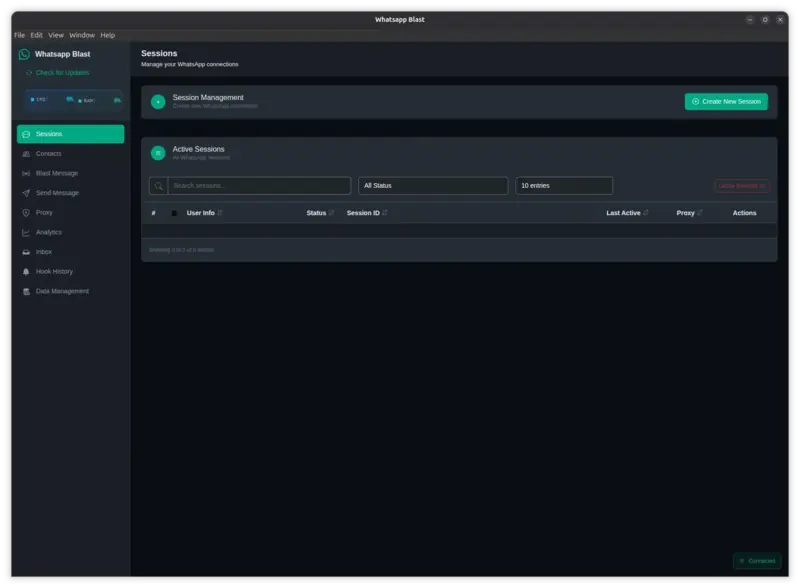
WhatsApp Blast Manager
Professional desktop application for managing multiple WhatsApp accounts and sending bulk messages with advanced analytics and automation.
Rp500.000
Rp500.000
Save 0%
Single License
WhatsApp Blast Manager is a comprehensive desktop solution for businesses and marketers who need to manage multiple WhatsApp accounts and execute large-scale messaging campaigns.
- # WhatsApp Blast Manager - Complete Feature List
- ### Multi-Session Management
- Unlimited WhatsApp accounts with simultaneous connection support
- Dual login methods via QR code scanning or pairing code with phone number
- Create, rename, and delete sessions with real-time connection monitoring
- Session import and export to ZIP files for single or bulk operations
- Individual proxy settings per session with session-specific configuration
- Auto-reconnection with up to 15 attempts using exponential backoff
- Session metadata preservation for easy migration between devices
- ### Advanced Contact Management
- Excel import support for .xlsx and .xls files with auto-detect columns
- Manual entry for adding contacts one by one through the interface
- Template download for easy bulk import with automatic phone validation
- Smart formatting with automatic phone number and WhatsApp JID conversion
- SQLite-powered contact database with search and filtering capabilities
- Duplicate detection to prevent duplicate contact entries
- ### Comprehensive Messaging System
- Text messages with plain text and markdown formatting support
- Media messages including images, videos, documents, audio files, and stickers
- Interactive content with location sharing, contact cards, button messages, list messages, and poll messages
- Quick reply templates to save and reuse common messages
- Multi-session blast distribution across multiple accounts
- Session selection modes including select all, random, and manual selection
- Randomized delays between messages with anti-spam protection
- Session rotation for load balancing with configurable delay intervals
- Multi-threading support with up to 50 parallel threads
- Campaign naming and organization with real-time progress tracking
- Success and failure statistics with pause, resume, and stop controls
- Smart retry logic with automatic retry on failure up to 5 attempts
- Individual message failure handling that continues with next contact
- Media blast support for bulk image, video, and document distribution
- ### Message Template System
- Variable placeholders for name, phone, firstName, lastName, company, and custom fields
- Random templates with multiple template support and randomized selection
- Template management to save, edit, and organize message templates
- ### Inbox and Message Reception
- Real-time message reception from designated hook sessions
- Smart message display with sender information and timestamp
- Message actions including reply, mark as read/unread, and delete
- Desktop notifications for new messages with filtering by date and sender
- Hook session manager with multi-hook support and load balancing
- Complete hook history with filtering and search capabilities
- Automatic notification system for new message alerts
- ### Analytics and Reporting
- Session statistics showing total sessions, active sessions, and health monitoring
- Message metrics including messages sent today, total messages, and delivery rates
- Read rates and failure rates with detailed error reasons
- Visual analytics powered by Chart.js with line charts, bar charts, and pie charts
- Status tracking with sent timestamp, delivered status, and read status
- Campaign analytics with per-campaign success rates and contact reach metrics
- Time-based analysis for hourly, daily, and weekly performance
- Session performance comparison across all connected sessions
- Complete blast history with campaign metadata and success/failure breakdown
- Export campaign reports in multiple formats
- ### Data Export
- Multiple export formats including JSON, Excel, and ZIP archives
- Scheduled exports with automatic periodic backups
- Custom reports for generating analytics reports
- ### Enterprise Proxy Support
- Multiple proxy types including HTTP, HTTPS, SOCKS4, and SOCKS5
- Global proxy for all sessions or per-session proxy toggle
- Authentication support with username and password
- Custom timeout configuration with connection pooling
- Keep-alive support with automatic failover
- Built-in proxy tester with connection verification and IP detection
- WhatsApp Web accessibility check with multi-endpoint testing
- Real-time stats for connection success/failure rates and response time
- Bandwidth usage tracking with credential masking in logs
- Encrypted proxy credential storage for security
- ### Professional License System
- Hardware-based security with unique device binding using CPU ID and MAC address
- Hostname checking with virtual machine detection
- Anti-piracy protection with permanent MAC filtering
- VM detection and blocking to prevent license sharing
- Hardware change detection with online verification
- Offline mode with grace period for offline usage
- Dedicated license portal for license management
- Auto-activation with automatic verification on startup
- Multi-tier licensing support for different license levels
- ### Automatic Update System
- Seamless updates with auto-check on startup and manual update checking
- Background downloading with one-click installation
- Desktop notifications and in-app update alerts
- Version change details with download progress tracking
- GitHub releases integration with private repository support
- Token authentication with delta updates for faster downloads
- ### Data Management and Cleanup
- Selective data cleanup for analytics, inbox messages, and read messages
- Purge hook history and clean message history by days
- Clear session logs with bulk operations
- Delete old messages with configurable retention periods
- Archive old campaigns and cleanup unused sessions
- Real-time storage statistics with database size monitoring
- Automatic optimization for database performance
- Full database backup to ZIP archives
- Incremental backups saving only changed data
- Session backups for exporting auth files
- One-click restore from backups with cloud backup compatibility
- ### Real-Time WebSocket Integration
- Local WebSocket server running on port 6464
- Event-driven architecture for session status updates and QR code live updates
- Pairing code updates with incoming message broadcasts
- Blast progress streaming with analytics real-time sync
- Smart throttling preventing event spam with 2-second minimum interval
- Subscription system for selective event subscriptions
- Multiple client support for multiple WebSocket connections
- ### System Performance Monitoring
- Real-time metrics for CPU usage percentage and RAM usage
- Process memory monitoring including heap, RSS, and external memory
- V8 engine statistics with visual resource graphs
- Memory usage trends and CPU load distribution
- Dynamic memory management auto-allocating 75% of system RAM to V8
- Manual garbage collection triggers with memory leak prevention
- Multi-threading with 256-thread pool for async operations
- Parallel message processing up to 50 threads
- Load balancing across threads with advanced V8 optimizations
- Turbo optimizations enabled with WebAssembly support
- GPU acceleration optimized for size and speed
- ### User Interface and Experience
- WhatsApp-inspired design with familiar and intuitive interface
- Dark mode with eye-friendly dark theme as default
- Responsive layout optimized for all screen sizes
- Bootstrap 5 powered professional components
- Tab navigation for sessions, contacts, blast campaigns, and single messages
- Proxy configuration and analytics dashboard integration
- Inbox viewer and hook manager with data management
- Interactive elements including loading spinners, toast notifications, and modal dialogs
- Progress bars with real-time counters
- Advanced features with search and filter functionality
- Drag and drop file uploads with copy to clipboard
- Right-click context menus and keyboard shortcuts
- ### Security Features
- Context isolation with secure renderer process separation
- Content Security Policy preventing XSS and code injection
- Encrypted storage for session auth files
- No plain-text passwords with all credentials encrypted
- Hardware binding with license tied to specific hardware
- Local-first architecture with all data stored locally
- No telemetry or tracking sent externally
- Proxy support for full anonymity
- Secure WebSocket with localhost-only server
- ### WhatsApp Baileys v7 Integration
- Baileys v7.0.0-rc.9 with latest WhatsApp Web API integration
- LID support with full Local Identifier system compatibility
- Multi-device compatible with WhatsApp multi-device feature
- Modern protocol using latest WhatsApp Web protocol
- Message reactions with emoji support
- Message editing when supported by WhatsApp
- Message deletion for everyone with typing indicators
- Read receipts for tracking message read status
- Presence updates showing online/offline status tracking
- ### Cross-Platform Support
- Windows x64 fully optimized and tested
- Linux Ubuntu/Debian with complete support
- macOS compatible and community tested
- Portable build requiring no installation
- Installer build with NSIS installer and auto-update
- Silent install with command-line installation support
- ### Scalability Features
- Unlimited sessions with no artificial limits
- Unlimited contacts supporting millions of contact imports
- Batch processing for thousands of messages
- Queue management with smart message queue and priority
- SQLite optimization with indexed queries for fast access
- Connection pooling for efficient database connections
- Batch operations with bulk inserts for performance
- Automatic cleanup preventing database bloat
- ### Business-Ready Features
- Campaign scheduler for scheduling future campaign execution
- Campaign templates with reusable campaign configurations
- A/B testing using different messages with random templates
- Campaign reports with detailed performance analysis
- Session sharing for exporting and importing between team members
- Centralized database for sharing contacts and templates
- Activity logging tracking all application actions
- Multi-user ready design for team environments
- Audit trail with complete message history
- Compliance reports for generating regulatory reports
- Data retention with configurable retention policies
- GDPR ready with data export and deletion tools
- ### Developer Features
- Event system using EventEmitter-based architecture
- WebSocket API for external integrations via WebSocket
- IPC protocol with well-documented IPC handlers
- Modular design easy to extend and customize
- Modern JavaScript with ES Modules ESM support
- Electron 37+ using latest Electron framework
- Node.js 14+ with modern Node.js features
- SQLite3 for reliable local database
- Professional logging with Pino logger integration
- ### Built-in Tools and Utilities
- Excel template generator for creating contact import templates
- Phone number validator for validating WhatsApp numbers
- QR code generator for generating session QR codes
- Session analyzer for analyzing session health and performance
- Database viewer for viewing and searching database records
- Log viewer for viewing application logs
- Error reporter with built-in error reporting system
- Performance profiler for profiling application performance
- Network monitor for monitoring network requests
- ### Bonus Features
- Auto-reply system ready for implementation
- Message scheduler for scheduling messages for future sending
- Contact groups for organizing contacts into groups
- Message history with complete searchable message archive
- Export reports in PDF and Excel formats
- Backup scheduler with automatic scheduled backups
- Multi-language ready with i18n framework in place
- Total: 200+ Premium Features
- Perfect for businesses, marketers, and agencies needing professional WhatsApp automation
- Last Updated: December 2025
- Version: 1.0.31
- Baileys Version: 7.0.0-rc.9
WhatsApp Blast Manager - System Requirements
Minimum System Requirements
Windows 10 64-bit or later macOS 10.13 High Sierra or later Ubuntu 18.04 LTS or Debian 10 or later 4GB RAM minimum 2GB free disk space Dual-core processor 2.0 GHz or higher Active internet connection for WhatsApp connectivity Display resolution 1280x720 or higher
Recommended System Requirements
Windows 11 64-bit macOS 12 Monterey or later Ubuntu 22.04 LTS or Debian 11 or later 8GB RAM or more 5GB free disk space Quad-core processor 2.5 GHz or higher Stable broadband internet connection Display resolution 1920x1080 or higher SSD storage for optimal database performance
Software Dependencies
Node.js version 14.0.0 or higher npm version 6.0.0 or higher Electron 37.0.0 or higher SQLite3 version 5.1.6 or higher WhatsApp account with active phone number Modern web browser for viewing documentation
Runtime Dependencies
Baileys 7.0.0-rc.9 for WhatsApp Web API integration Electron Updater 6.6.2 for automatic updates Axios 1.13.2 for HTTP requests WebSocket server ws 8.18.3 for real-time communication XLSX 0.18.5 for Excel file processing QRCode 1.5.3 for QR code generation Pino 8.17.2 for logging Archiver 7.0.1 for backup compression Unzipper 0.12.3 for session import
Optional Dependencies
Proxy server for enterprise proxy support SOCKS4/SOCKS5 proxy for anonymity HTTP/HTTPS proxy with authentication GitHub account for automatic updates from private repository GitHub token for accessing private releases
Development Requirements
Git version control system Code editor Visual Studio Code recommended npm or yarn package manager electron-builder 24.13.3 for building executables PostCSS 8.5.6 for CSS processing Tailwind CSS 4.1.11 for styling
Network Requirements
Port 6464 for WebSocket server localhost only Outbound HTTPS port 443 for WhatsApp Web connection Outbound HTTP/HTTPS for proxy connections No inbound ports required Firewall exceptions for Electron application DNS resolution for WhatsApp servers
Storage Requirements
500MB minimum for application installation 1GB minimum for session data and authentication files 2GB minimum for contact database Variable storage for media files in messages Additional space for analytics and message history Space for automatic backups and exports
WhatsApp Requirements
Active WhatsApp account with valid phone number WhatsApp installed on mobile device for QR code scanning WhatsApp multi-device feature enabled Phone must have internet connection during QR scanning WhatsApp account must not be banned or restricted Latest WhatsApp version recommended on mobile device
License Requirements
Valid license key for activation Hardware-based device binding Internet connection for initial license verification Offline grace period 30 days maximum Single license per machine License tied to CPU ID and MAC address No virtual machine support for licensed version
Operating System Specific
Windows requires Visual C++ Redistributable Windows Defender exclusion recommended for better performance macOS requires Gatekeeper approval for first launch macOS users may need to allow app in Security & Privacy settings Linux requires libgtk-3-0 and libnotify4 packages Linux users may need to set executable permissions
Browser Requirements
Chromium-based rendering engine included with Electron No external browser required for application HTML5 and CSS3 support built-in JavaScript ES2020 support WebSocket API support LocalStorage and IndexedDB support
Security Requirements
Antivirus software should whitelist application Admin/root privileges not required for installation User-level permissions sufficient for operation Encrypted storage for session authentication Secure WebSocket connections localhost only No cloud storage dependency all data local
Performance Requirements
Multi-threading support in operating system 256 concurrent socket connections supported 50 parallel message processing threads V8 JavaScript engine optimization 75% of system RAM allocated to V8 heap WebAssembly support for performance critical operations
Database Requirements
SQLite3 compatible file system Read/write permissions for application data directory Support for WAL Write-Ahead Logging mode Connection pooling up to 10 connections Indexed query support for fast lookups Automatic vacuum and optimization support
Backup Requirements
Write permissions for backup directory ZIP compression support Minimum 1GB free space for full database backup Network storage optional for cloud backup Scheduled task support for automatic backups
Update Requirements
Internet connection for checking updates GitHub API access for release information Download speeds minimum 1 Mbps recommended Temporary storage for update downloads Administrator privileges may be required for installation Automatic restart capability after updates
Compatibility Notes
Compatible with WhatsApp multi-device beta Works alongside WhatsApp Web and WhatsApp Desktop Does not interfere with mobile WhatsApp usage Session data portable between installations Export/import compatible across operating systems Database schema forward and backward compatible
Not Required
No cloud account or subscription needed No external database server required No web server installation needed No Docker or containerization required No complex network configuration needed No programming knowledge required for basic usage
Last Updated: December 2025 Version: 1.0.31
WhatsApp Blast Manager - Professional Documentation
Short Description
Professional desktop application for managing multiple WhatsApp accounts and sending bulk messages with advanced analytics and automation.
Description
WhatsApp Blast Manager is a comprehensive desktop solution for businesses and marketers who need to manage multiple WhatsApp accounts and execute large-scale messaging campaigns. Built with Electron framework and integrated with the latest Baileys WhatsApp Web API, this application provides unlimited session management, intelligent contact database, real-time campaign analytics, enterprise proxy support, and automated messaging workflows. The software includes advanced features like multi-threading message distribution, session rotation for load balancing, message template system with variables, and professional license management. Perfect for marketing agencies, customer support teams, and businesses requiring scalable WhatsApp automation with detailed performance tracking and compliance tools.
Product Overview
WhatsApp Blast Manager is a professional desktop application built with Electron for managing multiple WhatsApp accounts and sending bulk messages. The application provides enterprise-grade features including multi-session management, contact database, campaign analytics, proxy support, and automated messaging workflows.
Installation Guide
Standard Installation
Download the installer for your operating system from the releases page. Run the installer and follow the on-screen instructions. The application will be installed in your system's default program directory. Launch the application from the Start menu on Windows or Applications folder on macOS.
Portable Installation
Download the portable version as a ZIP archive. Extract the contents to your preferred directory. Run the executable file directly without installation. All data will be stored in the same directory as the application.
Development Installation
Clone the repository from GitHub using git clone command. Navigate to the project directory and run npm install to install dependencies. Start the development server using npm start command. Build production executables using npm run build.
Quick Start Guide
Creating Your First Session
Launch the application and navigate to the Sessions tab. Enter a unique name for your session and click Create Session. Choose between QR code or pairing code authentication method. For QR code scan with your phone's WhatsApp app under Linked Devices. For pairing code enter the displayed code in WhatsApp settings on your mobile device. Wait for successful connection indicated by green status.
Importing Contacts
Navigate to the Contacts tab and click Import Excel button. Select an Excel file containing contact information with columns for Name and Phone. The application automatically validates and formats phone numbers. Review imported contacts in the contact list and remove duplicates if necessary.
Sending Bulk Messages
Open the Blast Message tab and select sessions using Select All Random or Manual mode. Enter your message text with optional variable placeholders. Configure delay intervals and thread count for sending. Click Send Blast Message to start the campaign. Monitor progress in real-time with success and failure statistics.
Core Features Documentation
Multi-Session Management
The application supports unlimited WhatsApp accounts connected simultaneously. Each session operates independently with its own authentication and configuration. Sessions can be created using QR code scanning or pairing code method. Session data is stored locally with encrypted authentication files. Export sessions to ZIP files for backup or transfer to another device. Import sessions from ZIP backups to restore previous configurations.
Contact Database Management
Contacts are stored in a local SQLite database with full text search capability. Import contacts from Excel files with automatic column detection and phone validation. Export contacts to Excel format for external use or backup. Create custom contact groups for organized campaign targeting. Duplicate detection prevents multiple entries for the same phone number.
Bulk Messaging System
Send messages to multiple contacts across multiple WhatsApp sessions. Configure randomized delays between messages to avoid spam detection. Use session rotation to distribute load across multiple accounts. Support for up to 50 parallel message processing threads. Automatic retry logic handles temporary failures up to 5 attempts. Campaign progress tracked in real-time with pause resume and stop controls.
Message Templates
Create reusable message templates with variable placeholders. Supported variables include name phone firstName lastName company and custom fields. Use random template selection for A/B testing campaigns. Templates are stored in database and can be edited or deleted. Quick reply templates for common responses in inbox.
Analytics Dashboard
Real-time dashboard shows session statistics and message metrics. Track messages sent delivered and read with timestamp information. Visual charts powered by Chart.js for trend analysis. Campaign performance reports with success rates and delivery metrics. Export analytics data to JSON or Excel formats. Filter data by date range session or campaign name.
Proxy Configuration
Support for HTTP HTTPS SOCKS4 and SOCKS5 proxy protocols. Configure global proxy for all sessions or individual proxy per session. Proxy authentication with username and password encryption. Built-in proxy tester validates connection and checks IP address. Connection pooling with keep-alive for optimal performance. Automatic failover if proxy connection fails.
Inbox Message Reception
Designate specific sessions as hook receivers for incoming messages. Real-time message display with sender information and timestamp. Reply directly from inbox or mark messages as read. Desktop notifications alert you to new messages. Filter messages by date sender or keyword search. Export inbox messages to JSON format.
License Management
Hardware-based license binding to CPU ID and MAC address. Online license verification with offline grace period. License portal interface for activation and status checking. Anti-piracy features detect virtual machines and hardware changes. Support for multiple license tiers with different feature sets. Automatic license verification on application startup.
Automatic Updates
Application checks for updates on startup and periodically during use. Download updates in background without interrupting workflow. One-click installation with automatic restart after update. GitHub integration supports private repository releases. Delta updates download only changed files for faster updates. Version history and changelog displayed before updating.
Advanced Configuration
Session Settings
Configure individual settings for each WhatsApp session. Set custom proxy for specific session independent of global proxy. Adjust reconnection attempts and timeout intervals. Enable or disable specific session for campaign sending. Monitor session health with connection quality metrics. Export session logs for troubleshooting connection issues.
Database Optimization
Application automatically optimizes database for performance. Manual vacuum operation available in data management tab. Configure message retention period to limit database size. Archive old campaigns to reduce active database footprint. Scheduled cleanup removes old analytics and message history. Full database backup to ZIP archive with one-click restore.
WebSocket Integration
Local WebSocket server runs on port 6464 for real-time updates. Frontend connects automatically to receive session and message events. External applications can integrate using WebSocket API protocol. Subscription system allows selective event filtering. Smart throttling prevents event spam with minimum 2-second intervals. Support for multiple concurrent WebSocket client connections.
Performance Tuning
Application allocates 75% of system RAM to V8 JavaScript engine. Configure thread pool size for async operations up to 256 threads. Adjust parallel message processing threads between 1 and 50. Enable or disable garbage collection manual triggers. Monitor CPU and memory usage in performance dashboard. GPU acceleration enabled for rendering operations.
Troubleshooting Guide
Session Connection Issues
Ensure mobile phone has active internet connection during QR scan. Refresh QR code if expired after 60 seconds. Check WhatsApp multi-device is enabled on mobile app. Verify no other instances of WhatsApp Web active on same account. Disable proxy temporarily to test direct connection. Review session logs for specific error messages.
Message Sending Failures
Verify recipient phone number format includes country code. Check session status is connected before sending messages. Reduce parallel threads if experiencing rate limiting. Increase delay intervals between messages to avoid spam detection. Ensure contact has WhatsApp account active on phone number. Review message history for specific error codes and reasons.
Import Problems
Verify Excel file format is .xlsx or .xls extension. Check column headers match expected names like Name Phone or Number. Ensure phone numbers include country code prefix. Close Excel file before importing to prevent file lock. Review import log for specific validation errors. Use provided template as reference for correct format.
License Activation Issues
Verify internet connection active during license verification. Check hardware information matches license registration. Disable VPN or proxy during initial activation. Ensure license key copied correctly without extra spaces. Contact support if hardware changed after license purchase. Allow offline grace period up to 30 days without connection.
Performance Issues
Close unnecessary applications to free system resources. Reduce parallel message processing threads if CPU overloaded. Increase delay intervals to reduce network bandwidth usage. Run database optimization in data management tab. Clear old analytics data and message history. Restart application to release memory and reset connections.
Security Best Practices
Account Security
Use unique session names to identify accounts easily. Enable two-factor authentication on WhatsApp mobile account. Do not share session ZIP exports with untrusted parties. Regularly backup session data to secure location. Monitor session activity for unauthorized access attempts. Logout and delete sessions no longer in use.
Data Protection
All session authentication stored encrypted on local disk. Contact database protected with application-level encryption. No data transmitted to external servers or cloud services. Proxy credentials masked in logs and encrypted in storage. Regular backups prevent data loss from hardware failure. Export data before uninstalling application.
Network Security
Use proxy for anonymity when sending bulk messages. Avoid public WiFi networks for sensitive operations. Firewall whitelist application for network access. WebSocket server binds to localhost only no external access. HTTPS used for all external API communications. DNS queries use system resolver for privacy.
API Integration
WebSocket API
Connect to WebSocket server at ws://localhost:6464 endpoint. Subscribe to events using subscription message format. Available events include session.status qrcode.update message.received and blast.progress. Send IPC commands through WebSocket for automation. Receive real-time updates for all application state changes. Implement reconnection logic for connection failures.
IPC Protocol
Main process communicates with renderer using Electron IPC. Available channels documented in preload.js file. Send synchronous or asynchronous IPC messages. Handle responses using promise-based callbacks. Error handling with try-catch blocks in handlers. Custom events for application-specific functionality.
Backup and Recovery
Session Backup
Export individual sessions to ZIP files from sessions tab. Bulk export all sessions with single click operation. Session ZIP contains authentication files and configuration. Store session backups in secure location separate from application. Import sessions to new installation or different machine. Session data portable across Windows macOS and Linux.
Database Backup
Full database backup creates ZIP archive of SQLite files. Includes contacts messages analytics and campaign history. Schedule automatic backups daily weekly or monthly. Store backups on network drive or cloud storage. Restore from backup with one-click operation. Incremental backups save only changed data.
Compliance and Legal
Data Privacy
Application complies with GDPR data protection requirements. User data stored locally no cloud processing. Data export functionality for user data portability. Data deletion tools for right to be forgotten. Audit trail tracks all data access and modifications. Privacy policy included in application documentation.
WhatsApp Terms of Service
Use application in compliance with WhatsApp Terms of Service. Avoid sending unsolicited messages or spam content. Respect recipient privacy and opt-out requests. Follow local regulations for commercial messaging. Monitor account for compliance warnings from WhatsApp. Use appropriate delay intervals to avoid detection.
Commercial Use
License permits commercial use for legitimate business purposes. Suitable for marketing agencies customer support and notifications. Campaign analytics for ROI tracking and reporting. Contact segmentation for targeted messaging campaigns. Integration with CRM systems via API. Professional support available for enterprise deployments.
Support and Updates
Getting Help
Review documentation and troubleshooting guide first. Check GitHub issues page for known problems and solutions. Contact support via email with detailed error description. Include session logs and screenshots when reporting issues. Join community forum for peer support and tips. Professional support packages available for enterprises.
Software Updates
Application checks for updates automatically on startup. Manual update check available in settings menu. Download and install updates with single click. Release notes displayed before installing update. Rollback to previous version if update causes issues. Subscribe to release notifications on GitHub.
Version History
Current version 1.0.31 released December 2025. Uses Baileys 7.0.0-rc.9 for WhatsApp integration. Electron 37+ framework for desktop application. Regular updates for bug fixes and new features. Security patches released as high priority updates. Feature requests tracked in GitHub repository.
Technical Specifications
Architecture
Electron-based desktop application with Node.js backend. SQLite database for local data storage. WebSocket server for real-time communication. Modern JavaScript ES Modules throughout codebase. Event-driven architecture using EventEmitter pattern. Modular design for extensibility and maintenance.
Technology Stack
Electron 37.2.4 desktop application framework. Node.js 14+ JavaScript runtime environment. Baileys 7.0.0-rc.9 WhatsApp Web API library. SQLite3 5.1.6 embedded database engine. Bootstrap 5 frontend UI framework. Chart.js for analytics visualizations. Pino logger for structured logging.
File Structure
Main process in main.js handles application lifecycle. Renderer process in assets directory for UI logic. Services directory contains WhatsApp session and message managers. Database directory stores SQLite files and backups. Session auth files in sessions directory. Configuration files in config directory.
Licensing Information
License Types
Single-user license for individual use on one machine. Multi-user license for team deployments up to 10 machines. Enterprise license for unlimited installations with support. Developer license includes source code access. Lifetime license with free updates for major versions. Subscription license with monthly or annual billing.
License Terms
License bound to specific hardware CPU and MAC address. Transfer license to new machine requires deactivation. Virtual machines not supported for production use. One installation per license key enforced. Offline use permitted with 30-day grace period. Commercial use allowed under all license types.
Last Updated: December 2025 Version: 1.0.31